
પરિચય
This manual provides detailed instructions for the use and maintenance of your Generic Aerbes AB-D461 Wireless Bluetooth 5.0 Headset. This headset is designed to deliver a high-quality audio experience with advanced noise cancellation and deep bass, ensuring clear sound for music and calls. It features Bluetooth 5.0 for stable connectivity and a portable design for convenience. Please read this manual thoroughly before using the product to ensure proper operation and longevity.
પેકેજ સામગ્રી
પેકેજ ખોલતી વખતે કૃપા કરીને તેની સામગ્રી તપાસો. જો કોઈ વસ્તુ ખૂટે છે અથવા ક્ષતિગ્રસ્ત છે, તો તમારા રિટેલરનો સંપર્ક કરો.
- Wireless Bluetooth Earbuds (Left and Right)
- પોર્ટેબલ ચાર્જિંગ કેસ
- યુએસબી ચાર્જિંગ કેબલ
- કાનની ટીપ્સના બહુવિધ કદ
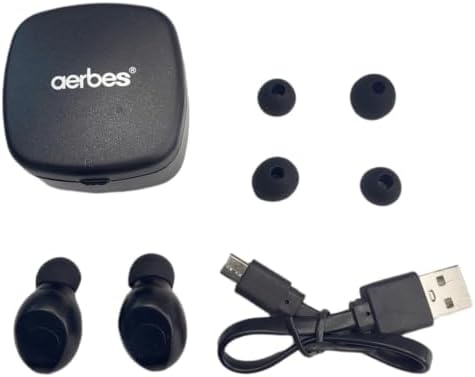
Figure 1: Contents of the Aerbes AB-D461 package, including earbuds, charging case, USB cable, and ear tips.
સેટઅપ
૪.૩. પ્રારંભિક ચાર્જિંગ
પ્રથમ ઉપયોગ કરતા પહેલા, ઇયરબડ્સ અને ચાર્જિંગ કેસને સંપૂર્ણપણે ચાર્જ કરો.
- બંને ઇયરબડ ચાર્જિંગ કેસમાં મૂકો. ખાતરી કરો કે તેઓ તેમના સંબંધિત સ્લોટમાં યોગ્ય રીતે બેઠેલા છે.
- USB ચાર્જિંગ કેબલને કેસ પરના ચાર્જિંગ પોર્ટ સાથે કનેક્ટ કરો અને બીજા છેડાને USB પાવર સ્ત્રોત (દા.ત., કમ્પ્યુટર, વોલ એડેપ્ટર) માં પ્લગ કરો.
- The indicator lights on the earbuds and/or case will illuminate to show charging status. Once fully charged, the lights may change color or turn off.
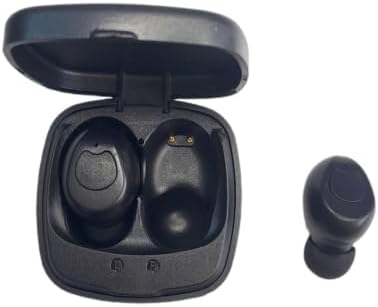
Figure 2: Earbuds placed in the charging case, showing charging contacts.
2. ઉપકરણ સાથે જોડી બનાવવી
The earbuds are designed for automatic connection.
- ચાર્જિંગ કેસ ખોલો. ઇયરબડ્સ આપમેળે ચાલુ થશે અને પેરિંગ મોડમાં પ્રવેશ કરશે.
- તમારા ઉપકરણ (સ્માર્ટફોન, ટેબ્લેટ, વગેરે) પર, બ્લૂટૂથ સક્ષમ કરો અને ઉપલબ્ધ ઉપકરણો શોધો.
- Select "Aerbes AB-D461" (or similar name) from the list of found devices.
- Once connected, you will hear a confirmation tone, and the indicator lights on the earbuds may change.
- After the initial pairing, the earbuds will automatically connect to the last paired device when removed from the case.
ઓપરેટિંગ સૂચનાઓ
પાવર ચાલુ/બંધ
- પાવર ચાલુ: Open the charging case, and the earbuds will power on automatically. Alternatively, press and hold the touch control area on both earbuds for approximately 3 seconds.
- પાવર બંધ: Place the earbuds back into the charging case and close the lid. They will power off automatically. Alternatively, press and hold the touch control area on both earbuds for approximately 5 seconds.
સંગીત પ્લેબેક
- ચલાવો/થોભો: બંને ઇયરબડ પર ટચ કંટ્રોલ એરિયા પર એકવાર ટેપ કરો.
- આગળનો ટ્રેક: જમણા ઇયરબડ પર ટચ કંટ્રોલ એરિયા પર બે વાર ટેપ કરો.
- પાછલો ટ્રેક: ડાબા ઇયરબડ પર ટચ કંટ્રોલ એરિયા પર બે વાર ટેપ કરો.
- અવાજ વધારો: Triple-tap the touch control area on the right earbud.
- અવાજ ધીમો: Triple-tap the touch control area on the left earbud.
ક Callલ મેનેજમેન્ટ
- જવાબ/કૉલ સમાપ્ત કરો: બંને ઇયરબડ પર ટચ કંટ્રોલ એરિયા પર એકવાર ટેપ કરો.
- કૉલ નકારો: બંને ઇયરબડ પરના ટચ કંટ્રોલ એરિયાને 2 સેકન્ડ માટે દબાવી રાખો.
વૉઇસ સહાયક
- વ Voiceઇસ સહાયકને સક્રિય કરો: Press and hold the touch control area on either earbud for 3 seconds (when not on a call).
જાળવણી
સફાઈ
- ઇયરબડ્સ અને ચાર્જિંગ કેસ સાફ કરવા માટે નરમ, સૂકા, લિન્ટ-ફ્રી કાપડનો ઉપયોગ કરો.
- ઘર્ષક ક્લીનર્સ, સોલવન્ટ્સ અથવા એરોસોલ સ્પ્રેનો ઉપયોગ કરશો નહીં.
- Regularly clean the ear tips and charging contacts to ensure optimal performance.
સંગ્રહ
- જ્યારે ઉપયોગમાં ન હોય, ત્યારે ઇયરબડ્સને સુરક્ષિત રાખવા અને ચાર્જ રાખવા માટે તેમના ચાર્જિંગ કેસમાં રાખો.
- ઉપકરણને ઠંડી, સૂકી જગ્યાએ, અતિશય તાપમાન અને સીધા સૂર્યપ્રકાશથી દૂર રાખો.
બેટરી કેર
- બેટરીનું જીવન વધારવા માટે, વારંવાર બેટરીને સંપૂર્ણપણે ડિસ્ચાર્જ કરવાનું ટાળો.
- ઉપકરણને નિયમિતપણે ચાર્જ કરો, ભલે વારંવાર ઉપયોગમાં ન હોય.
મુશ્કેલીનિવારણ
| સમસ્યા | સંભવિત કારણ | ઉકેલ |
|---|---|---|
| ઇયરબડ્સ ડિવાઇસ સાથે જોડાઈ રહ્યા નથી. | Bluetooth is off on device; earbuds are out of range; earbuds not in pairing mode; previously paired device interfering. | Ensure Bluetooth is enabled on your device. Place earbuds closer to the device. Ensure earbuds are removed from the case to enter pairing mode. Turn off Bluetooth on other nearby devices. Try forgetting the device in your phone's Bluetooth settings and re-pairing. |
| ઇયરબડ્સમાંથી કોઈ અવાજ નથી. | Volume too low; earbuds not connected; media paused; earbud battery low. | Increase volume on both your device and the earbuds. Check Bluetooth connection. Ensure media is playing. Charge the earbuds. |
| ઇયરબડ્સ ચાર્જ થતા નથી. | Charging cable faulty; charging port dirty; earbuds not seated correctly in case; case battery empty. | Try a different USB cable and power source. Clean charging contacts on earbuds and case. Ensure earbuds are properly placed in the case. Charge the charging case. |
| નબળી અવાજ ગુણવત્તા અથવા તૂટક તૂટક કનેક્શન. | હસ્તક્ષેપ; ઉપકરણ ખૂબ દૂર; ઓછી બેટરી. | Move closer to your device. Avoid environments with strong Wi-Fi or other Bluetooth signals. Ensure earbuds are fully charged. |
વિશિષ્ટતાઓ
| મોડલ નંબર | AB-D461 |
| બ્લૂટૂથ સંસ્કરણ | 5.0 |
| વાયરલેસ રેંજ | 10 મીટર (33 ફૂટ) સુધી |
| ટૉક ટાઈમ | લગભગ 4 કલાક |
| સ્ટેન્ડબાય સમય | લગભગ 40 કલાક |
| ચાર્જિંગ કેસ બેટરી ક્ષમતા | 300mAh |
| Noise Control Type | હાઇબ્રિડ અવાજ રદ |
| ફોર્મ ફેક્ટર | કાન માં |
| સામગ્રી | પ્લાસ્ટિક |
| રંગ | સફેદ |
| ઉત્પાદક | સામાન્ય |
| મૂળ દેશ | દક્ષિણ આફ્રિકા |
વોરંટી અને આધાર
વોરંટી માહિતી
આ ઉત્પાદન એ સાથે આવે છે 6 મહિનાની મર્યાદિત વyરંટિ from the date of purchase. This warranty covers manufacturing defects and workmanship. It does not cover damage caused by misuse, accidents, unauthorized modifications, or normal wear and tear. Please retain your proof of purchase for warranty claims.
ગ્રાહક આધાર
For technical assistance, warranty claims, or any questions regarding your Aerbes AB-D461 Wireless Bluetooth Headset, please contact your retailer or the manufacturer's customer service department. Refer to your purchase documentation for specific contact details.