
1. પરિચય
This manual provides detailed instructions for the safe installation, operation, and maintenance of your Generic 52-inch Low Profile Ceiling Fan with Lights, Model W1367P185623. Please read all instructions carefully before beginning installation and retain this manual for future reference.
This modern black low-profile ceiling fan is designed to provide efficient air circulation and integrated lighting for residential or commercial spaces. It features a DC motor for energy efficiency and an integrated 24-watt LED light kit with adjustable color temperatures (3000K, 4000K, 6000K), all controllable via the included remote.

Image 1.1: The 52-inch low profile ceiling fan with lights, shown installed in a contemporary living space.
2. સલામતી માહિતી
ચેતવણી: To reduce the risk of fire, electric shock, or personal injury, always follow these safety guidelines:
- તમારા નવા પંખાને ઇન્સ્ટોલ કરતા પહેલા તમામ સૂચનાઓ અને સુરક્ષા માહિતી વાંચો. રીview the accompanying diagrams thoroughly.
- બધા વાયરિંગ રાષ્ટ્રીય અને સ્થાનિક ઇલેક્ટ્રિકલ કોડ્સ અનુસાર હોવા જોઈએ. જો તમે વાયરિંગથી અજાણ હોવ, તો લાયક ઇલેક્ટ્રિશિયનનો સંપર્ક કરો.
- ઇન્સ્ટોલેશન પહેલાં, મુખ્ય ફ્યુઝ બોક્સ પરના સર્કિટ બ્રેકર્સ બંધ કરીને પાવર ડિસ્કનેક્ટ કરો.
- Ensure the installation site can support the fan's weight (approximately 15-20 lbs).
- ક્ષતિગ્રસ્ત બ્લેડ અથવા હાઉસિંગથી પંખો ચલાવશો નહીં.
- ચાહક બ્લેડના માર્ગમાં વસ્તુઓ મૂકવાનું ટાળો.
- This fan is ETL safety listed, indicating compliance with safety standards.
3. ઉત્પાદન સુવિધાઓ
The Generic 52-inch Low Profile Ceiling Fan offers a range of features for enhanced comfort and convenience:
- રીમોટ કંટ્રોલ: Full function remote control for fan speed, light dimming, light color temperature, and fan direction.
- ઉલટાવી શકાય તેવી મોટર: Allows for both downdraft (summer mode) and updraft (winter mode) operation to optimize air circulation year-round.
- 3 Light Color Temperatures: Integrated LED light kit provides Warm White (3000K), Natural White (4000K), and Cool White (6000K) options.
- ડિમેબલ એલઇડી: Adjust the brightness of the integrated LED light.
- ટાઈમર કાર્ય: પંખાને 1, 3, અથવા 6 કલાક પછી આપમેળે બંધ થવા માટે સેટ કરો.
- છ પંખા ગતિ: Choose from six distinct fan speeds for optimal airflow.
- શાંત ડીસી મોટર: Energy-efficient DC motor operates quietly.
- લો પ્રોfile ડિઝાઇન: Ideal for rooms with lower ceilings.
- મેટ બ્લેક ફિનિશ: Modern aesthetic to complement various decor styles.
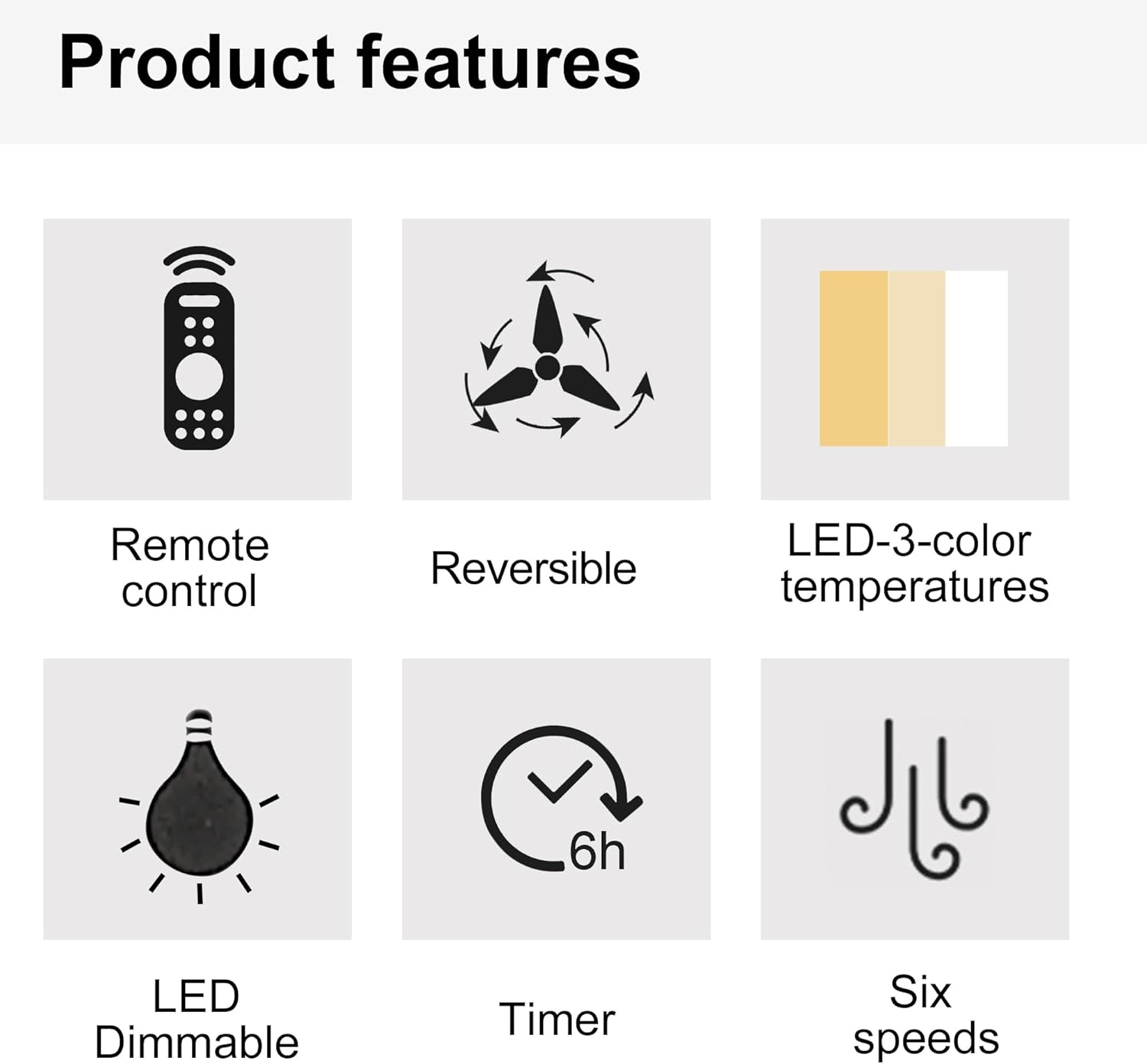
Image 3.1: Visual representation of key product features.

Image 3.2: Details of the fan's canopy and quiet DC motor.

Image 3.3: Details of the light cover and integrated 24W LED light kit.
4. પેકેજ સામગ્રી
Before installation, verify that all components are present and undamaged. If any parts are missing or damaged, contact customer support.
- સીલિંગ ફેન મોટર એસેમ્બલી
- ફેન બ્લેડ (5)
- Light Kit Assembly (Integrated LED)
- રીમોટ કંટ્રોલ
- Wall Cradle for Remote Control
- રીમોટ કંટ્રોલ માટે AAA બેટરી
- માઉન્ટ કરવાનું કૌંસ
- Hardware Pack (screws, wire nuts, washers, etc.)
- સૂચના માર્ગદર્શિકા
5. સેટઅપ અને ઇન્સ્ટોલેશન
મહત્વપૂર્ણ: Ensure power is disconnected at the circuit breaker before beginning installation.
- માઉન્ટ કરવાનું સ્થાન તૈયાર કરો: Securely attach the mounting bracket to a ceiling joist or an outlet box rated for fan support.
- પંખાને વાયર કરો: Connect the fan's electrical wires to the household wiring according to the wiring diagram provided in the full installation guide (not included here, but typically in a physical manual). Ensure all connections are secure with wire nuts.
- Attach the Fan Assembly: Carefully lift the fan motor assembly and attach it to the mounting bracket.
- પંખા બ્લેડ ઇન્સ્ટોલ કરો: Secure each fan blade to the motor housing using the provided screws.
- લાઇટ કિટ ઇન્સ્ટોલ કરો: Connect the light kit wiring and attach the light kit assembly to the bottom of the fan motor housing.
- લાઇટ કવર ઇન્સ્ટોલ કરો: Secure the light cover to the light kit.
For detailed wiring diagrams and step-by-step illustrations, refer to the complete installation guide included with your product.
6. ઓપરેટિંગ સૂચનાઓ
Your ceiling fan is operated using the included remote control. Install the AAA batteries into the remote control before use.

Image 6.1: Remote control functions overview.
6.1 ફેન ઓપરેશન
- પાવર ચાલુ/બંધ: Press the power button (usually a circle with a vertical line) to turn the fan on or off.
- પંખાની ઝડપ: Use buttons labeled 1-6 to select the desired fan speed. '1' is the lowest speed, '6' is the highest.
- પંખો બંધ: Press the dedicated "Fan OFF" button to stop the fan.
- Forward/Reverse Mode: Press the forward/reverse button (often depicted with arrows circulating) to change the fan's direction.
- સમર મોડ (ડાઉનડ્રાફ્ટ): બ્લેડ ઘડિયાળની વિરુદ્ધ દિશામાં ફરે છે, હવાને નીચે તરફ ધકેલે છે જેથી ઠંડકનો પવન ફૂંકાય.
- વિન્ટર મોડ (અપડ્રાફ્ટ): બ્લેડ ઘડિયાળની દિશામાં ફરે છે, છતની નજીક ફસાયેલી ગરમ હવાને પરિભ્રમણ કરવા માટે હવાને ઉપર તરફ ખેંચે છે.
- ટાઈમર કાર્ય: Press the "1H", "3H", or "6H" buttons to set the fan to turn off automatically after 1, 3, or 6 hours, respectively.

Image 6.2: Understanding Forward/Reverse (Summer/Winter) Modes.
૫.૨ હળવી કામગીરી
- લાઇટ ચાલુ/બંધ: Press the "LIGHT ON" or "LIGHT OFF" buttons to control the light.
- Adjust Light Color Temperature: Use the "WW" (Warm White), "NW" (Natural White), and "DW" (Cool White) buttons to cycle through the 3000K, 4000K, and 6000K color options.
- Dim the Light: Use the "+" and "-" buttons (often labeled "Dimmable +/-") to increase or decrease the light brightness.
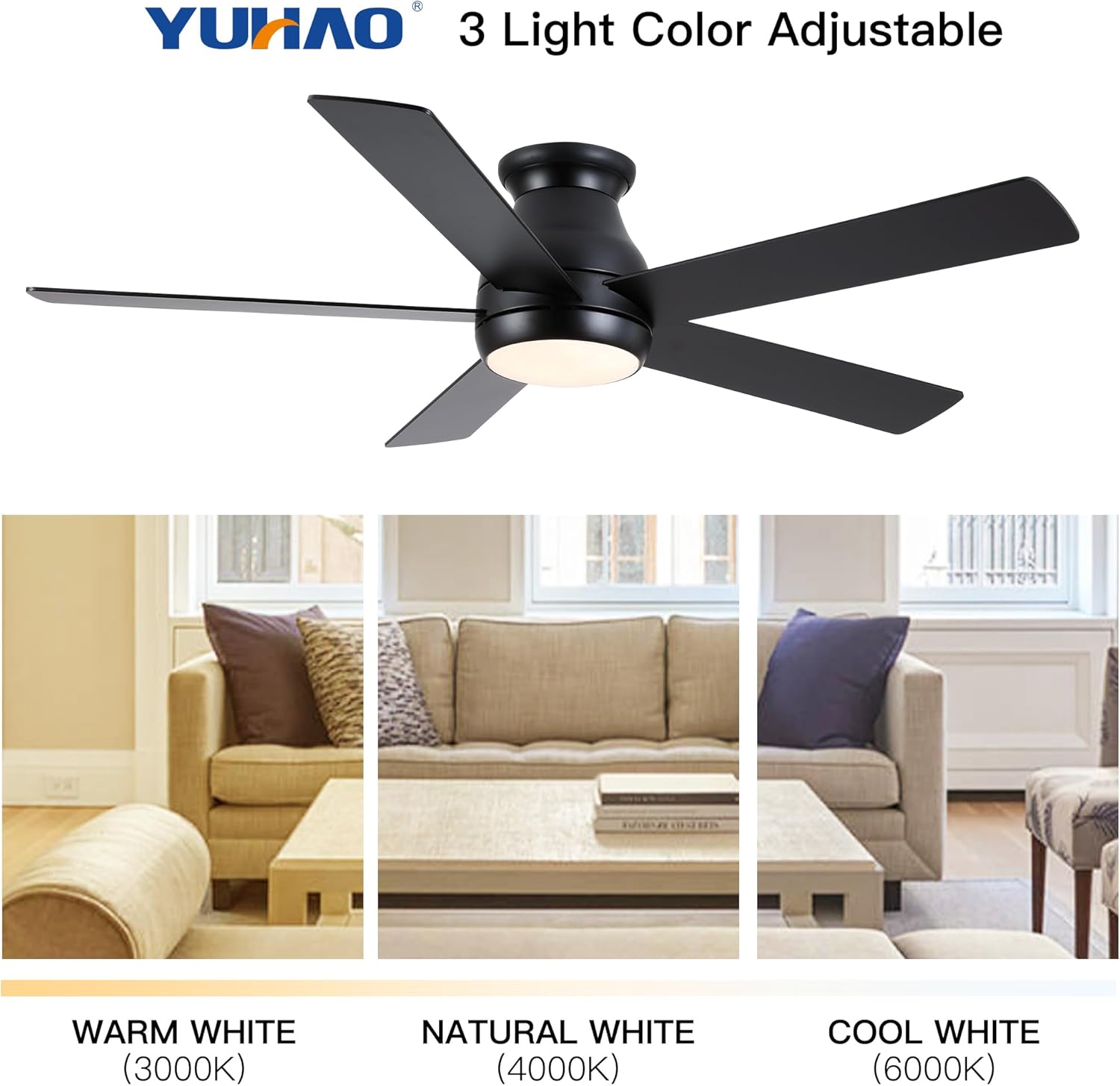
Image 6.3: Adjustable light color temperatures.
7. જાળવણી
Regular maintenance ensures optimal performance and extends the life of your ceiling fan.
- સફાઈ: સમયાંતરે પંખાના બ્લેડ અને મોટર હાઉસિંગને સોફ્ટ, ડી વડે સાફ કરો.amp કાપડ. ઘર્ષક ક્લીનર્સ અથવા સોલવન્ટ્સનો ઉપયોગ કરશો નહીં. સફાઈ કરતા પહેલા ખાતરી કરો કે પંખો બંધ છે અને પાવર ડિસ્કનેક્ટ થયેલ છે.
- ફાસ્ટનર્સને સજ્જડ કરો: Check all screws and fasteners annually to ensure they are secure. Loose connections can cause noise or wobble.
- બ્લેડ બેલેન્સ: If the fan wobbles, ensure all blades are securely attached and balanced. A balancing kit (not included) may be used if necessary.
- લાઇટ કિટ: The integrated LED light kit does not require bulb replacement. If the light malfunctions, consult the troubleshooting section or contact customer support.
8. મુશ્કેલીનિવારણ
જો તમને તમારા સીલિંગ ફેનમાં સમસ્યા આવે છે, તો નીચેની સામાન્ય સમસ્યાઓ અને ઉકેલોનો સંદર્ભ લો:
| સમસ્યા | સંભવિત કારણ | ઉકેલ |
|---|---|---|
| પંખો ચાલુ થતો નથી | પંખા પર વીજળી નથી; વાયર કનેક્શન છૂટા; રિમોટ કંટ્રોલ બેટરી ડેડ. | સર્કિટ બ્રેકર તપાસો; બધા વાયર કનેક્શન ચકાસો; રિમોટ કંટ્રોલ બેટરી બદલો. |
| પંખો ધ્રૂજતો | Loose blades or mounting bracket; Unbalanced blades. | Ensure all screws are tight; Check blade balance and adjust if necessary. |
| પ્રકાશ કામ કરતું નથી | Loose wire connection to light kit; Remote control battery dead; Light kit malfunction. | Check light kit wiring; Replace remote control batteries; Contact customer support if LED is faulty. |
| રીમોટ કંટ્રોલ કામ કરતું નથી | Dead batteries; Remote not paired (if applicable); Obstruction between remote and receiver. | Replace batteries; Refer to pairing instructions (if any); Ensure clear line of sight. |
જો આ ઉકેલો અજમાવવા પછી પણ સમસ્યા ચાલુ રહે, તો કૃપા કરીને ગ્રાહક સપોર્ટનો સંપર્ક કરો.
9. સ્પષ્ટીકરણો
| લક્ષણ | વિગત |
|---|---|
| મોડલ નંબર | ડબલ્યુ1367પી185623 |
| ચાહકનું કદ | 52 ઇંચ |
| ઉત્પાદન પરિમાણો | 52"D x 52"W x 10.63"H |
| રંગ | Matte Black (Antique Black) |
| મોટરનો પ્રકાર | ડીસી મોટર |
| લાઇટ કીટ | Integrated 24W LED |
| હળવા રંગનું તાપમાન | ૩૦૦૦K (ગરમ સફેદ), ૪૫૦૦K (કુદરતી સફેદ), ૬૫૦૦K (ઠંડો સફેદ) |
| નિયંત્રણ પ્રકાર | રિમોટ કંટ્રોલ |
| માઉન્ટિંગ પ્રકાર | ફ્લશ માઉન્ટ |
| ભલામણ કરેલ રૂમનું કદ | 12 ft. x 12 ft. to 18 ft. x 18 ft. (Large Room) |
| પ્રમાણપત્ર | ETL સલામતી સૂચિ |
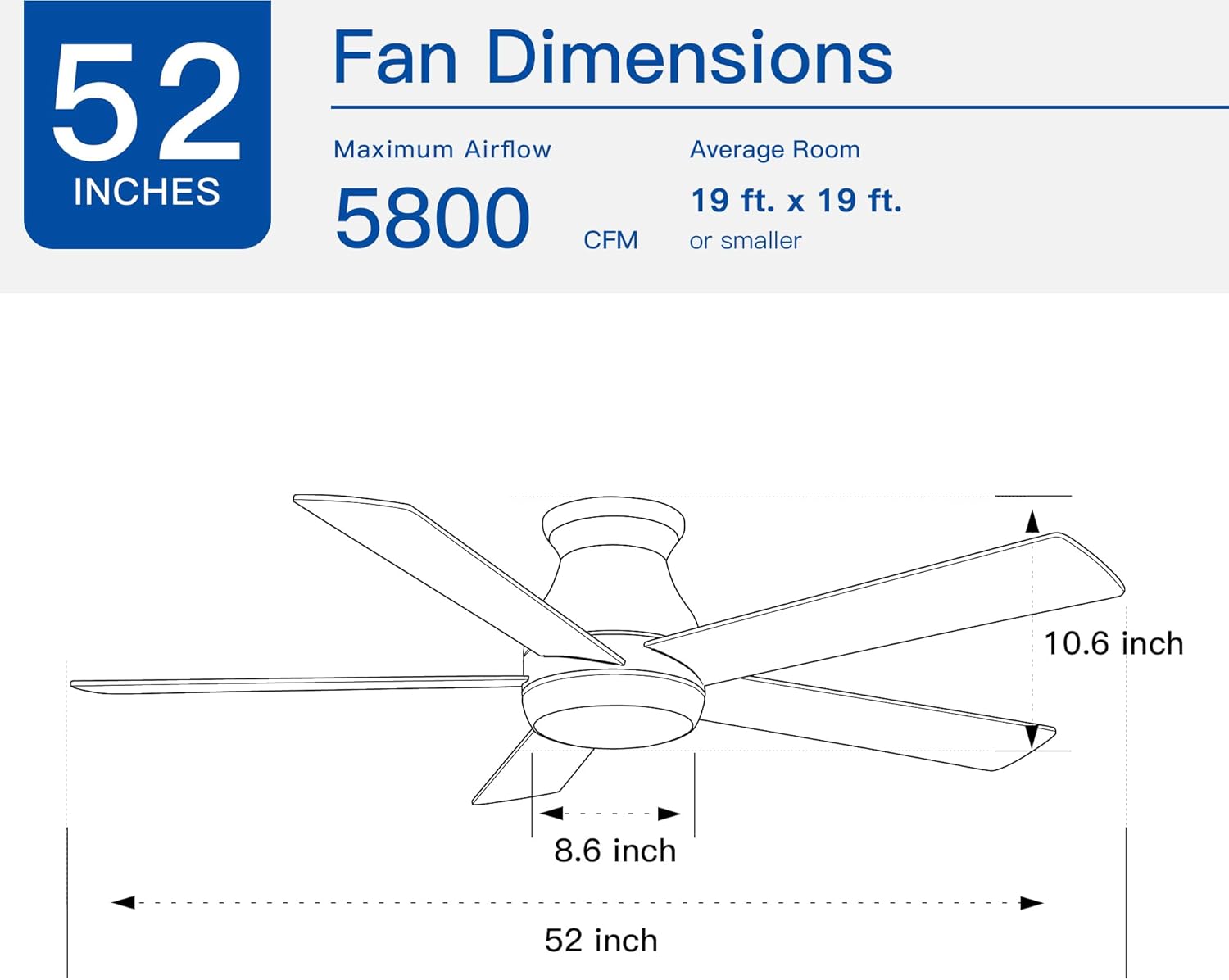
Image 9.1: Fan dimensions and airflow specifications.
10. વોરંટી અને સપોર્ટ
This product comes with a standard manufacturer's warranty. For specific warranty details, including duration and coverage, please refer to the warranty card included in your product packaging or contact the retailer where the product was purchased.
For technical support, replacement parts, or any questions not covered in this manual, please contact Generic customer service through the retailer's support channels or the contact information provided in your product documentation.