
પરિચય
This manual provides detailed instructions for the setup, operation, maintenance, and troubleshooting of your Generic G70 Wired RGB 60% Mini Gaming Keyboard. Please read this manual carefully before using the product to ensure proper functionality and longevity.
સેટઅપ
To set up your G70 keyboard, follow these simple steps:
- કીબોર્ડ ખોલો: કીબોર્ડને તેના પેકેજિંગમાંથી કાળજીપૂર્વક દૂર કરો.
- યુએસબી કેબલને કનેક્ટ કરો: Locate the USB-C cable attached to the keyboard. Plug the USB-A end of the cable into an available USB port on your computer or laptop.
- ડ્રાઇવર ઇન્સ્ટોલેશન: The keyboard is plug-and-play. Your operating system should automatically detect and install the necessary drivers. No additional software installation is typically required.
- કનેક્શન ચકાસો: Once connected, the keyboard's RGB backlighting should illuminate, indicating a successful connection. You can now begin using your keyboard.

Image: The Generic G70 Wired RGB 60% Mini Gaming Keyboard, showing its compact design and wired USB-C connection.
ઓપરેટિંગ સૂચનાઓ
મૂળભૂત ટાઇપિંગ
The G70 keyboard functions as a standard QWERTY keyboard for all basic typing needs. Its 60% layout is designed for compactness while retaining essential keys.
RGB બેકલાઇટ નિયંત્રણ
The keyboard features dynamic RGB backlighting with multiple modes and brightness levels. Use the following key combinations to adjust the lighting:
- FN + U: Increase streamer speed (for dynamic lighting effects).
- FN + J: Decrease streamer speed.
- FN + O or FN + L: બેકલાઇટ બ્રાઇટનેસ (5 સ્તરો) સમાયોજિત કરો.
- FN + I: Toggle backlight on/off or cycle through different stream light modes (4 kinds).
- એફએન + કે: Switch between different backlight effects (8 kinds).
- FN + M: Cycle through solid color light options.

Image: Detailed diagram illustrating the FN key combinations for multimedia, function keys, and lighting controls.
Compound Key Functions (FN Combinations)
Due to its compact 60% layout, many standard keys are accessed via the Function (FN) key. Refer to the diagram above and the following list for common combinations:
- FN + Esc: Accesses the tilde (~) key.
- FN + 1: Accesses F1. Similarly, એફ.એન. + 2 for F2, up to એફ.એન. + 0 for F10, એફએન + - for F11, and FN + = for F12.
- FN + R: અવાજ ધીમો.
- FN + T: વોલ્યુમ અપ.
- FN + Y: મ્યૂટ કરો.
- FN + બેકસ્પેસ: Delete function.

Image: The G70 keyboard displaying its vibrant RGB colorful light effects in both black and white color variants.
Video: An official product video demonstrating the features and RGB lighting of the Wired RGB Gaming Keyboard.
એર્ગોનોમિક ડિઝાઇન
The G70 keyboard features an ergonomic high-low key design, providing a comfortable typing experience and reducing wrist strain during extended use. The arc button design contributes to a natural feel.
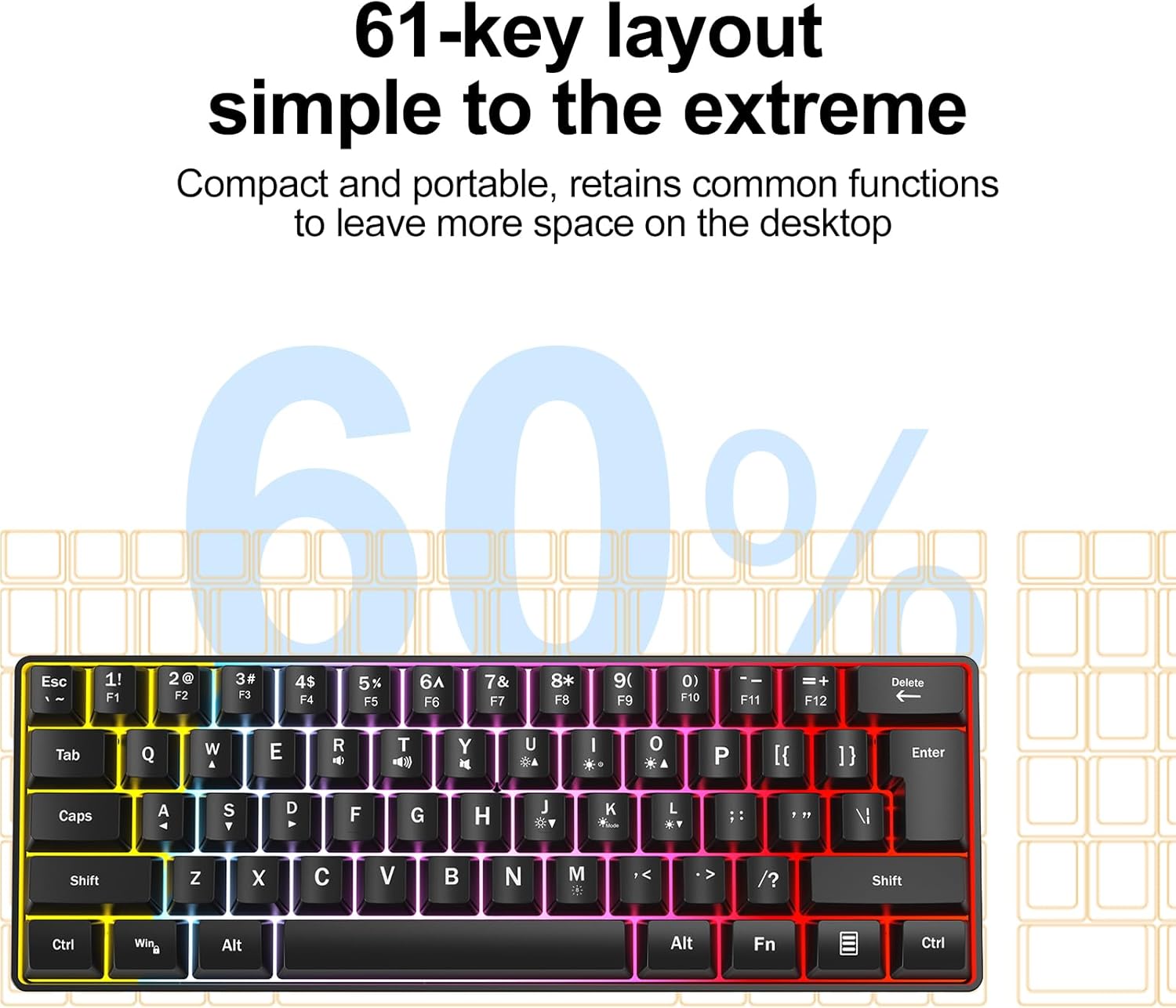
Image: A visual representation of the ergonomic high and low key design, demonstrating how it supports comfortable hand positioning.
જાળવણી
તમારા કીબોર્ડની ટકાઉપણું અને શ્રેષ્ઠ કામગીરી સુનિશ્ચિત કરવા માટે, આ જાળવણી માર્ગદર્શિકા અનુસરો:
- સફાઈ: Use a soft, dry cloth to wipe the surface of the keyboard. For deeper cleaning, use a slightly damp cloth with a mild cleaning solution, ensuring no liquid enters the keyboard.
- પ્રવાહી ટાળો: કીબોર્ડ પર પ્રવાહી ન ઢોળશો. જો પ્રવાહી ઢોળાય તો તરત જ કીબોર્ડને ડિસ્કનેક્ટ કરો અને ફરીથી કનેક્ટ કરતા પહેલા તેને સંપૂર્ણપણે સૂકવવા દો.
- ધૂળ દૂર કરવી: કીકેપ્સ વચ્ચેથી ધૂળ અને કચરો દૂર કરવા માટે સંકુચિત હવાનો ઉપયોગ કરો.
- સંગ્રહ: કીબોર્ડને સીધા સૂર્યપ્રકાશ અને અતિશય તાપમાનથી દૂર ઠંડી, સૂકી જગ્યાએ સંગ્રહિત કરો.
મુશ્કેલીનિવારણ
If you encounter any issues with your G70 keyboard, please refer to the following common problems and solutions:
- કીબોર્ડ જવાબ આપી રહ્યું નથી:
- ખાતરી કરો કે USB કેબલ કીબોર્ડ અને કમ્પ્યુટર બંનેમાં સુરક્ષિત રીતે પ્લગ થયેલ છે.
- તમારા કમ્પ્યુટર પર કીબોર્ડને બીજા USB પોર્ટમાં પ્લગ કરવાનો પ્રયાસ કરો.
- તમારા કમ્પ્યુટરને ફરીથી પ્રારંભ કરો.
- RGB Backlight Not Working or Incorrect:
- Check if the backlight is turned off using the FN + I key combination.
- Cycle through different lighting modes and brightness levels using the FN key combinations described in the Operating Instructions section.
- ખાતરી કરો કે તમારા કમ્પ્યુટરનો USB પોર્ટ પૂરતો પાવર પૂરો પાડી રહ્યો છે.
- Certain Keys Not Working:
- Clean around the affected key to remove any debris that might be obstructing its movement.
- For FN key combinations, ensure you are pressing the FN key simultaneously with the desired function key.
વિશિષ્ટતાઓ
Key technical specifications for the Generic G70 Wired RGB 60% Mini Gaming Keyboard:
| લક્ષણ | વિગત |
|---|---|
| બ્રાન્ડ | સામાન્ય |
| મોડલ નંબર | જી70 |
| કનેક્ટિવિટી ટેકનોલોજી | USB-C (વાયર્ડ) |
| કીબોર્ડ વર્ણન | પટલ |
| કી લેઆઉટ | 60% Mini (61-key) |
| બેકલાઇટ | RGB (8 kinds backlight, 4 kinds stream light, 5 levels brightness) |
| એર્ગોનોમિક ડિઝાઇન | High-low key profile |
| સુસંગત ઉપકરણો | લેપટોપ, પીસી |
| વસ્તુનું વજન | 0.82 પાઉન્ડ |
| રંગ | White Case + Grey Keycaps |

Image: The G70 keyboard with its dimensions clearly marked for reference.
વોરંટી અને આધાર
Information regarding specific warranty terms and direct customer support contact details for the Generic G70 keyboard were not provided in the product data. For any quality problems or questions during use, please refer to the seller's return policy or contact the seller directly through the platform where the product was purchased.