
Warm Audio WA-C1
Warm Audio WA-C1 Analog Chorus Vibrato Pedal User Manual
Model: WA-C1
પરિચય
The Warm Audio WA-C1 is an all-analog chorus and vibrato pedal designed to deliver classic modulated tones. This manual provides detailed instructions for setting up, operating, and maintaining your WA-C1 pedal to ensure optimal performance.
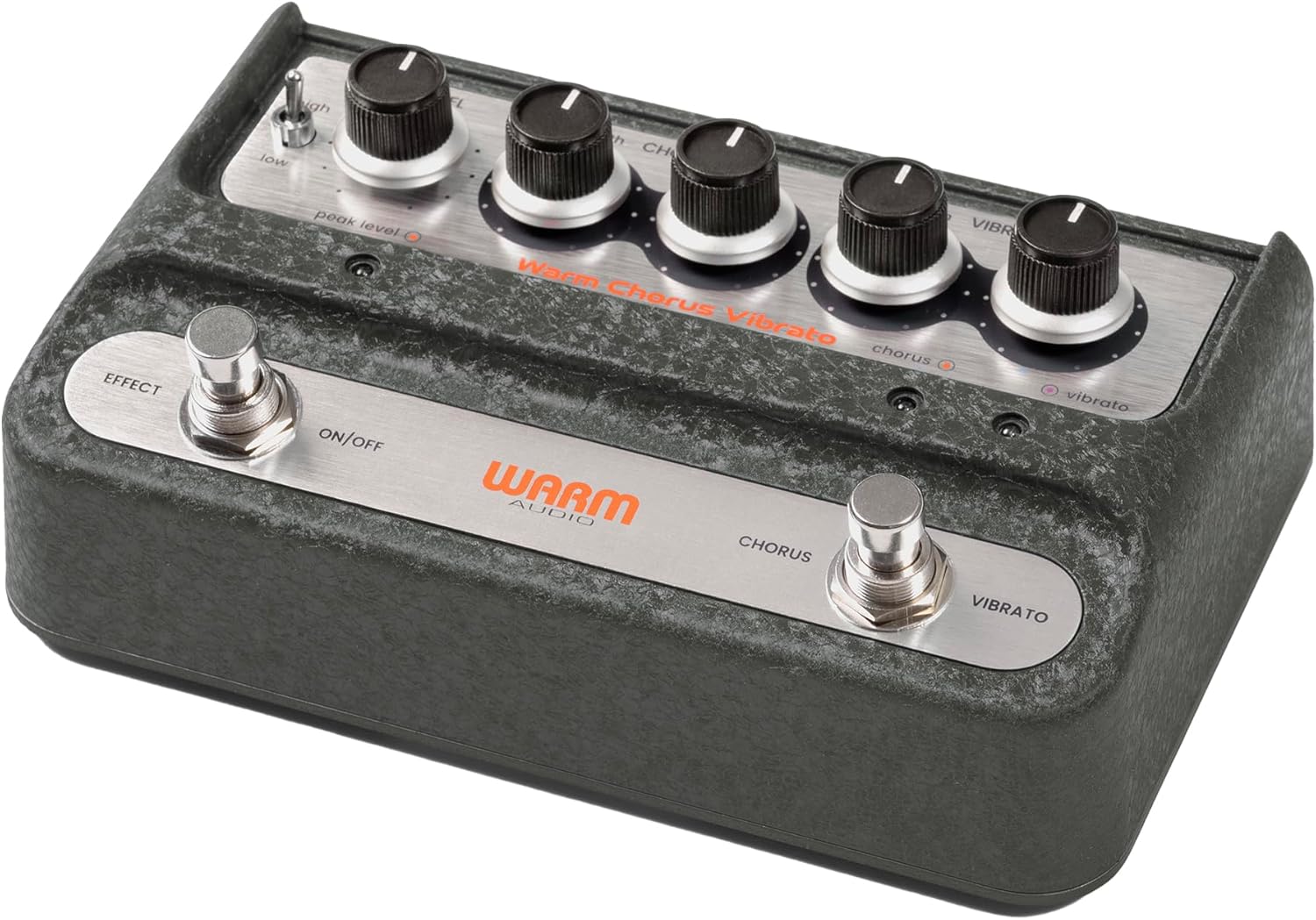
છબી: એકંદરે view of the Warm Audio WA-C1 Analog Chorus Vibrato pedal.
મહત્વપૂર્ણ સલામતી સૂચનાઓ
- ઉપયોગ કરતા પહેલા આ સૂચનાઓને સારી રીતે વાંચો.
- ભવિષ્યના સંદર્ભ માટે આ સૂચનાઓ રાખો.
- ઉત્પાદન પર અને આ માર્ગદર્શિકામાં આપેલી બધી ચેતવણીઓનું ધ્યાન રાખો.
- પાણીની નજીક આ ઉપકરણનો ઉપયોગ કરશો નહીં.
- માત્ર સૂકા કપડાથી સાફ કરો.
- કોઈપણ વેન્ટિલેશન છિદ્રોને અવરોધિત કરશો નહીં. ઉત્પાદકની સૂચનાઓ અનુસાર ઇન્સ્ટોલ કરો.
- રેડિએટર્સ, હીટ રજિસ્ટર, સ્ટોવ અથવા અન્ય ઉપકરણો જેવા કોઈપણ હીટ સ્ત્રોતોની નજીક ઇન્સ્ટોલ કરશો નહીં (સહિત ampલિફાયર) જે ગરમી ઉત્પન્ન કરે છે.
- માત્ર ઉત્પાદક દ્વારા ઉલ્લેખિત જોડાણો/એસેસરીઝનો ઉપયોગ કરો.
- વીજળીના વાવાઝોડા દરમિયાન અથવા લાંબા સમય સુધી ઉપયોગ ન થાય ત્યારે આ ઉપકરણને અનપ્લગ કરો.
- તમામ સેવાનો સંદર્ભ લાયક સેવા કર્મચારીઓને આપો. જ્યારે ઉપકરણને કોઈપણ રીતે નુકસાન થયું હોય, જેમ કે પાવર-સપ્લાય કોર્ડ અથવા પ્લગને નુકસાન થયું હોય, પ્રવાહી ઢોળાયેલું હોય અથવા ઉપકરણમાં વસ્તુઓ પડી હોય, ઉપકરણ વરસાદ અથવા ભેજના સંપર્કમાં આવ્યું હોય, સામાન્ય રીતે કામ કરતું નથી ત્યારે સર્વિસિંગ જરૂરી છે. , અથવા પડતું મૂકવામાં આવ્યું છે.
લક્ષણો
- Faithful recreation of a classic all-analog chorus/vibrato circuit.
- Premium all-analog preamp for responsive tone.
- Independent Depth and Rate controls for Chorus.
- Authentic Vibrato section.
- Switchable Hi-Z input for optimizing guitar clarity.
- Mono and Stereo output options.
નિયંત્રણો અને જોડાણો
ફ્રન્ટ પેનલ નિયંત્રણો

છબી: ઉપરથી નીચે સુધી view of the WA-C1 pedal's front panel, showing all control knobs and footswitches.
- લેવલ નોબ: Adjusts the overall output volume of the pedal.
- DEPTH (Chorus) Knob: Controls the intensity or sweep range of the chorus effect.
- RATE (Chorus) Knob: Controls the speed of the chorus modulation.
- DEPTH (Vibrato) Knob: Controls the intensity or sweep range of the vibrato effect.
- RATE (Vibrato) Knob: Controls the speed of the vibrato modulation.
- EFFECT ON/OFF Footswitch: Engages or bypasses the entire pedal effect. The associated LED indicates the effect status.
- CHORUS/VIBRATO Footswitch: Toggles between Chorus and Vibrato modes when the effect is active. The associated LEDs indicate the selected mode.
- HIGH/LOW Switch: A two-position switch that adjusts the input gain, allowing for optimal signal handling from various instruments.
- PEAK LEVEL LED: Illuminates to indicate signal clipping or excessive input level. Adjust the HIGH/LOW switch or input signal to prevent clipping.
રીઅર પેનલ કનેક્શન્સ

છબી: પાછળનો ભાગ view of the WA-C1 pedal, showing the power input, Hi-Z switch, input jack, and output jacks.
- POWER 9V Input: Connect a standard 9V DC power adapter (center negative, 2.1mm barrel connector). Ensure the power supply meets the pedal's requirements.
- HI-Z Switch: This switch adjusts the input impedance. Set to 'ON' for higher impedance instruments like guitars to enhance clarity in the high-end. Set to 'OFF' for lower impedance sources like keyboards.
- ઇનપુટ જેક: Connect your instrument (guitar, keyboard, etc.) to this 1/4-inch mono input.
- STEREO OUTPUT Jack: Use this 1/4-inch output for a stereo signal path, typically connecting to two amplifiers or a stereo effects loop.
- MONO OUTPUT Jack: Use this 1/4-inch output for a mono signal path, connecting to a single amplifier or the next pedal in your chain.
સેટઅપ
- પાવર કનેક્શન: Connect a compatible 9V DC (center negative) power adapter to the POWER 9V input on the rear panel. Do not use an incompatible power supply.
- સાધન જોડાણ: Connect your instrument to the INPUT jack on the rear panel using a standard 1/4-inch instrument cable.
- આઉટપુટ કનેક્શન:
- For mono operation, connect the MONO OUTPUT jack to your ampલિફાયર અથવા તમારી સિગ્નલ ચેઇનમાં આગળનું પેડલ.
- For stereo operation, connect both the MONO OUTPUT and STEREO OUTPUT jacks to two separate ampલાઇફાયર્સ અથવા સ્ટીરિયો ઇનપુટ ડિવાઇસ.
- Hi-Z Switch: If using a guitar, set the HI-Z switch to 'ON' for optimal high-end clarity. For other instruments like keyboards, set it to 'OFF'.
- પ્રારંભિક સેટિંગ્સ: Start with all DEPTH and RATE knobs at their minimum (fully counter-clockwise) and the LEVEL knob at noon (12 o'clock) for initial sound adjustments.
ઓપરેટિંગ સૂચનાઓ
- અસરને જોડવી: Press the EFFECT ON/OFF footswitch to activate the pedal. The corresponding LED will illuminate.
- મોડ પસંદ કરી રહ્યા છીએ: With the effect active, press the CHORUS/VIBRATO footswitch to toggle between Chorus and Vibrato modes. The respective LED will indicate the active mode.
- Adjusting Chorus: In Chorus mode, use the DEPTH (Chorus) and RATE (Chorus) knobs to dial in your desired modulation intensity and speed.
- Adjusting Vibrato: In Vibrato mode, use the DEPTH (Vibrato) and RATE (Vibrato) knobs to dial in your desired modulation intensity and speed.
- આઉટપુટ સ્તર: Use the LEVEL knob to adjust the overall output volume of the pedal. Ensure it matches or slightly boosts your bypassed signal level.
- ઇનપુટ ગેઇન: If your instrument's signal is too hot or too weak, use the HIGH/LOW switch to optimize the input gain. Monitor the PEAK LEVEL LED to avoid clipping.
જાળવણી
- સફાઈ: Clean the pedal's exterior with a soft, dry cloth. Do not use liquid cleaners or solvents.
- સંગ્રહ: Store the pedal in a dry, cool environment away from direct sunlight and extreme temperatures.
- પાવર સપ્લાય: Always use the correct 9V DC (center negative) power supply. Incorrect power can damage the unit and void the warranty.
- Footswitches and Jacks: Periodically check connections for any loose cables or debris.
મુશ્કેલીનિવારણ
| સમસ્યા | સંભવિત કારણ | ઉકેલ |
|---|---|---|
| પેડલ લગાવવામાં આવે ત્યારે અવાજ આવતો નથી. |
|
|
| Effect is too subtle or too intense. |
|
|
| Distortion or unwanted noise. |
|
|
વિશિષ્ટતાઓ
- મોડલ: WA-C1
- અસરનો પ્રકાર: Analog Chorus / Vibrato
- સિગ્નલ ફોર્મેટ: એનાલોગ
- પાવર જરૂરિયાત: 9V DC, Center Negative (Power adapter not included)
- ઇનપુટ: 1/4-inch Mono Jack
- આઉટપુટ: 1/4-inch Mono Jack, 1/4-inch Stereo Jack
- નિયંત્રણો: Level, Chorus Depth, Chorus Rate, Vibrato Depth, Vibrato Rate, High/Low Switch, Hi-Z Switch
- પરિમાણો: આશરે ૯.૦૬ x ૪.૮ x ૪.૪૧ ઇંચ (પેકેજ પરિમાણો)
- વજન: Approximately 2 pounds (Item Weight)
વોરંટી અને આધાર
Warm Audio products are designed for reliability and performance. For warranty information and technical support, please refer to the official Warm Audio webસાઇટ પર જાઓ અથવા તમારા અધિકૃત ડીલરનો સંપર્ક કરો. વોરંટી દાવાઓ માટે ખરીદીના પુરાવા તરીકે તમારી ખરીદી રસીદ રાખો.
વધુ સહાય માટે, મુલાકાત લો: www.warmaudio.com/support
Ask a question about this manual
Ask about setup, troubleshooting, compatibility, parts, safety, or missing instructions. Manuals+ will review the question and use this page’s manual context to help answer it.