
પરિચય
Thank you for choosing the Micool Mini Sleep Earbuds Wireless. These earbuds are designed for ultimate comfort and discretion, especially for sensitive sleepers. Featuring IPX5 waterproofing, Bluetooth 5.3 connectivity, and a lightweight, invisible design, they provide a peaceful audio experience for relaxation, sleep, or discreet listening.

Image: Micool Mini Sleep Earbuds in their charging case.
પેકેજ સામગ્રી
- Micool Mini Sleep Earbuds (Left and Right)
- ચાર્જિંગ કેસ
- USB-C ચાર્જિંગ કેબલ
- વપરાશકર્તા માર્ગદર્શિકા
સેટઅપ
૪.૩. પ્રારંભિક ચાર્જિંગ
- ચાર્જિંગ કેસમાં બંને ઇયરબડ્સ મૂકો.
- USB-C ચાર્જિંગ કેબલને ચાર્જિંગ કેસ પરના પોર્ટ અને પાવર સ્ત્રોત સાથે કનેક્ટ કરો.
- ચાર્જિંગ કેસ પરનો ડિજિટલ ડિસ્પ્લે બેટરીનું પ્રમાણ બતાવશેtage. Ensure the earbuds are fully charged before first use.
2. બ્લૂટૂથ જોડી
- ચાર્જિંગ કેસ ખોલો. ઇયરબડ્સ આપમેળે પેરિંગ મોડમાં પ્રવેશ કરશે.
- તમારા ઉપકરણ (દા.ત., સ્માર્ટફોન, ટેબ્લેટ, લેપટોપ) પર, બ્લૂટૂથ સક્ષમ કરો.
- માટે શોધો available Bluetooth devices and select "Micool Q26" (or similar name) from the list.
- એકવાર કનેક્ટ થઈ ગયા પછી, તમને એક ઓડિયો પ્રોમ્પ્ટ સંભળાશે, અને ઇયરબડ્સ ઉપયોગ માટે તૈયાર થઈ જશે.
ઓપરેટિંગ સૂચનાઓ
ઇયરબડ્સ પહેર્યા
The Micool Mini Sleep Earbuds are designed to fit snugly and discreetly within your ear, making them ideal for side sleepers. Gently insert each earbud into your ear canal until it feels secure and comfortable. The soft silicone ear tips adapt to your ear shape, minimizing pressure for extended wear.
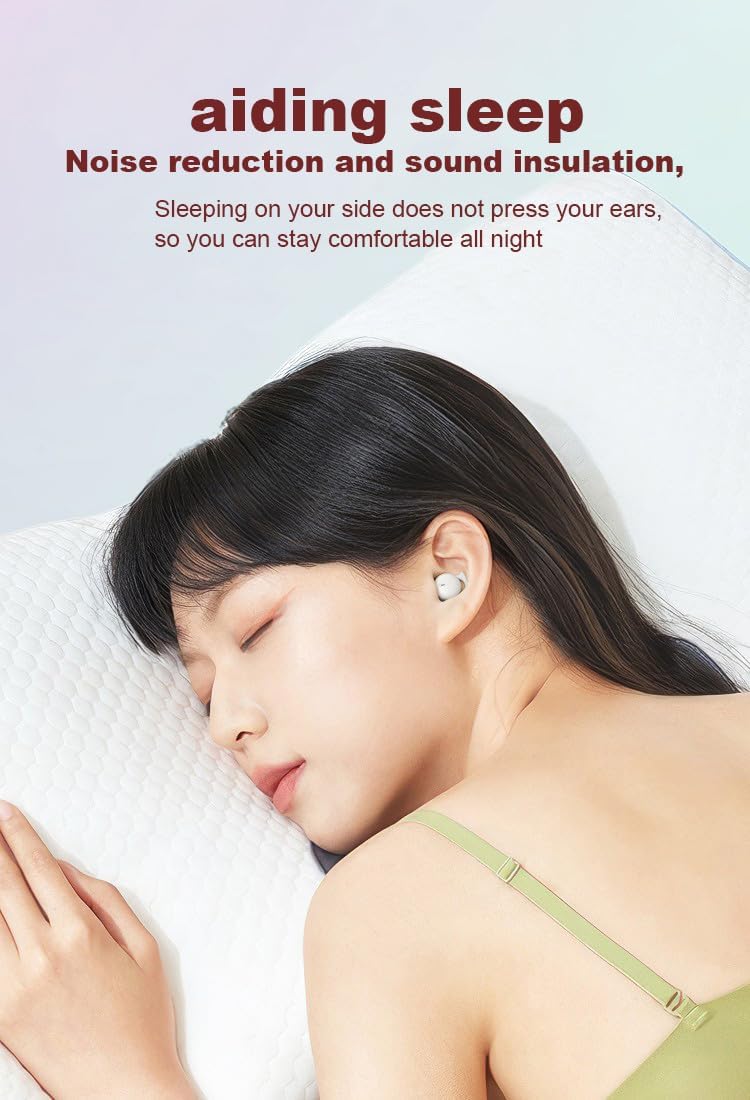
Image: Earbud worn discreetly for sleep.
નિયંત્રણોને ટચ કરો
Each earbud features a touch-sensitive button for easy control of your audio and calls.

Image: Touch button controls diagram.
- ચલાવો/થોભો: બંને ઇયરબડ પર એક વાર ટેપ કરો.
- કૉલનો જવાબ આપો/હૅન્ગ અપ કરો: ઇનકમિંગ કોલ અથવા એક્ટિવ કોલ દરમિયાન બંને ઇયરબડ પર એક વાર ટેપ કરો.
- આગલું ગીત: જમણા ઇયરબડ પર બે વાર ટૅપ કરો.
- પાછલું ગીત: ડાબા ઇયરબડ પર બે વાર ટૅપ કરો.
- કૉલ નકારો: ઇનકમિંગ કોલ દરમિયાન કોઈપણ ઇયરબડને 2 સેકન્ડ માટે દબાવી રાખો.
- વ Voiceઇસ સહાયકને સક્રિય કરો: કોઈપણ ઇયરબડ પર ત્રણ વાર ટૅપ કરો.
Independent Earbud Use
Both earbuds can be used independently. You can use one earbud while the other charges in the case, effectively extending your listening time. Simply remove one earbud from the case to use it in mono mode.
પાણી પ્રતિકાર (IPX5)
The earbuds are rated IPX5 water-resistant, meaning they can withstand splashes of water and sweat. They are suitable for use during light rain or workouts, but should not be submerged in water.
જાળવણી
- ઇયરબડ્સ અને ચાર્જિંગ કેસને નિયમિતપણે નરમ, સૂકા કપડાથી સાફ કરો.
- ઘર્ષક ક્લીનર્સ અથવા સોલવન્ટ્સનો ઉપયોગ કરવાનું ટાળો.
- યોગ્ય ચાર્જિંગ સુનિશ્ચિત કરવા માટે ઇયરબડ્સ અને કેસ બંને પર ચાર્જિંગ કોન્ટેક્ટ્સ સાફ રાખો.
- ઇયરબડ્સ ઉપયોગમાં ન હોય ત્યારે તેમને સુરક્ષિત રાખવા અને બેટરી લાઇફ જાળવવા માટે તેમના ચાર્જિંગ કેસમાં રાખો.
મુશ્કેલીનિવારણ
ઇયરબડ્સ જોડી રહ્યાં નથી
- ખાતરી કરો કે બંને ઇયરબડ સંપૂર્ણપણે ચાર્જ થયા છે.
- તમારા ઉપકરણ પર બ્લૂટૂથ બંધ કરો, પછી તેને પાછું ચાલુ કરો.
- Forget/delete "Micool Q26" from your device's Bluetooth list and attempt to pair again.
- ઇયરબડ્સને કેસમાં પાછા મૂકો, ઢાંકણ બંધ કરો, થોડીવાર રાહ જુઓ, પછી પેરિંગ મોડ ફરીથી શરૂ કરવા માટે ખોલો.
કોઈ સાઉન્ડ અથવા લો વોલ્યુમ નથી
- તમારા ડિવાઇસ અને ઇયરબડ બંને પર વૉલ્યૂમ લેવલ ચેક કરો.
- ખાતરી કરો કે ઇયરબડ્સ તમારા કાનમાં યોગ્ય રીતે બેસાડેલા છે.
- તમારા ઉપકરણ સાથે ઇયરબડ ફરીથી કનેક્ટ કરો.
ચાર્જિંગ સમસ્યાઓ
- ખાતરી કરો કે USB-C કેબલ કેસ અને પાવર સ્ત્રોત બંને સાથે સુરક્ષિત રીતે જોડાયેલ છે.
- ખાતરી કરો કે ઇયરબડ્સ પર અને કેસની અંદરના ચાર્જિંગ કોન્ટેક્ટ્સ સ્વચ્છ અને કચરોથી મુક્ત છે.
- અલગ USB-C કેબલ અથવા પાવર એડેપ્ટરનો ઉપયોગ કરવાનો પ્રયાસ કરો.
વિશિષ્ટતાઓ
| મોડેલનું નામ | પ્રશ્ન26 |
| બ્રાન્ડ | Micool |
| કનેક્ટિવિટી ટેકનોલોજી | વાયરલેસ (બ્લુટુથ 5.3) |
| પાણી પ્રતિકાર | IPX5 |
| ઇયર પ્લેસમેન્ટ | કાન માં |
| ફોર્મ ફેક્ટર | કાન માં |
| સામગ્રી | પ્લાસ્ટિક |
| સમાવાયેલ ઘટકો | કેબલ, વપરાશકર્તા માર્ગદર્શિકા |
| યુપીસી | 770029329733 |
| ઉત્પાદક | MICOOL |
| તારીખ પ્રથમ ઉપલબ્ધ | 12 જૂન, 2023 |
વોરંટી અને આધાર
Specific warranty information for the Micool Mini Sleep Earbuds (Model Q26) is not provided in the product details. Please refer to the warranty card included in your package or contact Micool customer support for detailed warranty terms and conditions.
For further assistance, technical support, or inquiries, please visit the official Micool website or contact their customer service department. Contact information can typically be found in the included user manual or on the product packaging.