
EarFun CW100G
EarFun Clip Open Ear Earbuds User Manual
Model: CW100G
પરિચય
Welcome to the user manual for your EarFun Clip Open Ear Earbuds. These wireless clip-on headphones are designed for adaptive comfort and a secure fit, featuring Bluetooth 6.0, LDAC support for Hi-Res Audio, and AI ENC for clear calls. This manual provides essential information to help you get the most out of your new earbuds.
બૉક્સમાં શું છે
- EarFun Clip Earbuds
- ચાર્જિંગ કેસ
- યુએસબી-સી કેબલ
- વપરાશકર્તા માર્ગદર્શિકા
ઉત્પાદન ઓવરview અને ડિઝાઇન
The EarFun Clip earbuds feature an innovative clip-on design for seamless fit and comfort. Crafted from ultra-soft, skin-friendly liquid silicone material, they provide a secure yet pressure-free experience for all-day wear. The upgraded C-Shaped Bridge design, paired with 0.55 titanium memory wire, adapts to the ear contour, effectively eliminating fatigue.

Figure 1: EarFun Clip Open Ear Earbuds and Charging Case.

Figure 2: Illustration of the C-Shaped Bridge design for adaptive comfort and secure fit.
સેટઅપ
1. પ્રારંભિક તૈયારી
Before first use, remove any insulating films from the earbuds. Place them back into the charging case to ensure they are fully charged.
2. જોડી બનાવવી
The EarFun Clip earbuds utilize Bluetooth 6.0 for faster and more secure connections. They support Google Fast Pair for Android users for a seamless setup experience.
- ચાર્જિંગ કેસ ખોલો. ઇયરબડ્સ આપમેળે પેરિંગ મોડમાં પ્રવેશ કરશે.
- On your device (smartphone, tablet, etc.), navigate to Bluetooth settings.
- Select "EarFun Clip" from the list of available devices to connect.
3. મલ્ટિપોઇન્ટ કનેક્શન
The earbuds support dual device connection, allowing you to connect to two devices simultaneously and switch between them effortlessly. This is ideal for managing audio between a phone and a laptop.
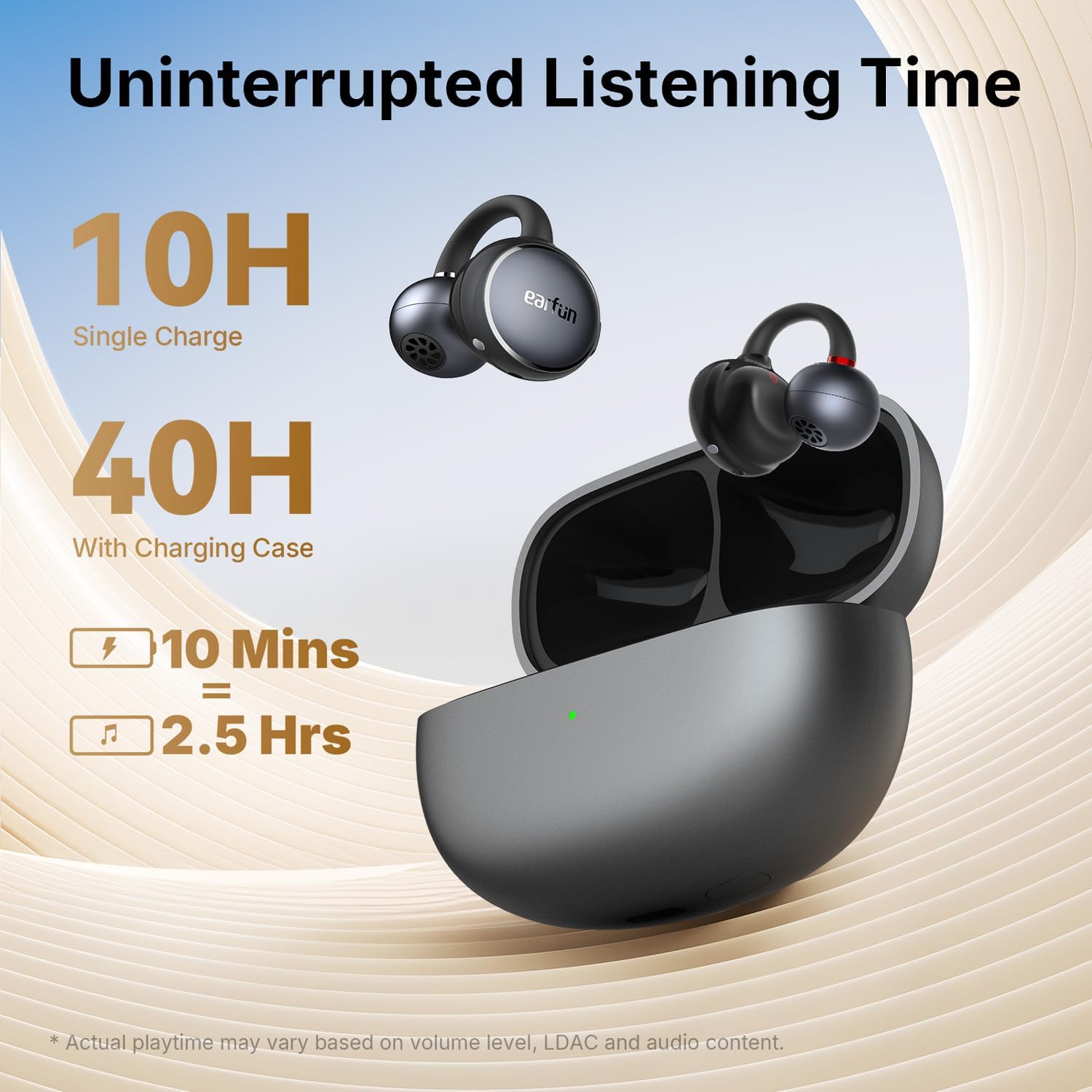
Figure 3: Earbuds demonstrating multipoint connection capabilities.
4. EarFun App
For enhanced features and customization, download the EarFun Audio App from the Google Play Store or Apple App Store. The app allows you to personalize settings, customize controls, adjust EQ presets, and enable listening modes like Theater Mode and Surge Bass.

Figure 4: EarFun Audio App interface for personalized settings.
ઓપરેટિંગ સૂચનાઓ
નિયંત્રણો
The EarFun Clip earbuds feature intuitive physical button controls, preventing accidental touches during activities. You can customize these controls via the EarFun Audio App.
- ચલાવો/થોભો: Single press (L/R earbud)
- આગળનો ટ્રેક: Double press (R earbud)
- પાછલો ટ્રેક: Double press (L earbud)
- અવાજ વધારો: Triple press (R earbud)
- અવાજ ધીમો: Triple press (L earbud)
- જવાબ/કૉલ સમાપ્ત કરો: Single press (L/R earbud)
- કૉલ નકારો: Press and hold for 2s (L/R earbud)
- વ Voiceઇસ સહાયકને સક્રિય કરો: Press and hold for 2s (L/R earbud)
કૉલ ગુણવત્તા
Equipped with dual microphones and AI-powered environmental noise cancellation, the earbuds effectively capture your voice while minimizing background noise, ensuring exceptional call clarity even in noisy environments.
ઓડિયો લક્ષણો
Experience peak wireless audio fidelity with LDAC and Hi-Res Audio support. Powered by 10.8mm custom carbon drivers, the earbuds deliver deep bass and rich sound across the spectrum. Advanced Directional Sound Tech minimizes sound leakage while allowing you to stay aware of your surroundings.

Figure 5: Internal structure of the 10.8mm custom carbon driver with BassSurge technology.

Figure 6: Advanced Directional Sound Tech for minimal sound leakage.
બેટરી જીવન અને ચાર્જિંગ
The EarFun Clip earbuds offer up to 10 hours of continuous playtime on a single charge, with a total of 40 hours when combined with the USB-C rechargeable case. For quick power-ups, a 10-minute charge provides approximately 2.5 hours of playback.

આકૃતિ 7: બેટરી લાઇફ અને ઝડપી ચાર્જિંગ ક્ષમતાઓ.
ટકાઉપણું
With an IP55 waterproofing rating, the EarFun Clip wireless earbuds are built to withstand sweat, rain, and dust, making them suitable for gym use and outdoor activities.

Figure 8: IP55 water and dust resistance for the earbuds.
જાળવણી
To ensure optimal performance and longevity of your EarFun Clip earbuds, follow these maintenance tips:
- ઇયરબડ્સ અને ચાર્જિંગ કેસને નિયમિતપણે નરમ, સૂકા કપડાથી સાફ કરો.
- If the earbuds or case get wet or dusty, ensure they are completely dry before charging.
- ઇયરબડ્સને સુરક્ષિત રાખવા અને બેટરી બચાવવા માટે ઉપયોગમાં ન હોય ત્યારે તેમને ચાર્જિંગ કેસમાં રાખો.
- Avoid exposing the earbuds to extreme temperatures or direct sunlight for prolonged periods.
મુશ્કેલીનિવારણ
If you encounter any issues with your EarFun Clip earbuds, please refer to the following common solutions:
Earbuds not connecting or pairing:
- Ensure the insulating films are removed from both earbuds.
- Verify Bluetooth is enabled on your device and the earbuds are within range.
- Try resetting the earbuds (refer to the specifications section for reset instructions).
- Delete the previous Bluetooth record for the earbuds on your device and try pairing again.
નબળી અવાજ ગુણવત્તા:
- Ensure the earbuds are properly fitted in your ears for optimal sound.
- Adjust EQ settings in the EarFun Audio App to your preference.
- ઓડિયો સ્ત્રોત ઉચ્ચ ગુણવત્તાનો છે કે નહીં તે તપાસો.
ચાર્જિંગ સમસ્યાઓ:
- Ensure the USB-C cable is securely connected to both the case and a power source.
- Verify that the charging case is not wet or dusty before charging.
વિશિષ્ટતાઓ
| લક્ષણ | વિગત |
|---|---|
| મોડેલનું નામ | ઇયરફન ક્લિપ |
| આઇટમ મોડલ નંબર | CW100G |
| કનેક્ટિવિટી ટેકનોલોજી | વાયરલેસ (બ્લુટુથ 6.0) |
| ઓડિયો ડ્રાઈવર પ્રકાર | ડાયનેમિક ડ્રાઈવર |
| ઑડિઓ ડ્રાઇવરનું કદ | 10.8 મિલીમીટર |
| આવર્તન પ્રતિભાવ | 20 KHz |
| સંવેદનશીલતા | 100 ડીબી |
| અવબાધ | 32 ઓહ્મ |
| રમવાનો સમય (સિંગલ ચાર્જ) | 10 કલાક સુધી |
| કુલ રમવાનો સમય (ચાર્જિંગ કેસ સાથે) | 40 કલાક સુધી |
| ઝડપી ચાર્જિંગ | 10 mins charge for 2.5 hours playtime |
| પાણી પ્રતિકાર સ્તર | IP55 (વોટરપ્રૂફ) |
| નિયંત્રણ પ્રકાર | બટન નિયંત્રણ |
| વસ્તુનું વજન | 49 ગ્રામ (1.73 ઔંસ) |
| ઉત્પાદન પરિમાણો | 1.1 x 0.99 x 0.85 ઇંચ |
| સામગ્રી | Liquid silicone, memory wire, composite |
વોરંટી અને આધાર
EarFun products typically come with a manufacturer's warranty. Please refer to the specific warranty information provided with your product packaging or on the official EarFun website for details regarding coverage and duration.
For FAQs and more information, please visit the official EarFun webગ્રાહક સેવા સાઇટ અથવા સંપર્ક કરો:
- સત્તાવાર વપરાશકર્તા માર્ગદર્શિકા (PDF): PDF ડાઉનલોડ કરો
- ગ્રાહક સેવા ઇમેઇલ: service@myearfun.com
- Webસાઇટ: www.myearfun.com
Ask a question about this manual
Ask about setup, troubleshooting, compatibility, parts, safety, or missing instructions. Manuals+ will review the question and use this page’s manual context to help answer it.