
1. ઓવરview
The Donerton T50S Smart Watch is a versatile fitness tracker designed for men and women, featuring a 1.85-inch HD touchscreen. It offers comprehensive health monitoring, over 100 sports modes, and convenient communication capabilities including answering and making calls directly from your wrist. With its IP68 waterproof rating and long battery life, it's an ideal companion for daily activities and fitness pursuits.

Image: Donerton T50S Smart Watch with a black strap, showcasing તેના વાઇબ્રન્ટ ડિસ્પ્લે.
2. બોક્સમાં શું છે
- Donerton T50S Smart Watch
- વોચ બેન્ડ
- ચાર્જિંગ કેબલ
- વપરાશકર્તા માર્ગદર્શિકા

Image: The Donerton T50S Smart Watch and its accessories as packaged.
3. Setup & Pairing
To begin using your Donerton T50S Smart Watch, follow these steps to pair it with your smartphone:
- ઘડિયાળ ચાર્જ કરો: પ્રથમ ઉપયોગ કરતા પહેલા, આપેલા ચુંબકીય ચાર્જિંગ કેબલનો ઉપયોગ કરીને સ્માર્ટવોચને સંપૂર્ણપણે ચાર્જ કરો.
- એપ ડાઉનલોડ કરો: Scan the QR code displayed on the watch screen or in the user manual to download the ગ્લોરીફિટ app from your phone's app store (compatible with iOS 9.0+ and Android 7.0+).
- બ્લૂટૂથ સક્ષમ કરો: તમારા સ્માર્ટફોન પર બ્લૂટૂથ ચાલુ કરો.
- ઉપકરણ જોડો: Open the GloryFit app, navigate to the device section, and select "Add device." Choose "T50S" from the list of available devices to initiate pairing. Confirm any pairing requests on both your phone and the watch.
- કૉલ ફંક્શન સક્ષમ કરો: After successful pairing, ensure the Bluetooth call function is enabled in your phone's Bluetooth settings for the T50S device. This allows you to answer/make calls directly from the watch.
Video: A step-by-step guide on connecting the Donerton T50S Smart Watch to your smartphone via the GloryFit app.

Image: Visual guide for connecting the smartwatch to the GloryFit app and enabling Bluetooth call features.
4. સ્માર્ટવોચનું સંચાલન
The T50S Smart Watch features an intuitive full-touch display for easy navigation:
- ઉપર/નીચે સ્વાઇપ કરો: મેનુઓ અને સૂચનાઓ દ્વારા સ્ક્રોલ કરો.
- ડાબે/જમણે સ્વાઇપ કરો: Access quick functions or different watch faces.
- ટૅપ કરો: Select an option or open an application.
- સાઇડ બટન: Press to wake the screen, return to the home screen, or access the main menu.

Image: The smartwatch displaying its array of multifunctional app icons.
૩. આરોગ્ય દેખરેખ
The T50S Smart Watch is equipped with high-performance optical sensors to track your health metrics:
- હાર્ટ રેટ મોનિટરિંગ: Accurately monitors your heart rate in real-time throughout the day. View weekly health reports in the GloryFit app.
- સ્લીપ મોનિટરિંગ: Automatically tracks your sleep status (deep sleep, light sleep, REM, awake time). Analyze your sleep patterns in the app to improve sleep habits.
- બ્લડ ઓક્સિજન મોનિટરિંગ: તમારા લોહીમાં ઓક્સિજનનું સ્તર માપે છે.
- મહિલા આરોગ્ય વ્યવસ્થાપન: Features physiological period reminders.

Image: The smartwatch displaying heart rate and sleep tracking data.
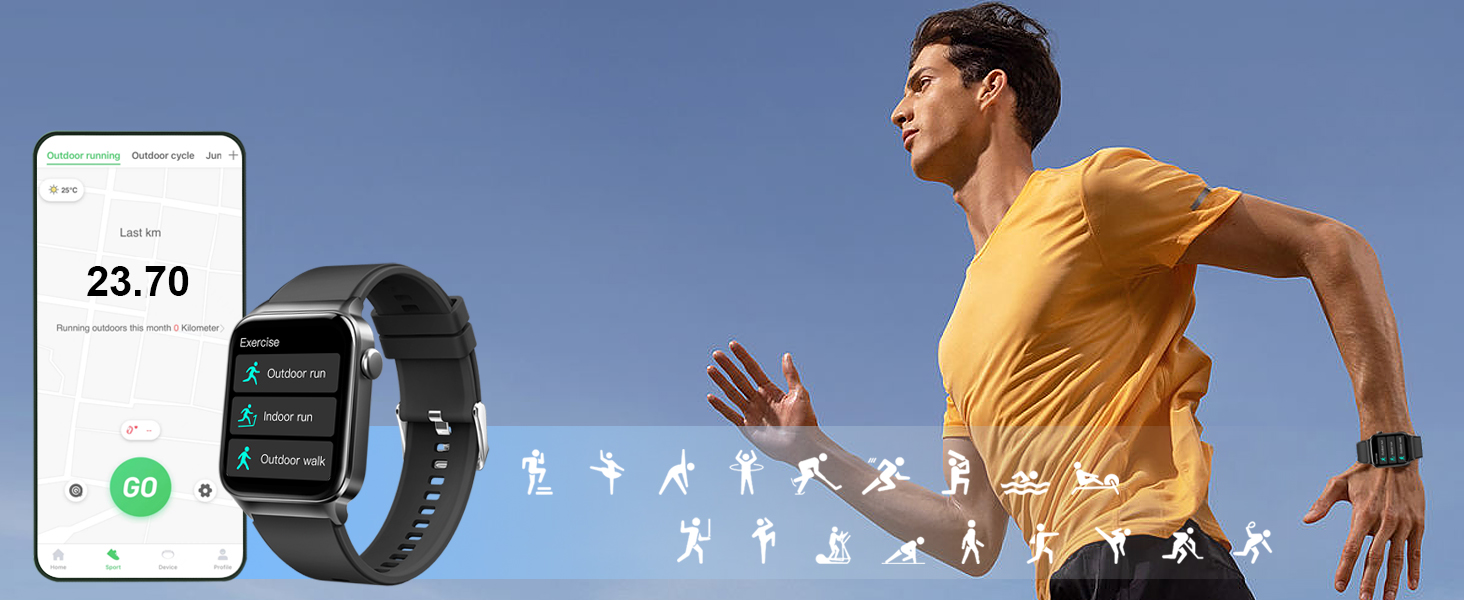
Image: Accurate heart rate tracking throughout the day, visible on the watch and synced app.
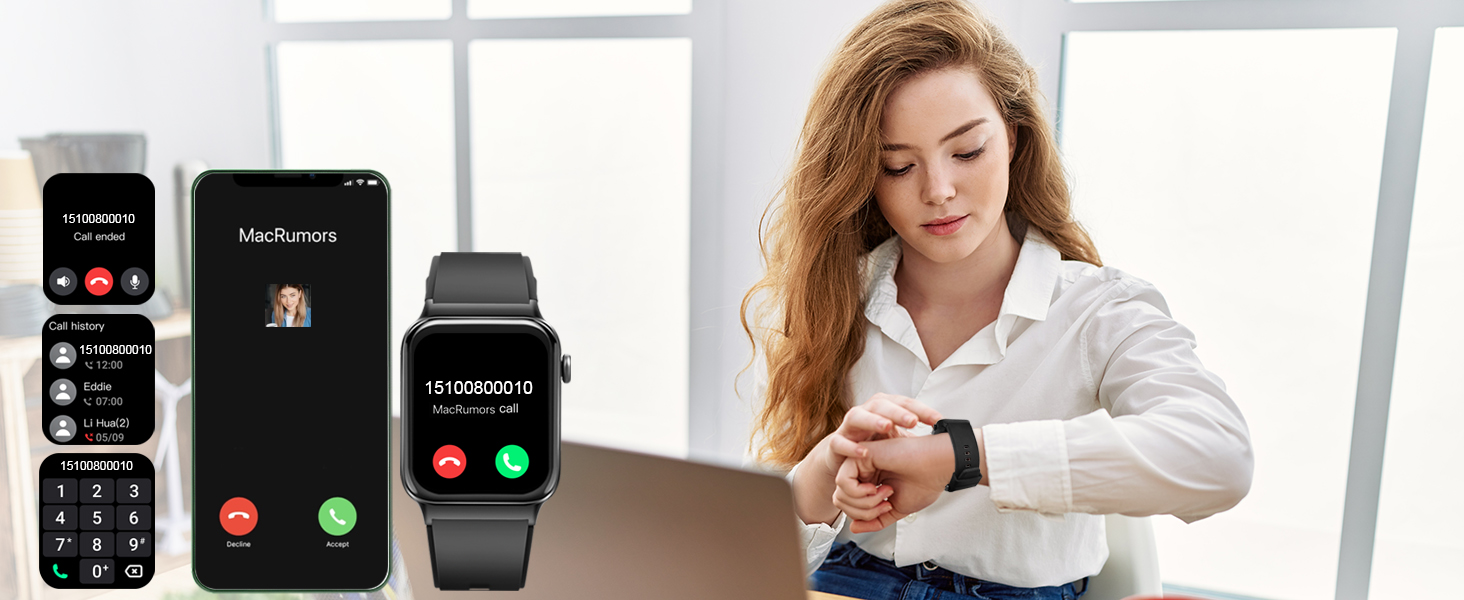
Image: Sleep monitoring function requires the watch to be connected to the app and worn correctly.

Image: The GloryFit app provides physiological period reminders, displayed on the watch interface.
૪.૫. સ્પોર્ટ્સ મોડ્સ અને એક્ટિવિટી ટ્રેકિંગ
The activity tracker supports over 100 sports modes and is IP68 waterproof:
- 100+ સ્પોર્ટ્સ મોડ્સ: Includes Running, Walking, Hiking, Basketball, Boating, Climbing, Cycling, Fitness, Football, and more.
- રીઅલ-ટાઇમ ડેટા: During exercise, it records data like heart rate, steps, calories burned, and distance.
- IP68 વોટરપ્રૂફ: Suitable for washing hands, face, or engaging in sweaty activities. નોંધ: Not recommended for use in hot water or seawater.

Image: The smartwatch tracking outdoor running activity, showing distance, calories, and steps.

Image: Track your daily activity data such as steps, calories burned, distance, and more.

Image: The smartwatch offers a wide range of sports modes for comprehensive activity tracking.
7. સંચાર સુવિધાઓ
Stay connected with your T50S Smart Watch:
- કૉલ કરો/જવાબ આપો: With a built-in HD speaker, you can directly answer or make calls after connecting to your smartphone via Bluetooth.
- સંદેશ સૂચનાઓ: Supports multiple smart reminders including text messages and SNS messages (Facebook, WhatsApp, Instagram, Twitter, etc.). All notifications are displayed on your smartwatch and reminded by vibration.
Video: Demonstrating the call answering and making features of the Donerton T50S Smart Watch.

Image: The smartwatch showing an incoming call, allowing direct interaction from the wrist.

Image: The smartwatch allows users to answer calls directly, showing the call interface on both devices.

Image: Connect your smartwatch to receive notifications from calls, texts, emails, and social media apps.
8. Customization & Display
તમારા સ્માર્ટવોચ અનુભવને વ્યક્તિગત બનાવો:
- 1.85'' HD Touch Screen: Enjoy a highly responsive touch and clear visual experience.
- 200+ DIY Watch Faces: Download over 200 free personalized watch faces from the GloryFit app.
- Custom Wallpapers: Use your favorite photos (family, selfies, pets, landscapes) as your watch wallpaper.
- બ્રાઇટનેસ એડજસ્ટમેન્ટ: Adjust the screen brightness to your preference.

Image: The 1.85-inch full touch screen offers over 200 cloud watch faces and allows custom photo wallpapers.
Image: The GloryFit app provides over 200 watch faces and options to DIY your smartwatch wallpaper.
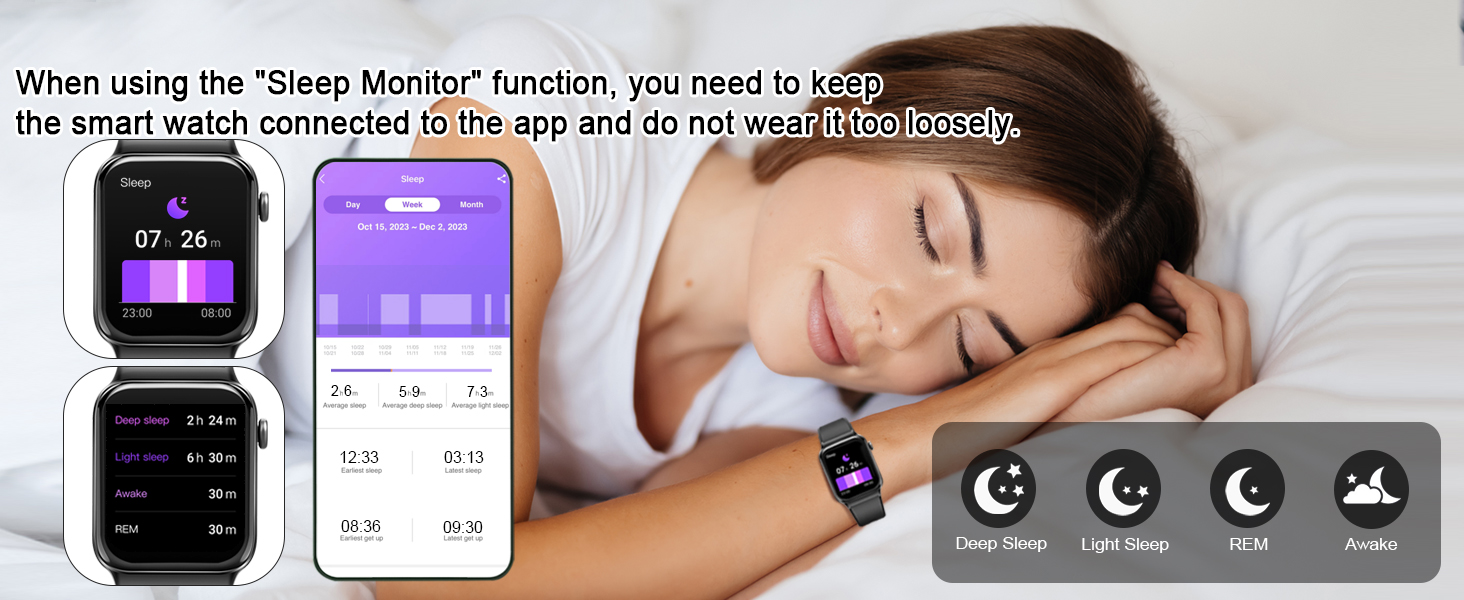
Image: The smartwatch offers 4-level brightness adjustment, customizable screen-on duration, and a 'Raise to Light Up' feature.
9. Battery Life & Charging
The T50S Smart Watch is designed for extended use:
- દૈનિક ઉપયોગ: લગભગ ૪-૭ દિવસ.
- સ્ટેન્ડબાય સમય: લગભગ 30 દિવસ.
- ચાર્જિંગ સમય: લગભગ 2 કલાક.
- ચાર્જિંગ પદ્ધતિ: Use the provided magnetic charging cable. Align the magnetic pins on the cable with the charging points on the back of the watch.
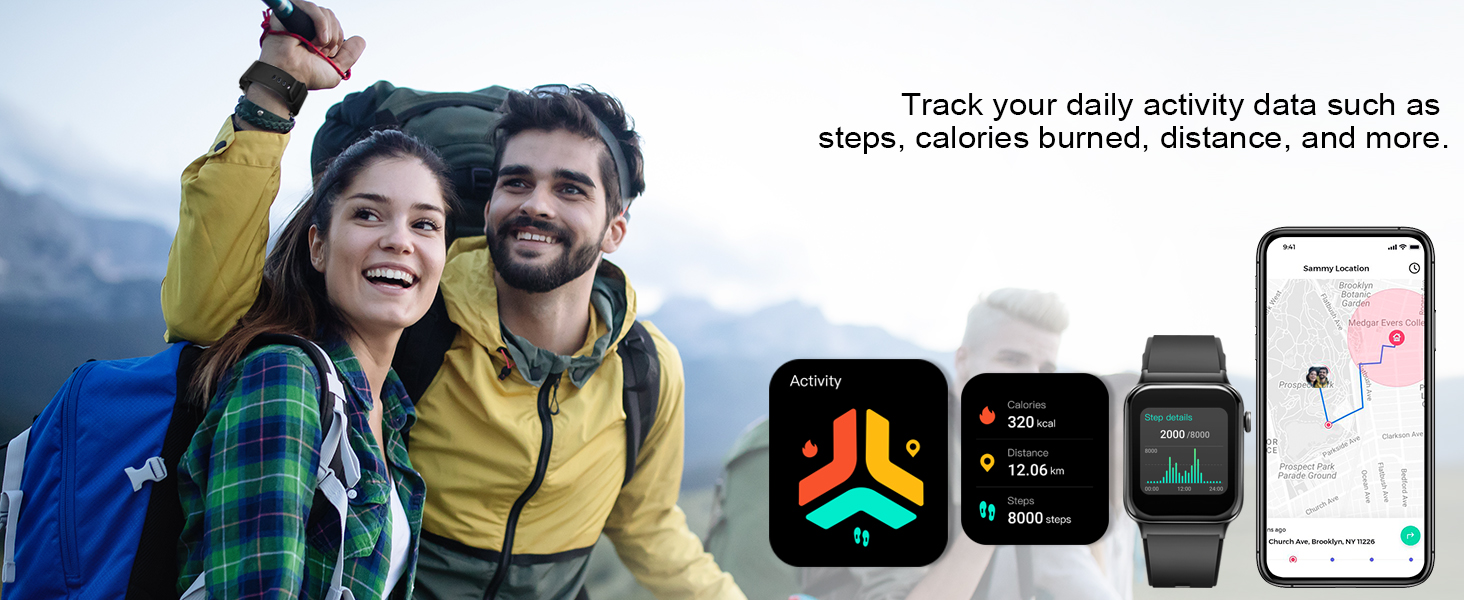
Image: The smartwatch features a long battery life with 30 days standby and 7 days daily use, charging in 2 hours.
10. Important Usage Tips
For optimal performance and comfort:
- Wear the T50S Smart Watch correctly: neither too tight nor too loose.
- Ensure there is room for your skin to breathe.
- Proper fit ensures sensors work accurately and comfortably.
- If the watch slips or sensors don't read correctly, adjust the band.

Image: Guidance on how to wear the T50S Smart Watch for comfort and accurate sensor readings.
11. વધારાની સુવિધાઓ
The Donerton T50S Smart Watch includes various other useful functions:
- ટાઈમર અને સ્ટોપવોચ: પ્રવૃત્તિઓ દરમિયાન ચોક્કસ સમય જાળવણી માટે.
- અલાર્મ ઘડિયાળ: તમારા કાંડાથી સીધા એલાર્મ સેટ કરો.
- બેઠાડુ રીમાઇન્ડર: નિષ્ક્રિયતાના સમયગાળા પછી તમને ખસેડવા માટે પ્રોત્સાહિત કરે છે.
- સંગીત નિયંત્રણ: તમારા સ્માર્ટફોન પર સંગીત પ્લેબેકને નિયંત્રિત કરો.
- હવામાન આગાહી: Syncs with your phone to provide local weather updates.
- ફોટો નિયંત્રણ: તમારા ફોનના કેમેરાને રિમોટલી કંટ્રોલ કરો.
- કેલ્ક્યુલેટર: A convenient tool for quick calculations.
- Intelligent Voice Assistant: For hands-free operation.

Image: When connected to your phone, the smartwatch automatically syncs weather information for the next week.

Image: The smartwatch offers remote camera control and music control functionalities.

Image: The smartwatch provides useful tools like stopwatch, alarm, and timer for daily convenience.
12. સ્પષ્ટીકરણો
| લક્ષણ | વિગત |
|---|---|
| મોડલ નંબર | T50S |
| સ્ક્રીન માપ | 1.85 ઇંચ |
| ડિસ્પ્લે પ્રકાર | HD Full Touch Color Screen |
| વોટરપ્રૂફ રેટિંગ | IP68 |
| બેટરી લાઇફ (દૈનિક ઉપયોગ) | 5-7 દિવસ |
| બેટરી લાઇફ (સ્ટેન્ડબાય) | 30 દિવસ |
| ચાર્જિંગ સમય | આશરે. 2 કલાક |
| કનેક્ટિવિટી | બ્લૂટૂથ |
| સુસંગતતા | iOS 9.0+ / Android 7.0+ |
| આરોગ્ય દેખરેખ | Heart Rate, Sleep, Blood Oxygen, Women's Health |
| સ્પોર્ટ્સ મોડ્સ | 100+ |
| ખાસ લક્ષણો | Bluetooth Calls, Smart Notifications, Custom Watch Faces, Music Control, Weather, Camera Control, Calculator, Voice Assistant |
| વસ્તુનું વજન | 3.52 ઔંસ |
| બેટરી ક્ષમતા | 300 મિલીamp કલાક |
| મેમરી સ્ટોરેજ ક્ષમતા | 4 જીબી |
| ઓપરેટિંગ સિસ્ટમ | એન્ડ્રોઇડ વેર 2.9 |
| જીપીએસ | બિલ્ટ-ઇન જીપીએસ |
13. મુશ્કેલીનિવારણ
- ઘડિયાળ ચાલુ નથી થઈ રહી: ખાતરી કરો કે ઘડિયાળ સંપૂર્ણપણે ચાર્જ થઈ ગઈ છે. તેને ચાર્જિંગ કેબલ અને પાવર સ્ત્રોત સાથે ઓછામાં ઓછા 30 મિનિટ માટે કનેક્ટ કરો.
- ફોન સાથે જોડી બનાવી શકાતી નથી: Make sure Bluetooth is enabled on your phone and the watch is within range. Restart both devices and try pairing again through the GloryFit app.
- કૉલ ફંક્શન કામ કરતું નથી: Verify that the T50S is connected for calls in your phone's Bluetooth settings (often listed as a separate connection for audio).
- સૂચનાઓ પ્રાપ્ત થઈ નથી: Check app permissions for GloryFit on your phone to ensure it has access to notifications. Also, confirm notifications are enabled within the GloryFit app settings for the watch.
- ખોટો હૃદય દર/ઊંઘનો ડેટા: Ensure the watch is worn correctly – snug but not too tight, allowing sensors to make proper contact with your skin.
14. વોરંટી અને સપોર્ટ
For warranty information, technical support, or further assistance, please refer to the contact details provided in your product packaging or visit the official Donerton webસાઇટ વોરંટી દાવા માટે તમારી ખરીદીની રસીદ રાખો.