
પરિચય
Thank you for choosing the FREEPEAR Party Bluetooth Speaker. This manual provides essential information for the safe and efficient operation of your speaker. Please read it thoroughly before use and retain it for future reference.
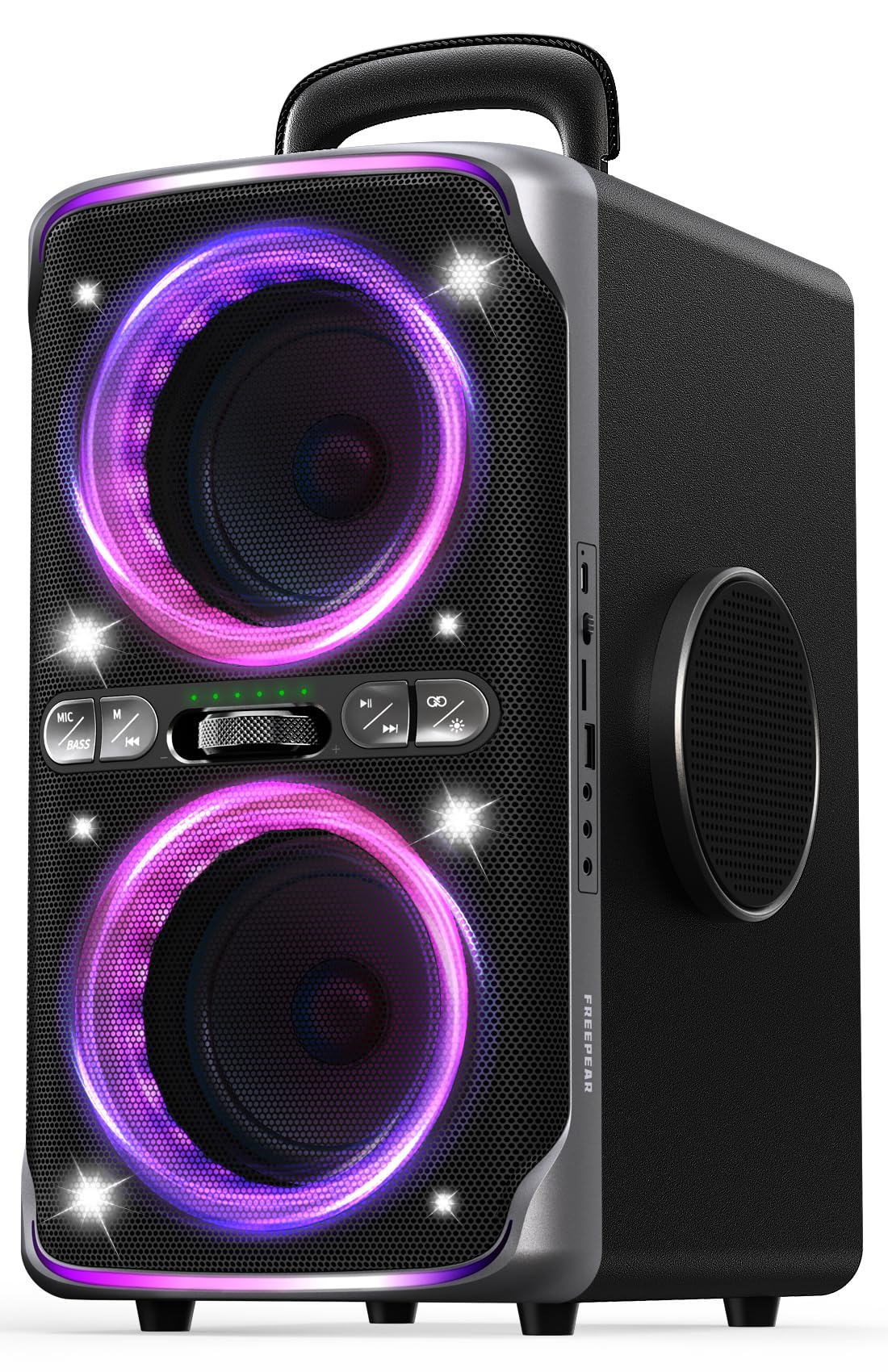
છબી: આગળ view of the FREEPEAR Party Bluetooth Speaker, showcasing its design and integrated colorful lighting.
પેકેજ સામગ્રી
ખાતરી કરો કે બધી વસ્તુઓ પેકેજમાં હાજર છે:
- પાર્ટી બ્લૂટૂથ સ્પીકર
- ઝડપી પ્રારંભ માર્ગદર્શિકા
- ઝડપી ચાર્જિંગ કેબલ
- ચાર્જિંગ કેબલ
- AUX કેબલ
ઉત્પાદન ઓવરview
The FREEPEAR Party Bluetooth Speaker is designed for powerful audio and dynamic light shows. Key features include:
- 240W Peak Sound Output: Dual 5-inch woofers and dual 3-inch tweeters deliver robust audio.
- Dazzling Light Shows: Multiple light modes synchronize with music.
- ટીડબ્લ્યુએસ જોડી: Connect two speakers for a 480W stereo experience.
- 15-કલાકનો રમવાનો સમય: લાંબા સમય સુધી ઉપયોગ માટે ઉચ્ચ ક્ષમતાવાળી બેટરી.
- IPX4 Splashproof: Resistant to water splashes, suitable for outdoor use.
- બહુમુખી કનેક્ટિવિટી: Bluetooth 5.3, AUX, USB, TF card, Microphone, and Guitar inputs.
- પાવર બેંક કાર્ય: Charge external devices via USB.
કંટ્રોલ પેનલ

છબી: વિગતવાર view of the speaker's control panel, showing buttons for microphone, bass, track control, volume knob, and light mode.
ઇનપુટ/આઉટપુટ પોર્ટ

Image: Close-up of the speaker's side panel, illustrating the various input and output ports including USB, AUX, microphone, and guitar jacks.
સેટઅપ
1. સ્પીકરને ચાર્જ કરવો
Before first use, fully charge the speaker. Connect the provided charging cable to the speaker's charging port and a power source. The battery indicator lights will show charging status. A full charge takes approximately 2.5 hours with a 30W charger.

Image: The speaker connected to a power source for charging, indicating its fast-charging capability.
2. પાવર ચાલુ/બંધ
Press and hold the Power button on the control panel for 2-3 seconds to turn the speaker ON or OFF.
3. બ્લૂટૂથ જોડી
- Turn on the speaker. It will automatically enter Bluetooth pairing mode, indicated by a flashing Bluetooth indicator light.
- તમારા ઉપકરણ (સ્માર્ટફોન, ટેબ્લેટ, વગેરે) પર બ્લૂટૂથ સક્ષમ કરો.
- માટે શોધો "FREEPEAR01" in your device's Bluetooth list and select it to connect.
- Once connected, the Bluetooth indicator light will be solid, and you will hear a confirmation tone.

Image: Individuals listening to music from the speaker, illustrating the seamless Bluetooth 5.3 connection.
4. TWS (ટ્રુ વાયરલેસ સ્ટીરિયો) પેરિંગ
To pair two FREEPEAR01 speakers for stereo sound:
- ખાતરી કરો કે બંને સ્પીકર્સ ચાલુ છે અને કોઈપણ બ્લૂટૂથ ઉપકરણ સાથે જોડાયેલા નથી.
- On one speaker (this will be the primary speaker), press the TWS button. The TWS indicator will flash.
- પ્રાથમિક સ્પીકર આપમેળે સેકન્ડરી સ્પીકરને શોધશે અને કનેક્ટ થશે.
- Once connected, both TWS indicator lights will be solid, and you will hear a confirmation tone.
- Now, connect your device to the primary speaker via Bluetooth as described above. Audio will play in stereo through both speakers.

Image: Two FREEPEAR speakers positioned to demonstrate True Wireless Stereo pairing, creating an immersive sound experience.
ઓપરેટિંગ સૂચનાઓ
1. Light Show Control
Press the Light Mode button on the control panel to cycle through different dazzling light show patterns. The lights can synchronize with the music or display various static and dynamic effects.

Image: The speaker's light show in action, creating a vibrant atmosphere for a group of people.
2. ઓડિયો ઇનપુટ મોડ્સ
The speaker supports multiple audio input options:
- બ્લૂટૂથ: Connect wirelessly as described in the Setup section.
- AUX ઇનપુટ: આપેલા 3.5mm AUX કેબલનો ઉપયોગ કરીને બાહ્ય ઑડિઓ ઉપકરણને કનેક્ટ કરો. સ્પીકર આપમેળે AUX મોડ પર સ્વિચ થઈ જશે.
- યુએસબી/ટીએફ કાર્ડ: Insert a USB drive or TF card into the respective port. The speaker will automatically play audio fileસંગ્રહ ઉપકરણમાંથી s.
- માઇક્રોફોન/ગિટાર ઇનપુટ: Connect a microphone or guitar to the dedicated jacks for karaoke or live performance. Adjust volume using the speaker's controls or the connected instrument/mic.

Image: Musicians utilizing the speaker's microphone and guitar inputs for a performance.
3. પાવર બેંક કાર્ય
The speaker can charge other devices. Connect your device's USB charging cable to the speaker's USB output port. This function is active when the speaker is powered on.

Image: The speaker acting as a power bank, charging a smartphone, demonstrating its utility beyond audio playback.
4. સાઉન્ડ મોડ્સ
The speaker features different sound modes optimized for various environments:
- ઇન્ડોર મોડ: Provides richer, more powerful sound, ideal for enclosed spaces.
- આઉટડોર મોડ: Delivers clearer, more resonant sound, suitable for open-air environments.
Switch between modes using the dedicated button on the control panel to optimize your listening experience.

Image: The speaker being used in diverse settings, highlighting its adaptability for both indoor and outdoor events.
જાળવણી
સફાઈ
Wipe the speaker with a soft, dry cloth. Do not use abrasive cleaners or solvents. Ensure all ports are dry before connecting cables.
સંગ્રહ
Store the speaker in a cool, dry place away from direct sunlight and extreme temperatures. If storing for an extended period, charge the battery to approximately 50% every three months to prolong battery life.
પાણી પ્રતિકાર (IPX4)
The speaker is IPX4 splashproof, meaning it can withstand splashes of water. Do not submerge the speaker in water or expose it to heavy rain.

Image: The speaker positioned near a pool, illustrating its IPX4 splashproof rating for use in wet environments.
મુશ્કેલીનિવારણ
| સમસ્યા | સંભવિત કારણ | ઉકેલ |
|---|---|---|
| સ્પીકર ચાલુ થતો નથી. | બેટરી ઓછી છે; પાવર બટન યોગ્ય રીતે દબાવવામાં આવ્યું નથી. | સ્પીકર ચાર્જ કરો; પાવર બટનને 2-3 સેકન્ડ માટે દબાવી રાખો. |
| કોઈ અવાજ નથી. | વૉલ્યૂમ ખૂબ ઓછું છે; ખોટો ઇનપુટ મોડ; ડિવાઇસ કનેક્ટેડ નથી. | Increase volume; Select correct input mode (Bluetooth, AUX, USB); Ensure device is paired. |
| બ્લૂટૂથ કનેક્ટ થઈ રહ્યું નથી. | સ્પીકર પેરિંગ મોડમાં નથી; ડિવાઇસ ખૂબ દૂર છે; હસ્તક્ષેપ. | Ensure speaker is in pairing mode; Move device closer; Disconnect other Bluetooth devices. |
| TWS જોડી નિષ્ફળ જાય છે. | Speakers already connected to other devices; Incorrect pairing sequence. | Disconnect both speakers from any Bluetooth devices; Follow TWS pairing steps carefully. |
| લાઈટ શો કામ કરી રહ્યો નથી. | Light mode turned off or stuck. | Press the Light Mode button to cycle through options or turn lights on. |
વિશિષ્ટતાઓ
| લક્ષણ | વિગત |
|---|---|
| બ્રાન્ડ | FREEPEAR |
| મોડલ નંબર | FREEPEAR01 |
| સ્પીકર મહત્તમ આઉટપુટ પાવર | 240 વોટ્સ (પીક) |
| કનેક્ટિવિટી ટેકનોલોજી | સહાયક, બ્લૂટૂથ, યુએસબી |
| બ્લૂટૂથ સંસ્કરણ | 5.3 |
| બ્લૂટૂથ રેન્જ | 33 ફૂટ (10 મીટર) |
| ઓડિયો આઉટપુટ મોડ | સ્ટીરિયો |
| વોટરપ્રૂફ રેટિંગ | IPX4 |
| બેટરી સરેરાશ જીવન | 15 કલાક |
| બેટરી ચાર્જ સમય | 2.5 Hours (with 30W charger) |
| સબવૂફર વ્યાસ | 5 ઇંચ |
| ટ્વીટર વ્યાસ | 3 ઇંચ |
| આઇટમના પરિમાણો (D x W x H) | 11.22"D x 15.94"W x 9.76"H |
| બિડાણ સામગ્રી | ધાતુ, પ્લાસ્ટિક, લાકડું |
| વધારાની સુવિધાઓ | Bass Boost, Built-In Powerbank, LED Light, Stereo Pairing |
સત્તાવાર ઉત્પાદન વિડિઓઝ
Video: No Limits! Just Powerful, Portable Party Sound!!!
Description: An official video showcasing the FREEPEAR speaker's powerful sound and portability, ideal for various party settings.
Video: Is This Actually Worth It?
Description: A seller-created video review of the FREEPEAR speaker, discussing its features and value proposition.
વોરંટી અને આધાર
વોરંટી માહિતી
The FREEPEAR Party Bluetooth Speaker comes with a 1 વર્ષની મર્યાદિત વોરંટી ખરીદીની તારીખથી. આ વોરંટી સામાન્ય ઉપયોગ હેઠળ ઉત્પાદન ખામીઓ અને કારીગરીને આવરી લે છે. તે દુરુપયોગ, અકસ્માતો, અનધિકૃત ફેરફારો અથવા સામાન્ય ઘસારાને કારણે થતા નુકસાનને આવરી લેતી નથી.
ગ્રાહક આધાર
For technical assistance, warranty claims, or any questions regarding your FREEPEAR speaker, please refer to the contact information provided in your Quick Start Guide or visit the official FREEPEAR store on Amazon: FREEPEAR Store.