
પરિચય
This user manual provides comprehensive instructions for the Chieftec AS-02B-TG-OP Midi Tower PC Case. It covers essential information regarding product features, installation procedures, operational guidelines, maintenance tips, and technical specifications. Please read this manual thoroughly before installing or operating your PC case to ensure proper functionality and longevity.
ઉત્પાદન ઓવરview
The Chieftec AS-02B-TG-OP is a Midi Tower PC case designed for optimal cooling and a modern aesthetic. It features a sleek brushed front panel, a tempered glass side panel, and a pre-installed 120mm PWM fan for efficient heat dissipation.
મુખ્ય લક્ષણો:
- Sleek brushed front panel design.
- Tempered glass side panel for component visibility.
- Optimized interior layout for efficient cooling.
- Pre-installed 120mm PWM fan at the rear.
- Support for various motherboard form factors (ATX, micro ATX, Mini-ITX).
- Multiple expansion bays for storage devices.
- Front I/O panel with USB 2.0, USB Type-C, and audio ports.
ઘટક ઓળખ:

આકૃતિ 1: આગળ-ડાબે view of the Chieftec AS-02B-TG-OP PC case, showcasing the brushed front panel and the tempered glass side panel.

આકૃતિ 2: સીધો આગળનો ભાગ view of the Chieftec AS-02B-TG-OP PC case, highlighting the brushed finish of the front panel.

આકૃતિ 3: Front-right angle view of the Chieftec AS-02B-TG-OP PC case, showing the subtle design elements.
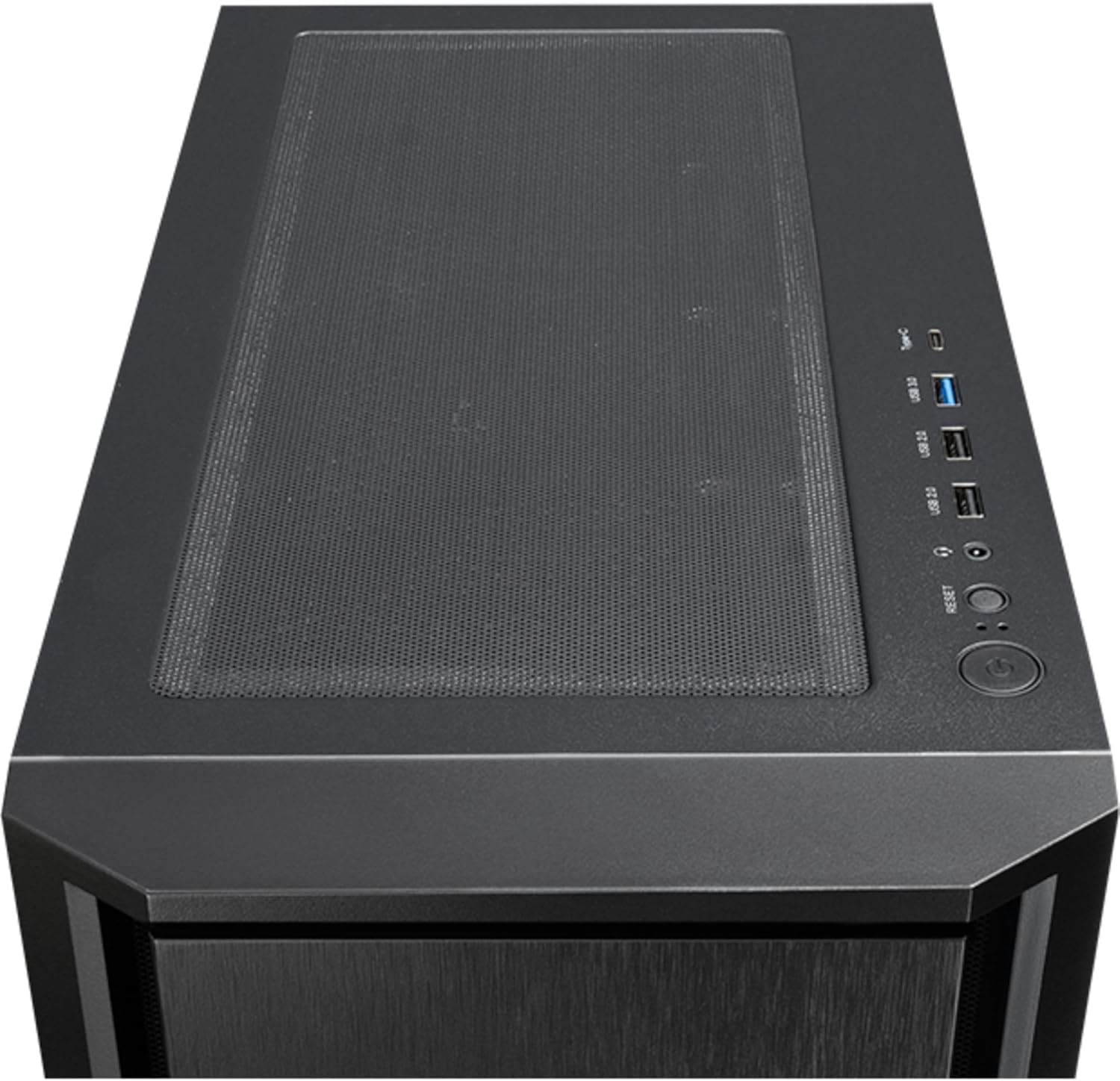
આકૃતિ 4: ટોચ view of the Chieftec AS-02B-TG-OP PC case, showing the top ventilation and the front I/O panel with USB ports and audio jacks.

આકૃતિ 5: પાછળ view of the Chieftec AS-02B-TG-OP PC case, detailing the expansion slots, rear fan mount, and PSU opening.

આકૃતિ 6: તળિયે view of the Chieftec AS-02B-TG-OP PC case, showing the case feet and bottom dust filter area.
સેટઅપ અને ઇન્સ્ટોલેશન
This section guides you through the process of installing components into your Chieftec AS-02B-TG-OP PC case.
1. Preparing the Case:
- કેસને સ્થિર, સપાટ સપાટી પર મૂકો.
- Carefully remove the tempered glass side panel by unscrewing the thumb screws at the rear.
- Remove the opposite side panel to access the cable management area.
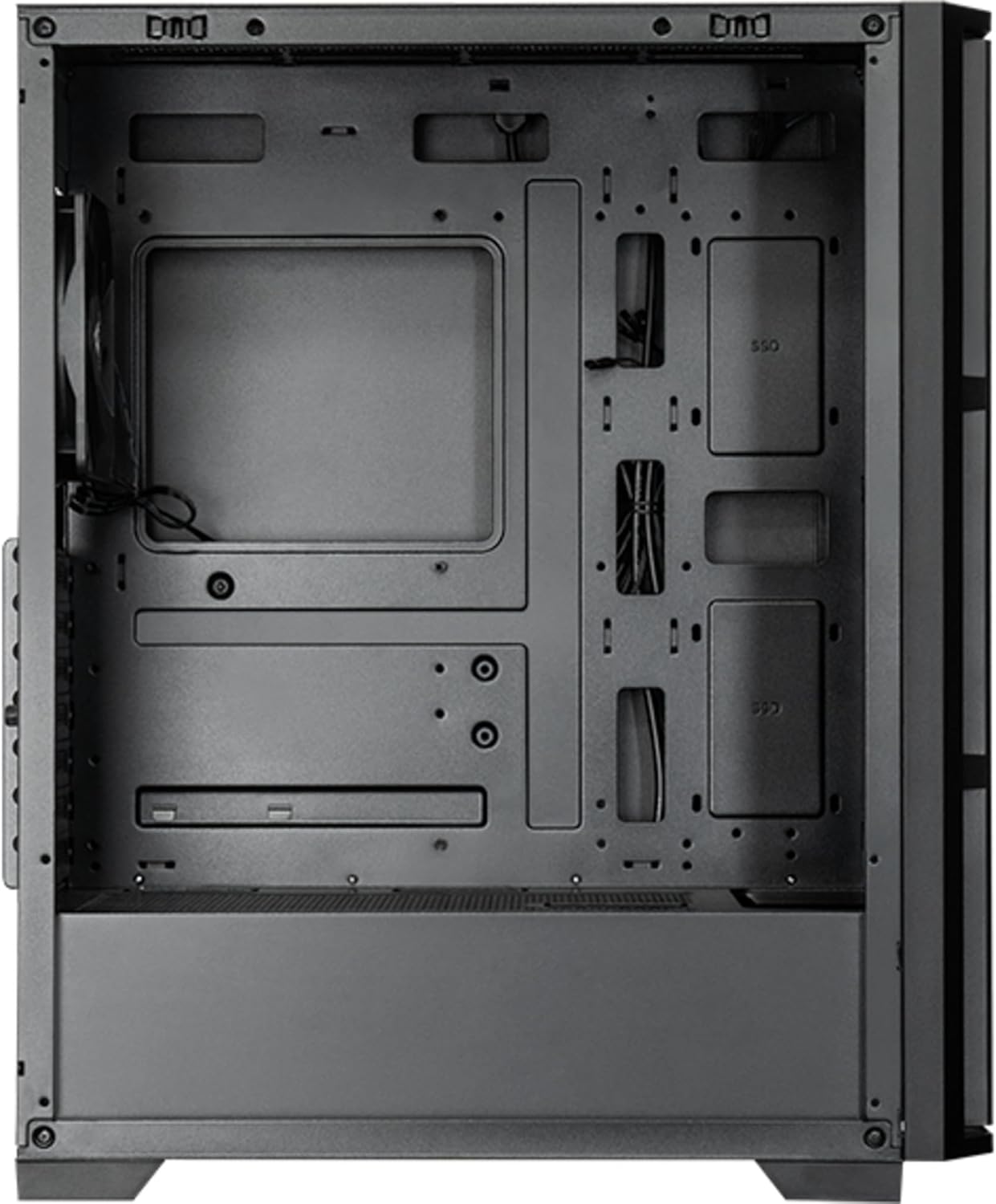
આકૃતિ 7: આંતરિક view of the main compartment, showing the motherboard tray and fan mounting points.
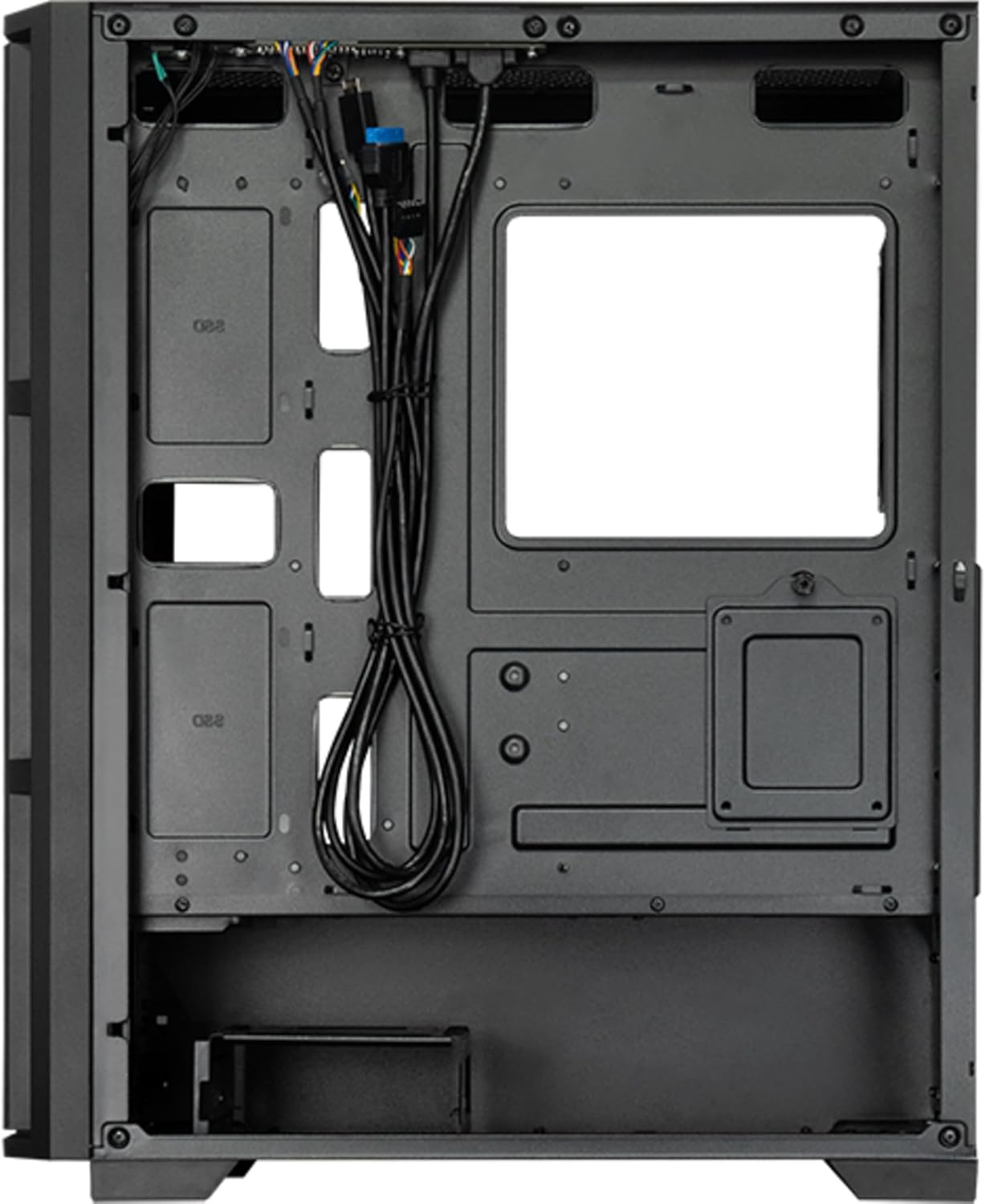
આકૃતિ 8: આંતરિક view from the backside, illustrating the cable management routes and drive mounting locations.
2. મધરબોર્ડ ઇન્સ્ટોલેશન:
- કેસના પાછળના ભાગમાં I/O શિલ્ડ ઇન્સ્ટોલ કરો.
- Align your ATX, micro ATX, or Mini-ITX motherboard with the standoffs inside the case.
- આપેલા સ્ક્રૂનો ઉપયોગ કરીને મધરબોર્ડને સુરક્ષિત કરો.
3. Power Supply Unit (PSU) Installation:
- The PSU is not included. Install your ATX power supply into the dedicated compartment at the bottom rear of the case.
- કેસના પાછળના ભાગમાંથી સ્ક્રૂ વડે PSU ને સુરક્ષિત કરો.
4. Storage Drive Installation:
- Install 3.5" HDDs into the drive cages located at the bottom.
- Install 2.5" SSDs/HDDs into the dedicated mounting points behind the motherboard tray.
- Secure all drives with appropriate screws.
5. Graphics Card and Expansion Cards:
- કેસના પાછળના ભાગમાં જરૂરી વિસ્તરણ સ્લોટ કવર દૂર કરો.
- Insert your graphics card or other expansion cards into the PCIe slots on the motherboard.
- કાર્ડ્સને સ્ક્રૂથી સુરક્ષિત કરો.
6. કેબલ મેનેજમેન્ટ:
- Route all power and data cables through the cutouts and tie-down points behind the motherboard tray.
- Connect the front panel I/O cables (USB, audio, power switch, reset switch, LED indicators) to the corresponding headers on your motherboard.
- Ensure cables do not obstruct airflow.
7. Fan and Cooling System Installation:
- The case includes one pre-installed 120mm PWM fan at the rear.
- Additional fans can be installed at the front (up to 3x 120mm/140mm) and top (up to 2x 120mm/140mm).
- Radiators up to 360mm can be installed at the front and up to 280mm at the top.
- Connect fan power cables to the motherboard fan headers.
ઓપરેટિંગ સૂચનાઓ
Once all components are installed and secured, and the side panels are reattached, your PC is ready for operation.
પાવરિંગ ચાલુ:
- Connect the power cable from your power supply to a wall outlet.
- Press the power button located on the top I/O panel of the case.
- The system should boot up, and any installed lighting will illuminate.
Front I/O Panel Usage:
- USB 2.0 પોર્ટ્સ (x2): For connecting peripherals such as keyboards, mice, and USB drives.
- USB ટાઇપ-સી પોર્ટ (x1): આધુનિક USB-C ઉપકરણોને કનેક્ટ કરવા માટે.
- Audio Jacks (Headphone/Microphone): For connecting headphones, speakers, or microphones.
- રીસેટ બટન: To restart the computer.
જાળવણી
નિયમિત જાળવણી શ્રેષ્ઠ કામગીરી સુનિશ્ચિત કરવામાં મદદ કરે છે અને તમારા પીસી ઘટકોનું આયુષ્ય લંબાવે છે.
સફાઈ:
- બાહ્ય: સોફ્ટનો ઉપયોગ કરો, ડીamp cloth to wipe down the exterior surfaces. Avoid abrasive cleaners.
- ડસ્ટ ફિલ્ટર્સ: The case features dust filters (e.g., on the top and bottom). Regularly remove and clean these filters with compressed air or by rinsing with water (ensure they are completely dry before reinstallation).
- આંતરિક: Periodically use compressed air to remove dust buildup from fans, heatsinks, and other internal components. Ensure the system is powered off and unplugged before cleaning the interior.
એરફ્લો:
- Ensure adequate space around the case for proper airflow.
- વેન્ટિલેશન ઓપનિંગ્સને અવરોધિત કરવાનું ટાળો.
મુશ્કેલીનિવારણ
આ વિભાગ તમને આવી શકે તેવી સામાન્ય સમસ્યાઓનું નિરાકરણ લાવે છે.
કોઈ શક્તિ નથી:
- Check if the power cable is securely connected to both the PSU and the wall outlet.
- Ensure the power switch on the PSU itself is in the "ON" position.
- ચકાસો કે ફ્રન્ટ પેનલ પાવર સ્વીચ કેબલ મધરબોર્ડ હેડર સાથે યોગ્ય રીતે જોડાયેલ છે.
ફરતા ન હોય તેવા પંખા:
- Check if fan power cables are securely connected to the motherboard fan headers or a fan controller.
- Ensure fan speed settings in BIOS/UEFI or operating system are not set to zero RPM.
ફ્રન્ટ પેનલ USB/ઓડિયો કામ કરતું નથી:
- Verify that the USB and audio cables from the front panel are correctly connected to the corresponding headers on the motherboard.
- Check motherboard drivers for USB and audio functionality.
વિશિષ્ટતાઓ
| લક્ષણ | વિગત |
|---|---|
| મોડેલનું નામ | AS-02B-TG-OP માટે તપાસ સબમિટ કરો, અમે 24 કલાકમાં તમારો સંપર્ક કરીશું. |
| બ્રાન્ડ | ચીફટેક |
| ફોર્મ ફેક્ટર | મીડી ટાવર |
| ઉત્પાદન રંગ | કાળો |
| સપોર્ટેડ મધરબોર્ડ ફોર્મ ફેક્ટર્સ | ATX, micro ATX, Mini-ITX |
| પરિમાણો (W x D x H) | ૨૧૦ મીમી x ૪૩૬ મીમી x ૪૪૬ મીમી (૮.૨૭" x ૧૭.૧૭" x ૧૭.૫૬") |
| વસ્તુનું વજન | 5.3 કિલો (આશરે 11.68 પાઉન્ડ) |
| 3.5" Expansion Bays | 2 |
| 2.5" Expansion Bays | 2 |
| 5.25" Expansion Bays | 0 |
| વિસ્તરણ સ્લોટ્સ | 7 |
| સાઇડ વિન્ડો | Yes (Tempered Glass) |
| લાઇટિંગ | Yes (Multi-color) |
| મહત્તમ CPU કુલર ઊંચાઈ | 16.5 સે.મી |
| ફ્રન્ટ I / O બંદરો | 2x USB 2.0, 1x USB Type-C, Audio In/Out |
| પ્રી-ઇન્સ્ટોલ કરેલ ચાહકો | 1x 120mm PWM (Rear) |
| Supported Front Fans (Max) | ૨x ૧૨૦ મીમી અથવા ૨x ૧૪૦ મીમી |
| Supported Top Fans (Max) | ૨x ૧૨૦ મીમી અથવા ૨x ૧૪૦ મીમી |
| Supported Front Radiators | 120mm, 140mm, 240mm, 280mm, 360mm |
| Supported Top Radiators | 120mm, 140mm, 240mm, 280mm |
| પાવર સપ્લાય સમાવેશ થાય છે | ના |
વોરંટી માહિતી
The Chieftec AS-02B-TG-OP PC case comes with a ૧ વર્ષની ઉત્પાદકની વોરંટી from the date of purchase. This warranty covers defects in materials and workmanship under normal use. It does not cover damage caused by misuse, accident, modification, unauthorized repair, or improper installation.
કૃપા કરીને વોરંટી દાવા માટે તમારી ખરીદીનો પુરાવો જાળવી રાખો.
આધાર
For technical assistance, troubleshooting beyond this manual, or warranty inquiries, please contact Chieftec customer support.
- Webસાઇટ: Refer to the official Chieftec webસપોર્ટ સંસાધનો અને સંપર્ક માહિતી માટે સાઇટ.
- ઇમેઇલ/ફોન: Specific contact details can typically be found on the product packaging or the official Chieftec support page.
When contacting support, please have your product model (AS-02B-TG-OP) and proof of purchase readily available.