
MOZOTER SP9i
MOZOTER SP9i Wireless Earbuds User Manual
Model: SP9i
પરિચય
Thank you for choosing the MOZOTER SP9i Wireless Earbuds. These earbuds are designed to provide a comfortable and stable audio experience with advanced Bluetooth 5.3 technology, deep bass sound, and extended playtime. This manual will guide you through the setup, operation, and maintenance of your new earbuds to ensure optimal performance.
બૉક્સમાં શું છે
- MOZOTER SP9i Wireless Earbuds (Left and Right)
- ચાર્જિંગ કેસ
- USB-C ચાર્જિંગ કેબલ
- ઇયરટિપ્સ (S, M, L કદ)
- વપરાશકર્તા માર્ગદર્શિકા
ઉત્પાદન ઓવરview
The MOZOTER SP9i earbuds feature an over-ear hook design for secure fit and comfort. Each earbud is equipped with intuitive touch controls for easy management of audio and calls. The compact charging case provides additional battery life and convenient storage.

Image: The MOZOTER SP9i Wireless Earbuds resting in their open charging case, showcasing the over-ear hook design and the charging contacts.
છબી: વિગતવાર view of an earbud highlighting the integrated Bluetooth 5.3 technology for stable and efficient wireless connectivity.
સેટઅપ
૪.૧. ઇયરબડ્સ અને કેસ ચાર્જ કરવા
પહેલા ઉપયોગ કરતા પહેલા, ઇયરબડ્સ અને ચાર્જિંગ કેસને સંપૂર્ણપણે ચાર્જ કરો. આપેલા USB-C કેબલને કેસ પરના ચાર્જિંગ પોર્ટ અને પાવર સ્ત્રોત સાથે કનેક્ટ કરો. કેસ પરની સૂચક લાઇટ ચાર્જિંગ સ્થિતિ બતાવશે.
- ચાર્જિંગ સમય: સંપૂર્ણ ચાર્જ કરવા માટે લગભગ 1.5 કલાક.
- ઇયરબડ રમવાનો સમય: એક ચાર્જ પર 12 કલાક સુધી.
- કેસ સાથે કુલ રમવાનો સમય: 60 કલાક સુધી.

Image: The charging case with earbuds inside, illustrating the 60-hour total playtime, 12-hour single charge, and 48-hour case capacity, along with the USB-C charging port.
2. તમારા ઉપકરણ સાથે પેરિંગ
- Ensure the charging case has power and the earbuds are inside.
- ચાર્જિંગ કેસ ખોલો. ઇયરબડ્સ આપમેળે ચાલુ થશે અને પેરિંગ મોડમાં પ્રવેશ કરશે.
- તમારા ઉપકરણ (સ્માર્ટફોન, ટેબ્લેટ, લેપટોપ) પર, બ્લૂટૂથ સક્ષમ કરો.
- માટે શોધો available Bluetooth devices and select "SP9i"સૂચિમાંથી.
- એકવાર કનેક્ટ થઈ ગયા પછી, તમને પુષ્ટિકરણ સ્વર સંભળાશે, અને ઇયરબડ્સની સૂચક લાઇટ્સ બંધ થશે અથવા ધીમે ધીમે ફ્લેશ થશે.
જો ઉપકરણમાં બ્લૂટૂથ સક્ષમ હોય, તો કેસમાંથી દૂર કર્યા પછી ઇયરબડ્સ આપમેળે છેલ્લા જોડીવાળા ઉપકરણ સાથે ફરીથી કનેક્ટ થઈ જશે.

Image: An illustration showing the MOZOTER SP9i earbuds in their open case, with a smartphone screen displaying a successful Bluetooth connection to "SP9i".
પહેરવાની સૂચનાઓ
For optimal sound quality and comfort, it is important to wear the earbuds correctly and choose the appropriate eartip size.
૩. ઇયરટિપ્સ પસંદ કરવી
The earbuds come with small (S), medium (M), and large (L) eartips. Experiment with different sizes to find the pair that provides the best seal and comfort for your ears. A good seal enhances bass response and passive noise cancellation.
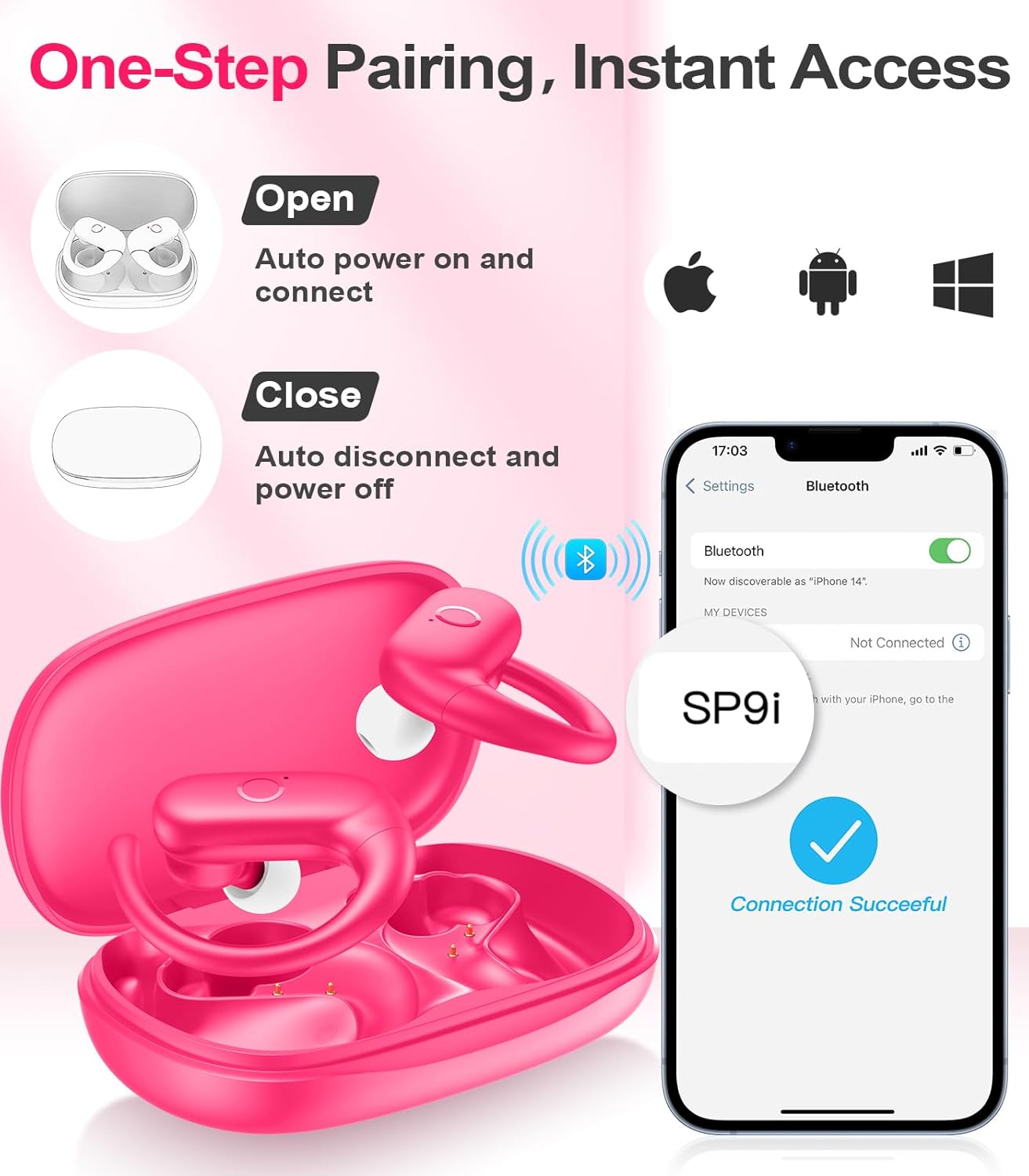
Image: A woman wearing an earbud, with an inset showing the three available eartip sizes (S, M, L) for a customized and comfortable fit.
2. સુરક્ષિત ફિટ હાંસલ કરવી
- પગલું 1: કાન પર ઇયરહૂક મૂકો.
- પગલું 2: તમારી કાનની નહેરમાં ધીમેધીમે ઇયરબડ દાખલ કરો.
- પગલું 3: Rotate the earbud slightly to find a comfortable and secure angle. The flexible ear hooks ensure a stable fit, ideal for sports and active use.

Image: A three-step diagram illustrating the correct method to wear the MOZOTER SP9i earbuds, ensuring a secure and comfortable fit with the ear hook.

Image: A woman wearing the MOZOTER SP9i earbuds, demonstrating the ergonomic design that rests comfortably and securely on the ear.
ઓપરેટિંગ સૂચનાઓ
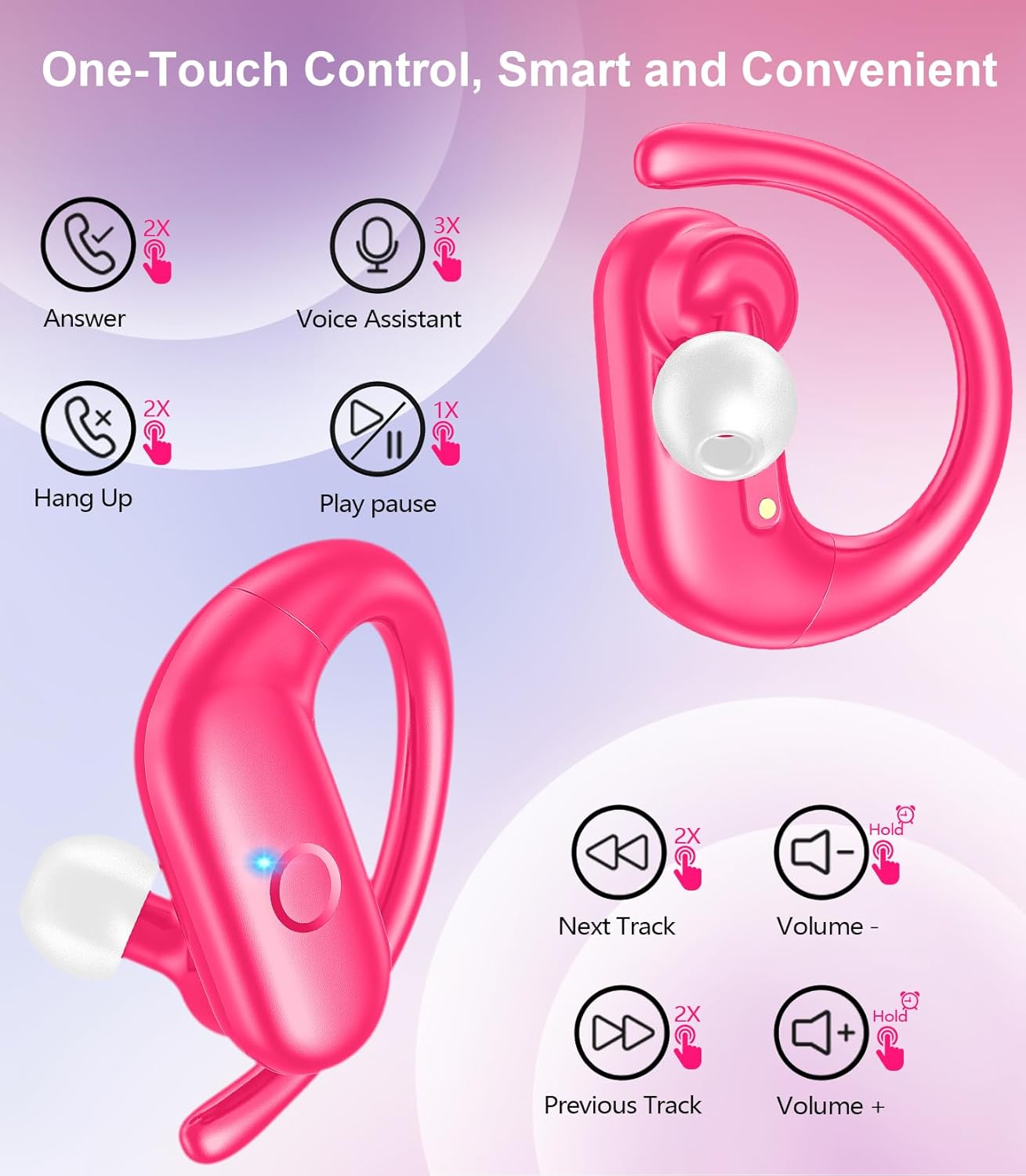
The MOZOTER SP9i earbuds feature intuitive touch controls on each earbud. The following table outlines the functions:
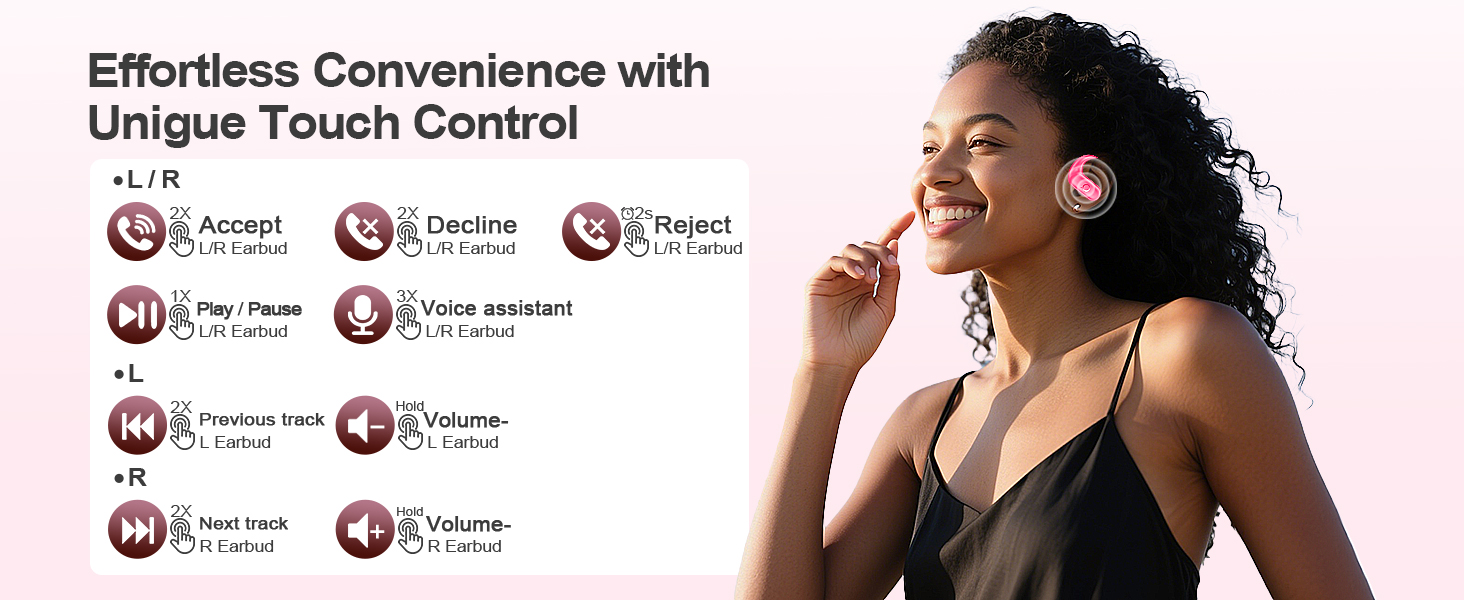
Image: A visual guide detailing the various touch control gestures for the MOZOTER SP9i earbuds, including call management, music playback, and volume adjustments.
| ક્રિયા | Gesture (L/R Earbud) |
|---|---|
| કૉલનો જવાબ આપો | Double-tap (2X) |
| હેંગ અપ ક Callલ | Double-tap (2X) |
| કૉલ નકારો | Triple-tap (3X) |
| સંગીત ચલાવો/થોભો | Single-tap (1X) |
| વૉઇસ સહાયકને સક્રિય કરો | Triple-tap (3X) |
| નેક્સ્ટ ટ્રૅક | Double-tap (2X) on અધિકાર ઇયરબડ |
| પાછલો ટ્રેક | Double-tap (2X) on ડાબી ઇયરબડ |
| વોલ્યુમ અપ | પકડી રાખો અધિકાર ઇયરબડ |
| વોલ્યુમ ડાઉન | પકડી રાખો ડાબી ઇયરબડ |
જાળવણી
યોગ્ય જાળવણી તમારા ઇયરબડ્સના લાંબા આયુષ્ય અને પ્રદર્શનની ખાતરી કરે છે.
- સફાઈ: Regularly clean the eartips and the charging contacts on both the earbuds and the case with a soft, dry, lint-free cloth. Avoid using harsh chemicals or abrasive materials.
- સંગ્રહ: જ્યારે ઉપયોગમાં ન હોય, ત્યારે ઇયરબડ્સને ધૂળ અને નુકસાનથી બચાવવા માટે તેમના ચાર્જિંગ કેસમાં રાખો.
- પાણીનો સંપર્ક: While designed for sports, avoid submerging the earbuds in water. Wipe off sweat or moisture immediately after use.
મુશ્કેલીનિવારણ
If you encounter any issues with your MOZOTER SP9i earbuds, please refer to the following common solutions:
- ઇયરબડ્સ જોડી રહ્યા નથી: Ensure both earbuds are charged and removed from the case. Turn off and on your device's Bluetooth. If issues persist, try resetting the earbuds (refer to manufacturer's webજો મેન્યુઅલમાં ન હોય તો ચોક્કસ રીસેટ સૂચનાઓ માટે સાઇટ).
- ફક્ત એક જ ઇયરબડ કામ કરી રહ્યું છે: Place both earbuds back into the charging case, close the lid, wait a few seconds, then open the lid and remove them. This often resynchronizes them.
- નબળી અવાજ ગુણવત્તા: Ensure the eartips provide a good seal in your ear. Clean any debris from the earbud speakers. Check your device's volume and audio settings.
- ચાર્જિંગ સમસ્યાઓ: ખાતરી કરો કે ચાર્જિંગ કેબલ કેસ અને પાવર સ્ત્રોત બંને સાથે સુરક્ષિત રીતે જોડાયેલ છે. ઇયરબડ્સ પર અને કેસની અંદરના ચાર્જિંગ કોન્ટેક્ટ્સને સાફ કરો.
- ઇયરબડ્સ પડી જવા: Experiment with different eartip sizes and adjust the ear hooks for a more secure fit as described in the Wearing Instructions section.
વિશિષ્ટતાઓ
| લક્ષણ | વિગત |
|---|---|
| મોડેલનું નામ | SP9i |
| કનેક્ટિવિટી ટેકનોલોજી | વાયરલેસ (બ્લુટુથ 5.3) |
| અવાજ નિયંત્રણ | નિષ્ક્રિય અવાજ રદ |
| અવબાધ | 4 ઓહ્મ |
| એરબડ વજન | લગભગ ૩.૫ ગ્રામ પ્રતિ ઇયરબડ |
| ઇયરબડ રમવાનો સમય | 12 કલાક સુધી |
| કુલ રમવાનો સમય (કેસ સાથે) | 60 કલાક સુધી |
| ચાર્જિંગ પોર્ટ | યુએસબી-સી |
| સમાવાયેલ ઘટકો | Earbuds, Charging Case, Eartips, User Manual |
વોરંટી અને આધાર
MOZOTER products are designed and manufactured to the highest quality standards. For warranty information and customer support, please refer to the documentation included with your purchase or visit the official MOZOTER website. If you require further assistance, please contact our customer service team.
Ask a question about this manual
Ask about setup, troubleshooting, compatibility, parts, safety, or missing instructions. Manuals+ will review the question and use this page’s manual context to help answer it.