
Oakcastle IR200
Oakcastle IR200 Internet Radio User Manual
મોડેલ: IR200
1. પરિચય
Thank you for choosing the Oakcastle IR200 Internet Radio. This manual provides essential information for the safe and efficient operation of your device. Please read it thoroughly before use and retain it for future reference.
The Oakcastle IR200 is a versatile audio system offering multiple listening options, including Internet Radio, DAB+, FM, Bluetooth 5.3, and AUX input. It features a color display, remote control, and podcast support for a comprehensive audio experience.
2. પેકેજ સામગ્રી
Carefully unpack the box and ensure all items listed below are present and in good condition:
- Oakcastle IR200 Internet Radio Unit
- પાવર કેબલ
- રીમોટ કંટ્રોલ
- વપરાશકર્તા માર્ગદર્શિકા (આ દસ્તાવેજ)
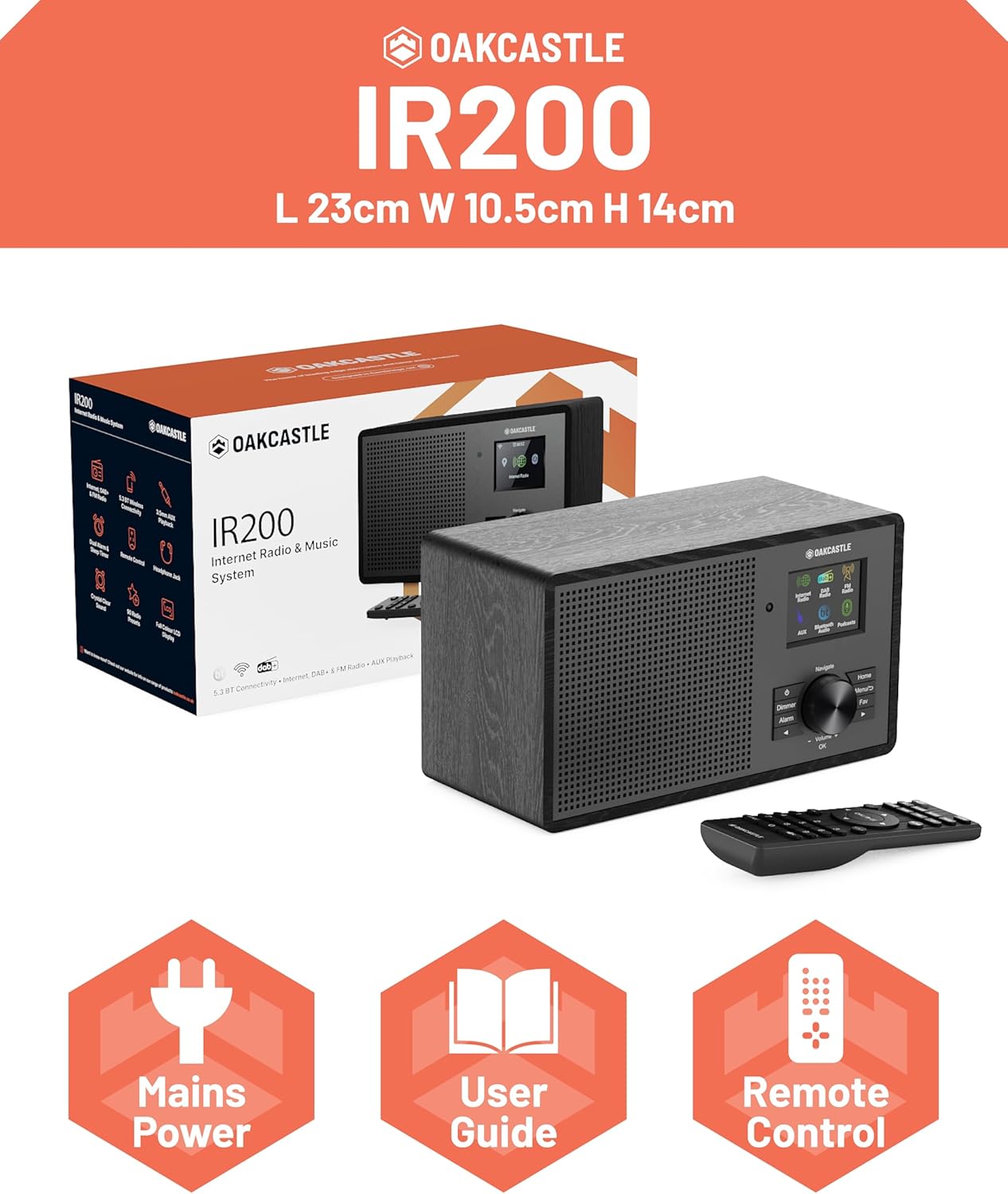
Image 2.1: Contents of the Oakcastle IR200 package, including the radio unit, its box, power cable, remote control, and user manual.
3. ઉત્પાદન ઓવરview
Familiarize yourself with the main components and controls of your Oakcastle IR200 radio.
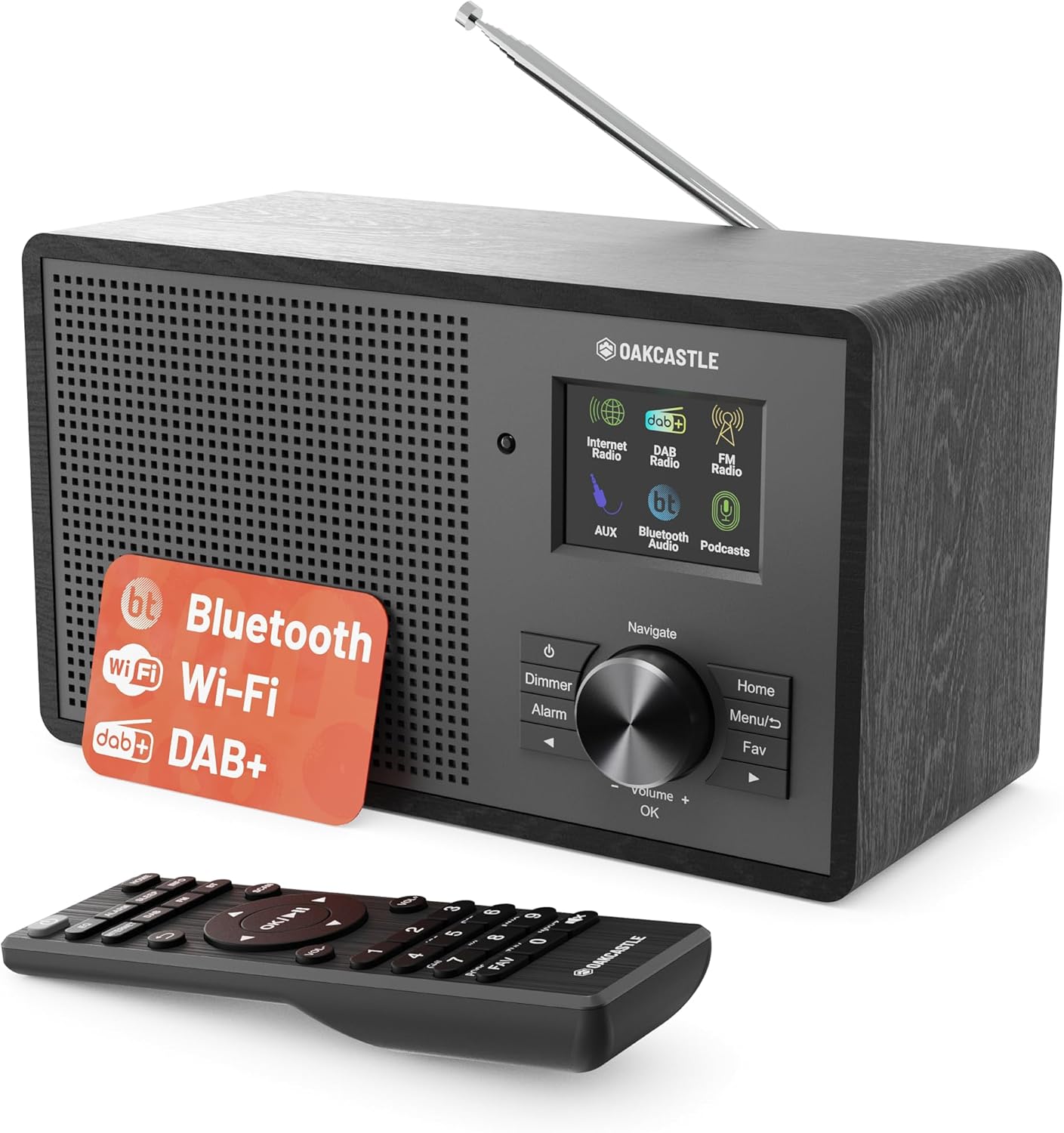
છબી 3.1: આગળ view of the Oakcastle IR200 radio, showcasing the display, control knob, buttons, and the included remote control.
3.1 ફ્રન્ટ પેનલ નિયંત્રણો
- ડિસ્પ્લે સ્ક્રીન: સ્ટેશન માહિતી, સમય અને મેનુ વિકલ્પો બતાવે છે.
- Navigate/Volume/OK Knob: Rotate to navigate menus or adjust volume; press to confirm selections.
- પાવર બટન: યુનિટ ચાલુ/બંધ કરે છે અથવા તેને સ્ટેન્ડબાય મોડમાં મૂકે છે.
- ડિમર બટન: ડિસ્પ્લેની તેજને સમાયોજિત કરે છે.
- એલાર્મ બટન: Accesses alarm settings.
- હોમ બટન: મુખ્ય મેનુ પર પાછા ફરે છે.
- મેનુ બટન: Accesses mode-specific menus.
- Fav Button: Accesses favorite station presets.
3.2 રીઅર પેનલ કનેક્શન્સ

છબી 3.2: પાછળ view of the Oakcastle IR200, highlighting the headphone output and AUX input ports.
- ટેલિસ્કોપિક એન્ટેના: DAB+ અને FM રિસેપ્શન માટે.
- AUX ઇનપુટ: બાહ્ય ઑડિઓ ઉપકરણોને કનેક્ટ કરો.
- હેડફોન આઉટપુટ: ખાનગી સાંભળવા માટે હેડફોન કનેક્ટ કરો.
- ડી.સી. માં: પાવર એડેપ્ટર કનેક્શન.
4. પ્રારંભિક સેટઅપ
4.1 પાવર કનેક્શન
- Insert the power cable into the DC IN port on the rear of the radio.
- Plug the other end of the power cable into a wall socket.
- Press the Power button on the front panel or remote control to turn on the radio.
૪.૨ એન્ટેના ગોઠવણ
For optimal DAB+ and FM reception, fully extend the telescopic antenna located at the rear of the unit.
4.3 Network Connection (for Internet Radio)
- Upon first power-on, the radio will guide you through the network setup.
- Select "Network Wizard" or "Wi-Fi Setup" from the menu.
- રેડિયો ઉપલબ્ધ Wi-Fi નેટવર્ક્સ માટે સ્કેન કરશે. સૂચિમાંથી તમારું નેટવર્ક પસંદ કરો.
- Enter your Wi-Fi password using the navigation knob and OK button.
- Once connected, the radio will display a confirmation message.
5. ઓપરેટિંગ મોડ્સ
The Oakcastle IR200 offers several listening modes. Press the "Home" button to access the main menu and select your desired mode.
5.1 ઈન્ટરનેટ રેડિયો
Access thousands of global radio stations via your Wi-Fi connection.

Image 5.1: The radio's display screen in Internet Radio mode, showing station information.
- મુખ્ય મેનુમાંથી, "ઇન્ટરનેટ રેડિયો" પસંદ કરો.
- You can browse stations by location, genre, or search by name.
- Rotate the Navigate knob to scroll through options and press OK to select.
- To save a station as a favorite, press the "Fav" button during playback.
૬.૧ DAB+ રેડિયો
ઉચ્ચ-ગુણવત્તાવાળા ડિજિટલ રેડિયો પ્રસારણનો આનંદ માણો.

Image 5.2: The radio's display screen in DAB+ Radio mode, showing the current station.
- From the main menu, select "DAB+ Radio".
- રેડિયો ઉપલબ્ધ DAB+ સ્ટેશનો માટે આપમેળે સ્કેન કરશે.
- Use the Navigate knob to select a station from the list.
- To save a station as a favorite, press the "Fav" button during playback.
5.3 એફએમ રેડિયો
પરંપરાગત એનાલોગ એફએમ પ્રસારણ સાંભળો.
- મુખ્ય મેનુમાંથી, "FM રેડિયો" પસંદ કરો.
- To auto-scan for stations, press and hold the OK button or use the scan function via the menu.
- To manually tune, rotate the Navigate knob.
- To save a station as a favorite, press the "Fav" button during playback.
૪.૩ બ્લૂટૂથ કનેક્ટિવિટી
તમારા બ્લૂટૂથ-સક્ષમ ઉપકરણોમાંથી વાયરલેસ રીતે ઑડિયો સ્ટ્રીમ કરો.

Image 5.3: The radio's display screen in Bluetooth mode, indicating readiness for pairing.
- From the main menu, select "Bluetooth". The radio will enter pairing mode.
- On your external device (e.g., smartphone), enable Bluetooth and search for "Oakcastle IR200".
- Select "Oakcastle IR200" to pair. Once connected, you can stream audio.
5.5 AUX ઇનપુટ
Connect external audio sources using a 3.5mm audio cable.
- Connect one end of a 3.5mm audio cable to the AUX IN port on the rear of the radio.
- બીજા છેડાને તમારા બાહ્ય ઉપકરણના હેડફોન જેક અથવા ઓડિયો આઉટપુટ સાથે જોડો.
- From the main menu, select "AUX".
- તમારા બાહ્ય ઉપકરણમાંથી પ્લેબેકને નિયંત્રિત કરો.
5.6 પોડકાસ્ટ
Browse and listen to a wide range of podcasts.
- From the main menu, select "Podcasts".
- Browse podcasts by category or search for specific titles.
- Select a podcast to start listening.
6. સેટિંગ્સ અને સુવિધાઓ
6.1 સિસ્ટમ સેટિંગ્સ
Access general system settings via the main menu to configure time, language, display, and more.
- સમય/તારીખ: Set time format, synchronize time.
- ભાષા: Select your preferred language for the menu.
- પ્રદર્શન: Adjust backlight, color scheme.
- નેટવર્ક: Reconfigure Wi-Fi settings.
- સૉફ્ટવેર અપડેટ: Check for and install firmware updates.
6.2 બરાબરી (EQ)
Customize the audio output to your preference using the equalizer settings, accessible via the remote control or system menu.
6.3 પ્રીસેટ્સનો
The radio supports over 90 presets for your favorite Internet, DAB+, and FM stations. To recall a preset, press the "Fav" button and select from the list.
6.4 એલાર્મ
Set alarms to wake up to your favorite radio station or a buzzer sound. Access alarm settings via the "Alarm" button on the front panel or remote.
7. રીમોટ કંટ્રોલ
The included remote control provides convenient access to all radio functions from a distance.
Ensure batteries are correctly inserted. Point the remote control towards the front of the radio for optimal response.
7.1 રીમોટ કંટ્રોલ કાર્યો
- શક્તિ: On/Off/Standby.
- વોલ્યુમ +/-: વોલ્યુમ સ્તરને સમાયોજિત કરો.
- નેવિગેશન બટનો (ઉપર/નીચે/ડાબે/જમણે): મેનુઓ નેવિગેટ કરો.
- બરાબર: પસંદગીની પુષ્ટિ કરો.
- Mode Buttons (Internet, DAB, FM, Bluetooth, AUX): મોડ્સ વચ્ચે સ્વિચ કરો.
- પ્રીસેટ બટનો (1-90+): Directly select saved favorite stations.
- ઇક્યૂ: એક્સેસ બરાબરી સેટિંગ્સ.
- મેનુ: Access mode-specific menus.
- ફેવ: Access favorite station list.
8. જાળવણી
8.1 સફાઈ
To clean the radio, use a soft, dry cloth. Do not use abrasive cleaners, waxes, or solvents as these may damage the finish.
.8.2.૧ સામાન્ય કાળજી
- યુનિટને સીધા સૂર્યપ્રકાશ, ગરમીના સ્ત્રોતો અને ભેજથી દૂર રાખો.
- યુનિટને પડતું મૂકવાનું કે તેને જોરદાર અસર કરવાનું ટાળો.
- એકમની આસપાસ યોગ્ય વેન્ટિલેશનની ખાતરી કરો.
9. મુશ્કેલીનિવારણ
| સમસ્યા | સંભવિત કારણ | ઉકેલ |
|---|---|---|
| કોઈ શક્તિ નથી | Power cable not connected; wall socket not active. | Check power cable connection; try a different wall socket. |
| કોઈ અવાજ નથી | વૉલ્યૂમ ખૂબ ઓછું છે; મ્યૂટ સક્રિય કર્યું છે; ખોટો સ્રોત પસંદ કર્યો છે. | Increase volume; Check mute status; Select correct input mode. |
| Internet Radio not connecting | Incorrect Wi-Fi password; Weak Wi-Fi signal; Router issue. | Re-enter Wi-Fi password; Move radio closer to router; Restart router. |
| ખરાબ DAB+/FM રિસેપ્શન | Antenna not extended; Poor signal area. | Fully extend antenna; Reposition radio for better signal. |
| બ્લૂટૂથ જોડી રહ્યું નથી | Radio not in pairing mode; Device too far; Device already paired. | Ensure radio is in Bluetooth mode; Move device closer; Unpair from other devices. |
10. સ્પષ્ટીકરણો
| લક્ષણ | વિગત |
|---|---|
| બ્રાન્ડ | ઓકકેસલ |
| મોડલ | IR200 |
| રંગ | કાળો |
| કનેક્ટિવિટી ટેકનોલોજી | Wi-Fi, Bluetooth 5.3, AUX |
| ટ્યુનિંગ ટેકનોલોજી | Internet Radio, DAB+, FM |
| ખાસ લક્ષણો | Bluetooth, EQ, Podcasts, Internet Radio, Remote Control |
| પાવર સ્ત્રોત | Electric Cable (Mains) |
| ઉત્પાદનના પરિમાણો (H x W x D) | ૪૬ સેમી x ૨૯ સેમી x ૮ સેમી (આશરે) |
| ઉત્પાદન વજન | 0.94 કિગ્રા |
| સુસંગત ઉપકરણો | MP3 પ્લેયર, સ્માર્ટફોન, ટેબ્લેટ |
11. વોરંટી અને સપોર્ટ
11.1 વોરંટી માહિતી
The Oakcastle IR200 comes with a standard warranty. An extended 3-year warranty is available upon product registration on the manufacturer's website. Please refer to the warranty card included in your package or visit the official Oakcastle webવિગતો માટે સાઇટ.
11.2 ગ્રાહક સપોર્ટ
For technical assistance, troubleshooting, or further inquiries, please contact Oakcastle customer support. Contact details can typically be found on the official Oakcastle webસાઇટ પર અથવા વોરંટી કાર્ડ પર.
Ask a question about this manual
Ask about setup, troubleshooting, compatibility, parts, safety, or missing instructions. Manuals+ will review the question and use this page’s manual context to help answer it.