
Target TT-IK-DST 1130
Target TT-IK-DST 1130 Tower Speaker User Manual
Model: TT-IK-DST 1130
1. પરિચય
This manual provides essential instructions for the safe and efficient operation of your Target TT-IK-DST 1130 Tower Speaker. Please read this manual thoroughly before using the product and retain it for future reference. The Target TT-IK-DST 1130 is a versatile audio system featuring 130W RMS output, an 8-inch subwoofer, Bluetooth connectivity, FM radio, USB playback, and karaoke functionality with a wireless microphone.
2. મહત્વપૂર્ણ સલામતી માહિતી
ઇલેક્ટ્રિક આંચકો, આગ અથવા યુનિટને નુકસાન અટકાવવા માટે નીચેની સલામતી સાવચેતીઓનું પાલન કરો:
- આ ઉપકરણને વરસાદ અથવા ભેજ માટે ખુલ્લા કરશો નહીં.
- કોઈપણ વેન્ટિલેશન ઓપનિંગ્સને અવરોધિત કરશો નહીં.
- પાવર સપ્લાય માટે યોગ્ય ગ્રાઉન્ડિંગની ખાતરી કરો.
- Do not open the speaker cabinet; refer all servicing to qualified personnel.
- ગરમીના સ્ત્રોતોની નજીક અથવા સીધા સૂર્યપ્રકાશમાં યુનિટ રાખવાનું ટાળો.
- માત્ર સૂકા કપડાથી સાફ કરો.
3. પેકેજ સામગ્રી
ખાતરી કરો કે નીચે સૂચિબદ્ધ બધી વસ્તુઓ તમારા પેકેજમાં શામેલ છે:
- Target TT-IK-DST 1130 Tower Speaker
- વાયરલેસ માઇક્રોફોન
- રીમોટ કંટ્રોલ
- પાવર કોર્ડ
- વપરાશકર્તા માર્ગદર્શિકા (આ દસ્તાવેજ)
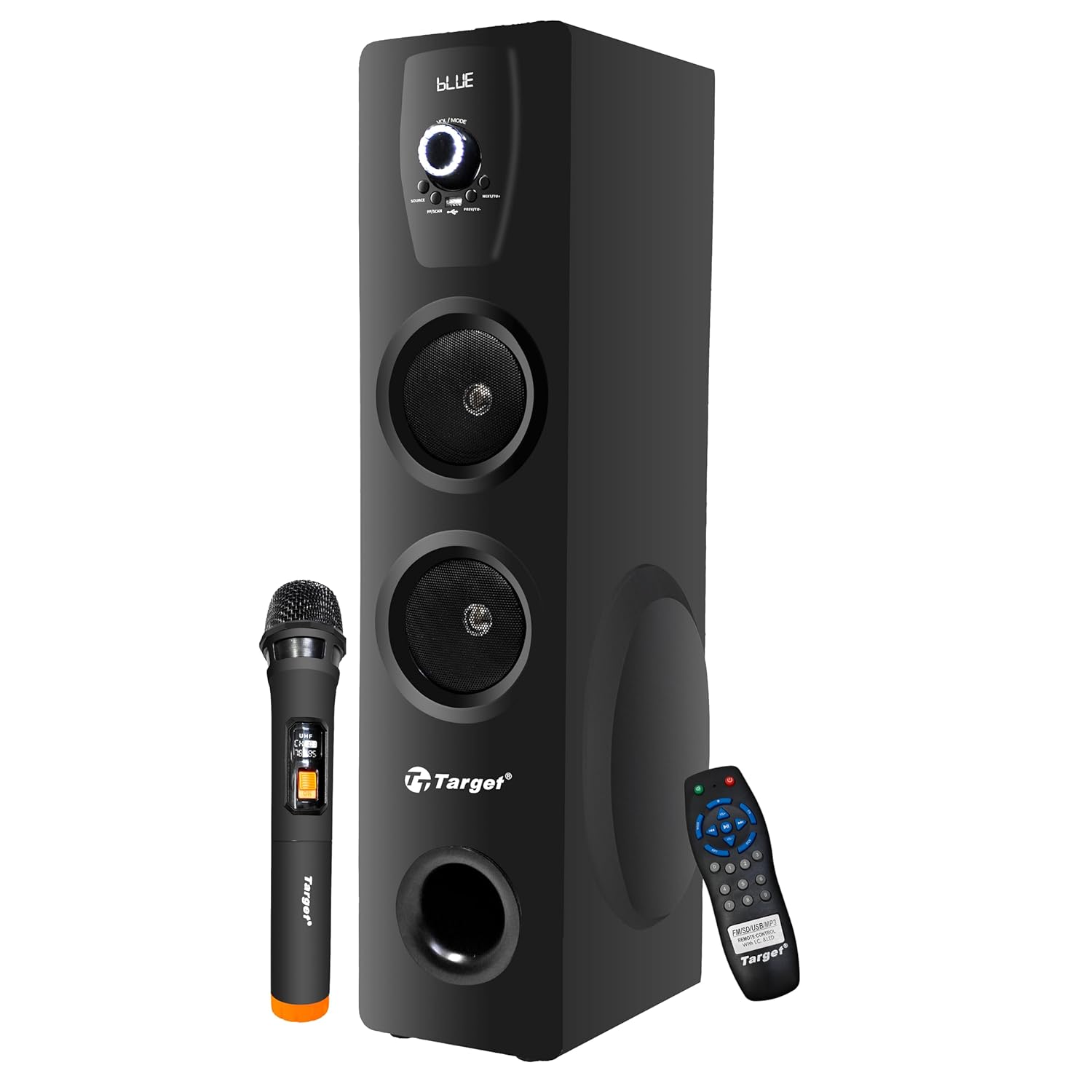
Figure 3.1: Target TT-IK-DST 1130 Tower Speaker with included wireless microphone and remote control.
4. ઉત્પાદન ઓવરview
The Target TT-IK-DST 1130 Tower Speaker is designed for a comprehensive audio experience. It features multiple input options and a user-friendly interface.
4.1 મુખ્ય લક્ષણો
- શક્તિશાળી ઓડિયો આઉટપુટ: 130 Watts RMS with dual drivers and an 8-inch subwoofer for deep bass.
- બહુવિધ કનેક્ટિવિટી: Bluetooth for wireless streaming, USB port for media playback, and FM radio.
- કરાઓકે કાર્યક્ષમતા: Includes a wireless microphone for vocal performances.
- સાહજિક ઇન્ટરફેસ: LED display for status indication and a full-function remote control.
- કમ્પ્યુટર સુસંગતતા: Plug-and-play setup for direct connection to PCs.

Figure 4.1: Visual representation of the speaker's main features.
4.2 નિયંત્રણ પેનલ
The main controls are located on the front panel of the speaker. These include the master volume knob, input selection buttons, and playback controls.

આકૃતિ 4.2: વિગતવાર view of the speaker's control panel.
4.3 રીમોટ કંટ્રોલ
The included remote control allows for convenient operation of all speaker functions from a distance.

Figure 4.3: Remote control and key feature icons.
5. સેટઅપ સૂચનાઓ
5.1 પ્લેસમેન્ટ
Place the tower speaker on a stable, flat surface. Ensure there is adequate space around the speaker for proper ventilation and optimal sound dispersion. Avoid placing it in enclosed spaces or directly against walls if possible.
5.2 પાવર કનેક્શન
- Connect the power cord to the power input port on the rear of the speaker.
- પાવર કોર્ડના બીજા છેડાને માનક AC પાવર આઉટલેટમાં પ્લગ કરો.
- Press the power button on the speaker or remote control to turn on the unit. The LED display will illuminate.
૫.૩ ઓડિયો સ્ત્રોતોને જોડવા
The speaker supports various audio input methods:
- બ્લૂટૂથ: સ્માર્ટફોન, ટેબ્લેટ અથવા અન્ય બ્લૂટૂથ-સક્ષમ ઉપકરણો સાથે વાયરલેસ કનેક્શન માટે.
- યુએસબી: ઑડિઓ ચલાવવા માટે fileયુએસબી ફ્લેશ ડ્રાઇવમાંથી સીધું.
- AUX/Line-In: For wired connection to devices using a 3.5mm audio cable.
- એફએમ રેડિયો: Built-in tuner for receiving FM broadcasts.
- એચડીએમઆઈ: For digital audio connection from compatible devices.
6. ઓપરેટિંગ સૂચનાઓ
6.1 પાવર ચાલુ/બંધ
દબાવો પાવર button on the control panel or remote control to turn the speaker on or off.
6.2 મોડ પસંદગી
દબાવો મોડ button on the control panel or remote control to cycle through available input modes: Bluetooth, USB, FM Radio, AUX, HDMI.
6.3 બ્લૂટૂથ ઓપરેશન
- Turn on the speaker and select બ્લૂટૂથ mode. The LED display will show "BLUE" or a similar indicator.
- તમારા મોબાઇલ ઉપકરણ પર બ્લૂટૂથ સક્ષમ કરો અને ઉપલબ્ધ ઉપકરણો માટે શોધો.
- " પસંદ કરોTT-IK-DST 1130" (or similar name) from the list to pair.
- એકવાર જોડી થઈ ગયા પછી, તમે સ્પીકર દ્વારા તમારા ઉપકરણમાંથી ઓડિયો ચલાવી શકો છો.
૬.૪ યુએસબી પ્લેબેક
- ઑડિયો ધરાવતી USB ફ્લેશ ડ્રાઇવ દાખલ કરો fileસ્પીકર પરના USB પોર્ટમાં s.
- પસંદ કરો યુએસબી mode. The speaker will automatically detect and begin playing audio files.
- Use the playback controls (Play/Pause, Next, Previous) on the speaker or remote control.
6.5 એફએમ રેડિયો
- પસંદ કરો FM મોડ
- દબાવો સ્કેન કરો button (if available) on the remote or speaker to automatically search and save available radio stations.
- નો ઉપયોગ કરો પહેલા/આગળ સાચવેલા સ્ટેશનો દ્વારા નેવિગેટ કરવા માટે બટનો.
૩.૪ કરાઓકે ફંક્શન
- Ensure the wireless microphone is powered on and within range of the speaker.
- Play your desired background music through any input mode (Bluetooth, USB, AUX, HDMI).
- Adjust the microphone volume using the dedicated control (if available) or the main volume.

Figure 6.1: Using the wireless microphone for karaoke.
7. જાળવણી અને સંભાળ
- સફાઈ: Use a soft, dry cloth to clean the exterior of the speaker. Do not use liquid cleaners or abrasive chemicals.
- સંગ્રહ: જ્યારે લાંબા સમય સુધી ઉપયોગમાં ન હોય, ત્યારે સ્પીકરને ઠંડી, સૂકી જગ્યાએ, સીધા સૂર્યપ્રકાશ અને અતિશય તાપમાનથી દૂર રાખો.
- વેન્ટિલેશન: ખાતરી કરો કે વેન્ટિલેશન ઓપનિંગ્સ ઓવરહિટીંગને રોકવા માટે અવરોધિત નથી.
8. મુશ્કેલીનિવારણ
જો તમને તમારા સ્પીકરમાં સમસ્યાઓ આવે, તો નીચેની સામાન્ય સમસ્યાઓ અને ઉકેલોનો સંદર્ભ લો:
| સમસ્યા | સંભવિત કારણ | ઉકેલ |
|---|---|---|
| કોઈ શક્તિ નથી | પાવર કોર્ડ જોડાયેલ નથી; પાવર આઉટલેટ સક્રિય નથી. | પાવર કોર્ડ કનેક્શન તપાસો; કોઈ અલગ આઉટલેટ અજમાવી જુઓ. |
| કોઈ અવાજ નથી | Volume too low; Incorrect input mode selected; Audio cable loose. | Increase volume; Select correct input mode; Reconnect audio cables. |
| બ્લૂટૂથ કનેક્ટ થઈ રહ્યું નથી | સ્પીકર પેરિંગ મોડમાં નથી; ડિવાઇસ બ્લૂટૂથ બંધ છે; ડિવાઇસ ખૂબ દૂર છે. | Ensure speaker is in Bluetooth mode; Turn on device Bluetooth; Move device closer. |
| Karaoke microphone not working | Microphone not powered on; Batteries low; Microphone out of range. | Check microphone power; Replace batteries; Move microphone closer to speaker. |
9. ટેકનિકલ વિશિષ્ટતાઓ
| લક્ષણ | વિગત |
|---|---|
| મોડલ | TT-IK-DST 1130 |
| બ્રાન્ડ | લક્ષ્ય |
| ઓડિયો આઉટપુટ | 130 વોટસ આર.એમ.એસ. |
| સબવૂફરનું કદ | 8 ઇંચ |
| કનેક્ટિવિટી | Bluetooth, USB, FM Radio, AUX, HDMI |
| આવર્તન પ્રતિભાવ | 20 Hz (Lower limit only provided) |
| અવબાધ | 8 ઓહ્મ |
| ચેનલોની સંખ્યા | 2 |
| સામગ્રી | એન્જિનિયર્ડ વુડ |
| ઉત્પાદનના પરિમાણો (L x W x H) | 22 x 25 x 90 સેમી |
| વસ્તુનું વજન | 1.5 કિગ્રા |
| પાવર સ્ત્રોત | કોર્ડેડ ઇલેક્ટ્રિક |
નોંધ: સ્પષ્ટીકરણો પૂર્વ સૂચના વિના બદલવાને પાત્ર છે.
10. વોરંટી અને ગ્રાહક સપોર્ટ
For warranty information, service, or technical support, please contact your retailer or the manufacturer directly. Keep your purchase receipt as proof of purchase for warranty claims.
Manufacturer: Target
Ask a question about this manual
Ask about setup, troubleshooting, compatibility, parts, safety, or missing instructions. Manuals+ will review the question and use this page’s manual context to help answer it.