
1. પરિચય
Thank you for choosing the Jesebang S75 Wireless Sport Earbuds. These earbuds are designed to provide a high-quality audio experience with features tailored for active lifestyles. This manual will guide you through the setup, operation, and maintenance of your new earbuds.
બૉક્સમાં શું છે:
- S75 Wireless Earbuds (x2)
- વાયરલેસ ચાર્જિંગ કેસ
- USB-C ચાર્જિંગ કેબલ
- વપરાશકર્તા માર્ગદર્શિકા
- Eartips (3 sizes: S, M, L)

Image: Contents of the Jesebang S75 package.
2. ઉત્પાદન ઓવરview
The Jesebang S75 earbuds feature advanced technology for superior sound and user convenience.
મુખ્ય લક્ષણો:
- બ્લૂટૂથ 5.4: Ensures stable, fast, and low-latency wireless connection up to 15 meters.
- 14.2mm ડાયનેમિક ડ્રાઇવર્સ: Delivers powerful stereo sound with deep bass, clear mids, and bright highs.
- ENC Noise-Canceling Mic: Reduces up to 80% of background noise for clear calls.
- IPX7 વોટરપ્રૂફ રેટિંગ: Protects against sweat and water splashes, ideal for workouts.
- Ergonomic Earhooks: Provides a secure and comfortable fit, preventing slippage during intense activities.
- ૪૨ કલાક કુલ રમવાનો સમય: 10 hours on a single charge, with an additional 40 hours from the charging case.
- Dual LED Digital Display: Shows battery levels for both the charging case and individual earbuds.
- સ્માર્ટ ટચ નિયંત્રણો: સંગીત, કૉલ્સ અને વૉઇસ સહાયકનું સરળ સંચાલન.
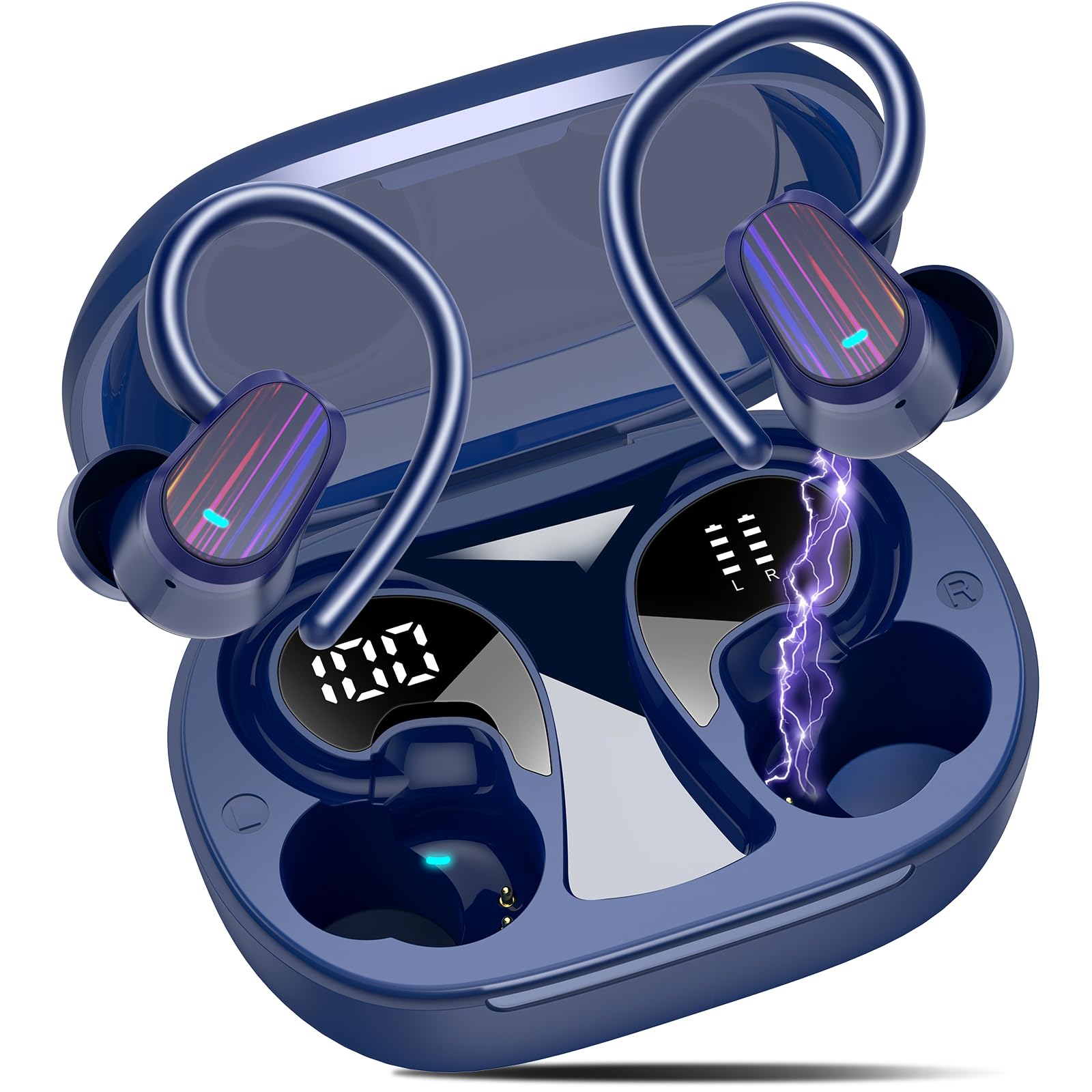
Image: Jesebang S75 Wireless Sport Earbuds and charging case.

Image: Internal structure highlighting the 14.2mm dynamic speaker for powerful stereo sound.

Image: ENC noise reduction technology for clear calls.
3. સેટઅપ
૫.૧ ઇયરબડ્સ અને કેસ ચાર્જ કરવા
પ્રથમ ઉપયોગ કરતા પહેલા, ઇયરબડ્સ અને ચાર્જિંગ કેસને સંપૂર્ણપણે ચાર્જ કરો.
- આપેલ USB-C ચાર્જિંગ કેબલને કેસની પાછળના ચાર્જિંગ પોર્ટ સાથે કનેક્ટ કરો.
- કેબલના બીજા છેડાને USB પાવર એડેપ્ટર (શામેલ નથી) અથવા કમ્પ્યુટરના USB પોર્ટ સાથે કનેક્ટ કરો.
- The LED digital display on the charging case will show the battery percentage of the case and individual earbuds. Ensure both earbuds and the case are fully charged (100%) before initial use.

Image: Charging the earbuds and case with LED display.
૧.૩ તમારા ઉપકરણ સાથે જોડી બનાવવી
The earbuds use Bluetooth 5.4 for a seamless connection.
- પ્રથમ વખતની જોડી: ચાર્જિંગ કેસ ખોલો. ઇયરબડ્સ આપમેળે પેરિંગ મોડમાં પ્રવેશ કરશે.
- તમારા ઉપકરણ (સ્માર્ટફોન, ટેબ્લેટ, કમ્પ્યુટર) પર, બ્લૂટૂથ સેટિંગ્સ પર જાઓ અને બ્લૂટૂથ ચાલુ કરો.
- Look for "S75" in the list of available devices and select it to connect.
- Once paired, the earbuds will automatically reconnect to the last paired device when you open the charging case.

Image: One-step auto pairing process.

Image: Bluetooth 5.4 Technology.
4. ઓપરેશન
૫.૧ ઇયરબડ્સ પહેરવા
The S75 earbuds are designed with soft and elastic earhooks for a secure and comfortable fit.
- Choose the correct size eartips (S, M, L) for the best fit and sound quality.
- Place the earbud into your ear canal.
- Gently adjust the earhook over your ear until it feels secure and comfortable.

Image: Comfortable design with IPX7 waterproof rating and flexible earhooks.

Image: Instructions for easy and stable wearing of the earbuds.
૪.૨ સ્માર્ટ ટચ કંટ્રોલ્સ
The earbuds feature highly sensitive touch sensors for easy control.
- ચલાવો/થોભો: Single tap on either earbud (L/R).
- કૉલ્સનો જવાબ આપો: Short tap on either earbud (L/R).
- કૉલ બંધ કરો: Long tap on either earbud (L/R).
- અવાજ વધારો: Single tap on the Right earbud.
- અવાજ ધીમો: Single tap on the Left earbud.
- આગળનો ટ્રેક: Long tap (2s) on the Right earbud.
- પાછલો ટ્રેક: Long tap (2s) on the Left earbud.
- વ Voiceઇસ સહાયકને સક્રિય કરો: Triple click on either earbud (L/R).

Image: Smart touch control functions.
5. જાળવણી
યોગ્ય જાળવણી તમારા ઇયરબડ્સના લાંબા સમય સુધી ટકી રહેવા અને શ્રેષ્ઠ કામગીરીની ખાતરી આપે છે.
5.1 સફાઈ
- Regularly clean the eartips with a soft, dry cloth.
- Wipe the earbuds and charging case with a slightly damp કાપડ, પછી સારી રીતે સૂકવો.
- કઠોર રસાયણો અથવા ઘર્ષક સામગ્રીનો ઉપયોગ કરવાનું ટાળો.
5.2 સંગ્રહ
- ઇયરબડ્સને સુરક્ષિત રાખવા અને ચાર્જ રાખવા માટે ઉપયોગમાં ન હોય ત્યારે તેમના ચાર્જિંગ કેસમાં સ્ટોર કરો.
- ઇયરબડ્સ અને કેસને ઠંડી, સૂકી જગ્યાએ, અતિશય તાપમાન અને સીધા સૂર્યપ્રકાશથી દૂર રાખો.

Image: IPX7 Waterproof design for daily use.
6. મુશ્કેલીનિવારણ
જો તમને કોઈ સમસ્યા આવે, તો કૃપા કરીને નીચેના સામાન્ય ઉકેલોનો સંદર્ભ લો:
૫.૧ ઇયરબડ્સ જોડી નથી રહ્યા
- ખાતરી કરો કે ઇયરબડ્સ ચાર્જ થયા છે.
- ખાતરી કરો કે તમારા ઉપકરણ પર બ્લૂટૂથ સક્ષમ છે.
- ઇયરબડ્સને કેસમાં પાછા મૂકો, ઢાંકણ બંધ કરો, થોડીવાર રાહ જુઓ, પછી પેરિંગ મોડમાં ફરીથી પ્રવેશવા માટે તેને ફરીથી ખોલો.
- Forget the device "S75" from your device's Bluetooth list and try pairing again.
૫.૨ અવાજ નહીં અથવા ઓછો અવાજ
- તમારા ડિવાઇસ અને ઇયરબડ બંને પર વૉલ્યૂમ લેવલ ચેક કરો.
- Ensure the earbuds are properly seated in your ears and the eartips provide a good seal.
- તમારા ઉપકરણ સાથે ઇયરબડ ફરીથી કનેક્ટ કરો.
6.3 ચાર્જિંગ સમસ્યાઓ
- ખાતરી કરો કે ચાર્જિંગ કેબલ કેસ અને પાવર સ્ત્રોત બંને સાથે સુરક્ષિત રીતે જોડાયેલ છે.
- કોઈ અલગ USB-C કેબલ અથવા પાવર એડેપ્ટર અજમાવી જુઓ.
- ખાતરી કરો કે ઇયરબડ્સ પર અને કેસની અંદરના ચાર્જિંગ કોન્ટેક્ટ્સ સ્વચ્છ અને કચરોથી મુક્ત છે.
7. સ્પષ્ટીકરણો
| લક્ષણ | વિગત |
|---|---|
| મોડેલનું નામ | S75 |
| બ્લૂટૂથ સંસ્કરણ | 5.4 |
| બ્લૂટૂથ રેન્જ | 15 મીટર |
| ઑડિઓ ડ્રાઇવરનું કદ | 14.2 મિલીમીટર |
| અવાજ નિયંત્રણ | ENC Noise Canceling Mic |
| પાણી પ્રતિકાર સ્તર | IPX7 વોટરપ્રૂફ |
| બેટરી લાઇફ (ઇયરબડ્સ) | 10 કલાક સુધી |
| કુલ રમવાનો સમય (કેસ સાથે) | 50 કલાક સુધી |
| ચાર્જિંગ ઈન્ટરફેસ | યુએસબી-સી |
| ઇયર પ્લેસમેન્ટ | કાન ઉપર |
| સામગ્રી | રબર, સિલિકોન |
| વસ્તુનું વજન | 3.84 ઔંસ |
8. સલામતી માહિતી
Please read and follow these safety guidelines to prevent damage to your device or injury to yourself.
- ઇયરબડ્સ અથવા ચાર્જિંગ કેસને ડિસએસેમ્બલ કરશો નહીં અથવા તેમાં ફેરફાર કરશો નહીં.
- ઉપકરણને અતિશય તાપમાન, સીધો સૂર્યપ્રકાશ અને ખુલ્લી જ્વાળાઓથી દૂર રાખો.
- Avoid exposing the device to excessive moisture, although it is IPX7 waterproof, prolonged submersion is not recommended.
- ચાર્જિંગ માટે ફક્ત આપેલ ચાર્જિંગ કેબલ અથવા પ્રમાણિત USB-C કેબલનો ઉપયોગ કરો.
- સાંભળવાના નુકસાનને રોકવા માટે ઇયરબડ્સનો લાંબા સમય સુધી વધુ પડતો અવાજ ન કરો.
- બાળકો અને પાલતુ પ્રાણીઓની પહોંચથી દૂર રાખો.
9. વોરંટી અને સપોર્ટ
Specific warranty details are not provided in this manual. For warranty information, technical support, or customer service, please refer to the product packaging or contact Jesebang customer support directly through their official webસાઇટ અથવા રિટેલર જ્યાંથી ઉત્પાદન ખરીદવામાં આવ્યું હતું.
૧૦. પ્રોડક્ટ વિડીયો
વિડિઓ: એક ઓવરview of the Jesebang Wireless Earbuds, highlighting their sports features and Bluetooth connectivity.