
1. મહત્વપૂર્ણ સલામતી માહિતી
Please read all instructions carefully before using this monitor. Keep this manual for future reference.
- પાવર સ્ત્રોત: મોનિટર સાથે પૂરા પાડવામાં આવેલ પાવર કોર્ડ અને એડેપ્ટરનો જ ઉપયોગ કરો. ખાતરી કરો કે પાવર આઉટલેટ યોગ્ય રીતે ગ્રાઉન્ડ થયેલ છે.
- વેન્ટિલેશન: વેન્ટિલેશનના છિદ્રોને અવરોધશો નહીં. યોગ્ય હવા પ્રવાહ માટે મોનિટરની આસપાસ પૂરતી જગ્યા આપો.
- ભેજ: Do not expose the monitor to rain, moisture, or high humidity. Avoid placing liquids near or on the monitor.
- સફાઈ: Disconnect the power cord before cleaning. Use a soft, dry cloth. Do not use liquid cleaners or aerosol cleaners.
- પ્લેસમેન્ટ: Place the monitor on a stable, flat surface. Avoid direct sunlight or heat sources.
- સર્વિસિંગ: આ ઉત્પાદનની જાતે સેવા કરવાનો પ્રયાસ કરશો નહીં. લાયક સેવા કર્મચારીઓને તમામ સેવાઓનો સંદર્ભ આપો.
2. પેકેજ સામગ્રી
Verify that all items are present in the package before proceeding with the setup.
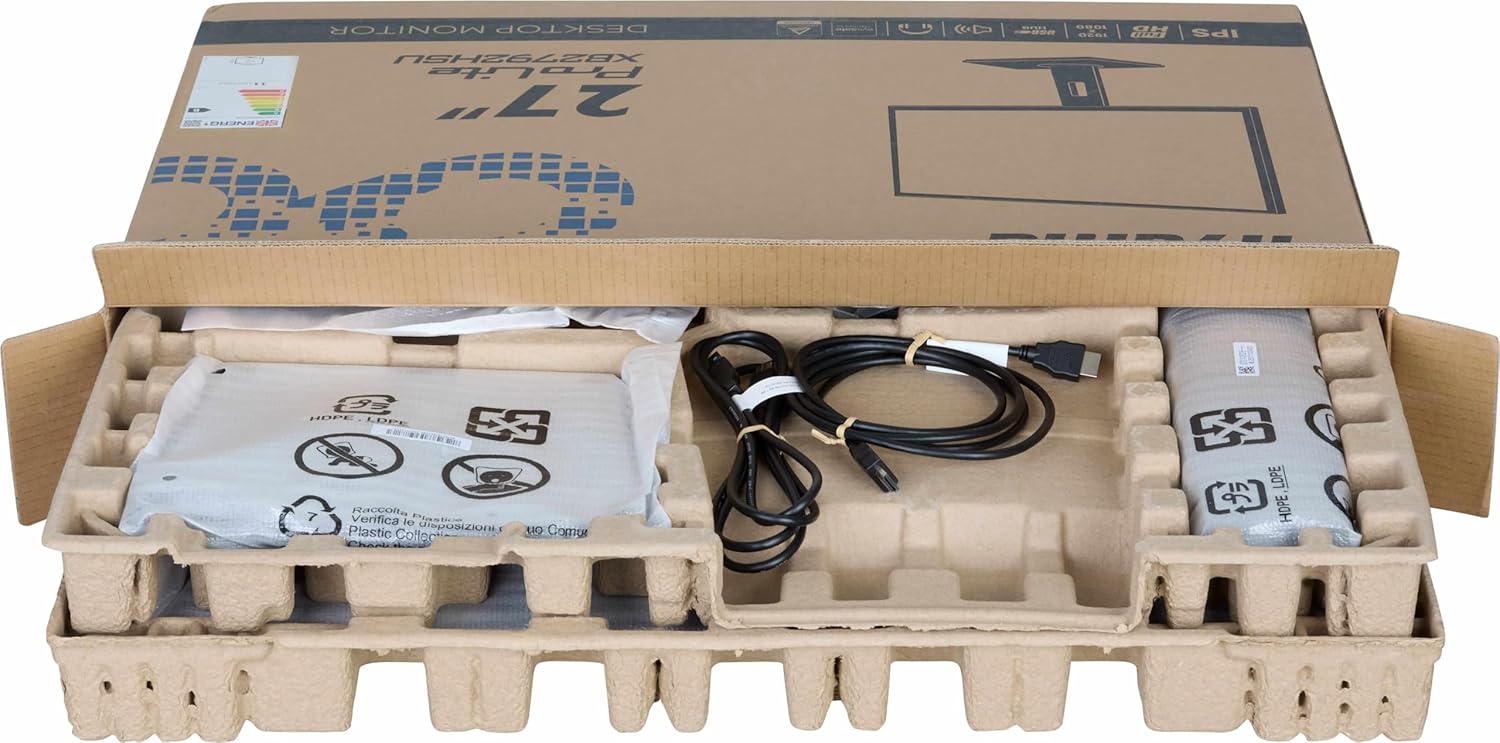
છબી: The iiyama ProLite XB2792QSU-B1 monitor and its accessories, including cables and stand components, neatly packed in the retail box.
- iiyama ProLite XB2792QSU-B1 Monitor
- મોનિટર સ્ટેન્ડ (બેઝ અને નેક)
- પાવર કેબલ
- HDMI કેબલ
- USB Cable (for USB hub functionality)
- Quick Start Guide / Safety Guide

છબી: એક ક્લોઝ-અપ view of the power cable, HDMI cable, and USB cable included with the monitor.
3. સેટઅપ સૂચનાઓ
૧.૨ સ્ટેન્ડ એસેમ્બલ કરવું
- Carefully remove the monitor from its packaging, keeping it protected on a soft surface (e.g., foam packaging).
- સ્ટેન્ડ નેકને મોનિટરની પાછળ જોડો. ખાતરી કરો કે તે સુરક્ષિત રીતે જગ્યાએ ક્લિક કરે છે અથવા જો આપવામાં આવે તો સ્ક્રૂથી બાંધેલું છે.
- Attach the stand base to the stand neck. Tighten the thumb screw or screws from the bottom of the base to secure it.

છબી: The rear of the iiyama ProLite XB2792QSU-B1 monitor, showing the stand securely attached to the monitor panel.
3.2 કનેક્ટિંગ કેબલ્સ
કોઈપણ જોડાણ કરતા પહેલા ખાતરી કરો કે મોનિટર અને તમારા કમ્પ્યુટરનો પાવર બંધ છે.
- પાવર કનેક્શન: પાવર કેબલને મોનિટરના પાવર ઇનપુટ સાથે અને પછી ગ્રાઉન્ડેડ ઇલેક્ટ્રિકલ આઉટલેટ સાથે જોડો.
- વિડિઓ કનેક્શન: Connect one end of the HDMI or DisplayPort cable to the corresponding port on your computer's graphics card and the other end to the HDMI or DisplayPort input on the monitor.
- USB Hub Connection (Optional): Connect the supplied USB cable from your computer's USB port to the upstream USB port on the monitor to enable the monitor's built-in USB 3.2 hub.
- ઑડિઓ કનેક્શન (વૈકલ્પિક): If you wish to use external speakers or headphones connected to the monitor, connect an audio cable from your computer's audio output to the monitor's audio input, or connect headphones directly to the monitor's audio output jack.

છબી: વિગતવાર view of the monitor's connectivity panel, showing the power input, HDMI ports, DisplayPort, USB 3.2 ports, and audio jack.
3.3 પ્રારંભિક પાવર ચાલુ
- તમારા કમ્પ્યુટર પર પાવર કરો.
- મોનિટર પર પાવર બટન દબાવો. પાવર સૂચક લાઇટ પ્રકાશિત થવી જોઈએ.
- મોનિટર આપમેળે ઇનપુટ સિગ્નલ શોધી કાઢશે. જો નહીં, તો તમારે ઓન-સ્ક્રીન ડિસ્પ્લે (OSD) મેનૂનો ઉપયોગ કરીને ઇનપુટ સ્રોત મેન્યુઅલી પસંદ કરવાની જરૂર પડી શકે છે.
4. મોનિટરનું સંચાલન
૪.૧ ઓન-સ્ક્રીન ડિસ્પ્લે (OSD) મેનુ
The OSD menu allows you to adjust various monitor settings. The control buttons are typically located on the bottom or rear of the monitor.

છબી: આગળ view of the iiyama ProLite XB2792QSU-B1 monitor, displaying its slim bezel design and the location of the control buttons (usually on the bottom right bezel or rear).
- OSD ખોલવા માટે મેનુ બટન દબાવો.
- મેનુ વિકલ્પોમાંથી આગળ વધવા માટે નેવિગેશન બટનો (સામાન્ય રીતે તીર) નો ઉપયોગ કરો.
- પસંદગીની પુષ્ટિ કરવા માટે પસંદ કરો/ઓકે બટન દબાવો અથવા સબ-મેનૂ દાખલ કરો.
- Press the Exit/Back button to return to the previous menu or exit the OSD.
4.2 Common OSD Settings
- ચિત્ર: Adjust Brightness, Contrast, Sharpness, Gamma, OverDrive.
- રંગ: Adjust Color Temperature, RGB levels, or select preset color modes.
- ઇનપુટ પસંદ કરો: HDMI અને ડિસ્પ્લેપોર્ટ ઇનપુટ્સ વચ્ચે મેન્યુઅલી સ્વિચ કરો.
- ઓડિયો: Adjust volume for the built-in speakers or headphone output.
- OSD સેટિંગ્સ: OSD ભાષા, સ્થિતિ અને સમયસમાપ્તિ ગોઠવો.
- માહિતી: Display current resolution, refresh rate, and model information.
૪.૩ એર્ગોનોમિક ગોઠવણો
મોનિટર સ્ટેન્ડ તમારા ઑપ્ટિમાઇઝ કરવા માટે વિવિધ ગોઠવણો કરવાની મંજૂરી આપે છે viewઆરામ.

છબી: એક બાજુ તરફીfile of the iiyama ProLite XB2792QSU-B1 monitor, illustrating its adjustable stand that allows for height, tilt, and swivel movements.
- ઊંચાઈ ગોઠવણ: મોનિટર પેનલની ઊંચાઈને સમાયોજિત કરવા માટે તેને ધીમેથી ઉપર અથવા નીચે દબાણ કરો અથવા ખેંચો.
- ટિલ્ટ ગોઠવણ: Hold the top and bottom edges of the monitor panel and gently tilt it forwards or backwards.
- સ્વીવેલ ગોઠવણ: Rotate the monitor panel left or right on its stand base.
- પીવોટ ફંક્શન: The monitor can be rotated 90 degrees to a portrait orientation. Ensure the monitor is at its maximum height and tilted back slightly before pivoting to avoid hitting the desk.
5. જાળવણી
5.1 મોનિટરની સફાઈ
- સફાઈ કરતા પહેલા હંમેશા મોનિટરને પાવર આઉટલેટમાંથી અનપ્લગ કરો.
- નરમ, લિન્ટ-ફ્રી કાપડનો ઉપયોગ કરોampપાણી અથવા હળવા, ઘર્ષણ વિનાના સ્ક્રીન ક્લીનરથી ધોઈ લો.
- સ્ક્રીન પર સીધું ક્લીનર સ્પ્રે ન કરો. પહેલા તેને કપડા પર લગાવો.
- બેન્ઝીન, પાતળા, એમોનિયા આધારિત ક્લીનર્સ અથવા ઘર્ષક સામગ્રીનો ઉપયોગ કરવાનું ટાળો, કારણ કે આ સ્ક્રીનને નુકસાન પહોંચાડી શકે છે અથવાasing.
5.2 સંગ્રહ
If storing the monitor for an extended period, disconnect all cables and pack it in its original packaging if possible. Store in a cool, dry place away from direct sunlight and extreme temperatures.
6. મુશ્કેલીનિવારણ
જો તમને તમારા મોનિટરમાં કોઈ સમસ્યા આવે, તો નીચેની સામાન્ય સમસ્યાઓ અને ઉકેલોનો સંદર્ભ લો.
| સમસ્યા | શક્ય ઉકેલ |
|---|---|
| પાવર નથી / પાવર LED બંધ છે |
|
| કોઈ સિગ્નલ નથી / "કોઈ સિગ્નલ નથી" સંદેશ |
|
| છબી ઝાંખી અથવા વિકૃત છે |
|
| રંગો ખોટા છે |
|
| યુએસબી પોર્ટ કામ કરતા નથી |
|
If the problem persists after trying these solutions, please contact iiyama customer support.
7. ટેકનિકલ વિશિષ્ટતાઓ
Below are the key technical specifications for the iiyama ProLite XB2792QSU-B1 monitor.
| લક્ષણ | સ્પષ્ટીકરણ |
|---|---|
| મોડલ નંબર | XB2792QSU-B1 |
| સ્ક્રીન માપ | 27 ઇંચ |
| પેનલ પ્રકાર | આઈપીએસ |
| ઠરાવ | 2560 x 1440 (QHD) |
| તાજું દર | 120Hz |
| પાસા રેશિયો | 16:9 |
| પ્રતિભાવ સમય | 5 મિલિસેકંડ |
| તેજ | 350 cd/m² |
| Viewએન્ગલ | 178° (H) / 178° (V) |
| હાર્ડવેર કનેક્ટિવિટી | 1x HDMI, 1x DisplayPort, 2x USB 3.2 Gen 1, 3.5mm Audio Out |
| આઇટમના પરિમાણો (D x W x H) | 8.25"D x 24.25"W x 15.59"H |
| વસ્તુનું વજન | 5.5 કિલોગ્રામ |
| રંગ | કાળો |
8. વોરંટી અને સપોર્ટ
This iiyama monitor comes with a manufacturer's warranty. For detailed warranty terms and conditions, please refer to the warranty card included in your product packaging or visit the official iiyama webસાઇટ
For technical support, troubleshooting assistance, or service inquiries, please contact iiyama customer support through their official channels. Have your monitor's model number (XB2792QSU-B1) and serial number ready when contacting support.
Official iiyama Webસાઇટ: www.iiyama.com