
1. પરિચય
This manual provides detailed instructions for the operation and maintenance of your Tiksounds P150 Smart Watch. Please read this manual thoroughly before using the device to ensure proper function and to maximize its capabilities. Keep this manual for future reference.
2. પેકેજ સામગ્રી
ખાતરી કરો કે બધી વસ્તુઓ પેકેજમાં હાજર છે:
- Tiksounds P150 Smart Watch
- ચાર્જિંગ કેબલ
- વપરાશકર્તા માર્ગદર્શિકા (આ દસ્તાવેજ)

3. ઉત્પાદન ઓવરview
3.1 મુખ્ય લક્ષણો
- બ્લૂટૂથ કૉલિંગ અને મેસેજ સૂચનાઓ: Make and answer calls directly from the watch. Receive instant notifications for messages and app alerts.
- ૮.૮ ઇંચની એચડી ટચસ્ક્રીન: Features a high-definition display with customizable watch faces.
- વિસ્તૃત બેટરી જીવન: Equipped with a 1000mAh battery, offering up to 20 days of typical usage and 85 days of standby time on a 3.5-hour charge.
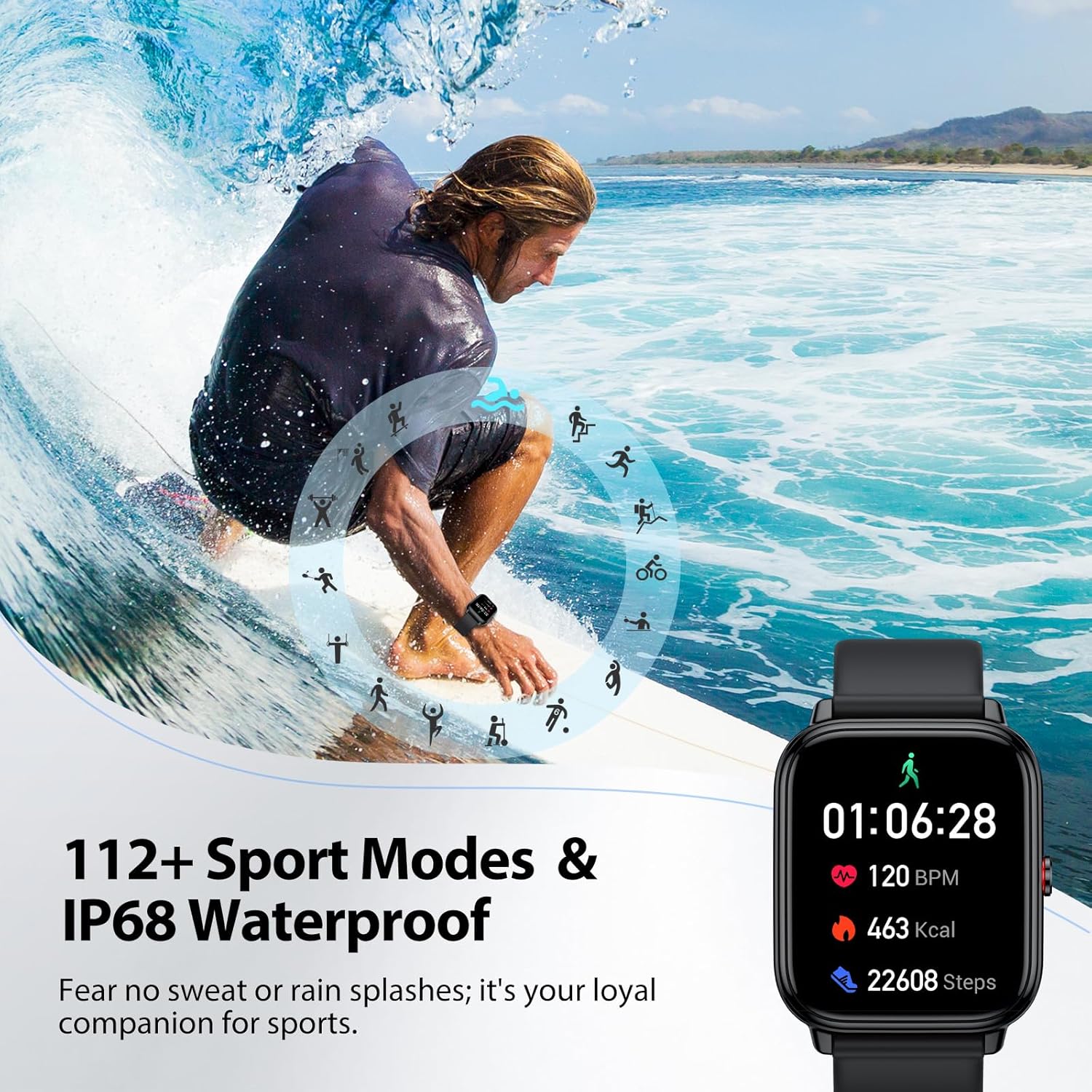
- 112+ સ્પોર્ટ્સ મોડ્સ: Tracks various indoor and outdoor activities including running, cycling, and soccer.
- 24/7 Health Tracking: Monitors stress, heart rate, blood oxygen, and sleep quality.
- IP68 વોટરપ્રૂફ: Resistant to sweat, rain, and handwashing.
- બહુવિધ કાર્યક્ષમતા: Includes alarm, stopwatch, timer, phone locator, camera control, music control, weather display, and more.
3.2 ઉપકરણના પરિમાણો
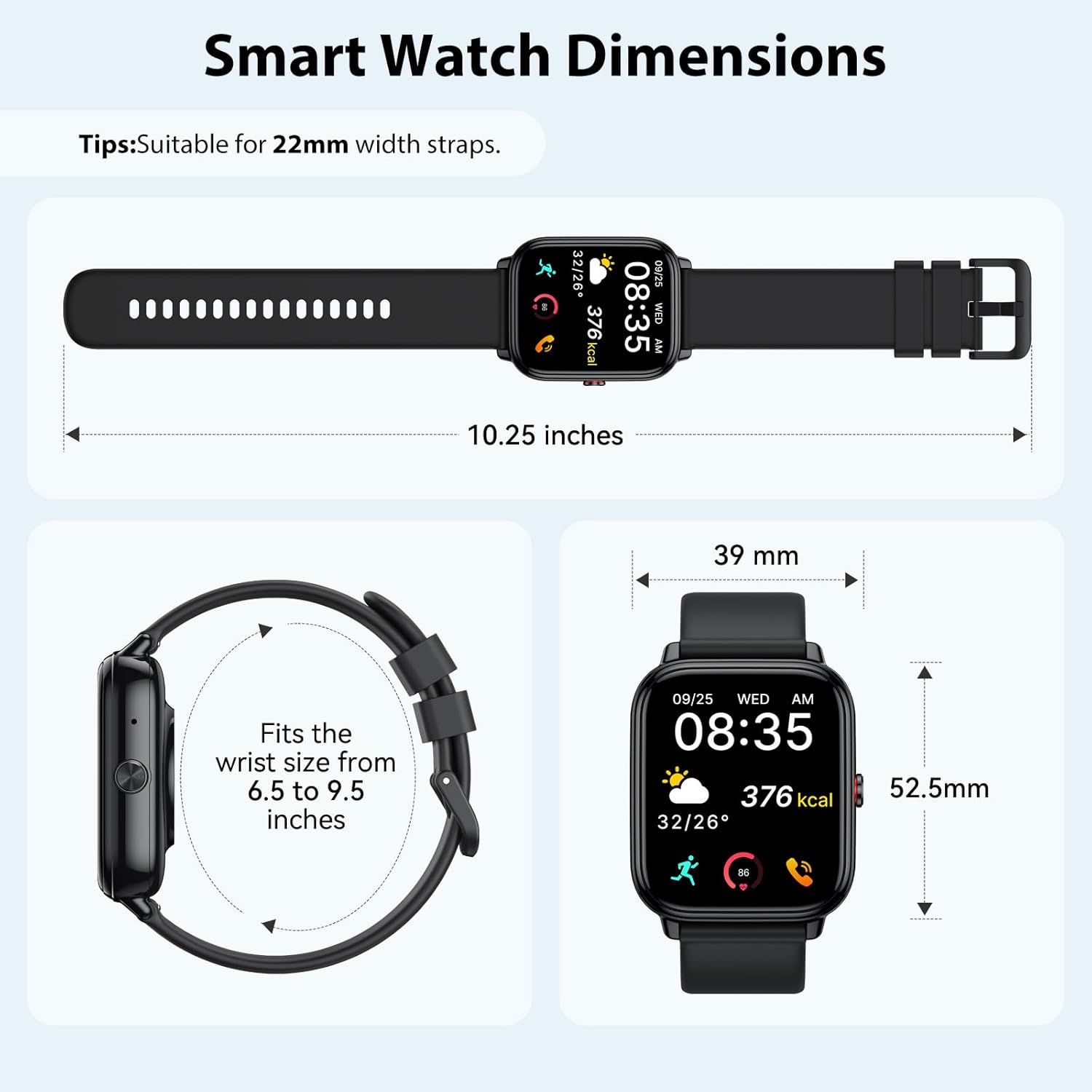
4. સેટઅપ
4.1 ઉપકરણને ચાર્જ કરવું
Before initial use, fully charge your smart watch. Connect the magnetic charging cable to the charging contacts on the back of the watch and plug the USB end into a power adapter (not included) or a computer USB port. A full charge takes approximately 3.5 hours.


૨.૨ એપ ઇન્સ્ટોલેશન અને પેરિંગ
The Tiksounds P150 Smart Watch is compatible with smartphones running Bluetooth 4.0, Android 7.0, iOS 9.0, or later versions. To connect your watch to your smartphone, follow these steps:
- એપ ડાઉનલોડ કરો: Scan the QR code below or search for "FitCloudPro" in your smartphone's app store to download and install the application.
- બ્લૂટૂથ સક્ષમ કરો: ખાતરી કરો કે તમારા સ્માર્ટફોન પર બ્લૂટૂથ સક્ષમ છે.
- ઉપકરણ જોડો: Open the "FitCloudPro" app, navigate to the device section, and tap to add a new device. Select "P150" from the list of available devices.
- જોડી બનાવવાની પુષ્ટિ કરો: The watch will send a Bluetooth request. Confirm the pairing on both your watch and smartphone.
- સૂચનાઓ સક્ષમ કરો: Within the "FitCloudPro" app settings, enable call and message alerts to receive notifications on your smartwatch.

5. ઓપરેટિંગ સૂચનાઓ
5.1 Bluetooth Calls and Message Notifications
Once paired with your smartphone, the P150 Smart Watch allows you to manage calls and receive notifications directly on your wrist.
- કૉલ્સ કરવા: Use the watch's dial pad or contact list to initiate calls.
- કોલ્સનો જવાબ આપવો: Incoming calls will display on the watch screen. Tap the green icon to answer.
- સંદેશ ચેતવણીઓ: All notifications from enabled apps (e.g., SMS, WhatsApp, Facebook) will be pushed to your watch with customizable vibration alerts.


૩.૧ ડિસ્પ્લે અને વોચ ફેસ
The 1.83-inch HD touchscreen offers a clear and responsive interface. You can personalize your watch with over 200 pre-installed watch faces or create custom designs using your own photos via the FitCloudPro app.


5.3 સ્પોર્ટ્સ મોડ્સ
The P150 Smart Watch supports over 112 professional sports modes. It accurately tracks key metrics such as steps, distance, calories burned, and workout duration to help analyze performance and optimize training plans.

5.4 Health Tracking
The built-in optical sensor continuously monitors your stress levels, heart rate, blood oxygen, and sleep quality. The dedicated app provides long-term health trends and personalized insights.
- હાર્ટ રેટ મોનિટરિંગ: રીઅલ-ટાઇમ હાર્ટ રેટ ડેટા પ્રદાન કરે છે.
- બ્લડ ઓક્સિજન મોનિટરિંગ: લોહીમાં ઓક્સિજન સંતૃપ્તિનું સ્તર માપે છે.
- સ્લીપ ટ્રેકિંગ: Analyzes sleep patterns, including deep sleep and light sleep duration.
- સ્ટ્રેસ મોનિટરિંગ: Helps track and manage stress levels throughout the day.

5.5 અન્ય કાર્યો
The P150 Smart Watch offers a range of additional practical features:
- એલાર્મ
- સ્ટોપવોચ
- ટાઈમર
- ફોન લોકેટર
- કેમેરા નિયંત્રણ
- સંગીત નિયંત્રણ
- હવામાન પ્રદર્શન
- શ્વાસની તાલીમ
- Women's Health Tracking
- બેઠાડુ સૂચના


વિડિઓ: ઓવરview of the Tiksounds P150 Smart Watch features, including long battery life, magnetic charging, various app functions, Bluetooth calling, 112+ sports modes, sleep tracking, 24/7 activity tracking, and customizable watch faces.
6. જાળવણી
- સફાઈ: Regularly clean the watch screen and strap with a soft, dry cloth. For stubborn dirt, use a slightly damp કાપડ અને સારી રીતે સૂકવી.
- પાણી પ્રતિકાર: The watch is IP68 waterproof, suitable for handwashing, rain, and daily sweating. Avoid hot water, saunas, or diving, as steam and high temperatures can compromise the seal.
- ચાર્જિંગ: ફક્ત આપેલા ચાર્જિંગ કેબલનો ઉપયોગ કરો. ચાર્જ કરતા પહેલા ખાતરી કરો કે ચાર્જિંગ કોન્ટેક્ટ સ્વચ્છ અને સૂકા છે.
- સંગ્રહ: ઉપયોગમાં ન હોય ત્યારે ઘડિયાળને ઠંડી, સૂકી જગ્યાએ રાખો. અતિશય તાપમાન ટાળો.

7. મુશ્કેલીનિવારણ
| સમસ્યા | શક્ય ઉકેલ |
|---|---|
| ઘડિયાળ ચાલુ થતી નથી | Ensure the watch is fully charged. Connect to the charging cable for at least 30 minutes. |
| સ્માર્ટફોન સાથે જોડી શકાતી નથી | 1. ખાતરી કરો કે તમારા ફોન પર બ્લૂટૂથ સક્ષમ છે. 2. Make sure the watch is within Bluetooth range. 3. Restart both the watch and the phone. 4. Check if the "FitCloudPro" app has necessary permissions. |
| કોઈ સૂચનાઓ પ્રાપ્ત થઈ નથી | 1. Verify that notifications are enabled in the "FitCloudPro" app settings. 2. Check phone's notification settings for the app. 3. Ensure the watch is connected via Bluetooth. |
| અચોક્કસ આરોગ્ય ડેટા | ખાતરી કરો કે ઘડિયાળ તમારા કાંડા પર ચુસ્તપણે પહેરેલી છે, ખૂબ ચુસ્ત કે ખૂબ ઢીલી નહીં. ઘડિયાળની પાછળના સેન્સરને સાફ કરો. |
| ટૂંકી બેટરી જીવન | Reduce screen brightness, disable unnecessary notifications, or use power-saving mode. Ensure the watch is fully charged. |
8. સ્પષ્ટીકરણો
- સ્ક્રીનનું કદ: 1.83 ઇંચ
- બેટરી ક્ષમતા: 1000 મિલીamp કલાક
- કનેક્ટિવિટી ટેકનોલોજી: બ્લૂટૂથ
- વાયરલેસ કોમ્યુનિકેશન સ્ટાન્ડર્ડ: બ્લૂટૂથ
- ઓપરેટિંગ સિસ્ટમ: Android Wear 1.0 (Android 7.0+ / iOS 9.0+ સાથે સુસંગત)
- મેમરી સ્ટોરેજ ક્ષમતા: 1 જીબી
- પાણી પ્રતિકાર: IP68
- વસ્તુનું વજન: 0.09 ગ્રામ
- ઉત્પાદક: ટિકસાઉન્ડ્સ
9. વોરંટી અને સપોર્ટ
For warranty information, technical support, or customer service inquiries, please refer to the official Tiksounds webસાઇટ પર જાઓ અથવા તેમના ગ્રાહક સપોર્ટનો સીધો સંપર્ક કરો. વિગતો સામાન્ય રીતે ઉત્પાદન પેકેજિંગ અથવા ઉત્પાદકના webસાઇટ