
પરિચય
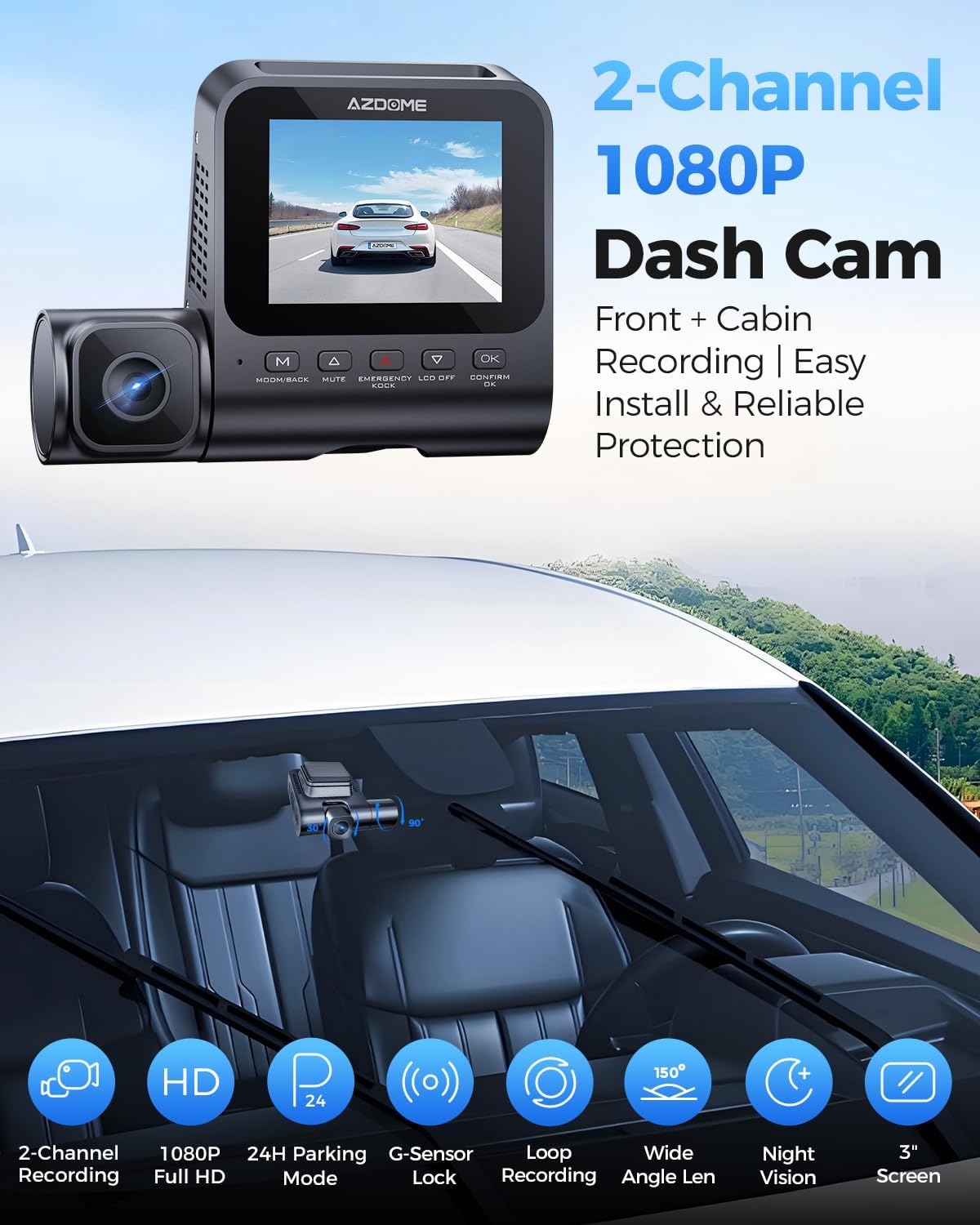
This manual provides detailed instructions for the installation, operation, and maintenance of your AZDOME V600 Dual Dash Cam. Please read this manual thoroughly before using the device to ensure proper functionality and safety. The AZDOME V600 is designed to record both front road views and interior cabin activity simultaneously, offering comprehensive coverage for your vehicle.

Image: The AZDOME V600 Dual Dash Cam, illustrating its compact design and dual-channel recording capability for both front road and interior cabin views.
પેકેજ સામગ્રી
ખાતરી કરો કે નીચે સૂચિબદ્ધ બધી વસ્તુઓ તમારા પેકેજમાં શામેલ છે:
- Dash camera × 1
- Type-C Car Charger × 1
- Electrostatic Films × 2
- 3M એડહેસિવ × 1
- કેબલ ક્લિપ્સ × 5
- Pry Tool × 1
- વપરાશકર્તા માર્ગદર્શિકા × 1

Image: A visual representation of all items included in the AZDOME V600 Dash Cam package, such as the camera, charger, mounting accessories, and user manual.
ઉત્પાદન ઓવરview
The AZDOME V600 features a compact design with a 3-inch screen, dual lenses for front and cabin recording, and intuitive controls. It is equipped with infrared night vision for clear interior recording in low light conditions.

છબી: એક દૃષ્ટાંતરૂપ ઓવરview of the AZDOME V600 Dash Cam, highlighting its 2-channel 1080P recording, parking mode, G-sensor, loop recording, wide-angle lens, and night vision capabilities.
ડ્યુઅલ-ચેનલ રેકોર્ડિંગ
The V600 records both the road ahead and the vehicle's interior simultaneously. The front lens captures external road details, while the interior lens records cabin activity and audio.
છબી: એક વિભાજન view demonstrating the front camera's perspective of the road and the interior camera's view of the cabin, both recording in 1080P Full HD.
નું વિશાળ ક્ષેત્ર View
The dashcam system provides a wide field of view, with a 121° front lens and a 131° cabin lens, designed to capture more of the road and interior surroundings, reducing blind spots.
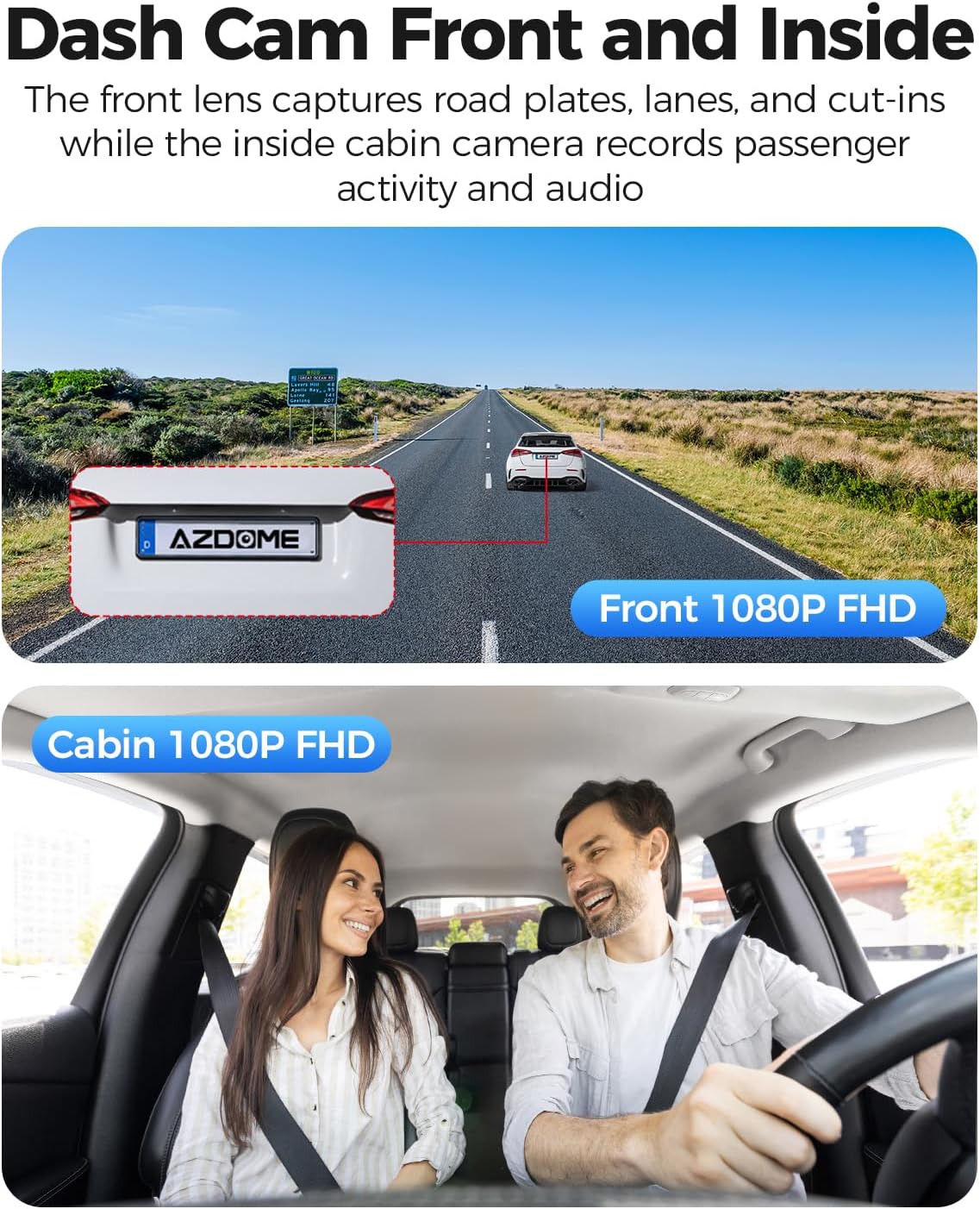
Image: A diagram illustrating the wide-angle coverage of the front (121°) and cabin (131°) cameras, showing how they capture a broad area around the vehicle.
સેટઅપ અને ઇન્સ્ટોલેશન
Follow these steps for quick and secure installation of your dash cam.
- સ્વચ્છ વિન્ડશિલ્ડ: Ensure the chosen area on your windshield is clean and dry for optimal adhesion.
- સ્ટેટિક સ્ટીકર લગાવો: Place the electrostatic film on the desired spot on the windshield. This helps in easy removal and repositioning without leaving residue.
- Mount Dash Cam: Attach the dash cam to the static sticker using the provided 3M adhesive. Ensure the lenses have a clear view of the road and cabin.
- પાવર કનેક્ટ કરો: Plug the Type-C car charger into the dash cam and then into your vehicle's cigarette lighter socket. Route the cable neatly using the provided cable clips and pry tool.
- માઇક્રોએસડી કાર્ડ દાખલ કરો: Before powering on, insert a compatible MicroSD card (up to 128GB, not included) into the designated slot. Ensure the card is inserted correctly until it clicks into place.
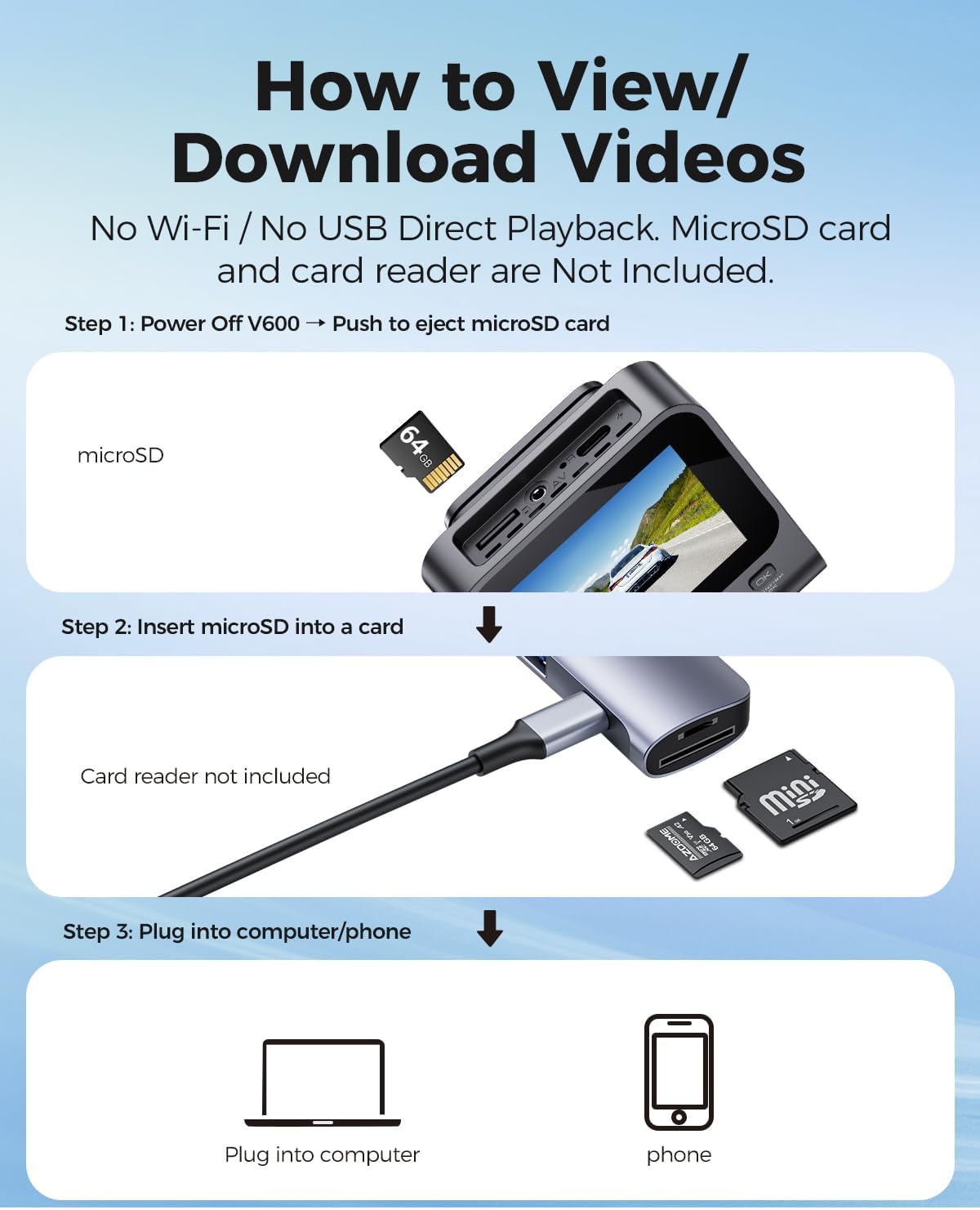
Image: A visual guide demonstrating the quick installation process of the dash cam, including cable routing and camera placement on the windshield.
ઓપરેટિંગ સૂચનાઓ
Basic Recording (Loop Recording)
Once powered on, the dash cam will automatically begin recording. The loop recording function continuously records video in segments (e.g., 1, 3, or 5 minutes) and overwrites the oldest unlocked files when the memory card is full. This ensures continuous recording without manual deletion.

Image: A visual representation of the loop recording feature, showing how new footage overwrites older, unlocked fileસતત રેકોર્ડિંગની ખાતરી કરવા માટે.
G-Sensor (Emergency Lock)
The built-in G-sensor detects sudden impacts or collisions. When an event is detected, the current video segment is automatically locked and saved to prevent it from being overwritten by loop recording. This footage serves as crucial evidence in case of an accident.

Image: An illustration depicting the G-Sensor Auto Lock feature, showing how it detects impacts and automatically locks video clips to protect them from being overwritten.
24-Hour Parking Mode
To enable continuous 24-hour parking monitoring, a 3-lead hardwire kit (not included, search ASIN: B096G6FKZP) is required. In parking mode, the dash cam can detect impacts (Collision Detection Parking Mode) or record continuously at a low frame rate (Time-Lapse Parking Mode). It also features low voltagતમારી કારની બેટરી ખતમ થતી અટકાવવા માટે e રક્ષણ.

Image: A graphic detailing the 24-Hour Parking Mode, including collision detection, time-lapse recording, and low voltage protection, with a note about the required hardwire kit.
IR નાઇટ વિઝન
The dash cam is equipped with IR lights to enhance interior cabin clarity in low-light conditions. For optimal night vision, the interior recording may switch to black-and-white mode to capture clearer details.

Image: An illustration highlighting the Clear Night Vision capabilities, showing how it brightens dark roads and reduces glare to capture more details, especially with infrared for the cabin.
Viewing and Downloading Videos
થી view or download recorded videos, follow these steps:
- પાવર બંધ: Ensure the V600 dash cam is powered off.
- Eject MicroSD Card: Gently push the MicroSD card to eject it from the slot.
- કાર્ડ રીડરમાં દાખલ કરો: Insert the MicroSD card into a card reader (not included).
- ઉપકરણ સાથે કનેક્ટ કરો: Plug the card reader into a computer or compatible phone to access the video files.

Image: A step-by-step guide demonstrating how to remove the MicroSD card from the V600, insert it into a card reader, and connect it to a computer or phone to view અને વિડીયો ડાઉનલોડ કરો.
જાળવણી
યોગ્ય જાળવણી તમારા ડેશ કેમના લાંબા સમય સુધી ટકી રહેવા અને શ્રેષ્ઠ કામગીરીની ખાતરી આપે છે.
- સફાઈ: Use a soft, dry cloth to clean the camera lenses and screen. Avoid abrasive cleaners or solvents.
- તાપમાન: Do not expose the dash cam to extreme temperatures for extended periods.
- માઇક્રોએસડી કાર્ડ: Regularly format your MicroSD card (at least once a month) to prevent data corruption and ensure smooth recording. Back up important fileફોર્મેટિંગ પહેલાં s.
- ફર્મવેર અપડેટ્સ: AZDOME ના અધિકારીને તપાસો webપ્રદર્શન સુધારવા અને નવી સુવિધાઓ ઉમેરવા માટે ઉપલબ્ધ ફર્મવેર અપડેટ્સ માટે સમયાંતરે સાઇટ પર સંપર્ક કરો.
મુશ્કેલીનિવારણ
સામાન્ય સમસ્યાઓના ઉકેલો માટે આ વિભાગનો સંદર્ભ લો.
| સમસ્યા | ઉકેલ |
|---|---|
| ડેશ કેમ ચાલુ થતો નથી. | Ensure the car charger is securely connected to both the dash cam and the vehicle's cigarette lighter. Check if the vehicle's power outlet is functioning. |
| રેકોર્ડિંગ અણધારી રીતે બંધ થઈ જાય છે. | The MicroSD card may be full or corrupted. Format the card regularly. Ensure you are using a high-speed (Class 10 or U1/U3) MicroSD card. |
| વિડિઓ footage ઝાંખું અથવા અસ્પષ્ટ છે. | Clean the camera lenses with a soft cloth. Ensure the protective film has been removed from the lenses. Check if the camera is securely mounted and not vibrating. |
| Parking mode is not working. | Parking mode requires a dedicated hardwire kit (ASIN: B096G6FKZP) for continuous power. Ensure the hardwire kit is correctly installed and connected. |
| G-Sensor is too sensitive or not sensitive enough. | ડેશ કેમના મેનૂમાં G-સેન્સર સંવેદનશીલતા સેટિંગને સમાયોજિત કરો. |
વિશિષ્ટતાઓ
| લક્ષણ | વિગત |
|---|---|
| મોડેલનું નામ | V600 |
| વિડિઓ કેપ્ચર રિઝોલ્યુશન | 1080p (Front and Cabin) |
| Front Field Of View | 150 ડિગ્રી |
| ખાસ લક્ષણો | G-Sensor, Loop Recording, IR Night Vision, 24-Hour Parking Mode |
| ડિસ્પ્લે | 3-ઇંચ સ્ક્રીન |
| સંગ્રહ આધાર | 128GB સુધીનું માઇક્રોએસડી કાર્ડ |
| માઉન્ટિંગ પ્રકાર | ડેશબોર્ડ માઉન્ટ |
| પાવર સ્ત્રોત | Charging Cable (Type-C Car Charger) |
| ઉત્પાદન પરિમાણો | 16 x 14 x 6 ઇંચ |
| વસ્તુનું વજન | 10.2 ઔંસ |
વોરંટી અને આધાર
વોરંટી માહિતી અને ટેકનિકલ સપોર્ટ માટે, કૃપા કરીને સત્તાવાર AZDOME નો સંદર્ભ લો. website or contact AZDOME customer service directly. Keep your purchase receipt as proof of purchase for warranty claims.
ઉત્પાદક: એઝેડોમ
Webસાઇટ: Visit the AZDOME Store on Amazon (સામાન્ય બ્રાન્ડ માહિતી માટે)