
પરિચય
This manual provides instructions for the setup, operation, and maintenance of your replacement remote control for Casio Projectors. Please read this manual thoroughly before use to ensure proper functionality and to maximize the lifespan of your device.
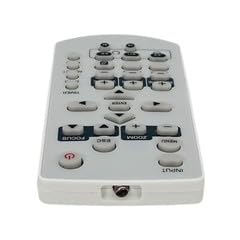
છબી 1: ઓવરview રિપ્લેસમેન્ટ રિમોટ કંટ્રોલનું.
પેકેજ સામગ્રી
- ૧ x રિપ્લેસમેન્ટ રિમોટ કંટ્રોલ
નોંધ: Batteries are not included and must be purchased separately. This is a replacement remote control and may not offer all functions of the original remote. Minor scratches may be present due to bulk item storage.
સેટઅપ
1. બેટરી ઇન્સ્ટોલેશન
- રિમોટ કંટ્રોલની પાછળના ભાગમાં બેટરીનો ડબ્બો શોધો.
- સ્લાઇડ કરીને બેટરી કવર ખોલો.
- કમ્પાર્ટમેન્ટની અંદર દર્શાવેલ યોગ્ય ધ્રુવીયતા (+ અને -) સુનિશ્ચિત કરીને, બે AAA બેટરી (શામેલ નથી) દાખલ કરો.
- બેટરી કવર સુરક્ષિત રીતે બંધ કરો.
Image 2: Battery compartment for AAA batteries.
2. Pairing (Not Required)
This remote control operates via infrared (IR) technology and typically does not require pairing. It is designed to work directly with compatible Casio projector models upon battery installation.
ઓપરેટિંગ સૂચનાઓ
Point the remote control directly at the infrared receiver on your Casio projector. Ensure there are no obstructions between the remote and the projector.
મૂળભૂત કાર્યો:
- પાવર ચાલુ/બંધ: દબાવો પાવર પ્રોજેક્ટરને ચાલુ અથવા બંધ કરવા માટેનું બટન.
- ઇનપુટ પસંદગી: નો ઉપયોગ કરો INPUT or source buttons to cycle through available input sources (e.g., HDMI, VGA).
- નેવિગેશન: દિશાત્મક તીર બટનોનો ઉપયોગ કરો (યુપી, ડાઉન, લેફ્ટ, રાઇટ) અને ધ દાખલ કરો or OK મેનુ નેવિગેટ કરવા માટે બટન.
- વોલ્યુમ નિયંત્રણ: If your projector has audio output, use the અવાજ +/- buttons to adjust the sound level.
- મેનુ એક્સેસ: દબાવો મેનુ button to access the projector's on-screen display (OSD) menu.
- બહાર નીકળો/પાછળ: નો ઉપયોગ કરો બહાર નીકળો or પાછળ button to close menus or return to the previous screen.
Refer to your Casio projector's original manual for specific functions and button layouts, as this replacement remote aims to replicate common controls.
જાળવણી
- સફાઈ: રિમોટ કંટ્રોલને નરમ, સૂકા કપડાથી સાફ કરો. પ્રવાહી ક્લીનર્સ અથવા ઘર્ષક સામગ્રીનો ઉપયોગ કરશો નહીં.
- બેટરી રિપ્લેસમેન્ટ: જ્યારે રિમોટનો પ્રતિભાવ ધીમો પડી જાય અથવા કામ કરવાનું બંધ કરી દે ત્યારે બેટરી બદલો. હંમેશા બંને બેટરીઓને એક જ સમયે સમાન પ્રકારની નવી (AAA) બેટરીથી બદલો.
- સંગ્રહ: જો રિમોટ કંટ્રોલનો લાંબા સમય સુધી ઉપયોગ ન થાય, તો લીકેજ અને સંભવિત નુકસાનને રોકવા માટે બેટરીઓ દૂર કરો. ઠંડી, સૂકી જગ્યાએ સ્ટોર કરો.
- નુકસાન ટાળો: Do not drop the remote control or expose it to extreme temperatures, humidity, or direct sunlight.
મુશ્કેલીનિવારણ
- રિમોટ કાર્યરત નથી:
- ખાતરી કરો કે બેટરીઓ યોગ્ય ધ્રુવીયતા સાથે યોગ્ય રીતે દાખલ કરવામાં આવી છે.
- જૂની બેટરીઓને નવી AAA બેટરીથી બદલો.
- Check for any obstructions between the remote control and the projector's IR receiver.
- ખાતરી કરો કે તમે મહત્તમ ઓપરેટિંગ રેન્જ (આશરે 5 મીટર) ની અંદર છો.
- કેટલાક કાર્યો કામ કરતા નથી:
- This is a replacement remote. Some advanced or specific functions of your original projector remote may not be supported.
- Verify the function exists on your projector model.
વિશિષ્ટતાઓ
| મોડલ નંબર | ATFO-RPL-RMT-070925-22182 |
| સુસંગત પ્રોજેક્ટર | Casio XJ-FC330XN, XJ-F210WN, XJ-UT310WN |
| કનેક્ટિવિટી ટેકનોલોજી | ઇન્ફ્રારેડ (IR) |
| મહત્તમ શ્રેણી | આશરે 5 મીટર (16 ફૂટ) |
| બેટરીનો પ્રકાર | 2 x AAA (શામેલ નથી) |
| રંગ | સફેદ/આછો ગ્રે |
| ખાસ લક્ષણ | અર્ગનોમિક્સ ડિઝાઇન |
| ઉત્પાદક | VieRemote |
વોરંટી અને આધાર
This product is a replacement remote control. For specific warranty information, please refer to the seller's policy at the time of purchase. For technical support or inquiries, please contact the seller directly through the platform where the purchase was made.