
પરિચય
This manual provides detailed instructions for the safe installation, operation, and maintenance of your TCL 62-inch ceiling fan. Please read this manual thoroughly before installation and keep it for future reference. Ensure all safety precautions are followed to prevent injury or damage.
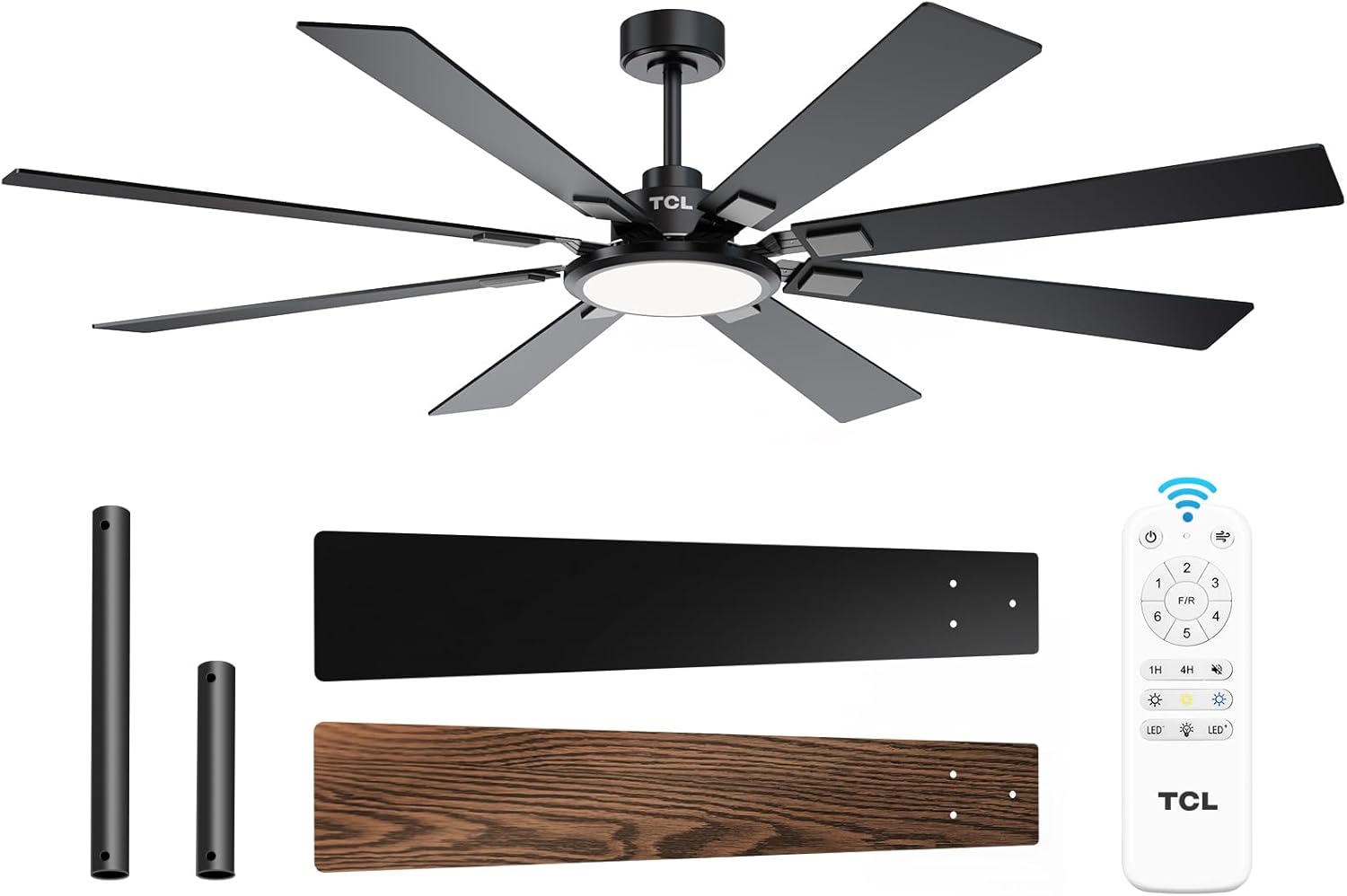
Figure 1: TCL 62-Inch Ceiling Fan Overview
સલામતી માહિતી
આગ, ઇલેક્ટ્રિક આંચકો અને વ્યક્તિગત ઈજાના જોખમને ઘટાડવા માટે આ ઉપકરણને ઇન્સ્ટોલ અને ચલાવતી વખતે હંમેશા મૂળભૂત સલામતી સાવચેતીઓનું પાલન કરો.
- બધી સૂચનાઓ વાંચો: Familiarize yourself with the fan's components and installation steps before beginning.
- ઇલેક્ટ્રિકલ સલામતી: Ensure the power is turned off at the circuit breaker before installation or servicing. All wiring must be in accordance with national and local electrical codes.
- માઉન્ટ કરવાનું: The fan must be mounted to a structurally sound ceiling joist or outlet box capable of supporting the fan's weight (12.4 lbs).
- બ્લેડ ક્લિયરન્સ: Maintain a minimum clearance of 7 feet from the floor to the fan blades.
- વ્યવસાયિક સ્થાપન: જો તમને વાયરિંગ અથવા ઇન્સ્ટોલેશન વિશે ખાતરી ન હોય, તો લાયક ઇલેક્ટ્રિશિયનનો સંપર્ક કરો.
સેટઅપ અને ઇન્સ્ટોલેશન
સમાવાયેલ ઘટકો
Before beginning installation, verify that all parts are present:
- 1 Ceiling Fan with 8 Blades
- સૂચના માર્ગદર્શિકા (આ દસ્તાવેજ)
- રીમોટ કંટ્રોલ
- Downrods (10-inch and 5-inch switchable)

Figure 2: Fan Components and Features
સ્થાપન પગલાં
- પાવર બંધ કરો: Disconnect power at the main circuit breaker to avoid electrical shock.
- માઉન્ટ કરવાનું કૌંસ સ્થાપન: Securely attach the mounting bracket to the ceiling outlet box or a structural support. Ensure it can safely hold the fan's weight.
- ડાઉનરોડ એસેમ્બલ કરો: Choose the appropriate downrod (5-inch or 10-inch) and assemble it with the fan motor unit.
- હેંગ ફેન: પંખાની એસેમ્બલીને કાળજીપૂર્વક ઉપાડો અને તેને માઉન્ટિંગ બ્રેકેટ પર લટકાવો.
- વાયરિંગ: Connect the electrical wires according to the wiring diagram provided in the separate installation guide. Ensure all connections are secure.
- બ્લેડ જોડો: Securely attach the 8 fan blades to the motor housing. Note that blades are reversible with black and wood-grain sides.
- લાઇટ કિટ ઇન્સ્ટોલ કરો: Connect and install the LED light panel to the bottom of the fan.
- પાવર પુન Restસ્થાપિત કરો: એકવાર ઇન્સ્ટોલેશન પૂર્ણ થઈ જાય અને બધા કનેક્શન્સ તપાસાઈ જાય, પછી સર્કિટ બ્રેકર પર પાવર પુનઃસ્થાપિત કરો.
ઇન્સ્ટોલેશન વિડિઓ માર્ગદર્શિકા
Video 1: Step-by-step guide on how to install the TCL ceiling fan, demonstrating the ease of assembly and mounting.
ઓપરેટિંગ સૂચનાઓ
Your TCL ceiling fan is operated using the included remote control. Ensure batteries are correctly installed in the remote.
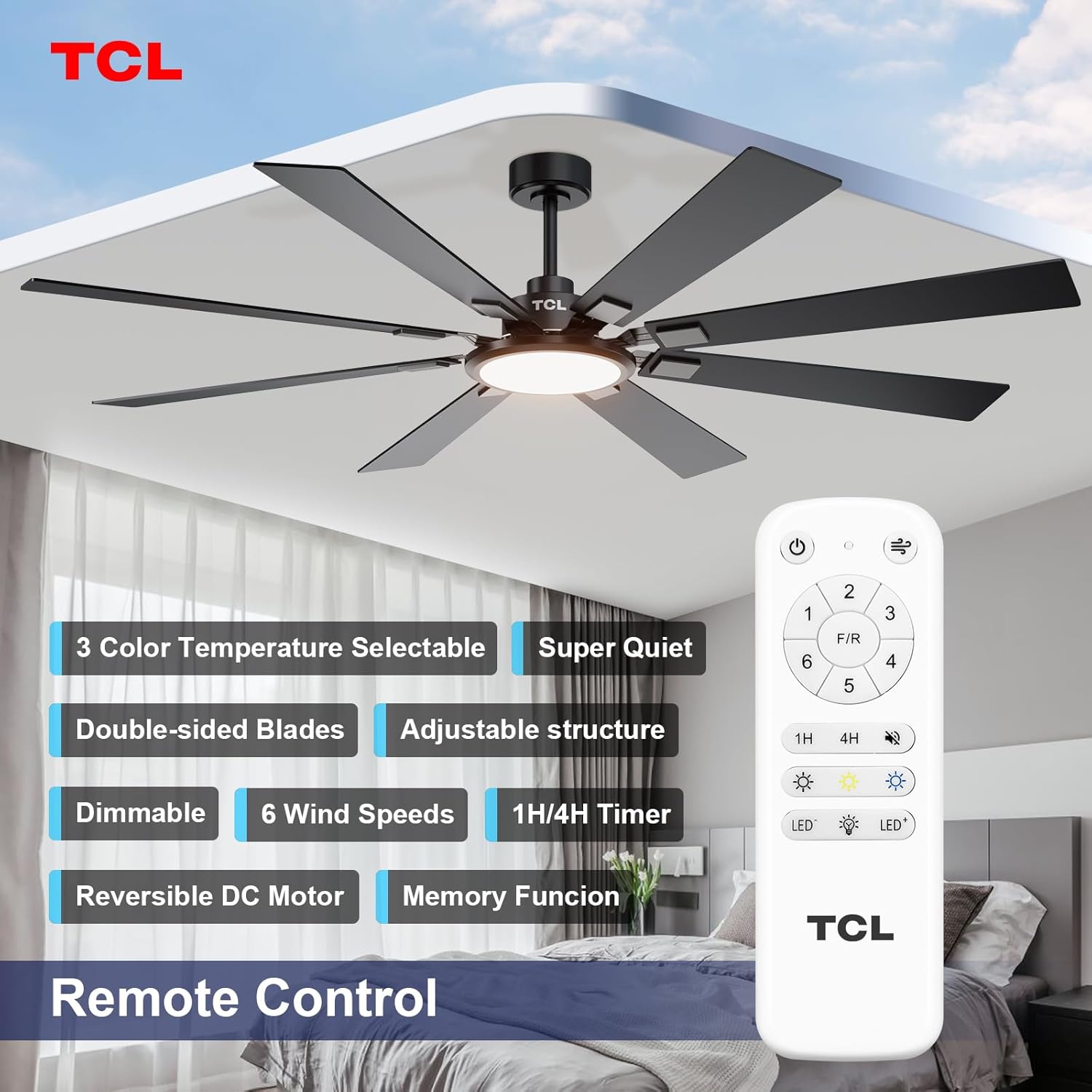
આકૃતિ 3: રિમોટ કંટ્રોલ લેઆઉટ
ચાહક ઝડપ નિયંત્રણ
The fan features 6 adjustable speeds to suit your comfort needs. Use the '1' through '6' buttons on the remote to select your desired speed.
- સ્તર 1-2: Low, comfortable wind for gentle air circulation.
- સ્તર 3-4: Medium, natural wind for moderate cooling.
- સ્તર 5-6: High, powerful wind for maximum cooling.
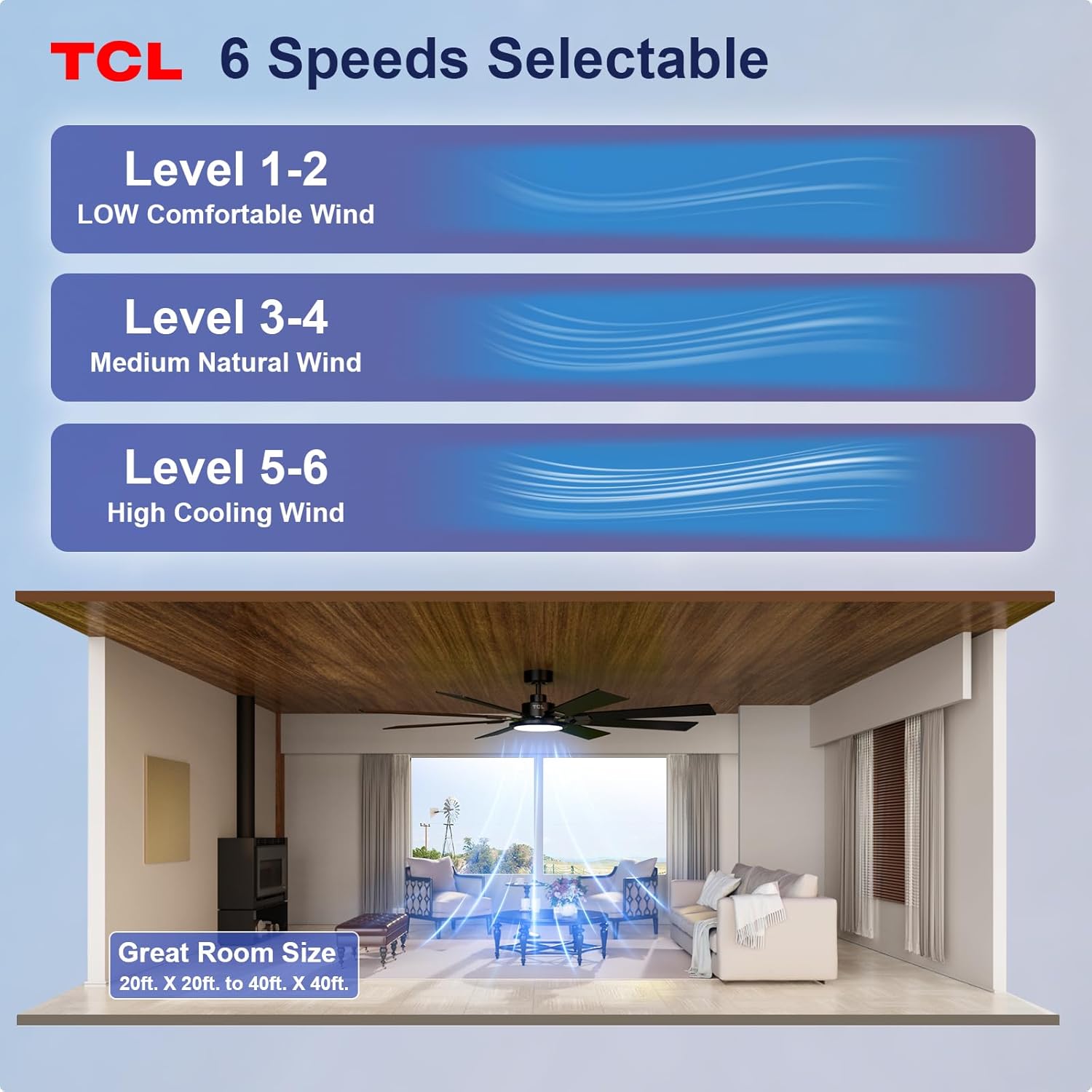
Figure 4: Fan Speed Settings
લાઇટ ઓપરેશન
The integrated LED light offers dimmable brightness and 3 color temperature options:
- ચાલુ/બંધ: Use the light button on the remote to turn the light on or off.
- ધીમું: Use the dimming buttons (up/down arrows) to adjust brightness from 10% to 100%.
- રંગ તાપમાન: Cycle through 3000K (Warm White), 4000K (Natural White), and 6000K (Cool White) using the color temperature button.
- મેમરી કાર્ય: The fan remembers your last light setting (brightness and color temperature) when turned off and on again. To ensure memory function works correctly, wait at least 20 seconds after turning off the light before turning it back on.

Figure 5: Customizable Light Settings
ઉલટાવી શકાય તેવી ડીસી મોટર
The fan features a reversible DC motor, allowing you to change the direction of airflow for year-round comfort. Use the 'F/R' button on the remote control.
- સમર મોડ (ડાઉનવર્ડ એરફ્લો): Blades rotate counter-clockwise, creating a downward breeze that provides a cooling effect.
- વિન્ટર મોડ (ઉપર તરફનો હવા પ્રવાહ): Blades rotate clockwise, drawing cool air up and pushing warm air down from the ceiling, helping to balance indoor heating.

Figure 6: Reversible DC Motor Function
ટાઈમર કાર્ય
Set the fan to automatically turn off after a specified period using the timer buttons (1H/4H) on the remote control.
શાંત કામગીરી
The fan is designed for noiseless operation, ensuring a peaceful environment.

Figure 7: Noiseless Operation Comparison
ઓપરેશન વિડિઓઝ
વિડિઓ ૧: ઓવરview of the TCL ceiling fan, highlighting its modern design and large size suitable for various rooms.
Video 3: Demonstrates the cooling power and stylish lighting features of the TCL ceiling fan.
વિડિઓ 4: એક વ્યાપક ઓવરview of the TCL ceiling fan's features and benefits.
જાળવણી
નિયમિત જાળવણી શ્રેષ્ઠ કામગીરી સુનિશ્ચિત કરે છે અને તમારા સીલિંગ ફેનનું આયુષ્ય વધારે છે.
- સફાઈ: સમયાંતરે પંખાના બ્લેડ અને મોટર હાઉસિંગને સોફ્ટ, ડી વડે સાફ કરો.amp કાપડ. ઘર્ષક ક્લીનર્સ અથવા સોલવન્ટનો ઉપયોગ કરશો નહીં. સફાઈ કરતા પહેલા ખાતરી કરો કે પાવર બંધ છે.
- બ્લેડ નિરીક્ષણ: પંખાના બ્લેડમાં કોઈ તિરાડો કે નુકસાન છે કે નહીં તે તપાસો. ક્ષતિગ્રસ્ત બ્લેડ તાત્કાલિક બદલો.
- સ્ક્રૂને સજ્જડ કરો: Over time, screws may loosen. Periodically check and tighten all screws on the motor housing and blade attachments.
- Light Cover: Ensure the light cover is securely fastened.
મુશ્કેલીનિવારણ
જો તમને તમારા ચાહક સાથે સમસ્યાઓનો અનુભવ થાય, તો નીચેની સામાન્ય સમસ્યાઓ અને ઉકેલોનો સંદર્ભ લો:
| સમસ્યા | સંભવિત કારણ | ઉકેલ |
|---|---|---|
| પંખો ચાલુ થતો નથી | પંખા પર વીજળી નથી; વાયર કનેક્શન છૂટા; રિમોટ કંટ્રોલ બેટરી ડેડ. | સર્કિટ બ્રેકર તપાસો; બધા વાયર કનેક્શન સુરક્ષિત છે કે નહીં તેની ખાતરી કરો; રિમોટ કંટ્રોલ બેટરી બદલો. |
| પ્રકાશ કામ કરતું નથી | Loose wire connection; LED panel issue. | Check light kit wiring; Contact customer support if LED panel is faulty. |
| અતિશય ધ્રુજારી | છૂટા બ્લેડ અથવા માઉન્ટિંગ હાર્ડવેર; અસંતુલિત બ્લેડ. | Ensure all blade screws and mounting screws are tight; Use a balancing kit (not included) if necessary. |
| ઘોંઘાટીયા કામગીરી | સ્ક્રૂ છૂટા; મોટરમાં સમસ્યા. | Tighten all screws; If noise persists, contact customer support. |
વિશિષ્ટતાઓ
Detailed technical specifications for the TCL 62-inch ceiling fan:
| લક્ષણ | વિગત |
|---|---|
| બ્રાન્ડ | ટીસીએલ |
| મોડલ નંબર | HFSB-000000D |
| કદ | 62 ઇંચ |
| રંગ | કાળો |
| સામગ્રી | ધાતુ, લાકડું |
| શૈલી | આધુનિક |
| ઇન્ડોર/આઉટડોર વપરાશ | ઇન્ડોર, આઉટડોર |
| પાવર સ્ત્રોત | DC |
| નિયંત્રણ પદ્ધતિ | દૂરસ્થ |
| પ્રકાશ સ્ત્રોત | એલઇડી |
| પ્રકાશ સ્ત્રોતોની સંખ્યા | 1 |
| ભાગtage | 120 વોલ્ટ |
| આછો રંગ | Warm to Cool White (2700K-6500K) |
| વાટtage | 66 વોટ |
| તેજ | 3000 Lumen (Max) |
| કાર્યક્ષમતા | એલઇડી, ડિમેબલ |
| વસ્તુનું વજન | 12.4 પાઉન્ડ |
| પરિમાણો (L x W x H) | 72"L x 72"W x 20"H (Note: Product is 62-inch, this dimension might refer to overall span) |
| યુપીસી | 846042019989 |
વોરંટી અને આધાર
વોરંટી માહિતી
This TCL ceiling fan is covered by a limited manufacturer's warranty. Please refer to the warranty card included in your product packaging for specific terms, conditions, and duration. Retain your proof of purchase for warranty claims.
ગ્રાહક આધાર
For technical assistance, troubleshooting not covered in this manual, or warranty inquiries, please contact TCL customer service. Contact information can typically be found on the product packaging or the official TCL webસાઇટ