
1. પરિચય
This manual provides detailed instructions for the installation, operation, and maintenance of your STUDIOFINIX Bluetooth 5.4 4-Zone 8-Channel Audio Amplifier Receiver. This amplifier is designed to deliver high-fidelity audio across multiple rooms, offering independent zone control, various input options, and a professional karaoke function. Please read this manual thoroughly before use to ensure proper setup and optimal performance.
2. સલામતી સૂચનાઓ
- પાવર સ્ત્રોત: ફક્ત આપેલા પાવર એડેપ્ટરનો ઉપયોગ કરો. ખાતરી કરો કે વોલ્યુમtage ઉપકરણ પર ઉલ્લેખિત આવશ્યકતાઓ સાથે મેળ ખાય છે.
- વેન્ટિલેશન: Do not block any ventilation openings. Install in a location with adequate airflow to prevent overheating.
- પાણી અને ભેજ: વરસાદ, ભેજ અથવા ટપકતા/છિદ્ર પડતા પ્રવાહીના સંપર્કમાં ન આવો. પાણીના સ્ત્રોતોથી દૂર રહો.
- ઉષ્મા: Do not place near heat sources such as radiators, heat registers, stoves, or other apparatus that produce heat.
- સફાઈ: Unplug the unit from the power outlet before cleaning. Use a dry, soft cloth only.
- સર્વિસિંગ: આ ઉત્પાદનની જાતે સેવા કરવાનો પ્રયાસ કરશો નહીં. લાયક સેવા કર્મચારીઓને તમામ સેવાઓનો સંદર્ભ આપો.
- સ્પીકર ઇમ્પિડન્સ: Ensure connected speakers have an impedance of 4-8 ohms. Connecting speakers with lower impedance may damage the ampજીવંત
3. પેકેજ સામગ્રી
ખાતરી કરો કે નીચે સૂચિબદ્ધ બધી વસ્તુઓ તમારા પેકેજમાં શામેલ છે:
- સ્ટુડિયોફિનિક્સ Ampલિફાયર x 1
- પાવર એડેપ્ટર x 1
- Black Terminal Connectors x 4
- સૂચના માર્ગદર્શિકા x 1

Figure 3.1: Package Contents. The image displays the amplifier unit, its power adapter, four black terminal connectors, and the user manual.
4. ઉત્પાદન ઓવરview
4.1 ફ્રન્ટ પેનલ પરિચય
The front panel provides access to primary controls and input ports for convenient operation.

Figure 4.1: Front Panel Layout. Key controls include the Volume/Power ON/OFF knob, MIC VOL knob, MIC input, AUX input, USB port, TF Card slot, and Bass/Treble adjustment knobs.
- VOLUME/PWR ON/OFF: Controls the master volume and powers the unit on/off.
- MIC VOL: કનેક્ટેડ માઇક્રોફોનના વોલ્યુમને સમાયોજિત કરે છે.
- MIC ઇનપુટ: માઇક્રોફોન કનેક્શન માટે 3.5mm જેક.
- AUX ઇનપુટ: 3.5mm jack for auxiliary audio devices.
- યુએસબી પોર્ટ: ઑડિઓ ચલાવવા માટે fileયુએસબી ડ્રાઇવમાંથી s.
- ટીએફ કાર્ડ સ્લોટ: ઑડિઓ ચલાવવા માટે files from a TF (MicroSD) card.
- BASS/TREBLE: Adjusts the low and high frequency response of the audio output.
4.2 ટોચની પેનલ પરિચય
The top panel features controls for mode selection, playback, and echo effects for karaoke.

Figure 4.2: Top Panel Layout. This view highlights the MODE button, playback controls (Fast Retreat/Previous Song, Play/Pause, Fast Forward/Next Song), and the ECHO button for microphone effects.
- DIRECTIONS: Switches between input sources (Bluetooth, Optical, AUX, LINE IN, USB, TF Card).
- પ્લેબેક નિયંત્રણો: Buttons for previous track, play/pause, and next track when using USB/TF card or Bluetooth.
- ઇકો: Activates and adjusts the echo effect for the microphone input.
- Zone Control Buttons (1, 2, 3, 4): Independently turn on or off each of the four audio zones.
4.3 Back Panel Introduction
The back panel contains the main speaker outputs and additional wired input options.

Figure 4.3: Back Panel Layout. This image shows the DC IN port, speaker output terminals for Zones 1-4 (supporting 8 speakers), Optical input, and stereo RCA Line In (R/L) inputs.
- ડી.સી. માં: Power input port for the provided power adapter.
- Speaker Outputs (ZONE 1-4): Connect up to 8 speakers (2 per zone) with 4-8 ohm impedance. Red terminals are positive (+), black terminals are negative (-).
- ઓપ્ટિકલ ઇનપુટ: Digital audio input for connecting devices like TVs or game consoles.
- LINE IN (R/L): Stereo RCA inputs for connecting analog audio sources.
5. સેટઅપ
5.1 સ્પીકર જોડાણ
આ amplifier supports up to 8 speakers, divided into 4 independent zones. Ensure your speakers have an impedance of 4-8 ohms.
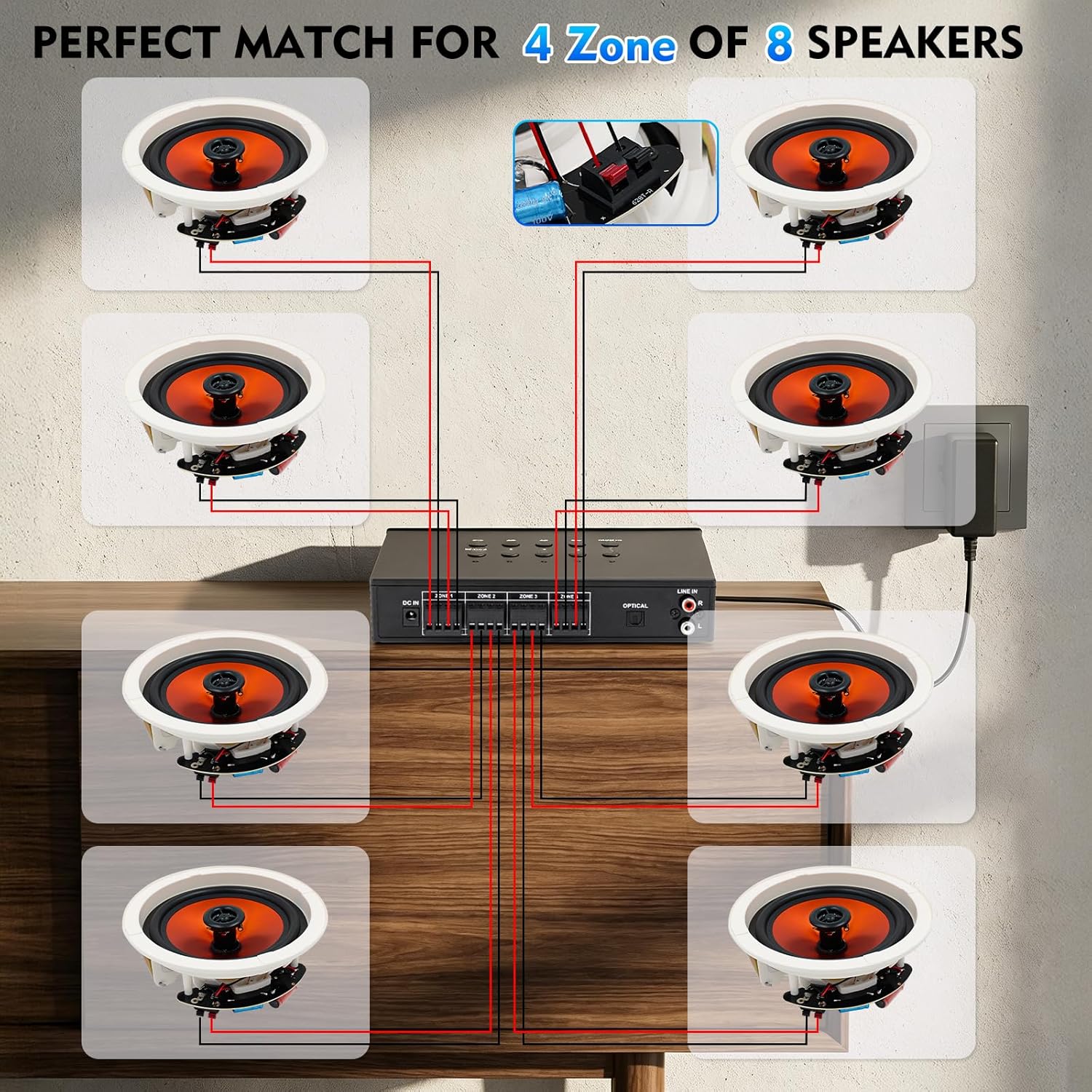
Figure 5.1: Speaker Wiring Diagram. This illustration demonstrates connecting two speakers per zone, with red wires to positive (+) terminals and black wires to negative (-) terminals on the amplifier's back panel.
- તમારા સ્પીકર્સ પર સકારાત્મક (+) અને નકારાત્મક (-) ટર્મિનલ્સને ઓળખો.
- Connect the positive (+) wire from each speaker to the corresponding red (+) terminal on the amplifier for the desired zone.
- Connect the negative (-) wire from each speaker to the corresponding black (-) terminal on the amplifier for the desired zone.
- Repeat for all speakers across the 4 zones. Ensure all connections are secure.
5.2 પાવર કનેક્શન
After connecting all speakers and audio sources, connect the power adapter.
- Insert the DC plug of the power adapter into the 'DC IN' port on the back of the ampજીવંત
- પાવર એડેપ્ટરને યોગ્ય વોલ આઉટલેટમાં પ્લગ કરો.
6. ઓપરેટિંગ સૂચનાઓ
૪.૨ પાવર ચાલુ/બંધ અને વોલ્યુમ નિયંત્રણ
- પર પાવર કરવા માટે amplifier, rotate the VOLUME/PWR ON/OFF knob clockwise until the display illuminates.
- To power off, rotate the knob counter-clockwise until it clicks off.
- Adjust the master volume by rotating the VOLUME/PWR ON/OFF નોબ
૪.૨ ઇનપુટ સ્ત્રોત પસંદગી
દબાવો મોડ button on the top panel to cycle through available input sources: Bluetooth, Optical, AUX, LINE IN, USB, and TF Card.
6.3 બ્લૂટૂથ પેરિંગ
બ્લૂટૂથ ઉપકરણને કનેક્ટ કરવા માટે:

Figure 6.1: Bluetooth Connectivity. The image shows a smartphone successfully paired with the amplifier, indicating stable Bluetooth 5.4 connection for wireless audio streaming.
- નો ઉપયોગ કરીને બ્લૂટૂથ મોડ પસંદ કરો મોડ button. The display will show "BT" or a similar indicator.
- તમારા સ્માર્ટફોન, ટેબ્લેટ અથવા અન્ય બ્લૂટૂથ-સક્ષમ ઉપકરણ પર, બ્લૂટૂથ સક્ષમ કરો અને ઉપલબ્ધ ઉપકરણો શોધો.
- Select "STUDIOFINIX" or a similar name from the list to pair.
- એકવાર જોડી બનાવી લીધા પછી, તમે વાયરલેસ રીતે ઓડિયો સ્ટ્રીમ કરી શકો છો ampજીવંત
6.4 Wired Input Operation
આ amplifier supports various wired audio sources:

Figure 6.2: Multiple External Audio Sources. This graphic illustrates the diverse input options available, including Microphone, Bluetooth, USB, AUX, and TF Card, allowing connection of various external devices.
- ઓપ્ટિકલ ઇનપુટ: Connect a digital audio cable from your source (e.g., TV, game console) to the OPTICAL port on the back panel. Select Optical mode using the મોડ બટન
- AUX ઇનપુટ: Connect a 3.5mm audio cable from your device to the AUX port on the front panel. Select AUX mode.
- લાઈન ઇન: Connect RCA cables from your analog audio source (e.g., CD player) to the LINE IN (R/L) ports on the back panel. Select LINE IN mode.
- યુએસબી/ટીએફ કાર્ડ: Insert a USB drive or TF card into the respective slot on the front panel. The amplifier will automatically switch to USB or TF mode and begin playback. Use the playback controls on the top panel to manage tracks.
૩.૪ કરાઓકે ફંક્શન
Enjoy karaoke with the built-in microphone input and echo effect.

Figure 6.3: Karaoke Ready. This image depicts individuals enjoying a karaoke session, highlighting the amplifier's capability to connect a microphone for vocal performances.
- તમારા માઇક્રોફોનને માં પ્લગ કરો MIC ઇનપુટ ફ્રન્ટ પેનલ પર.
- નો ઉપયોગ કરીને માઇક્રોફોન વોલ્યુમને સમાયોજિત કરો MIC VOL નોબ
- દબાવો ECHO button on the top panel to activate and adjust the echo effect for your vocals.
૪.૨ સ્વતંત્ર ઝોન નિયંત્રણ
આ amplifier allows you to independently control the power for each of the four speaker zones.

Figure 6.4: 4-Zone Independent Control. This visual demonstrates how the amplifier can manage audio in four separate areas, allowing users to turn zones on or off as needed for multi-room audio customization.
- સમર્પિતનો ઉપયોગ કરો ZONE 1, ZONE 2, ZONE 3, ZONE 4 buttons on the top panel to toggle each zone on or off.
- Note that while zones can be independently turned on/off, the overall volume, bass, and treble settings apply to all active zones simultaneously.
૫.૭ બાસ અને ટ્રેબલ એડજસ્ટમેન્ટ
Adjust the audio's tonal characteristics using the BASS અને ભયંકર knobs on the front panel to suit your preference.
7. જાળવણી
- સફાઈ: Disconnect the power before cleaning. Use a soft, dry cloth to wipe the exterior of the unit. Do not use liquid cleaners or aerosol sprays.
- સંગ્રહ: If storing the unit for an extended period, disconnect it from power and store in a cool, dry place away from direct sunlight.
- વેન્ટિલેશન: Regularly check that ventilation openings are clear of dust and debris.
8. મુશ્કેલીનિવારણ
| સમસ્યા | સંભવિત કારણ | ઉકેલ |
|---|---|---|
| કોઈ શક્તિ નથી | Power adapter not connected; Power outlet not working; Unit is off. | Ensure power adapter is securely connected and plugged into a live outlet. Turn the VOLUME/PWR ON/OFF knob clockwise. |
| સ્પીકર્સમાંથી અવાજ આવતો નથી | Incorrect input source selected; Speaker wires loose or incorrectly connected; Volume too low; Specific zone turned off. | Press MODE to select the correct input. Check speaker wire connections (positive/negative). Increase master volume. Ensure the relevant zone button is ON. |
| બ્લૂટૂથ કનેક્ટ થઈ રહ્યું નથી | Not in Bluetooth mode; Device too far; Device already connected to another ampજીવંત | Select Bluetooth mode. Move device closer to the amplifier. Disconnect from other Bluetooth devices and try pairing again. |
| માઇક્રોફોન કામ કરતું નથી | Microphone not plugged in; MIC VOL too low. | Ensure microphone is securely plugged into the MIC input. Increase the MIC VOL knob. |
| USB/TF કાર્ડ ચાલી રહ્યું નથી | Incorrect mode; Incompatible file ફોર્મેટ; દૂષિત મીડિયા. | Select USB or TF mode. Ensure audio files are in a supported format (e.g., MP3). Try a different USB drive or TF card. |
9. સ્પષ્ટીકરણો
| લક્ષણ | સ્પષ્ટીકરણ |
|---|---|
| બ્રાન્ડ | સ્ટુડિયોફિનિક્સ |
| મોડલ નંબર | ST-AMP-8PBT-BK-US |
| ચેનલોની સંખ્યા | 8 |
| આઉટપુટ વોટtage | ૧૦૦ વોટ્સ (કુલ) |
| બ્લૂટૂથ સંસ્કરણ | 5.4 |
| સ્પીકર ઇમ્પિડન્સ | 4-8 ઓહ્મ |
| ઇનપુટ વિકલ્પો | Optical, AUX, LINE IN, USB, TF Card, MIC, Bluetooth |
| આવર્તન પ્રતિભાવ | ±2dB@20-20kHz |
| સિગ્નલ ટુ-અવાજ ગુણોત્તર | 85dB |
| પરિમાણો (L x W x H) | 195mm x 40mm x 140mm (Approx.) |
10. વોરંટી માહિતી
This STUDIOFINIX ampલિફાયર એ સાથે આવે છે 1 વર્ષની મર્યાદિત વોરંટી from the date of purchase. This warranty covers manufacturing defects in materials and workmanship under normal use. It does not cover damage caused by misuse, accident, unauthorized modification, or improper installation. Please retain your proof of purchase for warranty claims.
11. ગ્રાહક આધાર
For technical assistance, warranty claims, or general inquiries, please contact STUDIOFINIX customer support through the retailer's platform or visit the official STUDIOFINIX webસંપર્ક માહિતી માટે સાઇટ.
Supportનલાઇન સપોર્ટ: www.studiofinix.com