
1. પરિચય
This manual provides comprehensive instructions for the TALIX AuraHalo G1 Open-Ear Headphones. Please read this manual carefully before use to ensure proper operation and to maximize the product's performance and lifespan. Keep this manual for future reference.
2. ઉત્પાદન ઓવરview
The TALIX AuraHalo G1 headphones feature an innovative open-ear design, allowing you to enjoy audio while remaining aware of your surroundings. They are ultra-lightweight, weighing only 5.2 grams per earbud, and offer a comfortable, secure fit. Equipped with Bluetooth 5.3, these headphones provide stable connectivity and clear sound, suitable for both iOS and Android devices. An IPX4 waterproof rating ensures durability against sweat and light rain.

Image: TALIX AuraHalo G1 Open-Ear Headphones in their charging case.
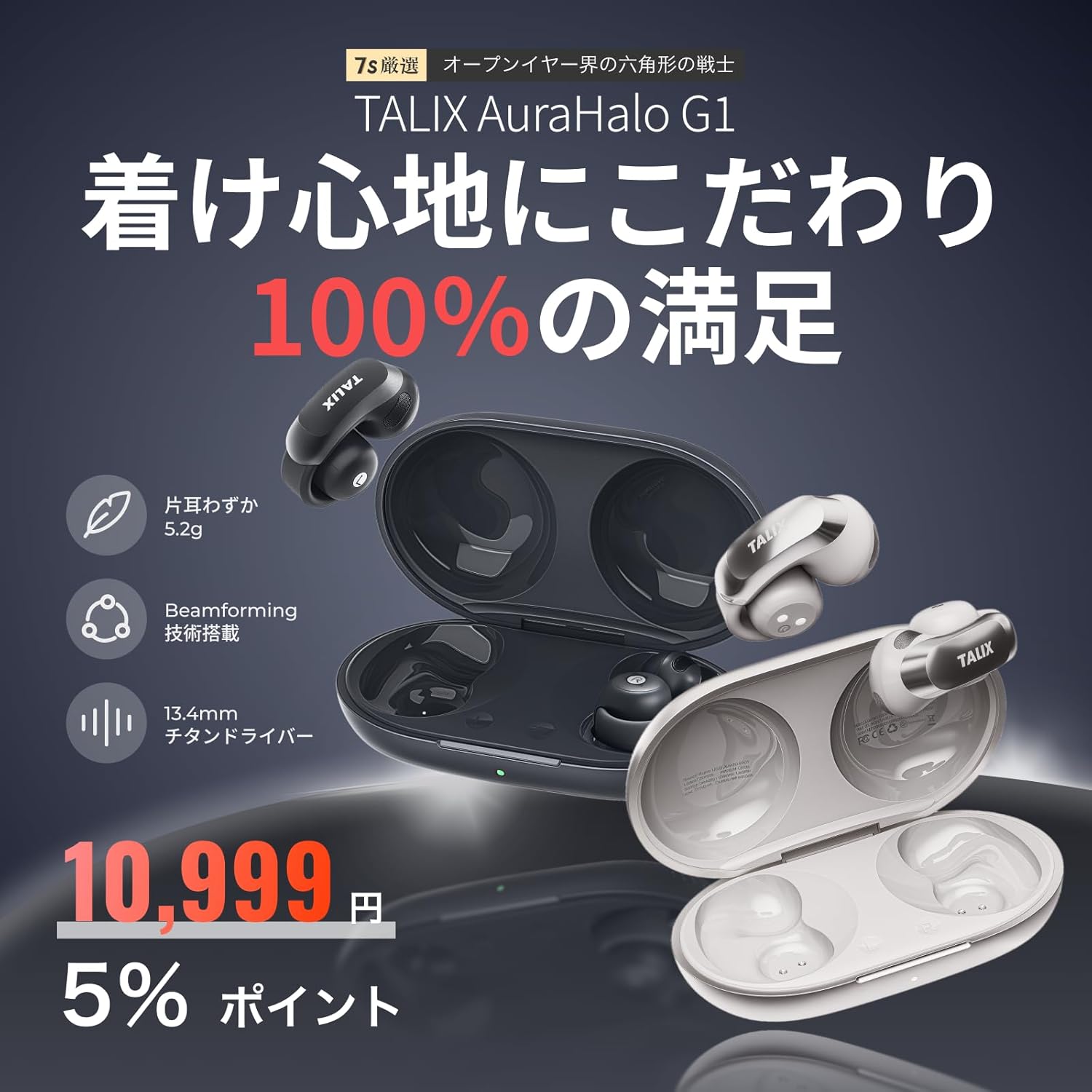
છબી: ઓવરview of TALIX AuraHalo G1 highlighting key features: 5.2g ultra-lightweight, Beamforming technology, and 13.4mm Titanium Driver.
3. પેકેજ સામગ્રી
કૃપા કરીને તપાસો કે બધી વસ્તુઓ પેકેજમાં હાજર છે:
- TALIX AuraHalo G1 Earbuds (Left and Right) x 1
- ચાર્જિંગ કેસ x 1
- USB-C ચાર્જિંગ કેબલ x 1
- વપરાશકર્તા માર્ગદર્શિકા x 1

Image: Contents of the TALIX AuraHalo G1 package, including earbuds, charging case, USB-C cable, and manual.
4. સેટઅપ
4.1 ચાર્જિંગ
પ્રથમ ઉપયોગ કરતા પહેલા, ઇયરબડ્સ અને ચાર્જિંગ કેસને સંપૂર્ણપણે ચાર્જ કરો.
- ચાર્જિંગ કેસમાં ઇયરબડ્સ મૂકો.
- Connect the USB-C charging cable to the charging port on the case and a power source.
- કેસ પરના સૂચક લાઇટ ચાર્જિંગ સ્થિતિ બતાવશે. સંપૂર્ણ ચાર્જ થવામાં લગભગ 1.5 કલાક લાગે છે.
4.2 પેરિંગ
- Open the charging case. The earbuds will automatically enter pairing mode, indicated by a flashing LED light.
- તમારા ઉપકરણ (સ્માર્ટફોન, ટેબ્લેટ, વગેરે) પર, બ્લૂટૂથ સક્ષમ કરો.
- માટે શોધો "TALIX AuraHalo G1" in the list of available Bluetooth devices and select it to connect.
- એકવાર કનેક્ટ થઈ ગયા પછી, ઇયરબડ્સ પરનો LED સૂચક ફ્લેશ થવાનું બંધ થઈ જશે.
૫.૧ ઇયરબડ્સ પહેરવા
For optimal sound and comfort, ensure the earbuds are worn correctly.
- Gently stretch the ear hook and place it over your ear.
- Adjust the earbud so the speaker part is directed towards your ear canal.
- Ensure the L (left) and R (right) markings match your ears. Do not excessively bend or stretch the ear hook.

Image: Visual guide demonstrating the correct way to wear the TALIX AuraHalo G1 earbuds, showing proper ear hook placement and speaker alignment, alongside examples of incorrect wearing.
5. ઓપરેટિંગ સૂચનાઓ
5.1 ટચ કંટ્રોલ્સ
The TALIX AuraHalo G1 earbuds feature intuitive touch controls on each earbud. The functions may vary slightly between the left and right earbuds.

Image: Diagram illustrating the touch control functions for the TALIX AuraHalo G1 earbuds.
| ક્રિયા | ડાબું ઇયરબડ | જમણું ઇરબડ |
|---|---|---|
| ડબલ ટેપ કરો | કૉલનો જવાબ આપો/સમાપ્ત કરો, સંગીત વગાડો/થોભાવો | કૉલનો જવાબ આપો/સમાપ્ત કરો, સંગીત વગાડો/થોભાવો |
| ટ્રિપલ ટેપ | Reject Incoming Call, Previous Track | Reject Incoming Call, Next Track |
| લાંબા સમય સુધી દબાવો | વૉઇસ સહાયકને સક્રિય કરો | વૉઇસ સહાયકને સક્રિય કરો |
5.2 કૉલ કાર્યો
- કallsલ્સનો જવાબ / અંત: કોઈપણ ઇયરબડ પર બે વાર ટૅપ કરો.
- નામંજૂર કallsલ્સ: કોઈપણ ઇયરબડ પર ત્રણ વાર ટેપ કરો.
- The built-in microphone with Beamforming technology enhances call clarity by reducing ambient noise.
5.3 સંગીત પ્લેબેક
- ચલાવો/થોભો: કોઈપણ ઇયરબડ પર બે વાર ટૅપ કરો.
- આગળનો ટ્રેક: જમણા ઇયરબડ પર ત્રણ વાર ટૅપ કરો.
- પાછલો ટ્રેક: ડાબા ઇયરબડ પર ત્રણ વાર ટૅપ કરો.
Voice. Voice અવાજ સહાયક
- સક્રિય કરો: Long press either earbud to activate your device's voice assistant (e.g., Siri, Google Assistant).
6. જાળવણી
6.1 સફાઈ
- ઇયરબડ્સ અને ચાર્જિંગ કેસને નિયમિતપણે નરમ, સૂકા, લિન્ટ-ફ્રી કપડાથી સાફ કરો.
- ઘર્ષક ક્લીનર્સ, સોલવન્ટ્સ અથવા એરોસોલ સ્પ્રેનો ઉપયોગ કરશો નહીં.
- ખાતરી કરો કે ચાર્જિંગ પોર્ટ અથવા સ્પીકર ગ્રિલ્સમાં કોઈ ભેજ પ્રવેશતો નથી.
6.2 સંગ્રહ
- જ્યારે ઉપયોગમાં ન હોય, ત્યારે ઇયરબડ્સને સુરક્ષિત રાખવા અને ચાર્જ રાખવા માટે તેમના ચાર્જિંગ કેસમાં રાખો.
- સીધા સૂર્યપ્રકાશ અને અતિશય તાપમાનથી દૂર ઠંડી, સૂકી જગ્યાએ સ્ટોર કરો.
૫.૪ પાણી પ્રતિકાર (IPX4)
The TALIX AuraHalo G1 earbuds are rated IPX4, meaning they are resistant to splashing water from any direction. This makes them suitable for use during workouts or in light rain. However, they are not designed for swimming or submersion in water. Do not expose them to pressurized water or high-velocity water.

Image: Visual representation of TALIX AuraHalo G1 earbuds with IPX4 water resistance, showing protection against splashes.
7. મુશ્કેલીનિવારણ
If you encounter any issues with your TALIX AuraHalo G1 headphones, please refer to the following common solutions:
- અવાજ નહીં/ઓછો અવાજ:
- Ensure the earbuds are properly charged.
- તમારા ડિવાઇસ અને ઇયરબડ બંને પર વૉલ્યૂમ લેવલ ચેક કરો.
- Ensure the earbuds are correctly paired and connected to your device.
- Try cleaning any debris from the speaker grilles.
- જોડી બનાવી શકાતી નથી:
- ખાતરી કરો કે તમારા ઉપકરણ પર બ્લૂટૂથ સક્ષમ છે.
- Ensure the earbuds are in pairing mode (flashing LED).
- તમારા ઉપકરણનું બ્લૂટૂથ બંધ કરીને ચાલુ કરો.
- તમારી બ્લૂટૂથ સૂચિમાંથી ઉપકરણ ભૂલી જાઓ અને ફરીથી જોડી બનાવવાનો પ્રયાસ કરો.
- Ensure the earbuds are not connected to another device.
- તૂટક તૂટક જોડાણ:
- ખાતરી કરો કે તમારું ઉપકરણ બ્લૂટૂથ રેન્જ (સામાન્ય રીતે 10 મીટર/33 ફૂટ) ની અંદર છે અને કોઈ પણ પ્રકારના અવરોધો નથી.
- મજબૂત ઇલેક્ટ્રોમેગ્નેટિક હસ્તક્ષેપ ટાળો.
- તમારા ઉપકરણ સાથે ઇયરબડને ફરીથી જોડો.
- ઇયરબડ્સ ચાર્જ થતા નથી:
- ખાતરી કરો કે ચાર્જિંગ કેબલ કેસ અને પાવર સ્ત્રોત બંને સાથે સુરક્ષિત રીતે જોડાયેલ છે.
- ચાર્જિંગ કેસમાં જ પાવર છે કે નહીં તે તપાસો.
- ઇયરબડ અને કેસ બંને પર ચાર્જિંગ કોન્ટેક્ટ સાફ કરો.
- કોઈ અલગ USB-C કેબલ અથવા પાવર એડેપ્ટર અજમાવી જુઓ.
- ટચ નિયંત્રણો પ્રતિસાદ આપતા નથી:
- સ્પર્શ નિયંત્રણોનો ઉપયોગ કરતી વખતે ખાતરી કરો કે તમારી આંગળીઓ સ્વચ્છ અને સૂકી છે.
- ઇયરબડ્સને કેસમાં મૂકીને ફરીથી બહાર કાઢીને ફરી શરૂ કરો.
જો સમસ્યા ચાલુ રહે, તો કૃપા કરીને ગ્રાહક સપોર્ટનો સંપર્ક કરો.
8. સ્પષ્ટીકરણો
| લક્ષણ | સ્પષ્ટીકરણ |
|---|---|
| મોડેલનું નામ | OW5405 |
| બ્રાન્ડ | ટેલિક્સ |
| કનેક્ટિવિટી ટેકનોલોજી | બ્લૂટૂથ |
| વાયરલેસ કોમ્યુનિકેશન ટેકનોલોજી | બ્લૂટૂથ 5.3 |
| ઇયર પ્લેસમેન્ટ | ખુલ્લા કાન |
| હેડફોન શૈલી | Ear Cuff |
| નિયંત્રણ પ્રકાર | નિયંત્રણને ટચ કરો |
| અવાજ નિયંત્રણ | Call Noise Cancellation (Beamforming) |
| Product Weight (per earbud) | 5.2 ગ્રામ |
| પાણી પ્રતિકાર સ્તર | IPX4 (વોટરપ્રૂફ) |
| ચાર્જિંગ સમય | 1.5 કલાક |
| કુલ રમવાનો સમય (ચાર્જિંગ કેસ સાથે) | 28 કલાક સુધી |
| Playtime (earbuds only) | 7 કલાક સુધી (50% વોલ્યુમ પર) |
| સુસંગત ઉપકરણો | એન્ડ્રોઇડ, આઇઓએસ |
| સામગ્રી | સિલિકોન, પ્લાસ્ટિક |
| સંવેદનશીલતા | 126 ડીબી |
| આવર્તન પ્રતિભાવ | 20 Hz (Note: Full range typically 20Hz-20kHz, only lower bound provided) |
9. વોરંટી અને સપોર્ટ
9.1 30-Day Return Guarantee
Returns are accepted within 30 days of purchase if the product is unopened and in a resalable condition. Please note that opened or used items, as well as included accessories or promotional gifts, are not eligible for return or exchange due to customer reasons.
9.2 Product Warranty (12 Months)
If a product defect occurs within 12 months from the order date, an exchange will be provided upon confirmation by our store. This warranty does not cover defects resulting from normal wear and tear, customer negligence, or improper use. Examples of improper use include, but are not limited to, earbuds soaked in sodium chloride from sweat and left in the charging case, leading to electrochemical reactions or oxidative corrosion. Please be aware of these exclusions.

Image: Information regarding the 30-day return guarantee and 12-month product warranty for TALIX AuraHalo G1.
9.3 ગ્રાહક સપોર્ટ
For further assistance or inquiries, please contact TALIX customer support through the retailer where you purchased the product.