
પરિચય
This manual provides essential instructions for the safe and efficient operation of your Generic Portable Bluetooth Speaker with Solar Charging, Model B0FVMB2F8H. Please read this manual thoroughly before using the product and retain it for future reference.
સલામતી માહિતી
- Do not expose the speaker to extreme temperatures or direct sunlight for prolonged periods when not in use, especially the solar panel.
- સ્પીકરને મજબૂત અસરમાં મૂકવા અથવા તેને આધીન કરવાનું ટાળો.
- સ્પીકરને જાતે ડિસએસેમ્બલ, રિપેર અથવા સુધારશો નહીં. કોઈપણ સમારકામ માટે લાયક સેવા કર્મચારીઓનો સંપર્ક કરો.
- Keep the speaker away from water and liquids, despite its waterproof design, to prevent damage to internal components.
- Use only the specified charging cables and power adapters.
- બાળકોની પહોંચથી દૂર રાખો.
પેકેજ સામગ્રી
કૃપા કરીને નીચેની વસ્તુઓ માટે પેકેજ તપાસો:
- Portable Bluetooth Speaker (Model B0FVMB2F8H)
- યુએસબી ચાર્જિંગ કેબલ
- ઝડપી પ્રારંભ માર્ગદર્શિકા
ઉત્પાદન ઓવરview
Familiarize yourself with the components of your speaker:
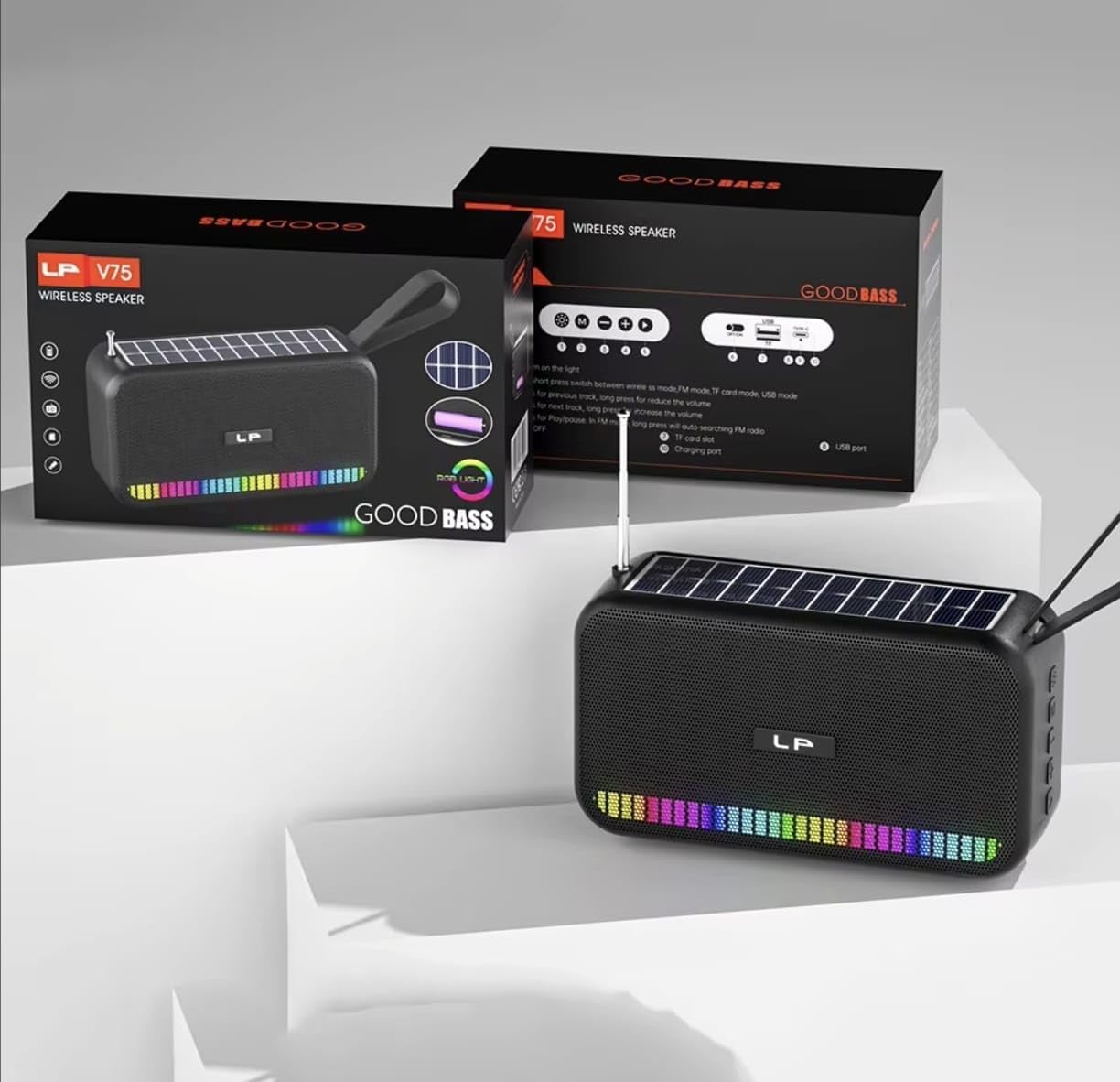
છબી: આગળ view of the portable Bluetooth speaker, highlighting its solar panel, LED light display, and overall dimensions (approximately 170.5mm length, 95mm height, 60mm width).
- સૌર પેનલ: Located on the top surface for solar charging.
- એલઇડી લાઇટ ડિસ્પ્લે: Front-facing lights that synchronize with music.
- નિયંત્રણ બટનો: (Details not provided, assuming standard buttons for power, volume, mode, play/pause).
- યુએસબી પોર્ટ: For charging and USB drive playback.
- ટીએફ કાર્ડ સ્લોટ: For TF card playback.
- ચાર્જિંગ પોર્ટ: For USB cable charging.
- એન્ટેના: Extendable for FM radio reception.
- વહન પટ્ટો: પોર્ટેબિલિટી માટે.

છબી: પાછળ view of the portable Bluetooth speaker, showing the battery compartment open with a rechargeable battery inserted. Also visible are the USB and charging ports.
સેટઅપ
1. સ્પીકરને ચાર્જ કરવો
Your speaker offers two charging methods:
- સૌર ચાર્જિંગ: Place the speaker with the solar panel facing direct sunlight. The charging indicator light will illuminate. Solar charging is ideal for maintaining battery life outdoors but may be slower than USB charging.
- યુએસબી ચાર્જિંગ: Connect the provided USB charging cable to the speaker's charging port and the other end to a USB power adapter (not included) or a computer's USB port. The charging indicator light will show charging status. A full charge typically takes several hours.
Ensure the speaker is fully charged before first use for optimal battery performance.
2. પાવર ચાલુ/બંધ
- પાવર ચાલુ કરવા માટે: Press and hold the Power button (usually marked with 🏻 or ચાલુ/બંધ) for approximately 3 seconds until you hear an audible prompt or see the LED lights activate.
- પાવર ઓફ કરવા માટે: Press and hold the Power button again for approximately 3 seconds until the speaker powers down.
ઓપરેટિંગ સૂચનાઓ
1. બ્લૂટૂથ મોડ
- બ્લૂટૂથ મોડ દાખલ કરો: Upon powering on, the speaker typically defaults to Bluetooth mode. If not, press the "M" (Mode) button until you hear the "Bluetooth Mode" prompt. The LED indicator will flash, indicating it's ready for pairing.
- જોડી બનાવવું:
- તમારા ઉપકરણ (સ્માર્ટફોન, ટેબ્લેટ, વગેરે) પર બ્લૂટૂથ સક્ષમ કરો.
- માટે શોધો available Bluetooth devices. The speaker will appear as "B0FVMB2F8H" or a similar name.
- Select the speaker from the list to connect. Once paired, you will hear a confirmation sound, and the LED indicator will stop flashing.
- પ્લેબેક નિયંત્રણ:
- ચલાવો/થોભો: પ્લે / થોભો બટન દબાવો (⏸).
- આગળનો ટ્રેક: Press the "Next" button (⏭).
- પાછલો ટ્રેક: Press the "Previous" button (⏮).
- અવાજ વધારો: Long press the "Next" button or use a dedicated Volume Up button.
- અવાજ ધીમો: Long press the "Previous" button or use a dedicated Volume Down button.
2. FM રેડિયો મોડ
- Enter FM Mode: Press the "M" (Mode) button repeatedly until you hear the "FM Radio" prompt.
- એન્ટેના વિસ્તૃત કરો: બહેતર રિસેપ્શન માટે ટેલિસ્કોપિક એન્ટેનાને સંપૂર્ણપણે લંબાવો.
- ઓટો સ્કેન: પ્લે/પોઝ બટન દબાવો અને પકડી રાખો (⏸) to automatically scan and save available FM stations. The speaker will cycle through frequencies and store them.
- Switch Stations: Use the "Next" (⏭) and "Previous" (⏮) buttons to navigate through the saved stations.
3. USB / TF Card Playback
- મીડિયા દાખલ કરો: Insert a USB flash drive into the USB port or a TF (MicroSD) card into the TF card slot. The speaker will automatically detect the media and switch to the corresponding playback mode.
- પ્લેબેક નિયંત્રણ: Use the Play/Pause, Next, and Previous buttons for controlling playback, similar to Bluetooth mode.
4. LED Light Display
The speaker features dynamic RGB LED lights that can synchronize with your music. Specific controls for the LED lights (e.g., changing patterns, turning off) are not detailed in the product information, but they typically activate automatically with audio playback. If there is a dedicated light button, press it to cycle through modes or turn off the lights.
5. હેન્ડ્સ-ફ્રી કૉલિંગ
જ્યારે બ્લૂટૂથ દ્વારા સ્માર્ટફોન સાથે કનેક્ટ થાય છે, ત્યારે સ્પીકરનો ઉપયોગ હેન્ડ્સ-ફ્રી કૉલ્સ માટે થઈ શકે છે.
- કૉલનો જવાબ આપો: પ્લે / થોભો બટન દબાવો (⏸) once to answer an incoming call.
- કૉલ સમાપ્ત કરો: પ્લે / થોભો બટન દબાવો (⏸) once to end an ongoing call.
- કૉલ નકારો: પ્લે/પોઝ બટન દબાવો અને પકડી રાખો (⏸) to reject an incoming call.
જાળવણી
- સફાઈ: Use a soft, dry cloth to clean the speaker's surface. Do not use abrasive cleaners, alcohol, or chemical solvents.
- સૌર પેનલ: Keep the solar panel clean and free of dust or debris to ensure efficient charging.
- સંગ્રહ: When not in use for extended periods, store the speaker in a cool, dry place. It is recommended to fully charge the battery every 3 months to prolong its lifespan.
મુશ્કેલીનિવારણ
| સમસ્યા | સંભવિત કારણ | ઉકેલ |
|---|---|---|
| સ્પીકર ચાલુ થતો નથી. | ઓછી બેટરી. | Charge the speaker using the USB cable or place it in direct sunlight. |
| બ્લૂટૂથ દ્વારા જોડી બનાવી શકાતી નથી. | ડિવાઇસમાં બ્લૂટૂથ ચાલુ નથી; સ્પીકર પેરિંગ મોડમાં નથી; ડિવાઇસથી ખૂબ દૂર છે. | Ensure Bluetooth is on and the speaker is in pairing mode. Move device closer to speaker (within 10 meters). Forget previous pairings on your device and try again. |
| કોઈ અવાજ નથી કે ઓછો અવાજ નથી. | Volume too low on speaker or connected device; incorrect mode selected. | Increase volume on both the speaker and your connected device. Ensure the correct mode (Bluetooth, FM, USB, TF) is selected. |
| એફએમ રેડિયો રિસેપ્શન નબળું છે. | એન્ટેના વિસ્તૃત નથી; નબળો સિગ્નલ. | Fully extend the telescopic antenna. Try repositioning the speaker for better signal reception. |
| USB/TF કાર્ડ ચાલી રહ્યું નથી. | અયોગ્ય file ફોર્મેટ; કાર્ડ/ડ્રાઇવ યોગ્ય રીતે દાખલ કરેલ નથી; દૂષિત મીડિયા. | ઑડિયોની ખાતરી કરો files are in a compatible format (e.g., MP3). Reinsert the USB drive or TF card. Try a different USB drive or TF card. |
વિશિષ્ટતાઓ
| મોડલ નંબર: | B0FVMB2F8H |
| કનેક્ટિવિટી ટેકનોલોજી: | બ્લૂટૂથ |
| પાવર સ્ત્રોત: | Solar, USB |
| રેડિયો બેન્ડ્સ સપોર્ટેડ: | એફએમ (૮૭.૫-૧૦૮ મેગાહર્ટ્ઝ) |
| ખાસ લક્ષણો: | Solar charging, LED light display, Multi-playback options (Bluetooth, FM Radio, USB, TF card) |
| સુસંગત ઉપકરણો: | Bluetooth devices, USB devices, TF cards, FM radio signals |
| ડિસ્પ્લે પ્રકાર: | એલઇડી |
| રંગ: | કાળો |
| ઉત્પાદક: | ચીન |
વોરંટી અને આધાર
આ ઉત્પાદન એ સાથે આવે છે 15-દિવસની વોરંટી from the date of purchase. This warranty covers manufacturing defects. It does not cover damage caused by misuse, accidents, unauthorized modifications, or normal wear and tear.
For warranty claims or technical support, please refer to the contact information provided by your retailer or the seller "CLASSYSA" on Amazon. Please retain your proof of purchase for warranty validation.