
વર્કપ્રો W082191AE
WORKPRO 96x24" Heavy-Duty Adjustable Workbench Instruction Manual
મોડેલ: W082191AE
પરિચય
This manual provides detailed instructions for the assembly, operation, maintenance, and troubleshooting of your WORKPRO 96x24" Heavy-Duty Adjustable Workbench. Please read this manual thoroughly before use to ensure safe and efficient operation and to maximize the lifespan of your workbench.
The WORKPRO workbench is designed for demanding tasks in garages and workshops, featuring a robust construction and versatile functionalities.
સલામતી માહિતી
Always follow basic safety precautions when using this workbench to reduce the risk of injury or damage. Keep the work area clean and well-lit. Ensure the workbench is placed on a stable, level surface before use. Do not exceed the maximum load capacity of 4000 lbs.
- ઉપયોગ કરતા પહેલા ખાતરી કરો કે બધા ફાસ્ટનર્સ સુરક્ષિત રીતે કડક છે.
- Do not stand or climb on the workbench.
- Distribute weight evenly across the workbench surface.
- Keep children and unauthorized persons away from the workbench during use.
- Disconnect power from the integrated power outlet when not in use or during maintenance.
ઘટકોની સૂચિ
એસેમ્બલી પહેલાં, ખાતરી કરો કે બધા ઘટકો હાજર છે અને તેમને કોઈ નુકસાન થયું નથી. જો કોઈ ભાગો ખૂટે છે અથવા નુકસાન થયું છે, તો ગ્રાહક સેવાનો સંપર્ક કરો.
| ઘટક | જથ્થો | વર્ણન |
|---|---|---|
| Rubber Wood Top | 1 | 96"x24" work surface, 1.2 inches thick. |
| લેગ એસેમ્બલીઝ | 4 | Industrial-grade Q195 square tubes with SPCC panels. |
| લેવલિંગ ફીટ | 4 | Adjustable feet for stability on uneven floors. |
| પાવર સ્ટ્રિપ | 1 | ETL/FCC-certified with 4 AC outlets, 1 USB, 1 Type-C port, 5FT cord. |
| પેગબોર્ડ | 1 | Side-mounted for tool organization. |
| પેગબોર્ડ હુક્સ | 20 | 10 long (3.9 in) and 10 short (2.2 in) hooks. |
| એસેમ્બલી હાર્ડવેર | 1 સેટ | Screws, bolts, and any necessary tools for assembly. |
સેટઅપ અને એસેમ્બલી
Assembly typically takes 15 minutes with clear instructions. It is recommended to have a Phillips screwdriver or electric drill with a screwdriver attachment, and a small drill for pilot holes, as some users have noted that pilot holes may not be pre-drilled for all screws.
એસેમ્બલી પગલાં:
- પગ જોડો: Secure the leg assemblies to the workbench top using the provided hardware. Ensure the dual-screw fastening points are aligned.
- Secure the Bezel: Attach any bezels or support beams as indicated in the instructions to reinforce the structure.
- ઊંચાઈ સમાયોજિત કરો: The workbench offers 6 adjustable heights from 28-3/4" to 38-1/2". Adjust each leg to your desired height setting (indicated by pre-drilled holes) and secure with the provided fasteners.
- Connect the Leveling Feet: Screw the height-adjustable leveling feet into the bottom of each leg. Adjust them to compensate for uneven floors and ensure the workbench is perfectly level and stable.
- Install Pegboard and Hooks: Attach the side-mounted pegboard. Insert the 10 long (3.9 in) and 10 short (2.2 in) hooks into the pegboard holes to organize your tools.
- Connect Power Outlet: Ensure the ETL-certified power strip is securely integrated into the workbench. Plug the 5FT power cord into a suitable wall outlet.
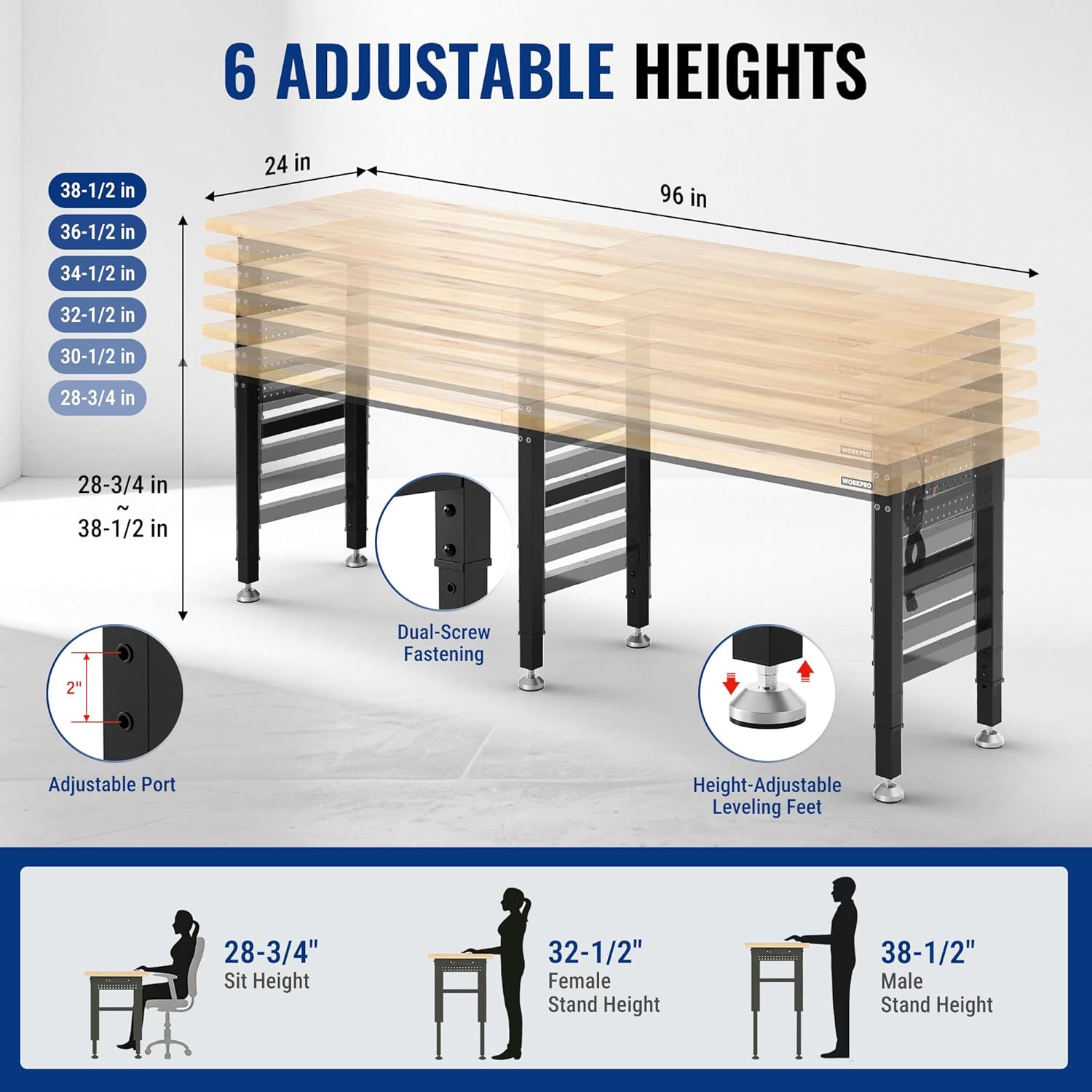
Figure 1: Attaching the workbench legs to the tabletop. Note the dual-screw fastening for stability.

Figure 2: Securing the bezel to the workbench frame for added structural integrity.

Figure 3: Diagram showing the six adjustable height options for the workbench, ranging from 28-3/4 inches to 38-1/2 inches.

Figure 4: Installation and adjustment of the height-adjustable leveling feet to ensure workbench stability.

Figure 5: The double-sided pegboard with various tools hung on the included hooks, demonstrating organized storage.

Figure 6: Close-up of the multi-functional power outlet, featuring 4 AC outlets, 1 USB port, and 1 Type-C port.
Video 1: Official WORKPRO video demonstrating the assembly process of the adjustable workbench.
ઓપરેટિંગ સૂચનાઓ
Adjusting Workbench Height:
To adjust the height, loosen the fasteners on each leg, slide the inner leg section to the desired height setting (indicated by pre-drilled holes), and re-tighten the fasteners securely. Ensure all legs are set to the same height for a level work surface. The workbench can be adjusted for sitting (28-3/4") or standing (up to 38-1/2") use.

Figure 7: The workbench demonstrating its adjustable height feature, suitable for both seated and standing work positions.
પાવર આઉટલેટનો ઉપયોગ:
The integrated power strip provides convenient access to power for your tools and devices. It includes 4 AC outlets, 1 USB port, and 1 Type-C port. Plug the workbench's main power cord into a grounded wall outlet. Use the power strip's on/off switch to control power to the outlets. Always ensure tools and devices are within the power strip's electrical limits.
Utilizing the Pegboard:
The side-mounted pegboard and included hooks allow for organized storage of frequently used tools and accessories, keeping your workspace tidy and efficient.
જાળવણી
- સફાઈ: Wipe the rubber wood top with a damp cloth and mild detergent. Avoid harsh chemicals that may damage the wood finish. Clean the metal frame with a damp કાપડ
- ફાસ્ટનર તપાસ: Periodically check all screws and bolts for tightness. Re-tighten as necessary to maintain stability and safety.
- Wood Top Care: The 1.2-inch thick solid rubber wood top is durable. To prolong its life and appearance, consider applying a wood conditioner or sealant periodically, especially if exposed to moisture or heavy use.
- ઇલેક્ટ્રિકલ સલામતી: Inspect the power cord and power strip for any signs of damage. Do not use if damaged.
મુશ્કેલીનિવારણ
| સમસ્યા | સંભવિત કારણ | ઉકેલ |
|---|---|---|
| Workbench is unstable or wobbles. | Uneven floor; loose fasteners; legs not adjusted to the same height. | Adjust the leveling feet until stable. Ensure all fasteners are tight. Verify all legs are set to the same height. |
| પાવર આઉટલેટ કામ કરતા નથી. | Power strip switch is off; not plugged into wall outlet; circuit breaker tripped. | Ensure the power strip switch is ON. Check if the workbench is plugged into a live wall outlet. Reset the circuit breaker if necessary. |
| ઊંચાઈ ગોઠવવામાં મુશ્કેલી. | Fasteners are too tight; debris in adjustment holes. | Loosen fasteners completely before attempting to adjust. Clear any obstructions from the adjustment holes. |
વિશિષ્ટતાઓ
- મોડલ: W082191AE
- પરિમાણો (L x W): 96 ઇંચ x 24 ઇંચ
- એડજસ્ટેબલ ઊંચાઈ શ્રેણી: 28-3/4 inches to 38-1/2 inches
- લોડ ક્ષમતા: 4000 lbs
- ટેબ્લેટોપ સામગ્રી: 1.2-inch thick Solid Rubber Wood
- ફ્રેમ સામગ્રી: Industrial-grade Q195 Square Tubes, SPCC Panels (Metal)
- પાવર આઉટલેટ: ETL/FCC-certified, 4 AC outlets, 1 USB port, 1 Type-C port, 5FT power cord
- Pegboard: Side-mounted, includes 20 hooks (10 long, 10 short)
- સ્તરીકરણ: Height-adjustable leveling feet
- એસેમ્બલી જરૂરી: હા
- બ્રાન્ડ: વર્કપ્રો
- ઉત્પાદક: HANGZHOU GREATSTAR INDUSTRIAL CO.,LTD
- જીટીઆઈએન/યુપીસી: 820909628316
વોરંટી અને આધાર
For warranty information or technical support, please refer to the documentation included with your purchase or contact WORKPRO customer service directly. Our expert customer service team is available to assist with any issues related to your workbench.
સંપર્ક માહિતી સામાન્ય રીતે ઉત્પાદકના webસાઇટ પર અથવા ઉત્પાદન પેકેજિંગ પર.
Ask a question about this manual
Ask about setup, troubleshooting, compatibility, parts, safety, or missing instructions. Manuals+ will review the question and use this page’s manual context to help answer it.