
મહત્વપૂર્ણ સુરક્ષા
વિદ્યુત ઉપકરણોનો ઉપયોગ કરતી વખતે, મૂળભૂત સલામતી સાવચેતીઓનું હંમેશા પાલન કરવું જોઈએ, જેમાં નીચેનાનો સમાવેશ થાય છે:
- ટોસ્ટર ચલાવતા પહેલા બધી સૂચનાઓ વાંચો.
- ગરમ સપાટીને સ્પર્શ કરશો નહીં. હેન્ડલ્સ અથવા નોબ્સનો ઉપયોગ કરો.
- વિદ્યુત આંચકાથી બચાવવા માટે, કોર્ડ, પ્લગ અથવા ટોસ્ટરને પાણી કે અન્ય પ્રવાહીમાં બોળશો નહીં.
- જ્યારે બાળકો દ્વારા અથવા તેની નજીકના કોઈપણ ઉપકરણનો ઉપયોગ કરવામાં આવે ત્યારે નજીકની દેખરેખ જરૂરી છે.
- જ્યારે ઉપયોગમાં ન હોય અને સફાઈ કરતા પહેલા આઉટલેટમાંથી અનપ્લગ કરો. ભાગો મૂકતા અથવા ઉતારતા પહેલા ઠંડુ થવા દો.
- ક્ષતિગ્રસ્ત કોર્ડ અથવા પ્લગ સાથે અથવા ઉપકરણમાં ખામી સર્જાયા પછી અથવા કોઈપણ રીતે નુકસાન થયા પછી કોઈપણ ઉપકરણને ચલાવશો નહીં.
- ઉપકરણ ઉત્પાદક દ્વારા ભલામણ ન કરાયેલ સહાયક જોડાણોનો ઉપયોગ ઇજાઓનું કારણ બની શકે છે.
- બહારનો ઉપયોગ કરશો નહીં.
- કોર્ડને ટેબલ અથવા કાઉન્ટરની કિનારે લટકવા ન દો, અથવા ગરમ સપાટીને સ્પર્શશો નહીં.
- ગરમ ગેસ અથવા ઇલેક્ટ્રિક બર્નર પર અથવા તેની નજીક અથવા ગરમ પકાવવાની નાની ભઠ્ઠીમાં ન મૂકો.
- ડિસ્કનેક્ટ કરવા માટે, કોઈપણ નિયંત્રણને "બંધ" કરો, પછી દિવાલના આઉટલેટમાંથી પ્લગ દૂર કરો.
- ઇચ્છિત ઉપયોગ સિવાય અન્ય માટે ઉપકરણનો ઉપયોગ કરશો નહીં.
- ટોસ્ટરમાં મોટા કદના ખોરાક, ધાતુના વરખના પેકેજો અથવા વાસણો ન નાખવા જોઈએ કારણ કે તેનાથી આગ લાગી શકે છે અથવા ઇલેક્ટ્રિક શોકનું જોખમ વધી શકે છે.
- જો ટોસ્ટર ચાલુ હોય ત્યારે, પડદા, ડ્રેપરીઝ, દિવાલો અને તેના જેવા સહિત જ્વલનશીલ સામગ્રીને ઢાંકવામાં આવે અથવા સ્પર્શ કરે તો આગ લાગી શકે છે.
- જ્યારે ટોસ્ટર પ્લગ ઇન હોય ત્યારે ખોરાકને દૂર કરવાનો પ્રયાસ કરશો નહીં.
- અડ્યા વિના કામ કરશો નહીં.
- હંમેશાં ઉપકરણને પ્રથમ પ્લગ જોડો, પછી દિવાલના આઉટલેટમાં પ્લગ કોર્ડ.
- આ ઉપકરણ ફક્ત ઘરેલું ઉપયોગ માટે છે.
ઉત્પાદન ઓવરview
The Gourmia 4-Slice Toaster (Model GDT2680) features dual independent controls, extra-wide slots, and multiple toasting functions for versatile use. Its compact design and smudge-resistant finish make it a practical addition to any kitchen.

આગળ view of the Gourmia 4-Slice Toaster, showcasing the dual control panels and four toasting slots.

The toaster features independent temperature settings for each pair of slots, allowing different items to be toasted simultaneously.
સેટઅપ
- Unpack the Toaster: ટોસ્ટર અને બધી પેકેજિંગ સામગ્રી કાળજીપૂર્વક દૂર કરો.
- Position the Toaster: Place the toaster on a stable, heat-resistant surface, away from flammable materials such as curtains or walls. Ensure adequate ventilation around the appliance.
- Initial Use (Burn-off): Before toasting food for the first time, operate the toaster without bread on the highest browning setting (6) for a few minutes. This will burn off any manufacturing residues and eliminate initial odors. It is normal for some smoke or odor to be present during this process.
- પ્લગ ઇન: પાવર પ્લગને પ્રમાણભૂત 120V AC ઇલેક્ટ્રિકલ આઉટલેટમાં દાખલ કરો.
ઓપરેટિંગ સૂચનાઓ
The Gourmia 4-Slice Toaster features two independent control panels, allowing you to toast different items simultaneously with separate settings.
1. Loading Bread
- Place up to two slices of bread, bagels, or other items into each set of toasting slots. The extra-wide slots accommodate various bread types.
- Ensure items are centered within the slots for even toasting.

Illustration of the simple three-step process: Add toast, choose settings, and enjoy.
2. Selecting Browning Level
- Use the browning control knob on each side of the toaster to select your desired toast shade from 1 (lightest) to 6 (darkest).
- The digital display will show the selected browning level and a countdown timer during operation.

Visual guide to the six browning levels, from barely toasted to dark roast.
3. Using Special Functions
Each control panel has dedicated buttons for special toasting modes:
- Bagel Mode: દબાવો બેગેલ button. This mode toasts the cut side of the bagel while gently warming the outer side.
- ડિફ્રોસ્ટ મોડ: દબાવો ડેફ્રોસ્ટ button. This mode is ideal for toasting frozen bread, waffles, or pastries, adding extra time to thaw before toasting.
- Reheat Mode: દબાવો ફરીથી ગરમી કરો button. This mode warms previously toasted items without further browning.
- રદ કરો: દબાવો રદ કરો button at any time to stop the toasting cycle and eject the bread.

The control panel showing the Bagel, Defrost, and Cancel function buttons.

Using the Defrost preset for frozen items like waffles.
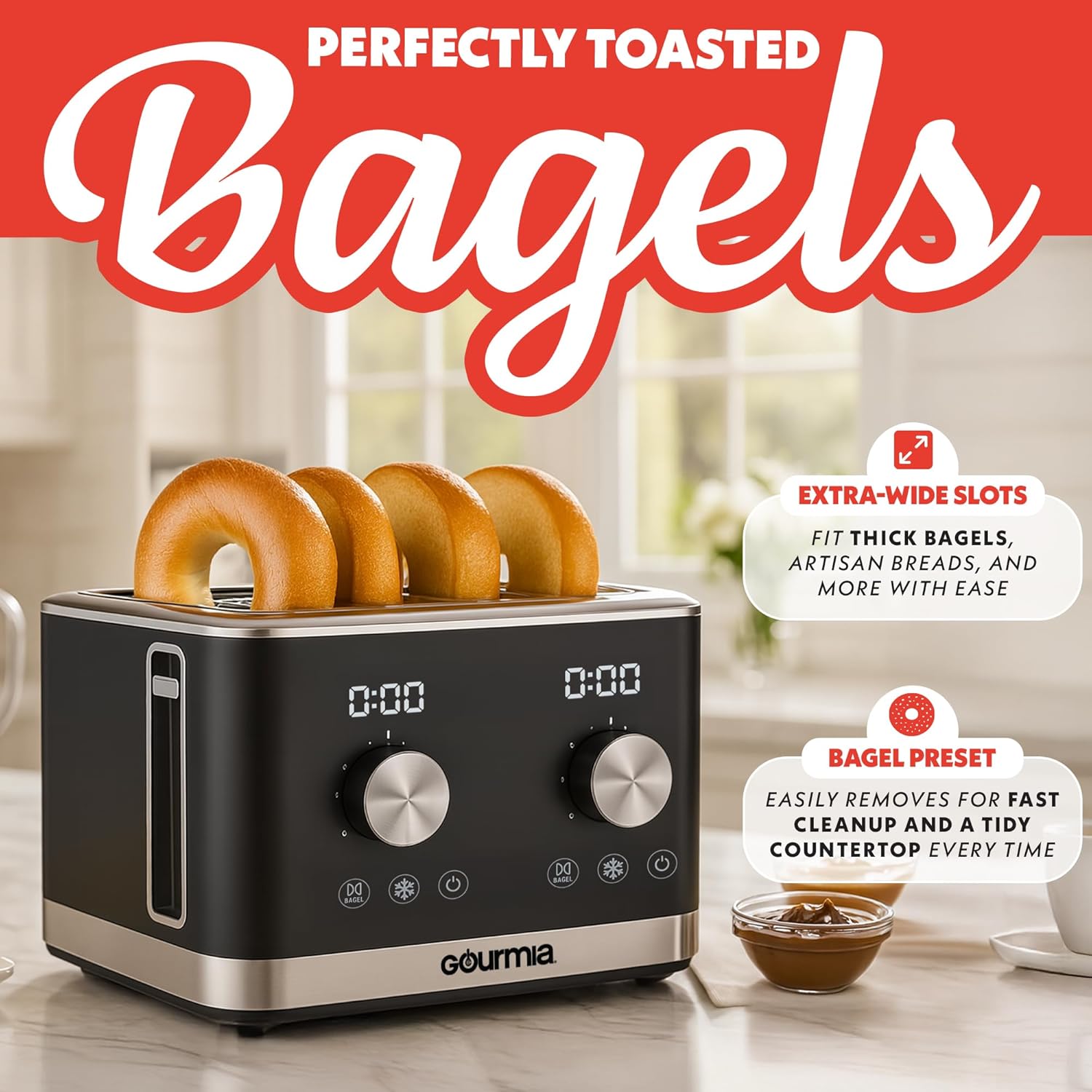
The extra-wide slots accommodate bagels, and the Bagel preset ensures proper toasting.
4. Starting the Toasting Cycle
- After selecting your desired browning level and any special functions, push down the carriage lever until it locks into place. The toasting cycle will begin.
- The digital display will show a countdown of the remaining toasting time.
- એકવાર ચક્ર પૂર્ણ થઈ જાય, પછી ટોસ્ટ આપમેળે પોપ અપ થઈ જશે.

The auto pop-up feature and extra-lift lever for safe removal of smaller items.
5. Using the Extra-Lift Lever
For smaller items that may be difficult to retrieve, gently lift the carriage lever upwards after the toasting cycle is complete. This raises the toast higher for easier and safer removal.
સફાઈ અને જાળવણી
નિયમિત સફાઈ શ્રેષ્ઠ કામગીરી સુનિશ્ચિત કરે છે અને તમારા ટોસ્ટરનું આયુષ્ય વધારે છે.
- અનપ્લગ કરો અને ઠંડુ કરો: ટોસ્ટરને હંમેશા પાવર આઉટલેટમાંથી અનપ્લગ કરો અને સાફ કરતા પહેલા તેને સંપૂર્ણપણે ઠંડુ થવા દો.
- Empty Crumb Trays: Pull out the two slide-out crumb trays located at the bottom of the toaster. Discard accumulated crumbs. Wipe the trays clean with a damp ફરીથી નાખતા પહેલા કાપડને સારી રીતે સૂકવી લો.
- સ્વચ્છ બાહ્ય: ટોસ્ટરના બાહ્ય ભાગને સોફ્ટ, ડી થી સાફ કરો.amp cloth. For stubborn stains, use a mild non-abrasive cleaner. The toaster features a smudge-resistant finish for easy cleaning.
- નિમજ્જન ન કરો: ટોસ્ટરને ક્યારેય પાણીમાં કે અન્ય કોઈ પ્રવાહીમાં બોળશો નહીં.
- સ્વચ્છ આંતરિક ભાગ: Do not insert any objects into the toasting slots to clean. If food becomes lodged, unplug the toaster and carefully remove the food after it has cooled.
- સંગ્રહ: When not in use, store the toaster in a clean, dry place. The power cord can be wrapped around the cord storage area at the bottom of the unit.

The removable crumb tray simplifies cleaning and keeps your countertop tidy.
મુશ્કેલીનિવારણ
| સમસ્યા | સંભવિત કારણ | ઉકેલ |
|---|---|---|
| ટોસ્ટર ચાલુ થતું નથી. | પ્લગ ઇન નથી; પાવર outage; ખામીયુક્ત આઉટલેટ. | ખાતરી કરો કે ટોસ્ટર કાર્યરત ઇલેક્ટ્રિકલ આઉટલેટમાં સુરક્ષિત રીતે પ્લગ થયેલ છે. તમારા સર્કિટ બ્રેકરને તપાસો. |
| Bread does not toast. | Carriage lever not fully depressed; browning setting too low. | Push the carriage lever down until it locks. Increase the browning setting. |
| ટોસ્ટ ખૂબ જ હળવો/ઘેરો છે. | Browning setting incorrect for desired shade. | ઘાટા ટોસ્ટ માટે બ્રાઉનિંગ કંટ્રોલ નોબને ઊંચી સેટિંગ અથવા હળવા ટોસ્ટ માટે નીચી સેટિંગમાં ગોઠવો. |
| ટોસ્ટરમાંથી ધુમાડો નીકળી રહ્યો છે. | Food lodged in slots; excessive crumbs in tray; initial burn-off. | Press CANCEL, unplug, and allow to cool. Carefully remove any lodged food. Empty crumb trays. Initial smoke is normal during first use. |
| Bread stuck in toaster. | Item too large; item not centered. | Press CANCEL, unplug, and allow to cool. Use the extra-lift lever. If still stuck, carefully remove with non-metallic tongs. |
વિશિષ્ટતાઓ
- મોડલ: જીડીટી 2680
- બ્રાન્ડ: ગૌરમિયા
- રંગ: કાળો
- સામગ્રી: પ્લાસ્ટિક, સ્ટેનલેસ સ્ટીલ
- ઉત્પાદનના પરિમાણો (D x W x H): ૧૨.૨" x ૧૪" x ૫૭.૨"
- વસ્તુનું વજન: 5 પાઉન્ડ
- વાટtage: 1700 વોટ
- ભાગtage: 120 વોલ્ટ
- Slot Count: 4
- બ્રાઉનિંગ લેવલ: 6
- ખાસ લક્ષણો: Cord Storage, Removable Crumb Tray, Variable Browning Control, Dual Independent Controls, Bagel Mode, Defrost Mode, Reheat Mode, Auto Pop-up, Extra-Lift Lever, Smudge-Resistant Finish.
- સમાવાયેલ ઘટકો: Toaster, Crumb Tray

Dimensions of the Gourmia 4-Slice Toaster for counter space planning.
વોરંટી અને આધાર
This Gourmia product is covered by a ૩ વર્ષની ઉત્પાદકની વોરંટી. For extended coverage, you can register your product online.
- વોરંટી નોંધણી: પર તમારી નવી પ્રોડક્ટ રજીસ્ટર કરો www.gourmia.com/register to receive an additional 2 years of FREE warranty coverage. This includes repair service and customer support.
- ગ્રાહક આધાર: For any questions, assistance, or warranty claims, please visit the Gourmia webસાઇટ અથવા તેમની ગ્રાહક સેવાનો સંપર્ક કરો.