
1. પરિચય અને ઓવરview
This manual provides essential instructions for setting up, operating, maintaining, and troubleshooting your iiyama SENSE INFINITY SENSE-15FH127-i7-UH1X-M laptop. This high-performance notebook features a 15.6-inch Full HD anti-glare display, an Intel Core i7-12650H processor, 16GB of DDR4 RAM, and a 1TB NVMe SSD, running on Windows 11 Home.
Please read this manual thoroughly before using your new laptop to ensure proper operation and to maximize its lifespan.

આકૃતિ 1.1: ફ્રન્ટ view of the iiyama SENSE INFINITY laptop with the screen open.
2. સેટઅપ
૧.૧ અનબોક્સિંગ અને પ્રારંભિક નિરીક્ષણ
પેકેજિંગમાંથી બધા ઘટકો કાળજીપૂર્વક દૂર કરો. ખાતરી કરો કે નીચેની વસ્તુઓ શામેલ છે:
- iiyama SENSE INFINITY Laptop
- AC Adapter Set (AC adapter and power cord)
- Various Manuals
- વોરંટી કાર્ડ
લેપટોપ અને એસેસરીઝને નુકસાનના કોઈપણ ચિહ્નો માટે તપાસો. જો કોઈ વસ્તુ ખૂટે છે અથવા નુકસાન થયું છે, તો તાત્કાલિક તમારા રિટેલરનો સંપર્ક કરો.
૩.૧ પાવર એડેપ્ટરને કનેક્ટ કરવું
Before first use, ensure the laptop battery is fully charged. Connect the AC adapter to the power input port on the laptop and then plug the power cord into a wall outlet.

આકૃતિ 2.1: બાજુ view illustrating the power input port and other external terminals.
૨.૩ પ્રારંભિક બુટ અને વિન્ડોઝ સેટઅપ
Press the power button to turn on the laptop. Follow the on-screen instructions to complete the Windows 11 Home setup process. This includes selecting your region, language, connecting to a network, and creating a user account.

Figure 2.2: Laptop displaying the Windows 11 operating system interface.
3. ઓપરેટિંગ સૂચનાઓ
૪.૧ પાવર ચાલુ/બંધ અને સ્લીપ મોડ
- પાવર ચાલુ: કીબોર્ડ ડેક પર સ્થિત પાવર બટન દબાવો.
- પાવર બંધ: વિન્ડોઝમાં સ્ટાર્ટ બટન પર ક્લિક કરો, પછી પાવર > શટ ડાઉન પસંદ કરો.
- નિદ્રા સ્થિતિ: લેપટોપનું ઢાંકણું બંધ કરો અથવા સ્ટાર્ટ મેનૂમાંથી પાવર > સ્લીપ પસંદ કરો.
૪.૨ કીબોર્ડ અને ટચપેડનો ઉપયોગ
The laptop features a Japanese keyboard layout and a multi-touch compatible touchpad. Refer to the Windows operating system documentation for specific gestures and keyboard shortcuts.
૫.૩ બાહ્ય ઉપકરણોને જોડવા
તમારા લેપટોપમાં બાહ્ય ઉપકરણોને કનેક્ટ કરવા માટે વિવિધ પોર્ટ છે:
- યુએસબી પોર્ટ્સ: 2x USB 3.1 (Type-C), 1x USB 3.0, 1x USB 2.0 for connecting peripherals like mice, keyboards, and external storage.
- ડિસ્પ્લે આઉટપુટ: 1x HDMI, 1x Mini DisplayPort for connecting external monitors or projectors.
- ઓડિયો જેક્સ: 1x Headphone/Speaker Output, 1x Microphone Input for audio devices.
- માઇક્રો એસડી કાર્ડ રીડર: Insert a micro SD card to access stored data.
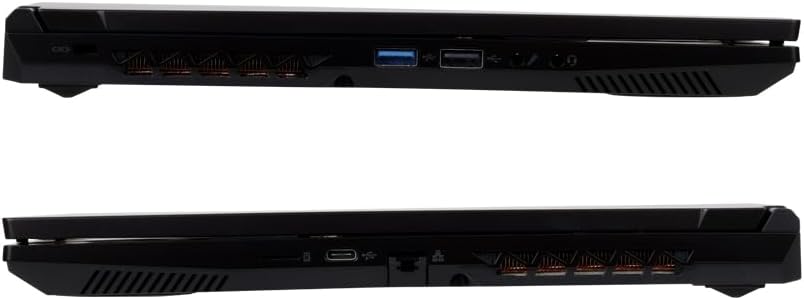
આકૃતિ 3.1: વિગતવાર view of the laptop's external ports on both sides.
૪.૨ નેટવર્ક કનેક્ટિવિટી
- Wi-Fi: The laptop supports Wi-Fi 6E (IEEE802.11 ax/ac/n/g/b/a). To connect, click the network icon in the taskbar, select your desired Wi-Fi network, and enter the password if prompted.
- વાયર્ડ લ LANન: Connect an Ethernet cable to the 1000BASE-T LAN port for a stable wired network connection.
- બ્લૂટૂથ: The laptop includes Bluetooth 5 for connecting wireless peripherals such as headphones or speakers.
4. જાળવણી
૩.૧ લેપટોપ સાફ કરવું
- સ્ક્રીન: નરમ, લિન્ટ-ફ્રી કાપડનો ઉપયોગ કરોampપાણી અથવા સ્ક્રીન ક્લીનરથી સાફ કરો. સ્ક્રીન પર સીધું પ્રવાહી છાંટશો નહીં.
- ચેસિસ અને કીબોર્ડ: નરમ, સૂકા કપડાનો ઉપયોગ કરો. હઠીલા ગંદકી માટે, થોડો ડીamp cloth can be used, ensuring no liquid enters the ports or vents.
- વેન્ટ્સ: શ્રેષ્ઠ હવા પ્રવાહ જાળવવા માટે સમયાંતરે ઠંડક વેન્ટ્સમાંથી ધૂળ સાફ કરવા માટે સંકુચિત હવાનો ઉપયોગ કરો.
4.2 બેટરી કેર
બેટરી જીવન વધારવા માટે:
- વારંવાર બેટરી સંપૂર્ણપણે ડિસ્ચાર્જ કરવાનું ટાળો.
- લેપટોપને અતિશય તાપમાનમાં ન રાખો.
- If storing the laptop for an extended period, charge the battery to approximately 50-60% before turning it off.
4.3 સોફ્ટવેર અપડેટ્સ
Regularly update your Windows operating system and drivers to ensure optimal performance, security, and compatibility. Windows Update can be accessed via the Settings menu.
5. મુશ્કેલીનિવારણ
This section addresses common issues you might encounter. For more complex problems, refer to the official iiyama support webસાઇટ અથવા ગ્રાહક સેવાનો સંપર્ક કરો.
૬.૧ પાવર નથી / લેપટોપ ચાલુ નથી થઈ રહ્યું
- ખાતરી કરો કે AC એડેપ્ટર લેપટોપ અને કાર્યરત પાવર આઉટલેટ બંને સાથે સુરક્ષિત રીતે જોડાયેલ છે.
- બીજા ઉપકરણને પ્લગ ઇન કરીને પાવર આઉટલેટ કાર્યરત છે કે નહીં તે તપાસો.
- જો બેટરી સંપૂર્ણપણે ખતમ થઈ ગઈ હોય, તો લેપટોપ ચાલુ થાય તે પહેલાં ચાર્જ થવામાં થોડી મિનિટો લાગી શકે છે.
5.2 પ્રદર્શન સમસ્યાઓ
- ખાલી સ્ક્રીન: Try pressing the function key combination (e.g., Fn + F5 or F7, depending on the model) to toggle the display output.
- External Monitor Not Detected: Ensure the cable is securely connected. Try restarting the laptop.
૫.૩ નેટવર્ક કનેક્ટિવિટી સમસ્યાઓ
- Wi-Fi: ખાતરી કરો કે Windows સેટિંગ્સમાં Wi-Fi સક્ષમ છે. તમારા રાઉટર અને મોડેમને ફરીથી શરૂ કરો.
- વાયર્ડ લ LANન: Check the Ethernet cable connection. Ensure your network adapter drivers are up to date.
૭.૩ ધીમું પ્રદર્શન
- બેકગ્રાઉન્ડમાં ચાલતી બિનજરૂરી એપ્લિકેશનો બંધ કરો.
- Ensure your operating system and drivers are updated.
- પ્રતિષ્ઠિત એન્ટીવાયરસ સોફ્ટવેરનો ઉપયોગ કરીને માલવેર અથવા વાયરસ તપાસો.
- Ensure adequate free space on your 1TB SSD.
6. સ્પષ્ટીકરણો
The following table details the technical specifications of the iiyama SENSE INFINITY SENSE-15FH127-i7-UH1X-M laptop:
| લક્ષણ | સ્પષ્ટીકરણ |
|---|---|
| બ્રાન્ડ | iiyama |
| મોડલ નંબર | SENSE-15FH127-i7-UH1X-M |
| ઓપરેટિંગ સિસ્ટમ | વિન્ડોઝ 11 હોમ |
| સ્ક્રીન માપ | 15.6 ઇંચ |
| મૂળ ઠરાવ | Full HD (1920x1080 pixels) |
| ડિસ્પ્લે પ્રકાર | Anti-glare Color LCD |
| CPU મોડલ | Intel Core i7-12650H Processor |
| CPU ઝડપ | 4.70GHz સુધી |
| ગ્રાફિક્સ | ઇન્ટેલ યુએચડી ગ્રાફિક્સ (સંકલિત) |
| ઇન્સ્ટોલ કરેલ RAM મેમરી | 16GB DDR4-3200 S.O.DIMM (8GBx2) |
| મેમરી સ્લોટ્સ | 2 |
| સંગ્રહ | 1TB NVMe M.2 SSD (PCIe 4.0x4) |
| ઓપ્ટિકલ ડ્રાઈવ | સજ્જ નથી |
| કાર્ડ રીડર | માઇક્રો એસડી કાર્ડ રીડર |
| ઓડિયો | High Definition Audio subsystem, Built-in Stereo Speakers, Built-in Microphone |
| Webકૅમ | 1 મિલિયન પિક્સેલ્સ |
| વાયર્ડ લ LANન | 1000BASE-T LAN Port |
| વાયરલેસ કનેક્ટિવિટી | Wi-Fi 6E (IEEE802.11 ax/ac/n/g/b/a), Bluetooth 5 |
| કીબોર્ડ | Japanese Keyboard |
| પોઇન્ટિંગ ડિવાઇસ | Multi-touch compatible Touchpad |
| બાહ્ય બંદરો | Headphone/Speaker Output x1, Microphone Input x1, USB 3.1 (Type-C) x2, USB 3.0 x1, USB 2.0 x1, HDMI x1, Mini DisplayPort x1 |
| TPM | TPM2.0 compatible |
| બેટરી લાઇફ (વિડિઓ પ્લેબેક) | Approx. 4.3 hours (JEITA3.0) |
| બેટરી લાઇફ (નિષ્ક્રિય) | Approx. 6.0 hours (JEITA3.0) |
| વજન | Approx. 2.03 kg (including battery) |
| પરિમાણો (WxDxH) | Approx. 360mm x 240mm x 27.7mm (including rubber feet) |
7. વોરંટી અને સપોર્ટ
૭.૧ માનક વોરંટી
This iiyama SENSE INFINITY laptop comes with a standard 1 વર્ષની વોરંટી ખરીદીની તારીખથી. કોઈપણ વોરંટી દાવા માટે કૃપા કરીને તમારી ખરીદીનો પુરાવો અને વોરંટી કાર્ડ રાખો.
The warranty covers manufacturing defects and hardware failures under normal use. It does not cover damage caused by misuse, accidents, unauthorized modifications, or natural disasters.
7.2 ટેકનિકલ સપોર્ટ
For technical assistance, driver downloads, or further troubleshooting, please refer to the official iiyama support website. You can also find contact information for customer service on your warranty card or the official product page.
When contacting support, please have your laptop's model number (SENSE-15FH127-i7-UH1X-M) and serial number ready.