
પરિચય
This manual provides essential information for the safe and efficient operation of your Zebronics Party FYRE 700 Portable Party Speaker. Please read this manual thoroughly before using the product and retain it for future reference.
The Zebronics Party FYRE 700 is a high-power portable party speaker designed for various audio applications, including music playback, karaoke, and live performances. It features dual 13.33 cm drivers, a wireless microphone, TWS function, multiple connectivity options, and dynamic RGB lighting.

Image: The Zebronics Party FYRE 700 speaker, showcasing its sleek design and integrated RGB lighting.
બોક્સ સમાવિષ્ટો
ખાતરી કરો કે નીચે સૂચિબદ્ધ બધી વસ્તુઓ પેકેજમાં શામેલ છે:
- DJ Speaker - 1 unit
- Remote Control - 1 unit
- Wireless Microphone - 1 unit
- Input Cable - 1 unit
- Charging Cable - 1 unit
- QR Code Guide - 1 unit
ઉત્પાદન લક્ષણો
- શક્તિશાળી ઓડિયો આઉટપુટ: 120W RMS output with dual 13.33 cm full-range drivers for clear and strong bass.
- વિસ્તૃત પ્લેબેક: Up to 7 hours of playback at 50% volume with LED off, supported by rapid charging.
- Karaoke and Recording: Includes a wireless microphone, supports karaoke, mic recording, and live performances.
- Comprehensive Sound Controls: Independent controls for music volume, bass, treble, microphone, guitar, and echo.
- ટ્રુ વાયરલેસ સ્ટીરિયો (TWS): Wirelessly pair two compatible speakers for an expanded stereo soundstage.
- બહુવિધ કનેક્ટિવિટી: Bluetooth v5.3, USB, and AUX input for versatile audio source connection.
- ગતિશીલ RGB લાઇટિંગ: 9 distinct RGB lighting modes to enhance the visual experience.
- પોર્ટેબિલિટી: Equipped with a convenient carry handle for easy transport.
- રીમોટ કંટ્રોલ: દૂરથી અનુકૂળ કામગીરી માટે.

છબી: ક્લોઝ-અપ view of the speaker's dual 13.33cm full-range drivers, illustrating the 120W RMS output capability.
સેટઅપ
૪.૩. પ્રારંભિક ચાર્જિંગ
Before first use, fully charge the speaker using the provided charging cable. Connect the charging cable to the Type-C port on the speaker and a compatible USB power adapter (not included). The charging indicator will show the charging status.
2. Connecting the Wireless Microphone
The speaker comes with a wireless microphone. Ensure the microphone has batteries installed and is powered on. The microphone will automatically pair with the speaker when both are turned on and within range.

Image: A hand holding the wireless microphone, highlighting its use for karaoke and recording.
ઓપરેટિંગ સૂચનાઓ
1. પાવર ચાલુ/બંધ
Press and hold the power button on the speaker's control panel to turn the speaker on or off.
2. બ્લૂટૂથ જોડી
- Turn on the speaker. It will automatically enter Bluetooth pairing mode.
- તમારા સ્માર્ટફોન અથવા અન્ય ઉપકરણ પર બ્લૂટૂથ સક્ષમ કરો.
- માટે શોધો "ZEB-PARTY FYRE 700" in the list of available devices and select it to pair.
- A confirmation sound will indicate successful pairing.
3. યુએસબી પ્લેબેક
MP3 ઑડિઓ ધરાવતો USB ફ્લેશ ડ્રાઇવ દાખલ કરો files into the USB port. The speaker will automatically detect and begin playing music from the USB drive.
4. AUX ઇનપુટ
Connect an external audio source (e.g., laptop, MP3 player) to the AUX input port using the provided input cable. The speaker will switch to AUX mode automatically.
5. Karaoke and Mic Recording
Use the wireless microphone for karaoke. Connect a guitar to the 6.3mm guitar input if desired. Adjust microphone and guitar volumes using the dedicated controls on the speaker's panel.

છબી: વિગતવાર view of the speaker's input ports (6.3mm Mic In, Guitar In, Type-C, AUX In, USB) and the included remote control and carry handle.
૫.૫. TWS ફંક્શન (ટ્રુ વાયરલેસ સ્ટીરિયો)
To pair two Party FYRE 700 speakers for a stereo experience:
- ખાતરી કરો કે બંને સ્પીકર્સ ચાલુ છે અને કોઈપણ બ્લૂટૂથ ઉપકરણ સાથે જોડાયેલા નથી.
- On one speaker, press the TWS button. It will emit a sound indicating it's searching for another speaker.
- The two speakers will automatically connect. A confirmation sound will indicate successful TWS pairing.
- Connect your device via Bluetooth to the primary speaker. Audio will now play in stereo across both speakers.

Image: Two Zebronics Party FYRE 700 speakers visually linked, representing the True Wireless Stereo (TWS) pairing function.
7. Sound Controls
Use the control panel on top of the speaker or the remote control to adjust:
- સંગીત વોલ્યુમ: Increase or decrease the overall music playback volume.
- બાસ/ટ્રેબલ: Adjust the low and high frequencies of the music.
- માઇક/ગિટાર વોલ્યુમ: Control the volume of connected microphones and guitars.
- પડઘો: Adjust the echo effect for the microphone.
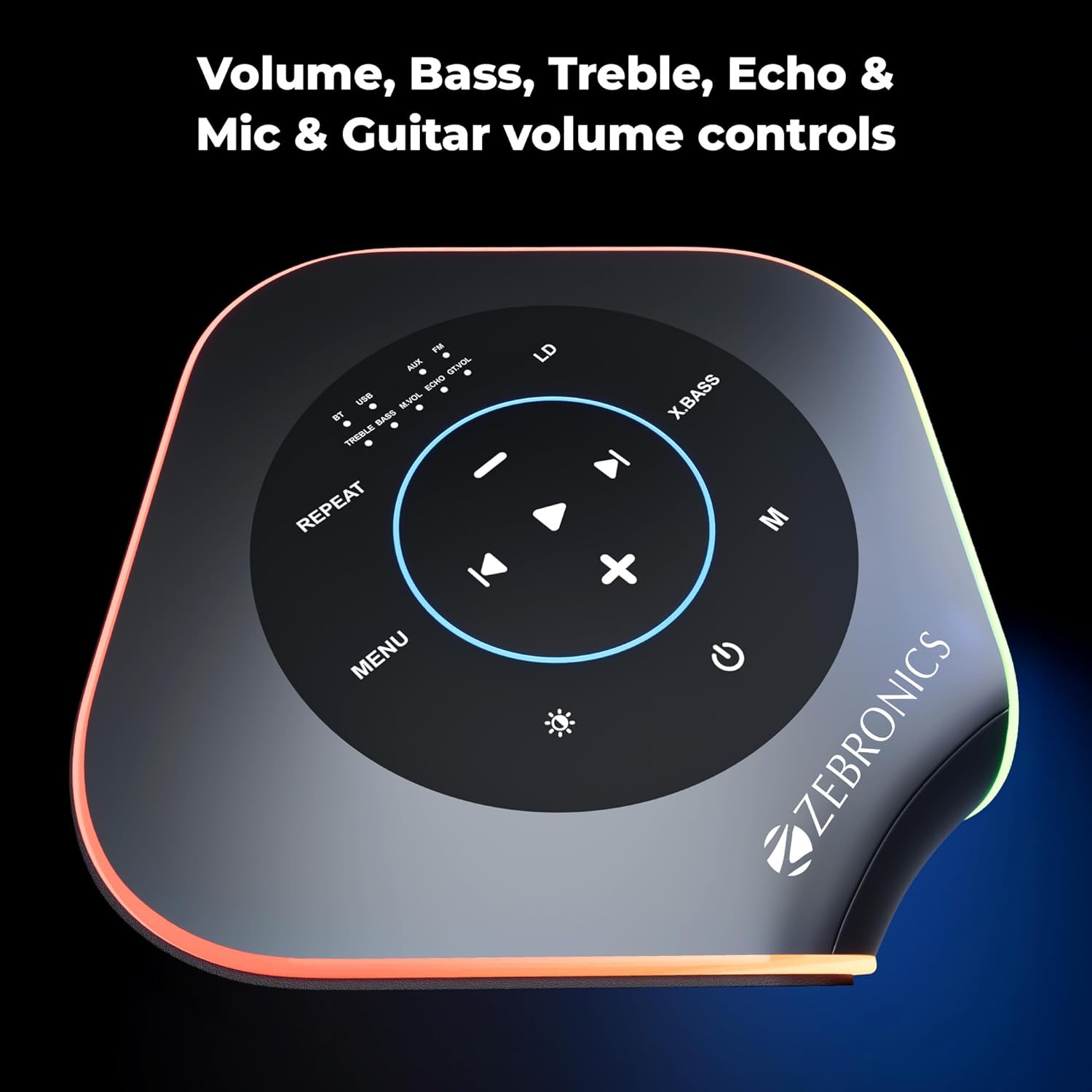
છબી: ઓવરહેડ view of the speaker's control panel, showing buttons for volume, bass, treble, echo, and mic/guitar controls.
8. RGB લાઇટિંગ મોડ્સ
The speaker features 9 dynamic RGB lighting modes. Press the dedicated RGB button on the control panel or remote to cycle through the different lighting effects.

છબી: બહુવિધ views of the Zebronics Party FYRE 700 speaker, demonstrating the variety of its 9 RGB lighting modes.
જાળવણી
- સ્પીકરને નરમ, સૂકા કપડાથી સાફ કરો. ઘર્ષક ક્લીનર્સ અથવા સોલવન્ટનો ઉપયોગ કરશો નહીં.
- Avoid exposing the speaker to water, moisture, or extreme temperatures.
- જ્યારે ઉપયોગમાં ન હોય ત્યારે સ્પીકરને ઠંડી, સૂકી જગ્યાએ સ્ટોર કરો.
- Do not attempt to disassemble or repair the speaker yourself. Contact authorized service personnel for assistance.
મુશ્કેલીનિવારણ
| સમસ્યા | સંભવિત કારણ | ઉકેલ |
|---|---|---|
| કોઈ શક્તિ નથી | બેટરી ખતમ થઈ ગઈ છે. | આપેલા ચાર્જિંગ કેબલનો ઉપયોગ કરીને સ્પીકરને ચાર્જ કરો. |
| કોઈ અવાજ નથી | વૉલ્યૂમ ખૂબ ઓછું અથવા મ્યૂટ છે. ખોટો ઇનપુટ સ્રોત પસંદ કરેલ છે. | Increase volume. Ensure correct input mode (Bluetooth, USB, AUX) is selected. |
| બ્લૂટૂથ કનેક્ટ થઈ રહ્યું નથી | Speaker is not in pairing mode. Device is too far. | Ensure speaker is in pairing mode. Move device closer to the speaker. Disconnect from other devices. |
| માઇક્રોફોન કામ કરતું નથી | Microphone is off or batteries are low. Microphone volume is low. | Turn on the microphone and check batteries. Increase microphone volume on the speaker. |
વિશિષ્ટતાઓ
| લક્ષણ | વિગત |
|---|---|
| આઉટપુટ પાવર | 120W RMS |
| ડ્રાઇવરનું કદ | Dual 13.33 cm full-range drivers |
| પ્લેબેક સમય | Up to 7 hours (at 50% volume with LED off) |
| કનેક્ટિવિટી | Bluetooth v5.3, USB, AUX |
| માઇક્રોફોન ઇનપુટ | Wireless Mic, 6.3mm Mic In |
| ગિટાર ઇનપુટ | 6.3mm Guitar In |
| RGB મોડ્સ | 9 સ્થિતિઓ |
| પાવર સ્ત્રોત | કોર્ડેડ ઇલેક્ટ્રિક (ચાર્જિંગ માટે) |
| આવર્તન પ્રતિભાવ | 18000 KHz |
| અવબાધ | 4 ઓહ્મ |
| પરિમાણો (L x W x H) | 23.5 x 23.5 x 50 સેન્ટિમીટર |
| વજન | 6000 ગ્રામ |
| મોડલ નંબર | ZEB |
વોરંટી અને આધાર
વોરંટી માહિતી
The Zebronics Party FYRE 700 comes with a 1-year carry-in warranty. For warranty claims, please carry the product to an authorized service center.
ઉત્પાદક સંપર્ક માહિતી
Zebronics India Pvt Ltd.
No.13/7, Smith Road, Royapettah,
Chennai-600002, Tamil Nadu, India
For further assistance or support, please refer to the QR Code Guide included in your package or visit the official Zebronics webસાઇટ