
1. પરિચય
Thank you for choosing the BLUETTI Elite 300 Portable Power Station. This manual provides essential information for the safe and efficient use of your device. Please read it thoroughly before operation and retain it for future reference.
The BLUETTI Elite 300 is a compact 3 kWh portable power station designed for reliable energy supply in various scenarios, including home backup, camping, and RV travel. It features a LiFePO4 battery, high power output, and smart app control.

Image: The BLUETTI Elite 300, highlighted as the world's most compact 3 kWh portable power station, shown in an outdoor setting with a camper and tent at night.
2. સલામતી સૂચનાઓ
Your safety is our top priority. Please observe the following safety guidelines:
- એકમને ડિસએસેમ્બલ, સમારકામ અથવા સંશોધિત કરશો નહીં.
- Avoid exposure to rain, moisture, or direct sunlight for prolonged periods.
- ગરમીના સ્ત્રોતો, ખુલ્લી જ્વાળાઓ અને જ્વલનશીલ પદાર્થોથી દૂર રહો.
- ફક્ત BLUETTI-મંજૂર એક્સેસરીઝ અને ચાર્જિંગ કેબલનો ઉપયોગ કરો.
- ઉપયોગ અને ચાર્જિંગ દરમિયાન યોગ્ય વેન્ટિલેશનની ખાતરી કરો.
- બાળકો અને પાલતુ પ્રાણીઓની પહોંચથી દૂર રાખો.
- જ્યારે ઉપયોગમાં ન હોય ત્યારે ઠંડી, સૂકી જગ્યાએ સ્ટોર કરો.
- The BLUETTI Elite 300 utilizes ultra-safe LiFePO4 battery cells and premium BMS technology for enhanced reliability and durability.
3. પેકેજ સામગ્રી
Upon unpacking, please verify that all items listed below are included:
- BLUETTI Elite 300 Portable Power Station
- એસી ચાર્જિંગ કેબલ
- ગ્રાઉન્ડિંગ સ્ક્રુ
- વપરાશકર્તા માર્ગદર્શિકા (આ દસ્તાવેજ)
If any items are missing or damaged, please contact BLUETTI customer support.
4. ઉત્પાદન ઓવરview
The BLUETTI Elite 300 is equipped with various ports and a clear display for intuitive operation. Familiarize yourself with the layout:
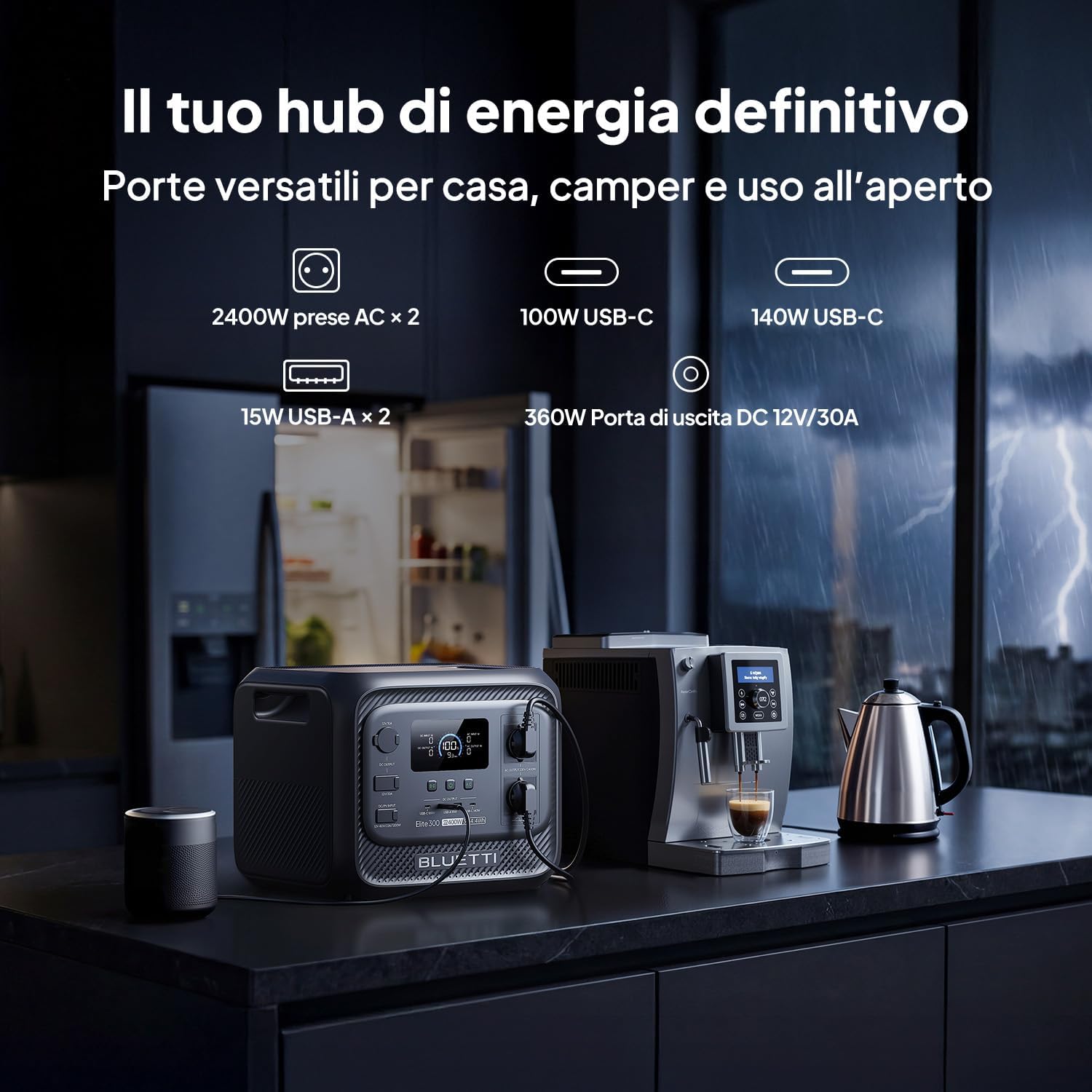
છબી: આગળ view of the BLUETTI Elite 300, illustrating its versatile ports including AC outlets, USB-C, USB-A, and a 12V/30A DC output, alongside its digital display.
પોર્ટ અને આઉટપુટ:
- એસી આઉટલેટ્સ (x2): 2400W continuous AC power, 4800W peak.
- યુએસબી-સી પોર્ટ્સ: 100W and 140W for fast charging compatible devices.
- USB-A પોર્ટ્સ (x2): 15W total for standard USB devices.
- DC 12V/30A Output: 360W dedicated port for RV appliances and other essential outdoor gear.
The integrated display provides real-time information on battery level, input/output power, and operational status.
5. સેટઅપ
Before first use, ensure the power station is fully charged. Follow these steps:
- અનપેક કરો: Carefully remove the BLUETTI Elite 300 and all accessories from the packaging.
- પ્રારંભિક ચાર્જ: Connect the AC charging cable to the power station and then to a wall outlet. The display will indicate charging status.
- સંપૂર્ણ ચાર્જ: Allow the unit to charge completely before its first use. This typically takes approximately 1.8 hours for 0-80% AC charging.
6. ઓપરેટિંગ સૂચનાઓ
6.1 પાવર સ્ટેશનને ચાર્જ કરવું
The Elite 300 supports multiple charging methods:
- એસી વોલ આઉટલેટ: Connect the AC charging cable to a standard wall outlet. Max 2300W input.
- સોલર પેનલ્સ: Connect compatible solar panels (up to 1200W Max) to the solar input port.
- કાર ચાર્જિંગ: Charge the unit while driving using a compatible car charger (Max 1200W input, full charge in 3.2 hours).
- Dual Charging (AC + Solar): Combine AC and solar charging for faster recharge times (up to 2400W Max, 80% in 78 minutes).

Image: Visual representation of the BLUETTI Elite 300 being charged via AC wall outlet, a car charger, and solar panels, highlighting rapid charging capabilities.

Image: An illustration showing the BLUETTI Elite 300 being charged inside an RV while the vehicle is in motion, demonstrating the 'Charge while driving' feature.
6.2 Discharging and Powering Devices
તમારા ઉપકરણોને પાવર આપવા માટે:
- ચાલુ કરો: યુનિટ ચાલુ કરવા માટે મુખ્ય પાવર બટન દબાવો.
- આઉટપુટ પસંદ કરો: Activate the desired output ports (AC, DC, USB) by pressing their respective buttons.
- ઉપકરણોને કનેક્ટ કરો: Plug your devices into the appropriate ports.
- મોનિટર: The display will show the current output wattage and estimated remaining runtime.
The Elite 300 delivers 2400W of continuous AC power with a 4800W peak, capable of running high-demand appliances like kettles, air conditioners, and power tools.

Image: The BLUETTI Elite 300 connected to and powering a refrigerator, oven, air conditioner, induction hob, chainsaw, and drill, indicating estimated runtimes for each.

Image: A person using a power saw outdoors, powered by the BLUETTI Elite 300, demonstrating its capability to run demanding tools with prolonged autonomy.

Image: The BLUETTI Elite 300 powering an air conditioner, microwave, refrigerator, and coffee machine in an RV kitchen, illustrating its use for off-grid comfort.
૩.૪ અવિરત વીજ પુરવઠો (UPS) કાર્ય
The Elite 300 features a reliable UPS function with a <10ms switchover time. In the event of a power outage, it instantly switches to battery power, ensuring critical devices like routers, computers, and refrigerators remain operational without interruption.

Image: A BLUETTI Elite 300 connected to a computer setup, illustrating its instant power switchover (<10ms) during a power outage to prevent data loss or work interruption.

Image: A person working on a computer during a simulated blackout, with the BLUETTI Elite 300 powering the computer, router, and refrigerator, emphasizing continuous power supply.
6.4 સ્માર્ટ એપ્લિકેશન નિયંત્રણ
Manage your power remotely with the BLUETTI app. The app allows you to:
- Monitor power usage and battery status.
- Control output ports.
- Set charging schedules.
- સૂચનાઓ પ્રાપ્ત કરો.

Image: A hand holding a smartphone displaying the BLUETTI app interface, showing remote control and monitoring features for the power station in a kitchen setting.
7. જાળવણી
To ensure the longevity and optimal performance of your BLUETTI Elite 300, follow these maintenance guidelines:
- નિયમિત સફાઈ: Wipe the exterior with a dry, soft cloth. Do not use abrasive cleaners or solvents.
- સંગ્રહ: If storing for extended periods, charge the unit to 50-80% every 3-6 months to preserve battery health. Store in a cool, dry environment.
- વેન્ટિલેશન: ખાતરી કરો કે વેન્ટિલેશનના છિદ્રો ધૂળ અને કાટમાળથી મુક્ત છે.
- બેટરી આરોગ્ય: બેટરીને વારંવાર સંપૂર્ણપણે ડિસ્ચાર્જ કરવાનું ટાળો, કારણ કે આનાથી તેનું આયુષ્ય ઘટી શકે છે.
8. મુશ્કેલીનિવારણ
If you encounter issues with your BLUETTI Elite 300, refer to the following common problems and solutions:
| સમસ્યા | સંભવિત કારણ | ઉકેલ |
|---|---|---|
| યુનિટ ચાલુ થતું નથી | Battery is completely discharged; Power button not pressed correctly. | Charge the unit using the AC adapter; Press and hold the power button for 3 seconds. |
| AC આઉટપુટ કામ કરતું નથી | AC output not enabled; Overload protection activated; Device power exceeds 2400W. | Press the AC output button; Reduce the load; Check device wattage. |
| ધીમું ચાર્જિંગ | Using a low-power charger; High ambient temperature; Solar input insufficient. | Use the provided AC charger or higher wattage solar panels; Ensure good ventilation; Check solar panel orientation. |
| એપ્લિકેશન કનેક્શન સમસ્યાઓ | Bluetooth/Wi-Fi off; App not updated; Unit too far from phone. | Ensure Bluetooth/Wi-Fi is active on your phone; Update the BLUETTI app; Move closer to the unit. |
For further assistance, please contact BLUETTI customer support.
9. સ્પષ્ટીકરણો
Detailed technical specifications for the BLUETTI Elite 300 Portable Power Station:
| લક્ષણ | સ્પષ્ટીકરણ |
|---|---|
| મોડેલનું નામ | BLUETTI Elite 300 |
| બેટરીનો પ્રકાર | LiFePO4 |
| ક્ષમતા | 3014.4 Watt-hours (3 kWh) |
| એસી આઉટપુટ પાવર | 2400W (Continuous), 4800W (Peak) |
| એસી આઉટપુટ વોલ્યુમtage | ૨૪૦ વોલ્ટ (એસી) |
| યુએસબી-સી આઉટપુટ | 100W, 140W |
| યુએસબી-એ આઉટપુટ | 15W (x2) |
| ડીસી આઉટપુટ | 12V/30A (360W) |
| મહત્તમ એસી ઇનપુટ | 2300W |
| મહત્તમ સોલર ઇનપુટ | 1200W |
| Max Combined Input (AC+Solar) | 2400W |
| યુપીએસ કાર્ય | <10ms Switchover Time |
| પરિમાણો (L x W x H) | 36.5L x 30.5W x 29.5H cm |
| વજન | 26.3 કિગ્રા |
| મૂળ દેશ | ચીન |
10. વોરંટી અને સપોર્ટ
For warranty information, please refer to the warranty card included with your product or visit the official BLUETTI website. BLUETTI is committed to providing reliable power solutions and excellent customer service.
If you require technical support, have questions about your product, or need to claim warranty service, please contact BLUETTI customer support through their official channels. Contact details are typically found in the included user manual or on the BLUETTI webસાઇટ