
1. પરિચય
This manual provides detailed instructions for the setup, operation, and maintenance of your Eyoyo EYH2 Handheld USB 2D Barcode Scanner and Eyoyo EY-045 2-in-1 Wireless Mouse Barcode Scanner. Please read this manual thoroughly before using the devices to ensure proper functionality and to prevent damage.
2. ઉત્પાદન ઓવરview
2.1 Eyoyo EY-H2 Handheld USB 2D Barcode Scanner
The Eyoyo EY-H2 is a wired USB 2D barcode scanner designed for efficient data capture. It offers plug-and-play functionality, requiring no software or driver installation. This scanner is suitable for various environments including retail, warehouses, libraries, and inventory management.

છબી 2.1.1: The Eyoyo EY-H2 2D Barcode Scanner demonstrates superior decoding capabilities compared to traditional laser scanners, accurately reading various 1D and 2D barcodes, including those with damage or complex formats.

છબી 2.1.2: The EY-H2 scanner offers plug-and-play connectivity via USB, compatible with Windows, macOS, Linux, and POS systems, requiring no additional drivers or software.

છબી 2.1.3: The EY-H2 scanner features adjustable sound settings, allowing users to turn the beep sound on or off as needed for different working environments.

છબી 2.1.4: The EY-H2 scanner is designed with drop resistance, capable of sustaining drops from up to 1.5 meters (5 feet) without damage.
2.2 Eyoyo EY-045 2-in-1 Wireless Mouse Barcode Scanner
The Eyoyo EY-045 combines the functionality of a high-precision optical mouse with a powerful 2D barcode scanner. This device aims to streamline workflows by integrating two essential tools into one, reducing desk clutter and improving efficiency. It supports multiple connection methods and features a long-lasting battery with a visual indicator.

છબી 2.2.1: The EY-045 offers a 2-in-1 design, functioning as both a wireless mouse for office tasks and a barcode scanner for data entry, activated by a dedicated button.

છબી 2.2.2: The mouse-style barcode scanner facilitates faster data entry, particularly in retail Point-of-Sale (POS) environments, by allowing seamless transition between mouse and scanning functions.

છબી 2.2.3: The EY-045 supports two wireless connection methods: Bluetooth Mode for laptops, tablets, and phones, and 2.4G Mode via a USB dongle for PCs.
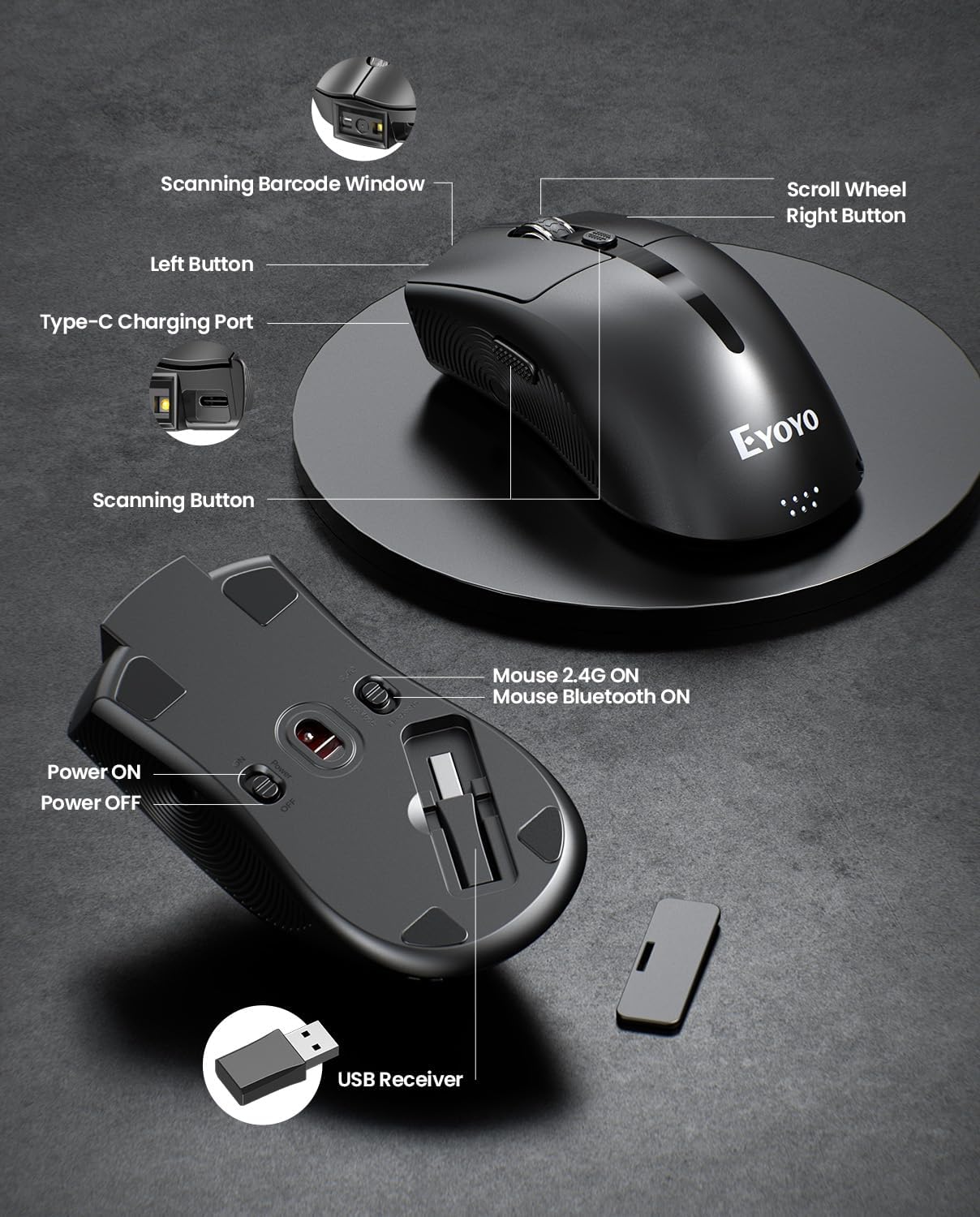
છબી 2.2.4: This diagram highlights the key components of the EY-045, including the Scanning Barcode Window, Scroll Wheel, Left/Right Buttons, Type-C Charging Port, Scanning Button, Power ON/OFF switch, Mouse 2.4G/Bluetooth ON switches, and the USB Receiver storage slot.
3. સેટઅપ
3.1 Eyoyo EY-H2 Handheld Scanner Setup
- યુએસબી કેબલને કનેક્ટ કરો: Plug the USB cable from the EY-H2 scanner into an available USB port on your computer or POS system.
- સિસ્ટમ ઓળખ: The operating system (Windows, macOS, Linux, or POS) will automatically detect and install the necessary drivers. No manual driver installation is required.
- ઉપયોગ માટે તૈયાર: Once recognized, the scanner is ready to use. Open any application where you want to input scanned data (e.g., Notepad, Word, Excel, POS software).
3.2 Eyoyo EY-045 Mouse Scanner Setup
The EY-045 offers three connection methods:
3.2.1 2.4G Wireless Connection (for PC)
- USB રીસીવર મેળવો: Locate the 2.4G USB receiver stored in the bottom slot of the EY-045 mouse.
- રીસીવર દાખલ કરો: Plug the USB receiver into an available USB port on your PC.
- પાવર ચાલુ: Slide the power switch on the bottom of the EY-045 to the 'ON' position.
- Select 2.4G Mode: Ensure the mode switch on the bottom is set to 'Mouse 2.4G ON'. The device will automatically connect.
3.2.2 Bluetooth 5.0 Connection (for Laptops/Tablets/Phones)
- પાવર ચાલુ: Slide the power switch on the bottom of the EY-045 to the 'ON' position.
- બ્લૂટૂથ મોડ પસંદ કરો: Ensure the mode switch on the bottom is set to 'Mouse Bluetooth ON'. The device will enter pairing mode (indicator light may flash).
- હોસ્ટ ડિવાઇસ પર બ્લૂટૂથ સક્ષમ કરો: On your laptop, tablet, or phone, go to Bluetooth settings and turn Bluetooth on.
- ઉપકરણ જોડો: માટે શોધો available devices and select 'Eyoyo EY-045' (or similar name) to pair.
3.2.3 USB-C Wired Connection (for Charging and Working)
- USB-C કેબલ કનેક્ટ કરો: Plug the provided USB-C charging cable into the Type-C charging port on the front of the EY-045.
- Connect to Host: Plug the other end of the USB-C cable into a USB port on your computer.
- કાર્યક્ષમતા: The device will charge and function as a wired mouse and scanner simultaneously.
4. ઓપરેટિંગ સૂચનાઓ
4.1 Using the Eyoyo EY-H2 Handheld Scanner
- લક્ષ્ય અને સ્કેન: Point the scanner's window at the barcode you wish to read.
- Press Trigger: Press the trigger button on the handle. A red scanning line or light will appear.
- પુષ્ટિ: A successful scan will typically be indicated by a beep sound (if enabled) and the data appearing in your active application.
- Adjust Sound: To adjust the sound, scan the appropriate configuration barcodes provided in the full user manual (e.g., 'Turn On Sound' or 'Turn Off Sound' barcodes).
4.2 Using the Eyoyo EY-045 Mouse Scanner
- માઉસ ફંક્શન: When connected, the EY-045 functions as a standard optical mouse for navigation and clicking.
- Switch to Scanner Mode: To scan a barcode, press the dedicated scanning button located on the side of the mouse. The scanning light will activate.
- બારકોડ સ્કેન કરો: Aim the scanning window at the barcode and press the scanning button. The scanned data will be transmitted to your connected device.
- બેટરી સૂચક: Monitor the 4-level LED power indicator (25%-50%-75%-100%) on the tail of the mouse to check the battery status. Recharge when the indicator shows low power.
- ઑફલાઇન સ્ટોરેજ: The EY-045 can store up to 100,000 barcodes when operating away from a computer. To upload stored data, connect the scanner to your computer and follow the instructions in the full user manual for data transfer.
5. જાળવણી
- સફાઈ: Use a soft, dry cloth to clean the exterior of the scanner. For the scanning window, use a lint-free cloth lightly dampહળવા, ઘર્ષક ન હોય તેવા ક્લીનરથી સાફ કરો. કઠોર રસાયણો અથવા ઘર્ષક સામગ્રી ટાળો.
- સંગ્રહ: Store the scanners in a cool, dry place away from direct sunlight and extreme temperatures.
- કેબલ કેર: Avoid bending or twisting the USB cables excessively to prevent internal damage.
- Battery Care (EY-045): For optimal battery life, avoid fully discharging the battery frequently. Recharge the device regularly. If storing for an extended period, charge the battery to about 50% before storage.
6. મુશ્કેલીનિવારણ
- સ્કેનર બારકોડ વાંચતો નથી:
- Ensure the barcode is clean and not excessively damaged.
- Check the distance and angle of the scanner to the barcode.
- Verify that the scanner is properly connected (EY-H2: USB cable; EY-045: 2.4G dongle, Bluetooth, or USB-C cable).
- For EY-045, ensure it is in scanner mode by pressing the dedicated scan button.
- No Data Output:
- Confirm the scanner is successfully connected to your device.
- Ensure an application (e.g., Notepad, Word, POS software) is open and active to receive input.
- Restart the computer and reconnect the scanner.
- EY-045 Not Connecting Wirelessly:
- Check if the EY-045 is powered on and the correct wireless mode (2.4G or Bluetooth) is selected.
- 2.4G માટે, ખાતરી કરો કે USB રીસીવર કમ્પ્યુટરમાં સુરક્ષિત રીતે પ્લગ થયેલ છે.
- For Bluetooth, ensure Bluetooth is enabled on your host device and the EY-045 is paired. Try unpairing and re-pairing if issues persist.
- ખાતરી કરો કે બેટરી ચાર્જ થઈ છે.
- EY-045 Battery Drains Quickly:
- જ્યારે ઉપકરણ ઉપયોગમાં ન હોય ત્યારે ખાતરી કરો કે તે બંધ છે.
- Check the battery indicator for its current level.
- આપેલા USB-C કેબલનો ઉપયોગ કરીને ઉપકરણને સંપૂર્ણપણે ચાર્જ કરો.
7. સ્પષ્ટીકરણો
7.1 Eyoyo EY-H2 Handheld USB 2D Barcode Scanner
- કનેક્ટિવિટી: વાયર્ડ યુએસબી
- ડીકોડિંગ ક્ષમતા: 1D and 2D barcodes (including QR codes)
- ઇન્સ્ટોલેશન: પ્લગ એન્ડ પ્લે, ડ્રાઇવરની જરૂર નથી
- સુસંગતતા: Windows, macOS, Linux, POS systems
- ટકાઉપણું: Drop resistance up to 1.5m (5ft)
- કેબલ લંબાઈ: 1.8M / 5.9ft
- વિશેષતાઓ: Adjustable sound (on/off)
7.2 Eyoyo EY-045 2-in-1 Wireless Mouse Barcode Scanner
- ડિઝાઇન: 2-in-1 (Optical Mouse + 2D Barcode Scanner)
- કનેક્ટિવિટી: Bluetooth 5.0, 2.4G Wireless (via USB dongle), USB-C Wired
- ડીકોડિંગ ક્ષમતા: 1D, 2D, and QR codes (including from digital screens)
- બેટરી: 1200mAh રિચાર્જેબલ બેટરી
- બેટરી જીવન: 10+ hours continuous scanning, 20 days daily mouse use
- બેટરી સૂચક: 4-level LED (25%-50%-75%-100%)
- ઑફલાઇન સ્ટોરેજ: Up to 100,000 barcodes
- સુસંગતતા: Windows (XP/7/8/10/11), macOS, Android, iOS
- વિશેષતાઓ: Adjustable beep sounds, dedicated scan button
8. વોરંટી અને સપોર્ટ
Eyoyo products are designed for reliability and performance. For specific warranty information, please refer to the warranty card included with your product or visit the official Eyoyo website. For technical support, troubleshooting assistance, or further inquiries, please contact Eyoyo customer service through the contact information provided on the product packaging or the official webસાઇટ