
1. ઓવરview
The Philips TAZ2200 is a versatile portable sound machine designed for enjoying various audio formats. It features a top-loading CD player, a front-loading cassette player, FM radio, Bluetooth 6.0 connectivity, USB playback, and a 3.5mm audio input. Equipped with dynamic bass boost and 6W stereo speakers, it delivers rich sound. The unit can be powered by AC mains or batteries and includes a carrying handle for portability.
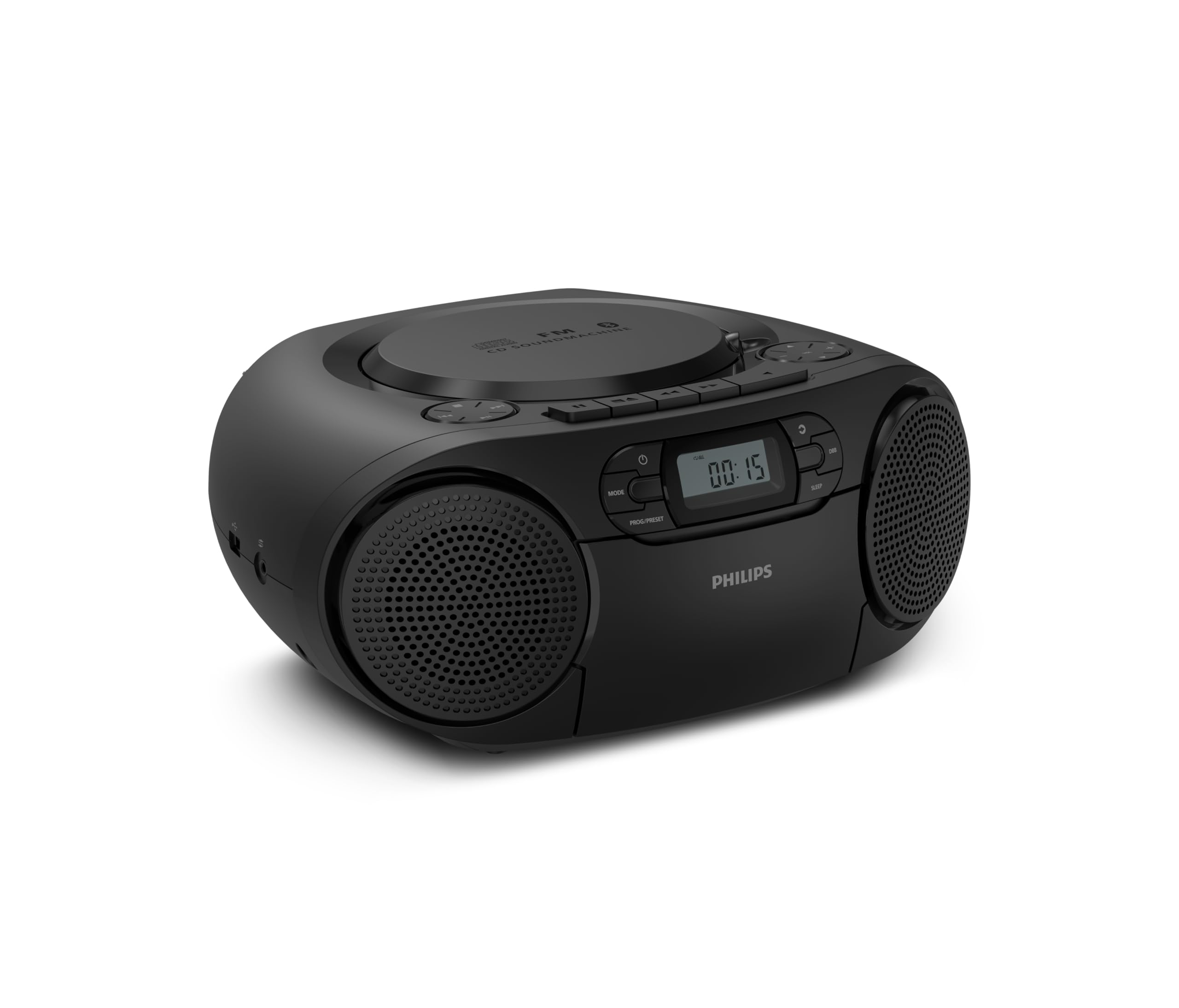
આગળ view of the Philips TAZ2200 CD Soundmachine, showing the main display and control buttons.
2. સલામતી માહિતી
Please read these safety instructions carefully before using your device and keep them for future reference. Incorrect use may result in hazards.
- પાવર સ્ત્રોત: ફક્ત ઉલ્લેખિત પાવર એડેપ્ટર અથવા બેટરીનો ઉપયોગ કરો. ખાતરી કરો કે વોલ્યુમtage યુનિટની જરૂરિયાતોને પૂર્ણ કરે છે.
- પાણી અને ભેજ: યુનિટને વરસાદ, ભેજ, ટપકતા કે છાંટા પડતાં ખુલ્લા પાડશો નહીં. યુનિટ પર વાઝ જેવી પ્રવાહીથી ભરેલી વસ્તુઓ ન મૂકો.
- વેન્ટિલેશન: Ensure adequate ventilation. Do not block any ventilation openings. Maintain a minimum distance around the unit for sufficient ventilation.
- ઉષ્મા: રેડિએટર્સ, હીટ રજિસ્ટર, સ્ટોવ અથવા અન્ય ઉપકરણો (જેમાં શામેલ છે) જેવા ગરમીના સ્ત્રોતોની નજીક યુનિટ ન મૂકો. ampલિફાયર) જે ગરમી ઉત્પન્ન કરે છે.
- બેટરી: Follow correct polarity when inserting batteries. Do not mix old and new batteries, or different types of batteries. Remove batteries if the unit is not used for a long period.
- સફાઈ: Unplug the unit from the power outlet before cleaning. Use a soft, dry cloth. Do not use liquid cleaners or aerosol cleaners.
- સર્વિસિંગ: આ ઉત્પાદનની જાતે સેવા કરવાનો પ્રયાસ કરશો નહીં. લાયક સેવા કર્મચારીઓને તમામ સેવાઓનો સંદર્ભ આપો.
3. બોક્સમાં શું છે
અનપેક કરતી વખતે, કૃપા કરીને ખાતરી કરો કે નીચે સૂચિબદ્ધ બધી વસ્તુઓ હાજર છે:
- Philips TAZ2200 CD Soundmachine
- પાવર કેબલ
- ઝડપી શરૂઆત માર્ગદર્શિકા
- વોરંટી પુસ્તિકા
- સલામતી શીટ
4. નિયંત્રણ અને જોડાણો
ફ્રન્ટ પેનલ નિયંત્રણો
The front panel features the main display, power button, mode selection, program/preset buttons, and dynamic bass boost (DBB) control. Playback controls for CD and USB are also located here.

વિગતવાર આગળનો ભાગ view showing the display, power, mode, program/preset, and DBB buttons.
બાજુ અને પાછળના જોડાણો
The side of the unit provides a USB port for digital audio playback and a 3.5mm audio input jack for connecting external devices.

બાજુ view illustrating the USB port and Audio Input jack.
The top of the unit houses the CD compartment and additional playback controls, while the rear features the AC power input and the FM antenna.

ટોચ view showing the CD compartment and associated controls.

પાછળ view displaying the AC power input and the telescopic FM antenna.
5. સેટઅપ
5.1 પાવર સપ્લાય
એસી પાવર
- ખાતરી કરો કે એકમ બંધ છે.
- Connect the supplied power cable to the AC IN socket on the rear of the sound machine.
- Plug the other end of the power cable into a wall power outlet.
બેટરી પાવર
For portable use, the unit can operate on 6 x C-type batteries (not included).
- એકમના તળિયે સ્થિત બેટરી કમ્પાર્ટમેન્ટ કવર ખોલો.
- Insert 6 C-type batteries, ensuring correct polarity (+/-) as indicated inside the compartment.
- બેટરી કમ્પાર્ટમેન્ટ કવર સુરક્ષિત રીતે બંધ કરો.
૪.૨ એન્ટેના ગોઠવણ
For optimal FM radio reception, fully extend the telescopic antenna located at the rear of the unit. Adjust its position and angle to achieve the clearest signal.
6. ઓપરેટિંગ સૂચનાઓ
6.1 સામાન્ય કામગીરી
- પાવર ચાલુ/બંધ: દબાવો પાવર એકમ ચાલુ અથવા બંધ કરવા માટે બટન.
- વોલ્યુમ નિયંત્રણ: નો ઉપયોગ કરો વોલ + or વોલ્યુમ - વોલ્યુમ સ્તરને સમાયોજિત કરવા માટે બટનો.
- ડાયનેમિક બાસ બૂસ્ટ (DBB): દબાવો ડીબીબી button to activate or deactivate the dynamic bass boost feature for enhanced bass sound.
- મોડ પસંદગી: દબાવો મોડ button repeatedly to switch between CD, Cassette, FM Radio, Bluetooth, USB, and Audio Input modes.
6.2 સીડી પ્લેબેક
- Open the CD compartment cover on top of the unit.
- Place a CD (CD, CD-R, or CD-RW) with the label side facing up onto the spindle.
- સીડી કમ્પાર્ટમેન્ટ કવર બંધ કરો.
- દબાવો મોડ સીડી મોડ પસંદ કરવા માટે બટન.
- દબાવો રમો/થોભો પ્લેબેક શરૂ કરવા માટે બટન.
- નો ઉપયોગ કરો છોડો બટનો (|< or >> |) ટ્રેક છોડવા માટે.
- દબાવો અને પકડી રાખો |< or >> | to search within a track.
- દબાવો રોકો પ્લેબેક બંધ કરવા માટે બટન.
6.3 કેસેટ પ્લેબેક
- Open the cassette compartment door on the front of the unit.
- ખુલ્લી ધાર ઉપરની તરફ રાખીને કેસેટ ટેપ દાખલ કરો.
- કેસેટ કમ્પાર્ટમેન્ટનો દરવાજો બંધ કરો.
- દબાવો મોડ કેસેટ મોડ પસંદ કરવા માટે બટન.
- દબાવો રમો પ્લેબેક શરૂ કરવા માટે બટન.
- નો ઉપયોગ કરો ફાસ્ટ ફોરવર્ડ or રીવાઇન્ડ કરો buttons to quickly advance or rewind the tape.
- દબાવો રોકો પ્લેબેક બંધ કરવા માટે બટન.
6.4 એફએમ રેડિયો
- દબાવો મોડ FM રેડિયો મોડ પસંદ કરવા માટે બટન.
- ઓટો સ્કેન: દબાવો અને પકડી રાખો PROG/PRESET ઉપલબ્ધ FM સ્ટેશનોને આપમેળે સ્કેન અને સ્ટોર કરવા માટે બટન.
- મેન્યુઅલ ટ્યુનિંગ: દબાવો ટ્યુનિંગ બટનો (|< or >> |) to manually tune to a desired frequency.
- પ્રીસેટ્સ સાચવી રહ્યાં છે: After tuning to a station, press PROG/PRESET once, then use |< or >> | પ્રીસેટ નંબર પસંદ કરવા માટે, અને દબાવો PROG/PRESET પુષ્ટિ કરવા માટે ફરીથી.
- રિસીલ્ડિંગ પ્રીસેટ્સનો: એફએમ મોડમાં, દબાવો PROG/PRESET repeatedly to cycle through saved preset stations.
6.5 બ્લૂટૂથ પ્લેબેક
- દબાવો મોડ button to select Bluetooth mode. The display will show 'BT' and flash, indicating it's in pairing mode.
- તમારા બ્લૂટૂથ-સક્ષમ ઉપકરણ (સ્માર્ટફોન, ટેબ્લેટ) પર, બ્લૂટૂથ સક્ષમ કરો અને ઉપલબ્ધ ઉપકરણો શોધો.
- Select "Philips TAZ2200" from the list of devices.
- Once paired, the unit will emit a confirmation sound, and 'BT' will stop flashing.
- Start playing audio on your connected device. The sound will be streamed to the sound machine.
૬.૪ યુએસબી પ્લેબેક
- યુનિટની બાજુમાં આવેલા USB પોર્ટમાં USB ફ્લેશ ડ્રાઇવ દાખલ કરો.
- દબાવો મોડ USB મોડ પસંદ કરવા માટે બટન.
- આ યુનિટ આપમેળે સુસંગત ઑડિઓ શોધી કાઢશે અને વગાડવાનું શરૂ કરશે. files (MP3, WAV, WMA).
- Use the playback controls (રમો/થોભો, છોડો, રોકો) as you would for CD playback.
૬.૫ ઓડિયો ઇનપુટ (AUX)
- Connect one end of a 3.5mm audio cable (not included) to the AUDIO IN jack on the side of the sound machine.
- Connect the other end of the audio cable to the headphone jack or audio output of your external device (e.g., MP3 player, turntable).
- દબાવો મોડ button to select Audio Input mode.
- Start playing audio on your external device. The sound will be played through the sound machine.
7. જાળવણી
- યુનિટની સફાઈ: યુનિટના બાહ્ય ભાગને નરમ, સહેજ ડી વડે સાફ કરોamp કાપડ ઘર્ષક ક્લીનર્સ અથવા સોલવન્ટનો ઉપયોગ કરશો નહીં.
- સીડી પ્લેયર કેર: Keep the CD compartment clean. If the lens is dirty, use a specialized CD lens cleaner. Avoid touching the lens.
- કેસેટ પ્લેયર કેર: સમયાંતરે ટેપ હેડ્સ સાફ કરો અને રોલર્સને કપાસના સ્વેબથી હળવા હાથે પીંચ કરો.ampઆઇસોપ્રોપીલ આલ્કોહોલ સાથે સમાપ્ત.
- બેટરી રિપ્લેસમેન્ટ: If using batteries, replace all 6 C-type batteries when the unit's performance diminishes or if the unit will not be used for an extended period.
- સંગ્રહ: When not in use, store the unit in a clean, dry place away from direct sunlight and extreme temperatures.
8. મુશ્કેલીનિવારણ
If you encounter any issues with your Philips TAZ2200, please refer to the table below for common problems and solutions.
| સમસ્યા | સંભવિત કારણ | ઉકેલ |
|---|---|---|
| કોઈ શક્તિ નથી | પાવર કેબલ જોડાયેલ નથી; બેટરી ખાલી થઈ ગઈ છે અથવા ખોટી રીતે દાખલ કરવામાં આવી છે. | AC પાવર કનેક્શન તપાસો; બેટરી બદલો અથવા યોગ્ય પોલેરિટી ખાતરી કરો. |
| કોઈ અવાજ નથી | અવાજ ખૂબ ઓછો છે; ખોટો મોડ પસંદ કરેલ છે; હેડફોન કનેક્ટેડ છે. | Increase volume; Select the correct source mode (CD, FM, BT, etc.); Disconnect headphones. |
| સીડી ચાલી રહી નથી | સીડી ખોટી રીતે દાખલ કરવામાં આવી છે; સીડી ગંદી અથવા સ્ક્રેચવાળી છે; સીડી ફોર્મેટ સપોર્ટેડ નથી. | Insert CD with label side up; Clean or replace CD; Ensure CD is CD-R/RW compatible. |
| Cassette not playing | Cassette inserted incorrectly; Tape is damaged. | Insert cassette correctly; Try a different cassette. |
| નબળું એફએમ સ્વાગત | Antenna not extended or positioned correctly; Weak signal. | Fully extend and adjust the telescopic antenna; Try moving the unit to a different location. |
| બ્લૂટૂથ કનેક્ટ થઈ રહ્યું નથી | Unit not in pairing mode; Bluetooth device too far; Device already paired with another unit. | Ensure unit is in Bluetooth mode and flashing; Move device closer; Disconnect from other devices. |
| USB પ્લેબેક સમસ્યાઓ | USB ડ્રાઇવ યોગ્ય રીતે દાખલ કરેલ નથી; અસંગત file format; USB drive corrupted. | USB ડ્રાઇવ ફરીથી દાખલ કરો; ખાતરી કરો files are MP3, WAV, or WMA; Try a different USB drive. |
9. સ્પષ્ટીકરણો
| લક્ષણ | સ્પષ્ટીકરણ |
|---|---|
| બ્રાન્ડ | ફિલિપ્સ |
| મોડલ નંબર | TAZ2200/10 |
| કનેક્ટિવિટી ટેકનોલોજી | Bluetooth 6.0, USB, Audio Input (3.5mm) |
| સ્પીકરનો પ્રકાર | Stereo (2 speakers) |
| આઉટપુટ પાવર | 6 વોટ્સ (મહત્તમ) |
| સપોર્ટેડ મીડિયા | CD, CD-R, CD-RW, Cassette, USB (MP3, WAV, WMA) |
| રેડિયો ટ્યુનર | Digital FM with 20 presets |
| પાવર સ્ત્રોત | AC (wired), 6 x C-type batteries (not included) |
| પરિમાણો (LxWxH) | 24.5 x 28.5 x 12.5 સેમી |
| વજન | 1.35 કિલોગ્રામ |
| રંગ | ચાંદી |
10. વોરંટી અને સપોર્ટ
૧.૨ પ્રોડક્ટની વોરંટી
This Philips TAZ2200 CD Soundmachine comes with a 2 વર્ષની વોરંટી ખરીદીની તારીખથી. વોરંટી દાવાઓ માટે કૃપા કરીને ખરીદીનો પુરાવો રાખો. વોરંટી સામાન્ય ઉપયોગની સ્થિતિમાં ઉત્પાદન ખામીઓ અને ખામીઓને આવરી લે છે.
10.2 ગ્રાહક સપોર્ટ
For technical assistance, troubleshooting beyond this manual, or warranty service, please refer to the contact information provided in the warranty booklet included with your product. You can also visit the official Philips support website for your region for further assistance and FAQs.