1. પરિચય અને ઓવરview
This manual provides instructions for the 7.3-inch E-Paper Display Module (GDEP073E01) and its accompanying ESP32-L(C73) Demo Kit. The GDEP073E01 display utilizes E Ink Spectra 6 technology, offering a six-color display with enhanced color gamut, high saturation, and an 800x480 pixel resolution. The ESP32-L(C73) evaluation kit is designed to facilitate the development of e-paper display projects, providing a robust platform with an ESP32-WROOM-32D module, USB serial port, and various interfaces. The kit includes the ESP32-L motherboard and the DESPI-C73 connector board, enabling seamless integration and development.

2. વિશિષ્ટ લક્ષણો
- E Ink Spectra 6 Technology: Offers a six-color system (black, white, red, green, blue, yellow) for vibrant and highly saturated full-color displays.
- Bistable Display: Content remains visible even when power is removed, contributing to energy efficiency.
- Pure Reflection Mode: Provides a natural, glare-free viewing experience similar to reading on paper.
- પહોળી Viewએન્ગલ: Clear visibility from angles exceeding 170 degrees.
- Anti-Glare Surface: Hard-coated surface reduces reflections and eye strain.
- પર્યાવરણને અનુકૂળ કાર્યક્ષમતા: Zero power consumption when the display is not actively refreshing.
- High Resolution and Contrast: Features 127.8 PPI and an 800x480 resolution for sharp and clear content.
- વિવિધ વાતાવરણમાં અનુકૂલનશીલ: Operates reliably in temperatures ranging from 0°C to 50°C.
- Interactive Sparkle Technology: Enhances engagement with localized image flickering.
3. ટેકનિકલ વિશિષ્ટતાઓ
3.1. 7.3 Inch E-Paper Display (GDEP073E01)
| પરિમાણ | મૂલ્ય | પરિમાણ | મૂલ્ય |
|---|---|---|---|
| ભાગ નંબર | GDEP073E01 | કનેક્ટર | 50 PIN FPC |
| પ્રકાર | ડોટ મેટ્રિક્સ | રંગ | ઇ ઇન્ક સ્પેક્ટ્રા 6 |
| કદ | 7.3 ઇંચ | Full Refresh Time | 15-22 સેકન્ડ |
| IC | NC | ઓપરેટિંગ તાપમાન | 0℃ ~ 50℃ |
| ઠરાવ | 800x480 | સંગ્રહ તાપમાન | -25℃ ~ 60℃ |
| PPI | 127.8 | Refresh Power Consumption | TBD |
| Outline Size (mm) | 170.2 x 111.2 x 0.91 | સ્ટેન્ડબાય પાવર વપરાશ | TBD |
| સક્રિય ક્ષેત્ર (મીમી) | 160 x 96 | ઈન્ટરફેસ | SPI |
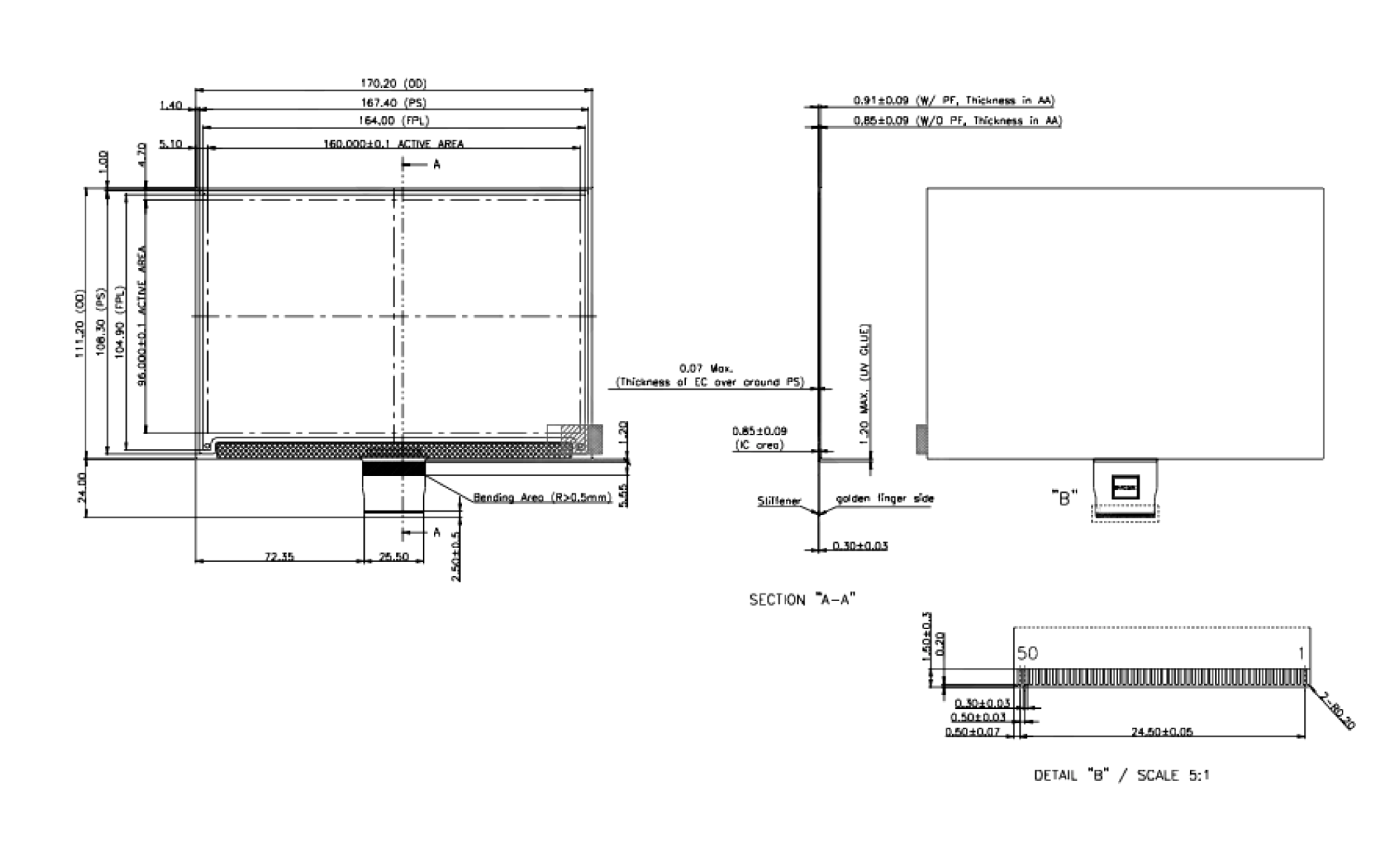
3.2. ESP32-L(C73) Development Kit
| પરિમાણ | મૂલ્ય |
|---|---|
| ભાગ નંબર | ESP32-L(C73) |
| IC | ESP32-WROOM-32D નો પરિચય |
| પ્લેટફોર્મ | આર્ડુઇનો |
| કાર્ય | Drive 4" & 7.3" E6 E-paper Display |
| લક્ષણ | Supports full refresh, fast refresh, and partial refresh |
| મુખ્ય કાર્ય | E-paper display learning, testing, evaluation, and secondary development |
| બહારનું પરિમાણ | 70x54mm (ESP32-L); 47x32mm (DESPI-C73) |
| ઓપરેટિંગ તાપમાન | -20℃ ~ 70℃ |
| પાવર ઇનપુટ | ડીસી 5 વી |
| ગ્રેસ્કેલ સ્તર | Max 16 Grayscale |
| Reserved Functions | Type-C, LED indicator, User-defined button, Reset button, Font chip, Flash chip, Current detection |
| ઈન્ટરફેસ | ટાઈપ-સી |
4. સેટઅપ સૂચનાઓ
Follow these steps to assemble and power your 7.3 Inch E-Paper Display Module with the ESP32 Demo Kit:
- Connect the E-Paper Display: Carefully connect the 7.3-inch E-Paper Display (GDEP073E01) to the DESPI-C73 connector board using its 50-pin FPC (Flexible Printed Circuit) interface. Ensure the connection is secure and properly aligned to avoid damage.
- Attach the Connector Board: Mount the DESPI-C73 connector board onto the ESP32-L(C73) motherboard. The DESPI-C73 is designed to interface directly with the ESP32-L.
- પાવર કનેક્શન: Connect the ESP32-L(C73) motherboard to a DC5V power source using a USB Type-C cable. The Type-C port on the ESP32-L serves as both a power input and a data interface for programming.
- પાવર ચાલુ: Locate the power switch on the ESP32-L board and slide it to the 'ON' position.
- Development Environment Setup (Optional): For programming and development, connect the ESP32-L(C73) to your computer via the USB Type-C cable. Install the necessary drivers and the Arduino IDE (or preferred development environment) with ESP32 board support. Refer to the goodisplay documentation for specific software setup and exampલે કોડ.


5. ઓપરેટિંગ સૂચનાઓ
The ESP32-L(C73) Demo Kit is primarily a development platform. Operation involves programming the ESP32 module to control the e-paper display.
- પ્રોગ્રામિંગ: Use the Arduino IDE or Espressif IDF to write and upload code to the ESP32-L(C73) board via the Type-C USB interface. The goodisplay website typically provides example code and libraries for display control.
- Displaying Content: Your program will send image data and commands to the GDEP073E01 display via the SPI interface. The display supports various refresh modes:
- Full Refresh: Clears the entire screen and redraws all content. This provides the highest image quality but takes longer (15-22 seconds) and consumes more power.
- ઝડપી તાજું કરો: A quicker refresh mode, often used for animations or frequent updates, with potentially lower image quality or temporary ghosting.
- Partial Refresh: Updates only a specific area of the screen, significantly reducing refresh time and power consumption. This is ideal for dynamic content like clocks or sensor readings.
- કાર્યક્ષમતા ફરીથી સેટ કરો: The ESP32-L board includes a reset button. Pressing this button will restart the ESP32 microcontroller, which can be useful during development or if the device becomes unresponsive.
- એલઇડી સૂચક: Observe the onboard LED indicators for status feedback during operation and programming.
6. જાળવણી
- સફાઈ: To clean the e-paper display surface, use a soft, lint-free cloth. If necessary, slightly dampen the cloth with distilled water. Avoid using harsh chemicals, abrasive cleaners, or excessive pressure, as these can damage the display.
- સંગ્રહ: Store the module and display within the specified storage temperature range of -25℃ to 60℃. Protect it from direct sunlight, high humidity, and extreme temperature fluctuations.
- હેન્ડલિંગ: Handle the display and FPC connector with care. Avoid bending or creasing the FPC, as this can lead to permanent damage. Always take anti-static precautions when handling electronic components.
- ફર્મવેર અપડેટ્સ: Periodically check the goodisplay website or community forums for firmware updates for the ESP32-L(C73) board, which may offer performance improvements or new features.
7. મુશ્કેલીનિવારણ
- Display Not Showing Anything:
- Verify that the ESP32-L board is powered on and the power LED is illuminated.
- Check all FPC and board-to-board connections for proper seating and alignment.
- Ensure your code is correctly uploaded and initialized the display. - Display Not Updating / Frozen:
- Confirm that the SPI communication lines are correctly connected and functioning.
- Check the 'BUSY' signal from the e-paper display; the ESP32 should wait for this signal to clear before sending new commands.
- Perform a full refresh in your code to clear any residual image or 'ghosting'. - Ghosting or Image Retention:
- This is common with e-paper displays. Ensure you are performing a full refresh periodically, especially after displaying complex images or text.
- Adjust refresh parameters in your code if available. - ESP32 Not Responding to PC:
- Ensure the USB Type-C cable is securely connected to both the ESP32-L and your computer.
- Check if the correct USB-to-serial drivers are installed on your computer.
- Try pressing the reset button on the ESP32-L board. - Incorrect Colors or Image Distortion:
- Verify that the image data format and color palette used in your code match the E Ink Spectra 6 specifications.
- Ensure the display is operating within its specified temperature range.
8. વપરાશકર્તા ટિપ્સ
- Start with Exampલેસ: Always begin by running the provided example code from goodisplay. This helps confirm hardware functionality and provides a baseline for your own projects.
- Understand Refresh Modes: Experiment with full, fast, and partial refresh modes to optimize your application for speed, power consumption, and display quality. Partial refresh is excellent for frequently changing small elements.
- ઉર્જા વ્યવસ્થાપન: Leverage the low-power nature of e-paper. Design your application to only refresh the display when necessary, and utilize the ESP32's deep sleep modes to maximize battery life for portable applications.
- સમુદાય સંસાધનો: Engage with online communities and forums for ESP32 and e-paper displays. Many developers share code, tips, and solutions that can accelerate your project.
9. ઉત્પાદન એપ્લિકેશનો
The 7.3-inch E-Paper Display Module with ESP32 Demo Kit is versatile and suitable for a wide range of applications, including:


10. વોરંટી અને સપોર્ટ
For warranty information, technical support, and additional resources, please refer to the official goodisplay website or contact their customer service. Keep your purchase records for any warranty claims.


