1. પરિચય
The DYMO LabelMANAGER 300 (LM300) is an electronic labelmaker designed for various labeling applications, including industrial and professional use. It features a QWERTY keyboard and a 15-character LCD display for easy label creation and previewing. This device supports printing on multiple D1 tape widths and offers advanced features such as barcode printing and various text formatting options.
ઉત્પાદન ઓવરview
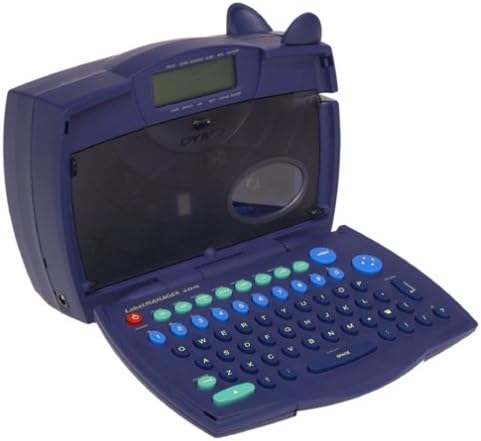
Image 1.1: The DYMO LabelMANAGER 300 in an open position, revealing its QWERTY keyboard and LCD screen. The device is dark blue with light blue and green function keys.
Key features of the LabelMANAGER 300 include:
- Designed for engineering and shop floor applications.
- 15-character LCD display for easy editing and previewing
- Prints on D1 tape widths: 0.25, 0.325, 0.5, and 0.75 inches.
- Features a QWERTY keyboard with profiled keys for efficient input.
- Capable of printing electrical symbols and various barcode types.
2. સેટઅપ
ઉપકરણને અનપેક કરી રહ્યું છે
Carefully remove all components from the packaging. Ensure all items are present before proceeding with setup.

Image 2.1: The DYMO LabelMANAGER 300 shown with its standard accessories, including a D1 tape cassette and the product documentation.
પેકેજમાં શામેલ હોવું જોઈએ:
- DYMO LabelMANAGER 300 Printer
- D1 Label Tape Cassette (starter roll)
- વપરાશકર્તા માર્ગદર્શિકા (આ દસ્તાવેજ)
- 2 AA બેટરી (સમાવેલ)
બેટરી ઇન્સ્ટોલેશન
- Locate the battery compartment on the underside of the labelmaker.
- બૅટરી કમ્પાર્ટમેન્ટ કવર ખોલીને સ્લાઇડ કરો.
- કમ્પાર્ટમેન્ટની અંદર દર્શાવેલ યોગ્ય ધ્રુવીયતા (+/-) સુનિશ્ચિત કરીને, 2 AA બેટરી દાખલ કરો.
- બેટરી કમ્પાર્ટમેન્ટ કવરને ત્યાં સુધી બદલો જ્યાં સુધી તે સુરક્ષિત રીતે જગ્યાએ ન આવે.
ટેપ કેસેટ ઇન્સ્ટોલેશન
- Open the labelmaker cover by gently lifting it from the front.
- Locate the tape cassette compartment.
- Insert a DYMO D1 label tape cassette into the compartment, ensuring the tape feeds correctly into the print head mechanism.
- Close the labelmaker cover until it latches securely.
3. ઓપરેટિંગ સૂચનાઓ
પાવરિંગ ચાલુ/બંધ
- પાવર ચાલુ કરવા માટે: દબાવો શક્તિ button. The LCD display will illuminate.
- પાવર બંધ કરવા માટે: દબાવો અને પકડી રાખો શક્તિ button until the display turns off. The device also features an automatic shut-off to conserve battery power after a period of inactivity.
Basic Label Creation
- ખાતરી કરો કે ઉપકરણ ચાલુ છે.
- Use the QWERTY keyboard to type your desired text. The text will appear on the 15-character, two-line LCD display.
- Review the text on the display for accuracy. Use the arrow keys to navigate and edit if necessary.
- દબાવો છાપો લેબલ છાપવા માટે બટન.
- Once printed, use the integrated cutter to cut the label.
ટેક્સ્ટ ફોર્મેટિંગ
The LabelMANAGER 300 offers various text formatting options:
- Print Styles: Select from normal, narrow, bold, vertical, outline, shadow, mirror, and boxed styles. Refer to the device's menu for specific style selection.
- Text Effects: Apply underline, shadow, or box effects to your text.
- સમર્થન: Labels can be printed with left, center, or right justification.
- Multi-line Printing: Print one, two, three, or four lines on a single label, depending on the tape width.
અદ્યતન સુવિધાઓ
- Incremental Numbering: Automatically print a series of labels with sequential numbers.
- Repeat Printing: Print multiple copies of the same label.
- Barcode Printing: The LM300 supports printing various barcode types, including UPC-A, UPC-E, EAN-8, EAN-13, Code-39, and Code-128. Access this feature through the device's menu.
- વિદ્યુત ચિહ્નો: Embed common electrical symbols into your labels for specialized applications.
- Last-Label Memory: The device retains the last printed label in memory for quick reprinting.
4. જાળવણી
ઉપકરણની સફાઈ
- Ensure the labelmaker is powered off before cleaning.
- ઉપકરણના બાહ્ય ભાગને નરમ સાથે સાફ કરો, ડીamp કાપડ ઘર્ષક ક્લીનર્સ અથવા સોલવન્ટનો ઉપયોગ કરશો નહીં.
- To clean the print head, open the cover and gently wipe the print head with a cotton swab lightly dampઆઇસોપ્રોપીલ આલ્કોહોલથી ભરેલું. કવર બંધ કરતા પહેલા તેને સંપૂર્ણપણે સુકાવા દો.
સંગ્રહ
When not in use, store the DYMO LabelMANAGER 300 in a cool, dry place away from direct sunlight and extreme temperatures. If storing for an extended period, it is recommended to remove the batteries to prevent leakage.
5. મુશ્કેલીનિવારણ
If you encounter issues with your LabelMANAGER 300, refer to the following common problems and solutions:
- કોઈ શક્તિ નથી:
- Check if batteries are inserted correctly with proper polarity.
- Replace old or depleted batteries with new AA batteries. - નબળી પ્રિન્ટ ગુણવત્તા:
- Ensure the tape cassette is installed correctly.
- Clean the print head as described in the Maintenance section.
- Try a new tape cassette, as old tape may affect print quality. - Tape Jams:
- Open the cover and carefully remove any jammed tape. Ensure no adhesive residue is left in the mechanism.
- Make sure the tape cassette is seated properly. - ડિસ્પ્લે કામ કરતું નથી:
- Check battery power. If the display is dim or blank, replace batteries.
- Power cycle the device (turn off, then on again). - ઉપકરણ પ્રતિસાદ આપતું નથી:
- Remove and reinsert batteries to perform a soft reset.
- If the issue persists, contact customer support.
6. સ્પષ્ટીકરણો
| લક્ષણ | વિગત |
|---|---|
| મોડેલનું નામ | LM300 |
| બ્રાન્ડ | ડીવાયએમઓ |
| પ્રિન્ટીંગ ટેકનોલોજી | થર્મલ |
| ડિસ્પ્લે | 15-character, 2-line LCD |
| કીબોર્ડ લેઆઉટ | QWERTY |
| સપોર્ટેડ ટેપ પહોળાઈ | 0.25, 0.325, 0.5, 0.75 inches (D1 tapes) |
| Print Styles | Normal, Narrow, Bold, Vertical, Outline, Shadow, Mirror, Boxed |
| ટેક્સ્ટ ઇફેક્ટ્સ | Underline, Shadow, Box |
| Barcode Support | UPC-A, UPC-E, EAN-8, EAN-13, Code-39, Code-128 |
| પાવર સ્ત્રોત | 2 AA બેટરી (સમાવેલ) |
| વસ્તુનું વજન | 2.3 પાઉન્ડ |
| પેકેજ પરિમાણો | 11.1 x 8 x 4.4 ઇંચ |
| Max Copy Resolution (B&W) | 300 ડીપીઆઈ |
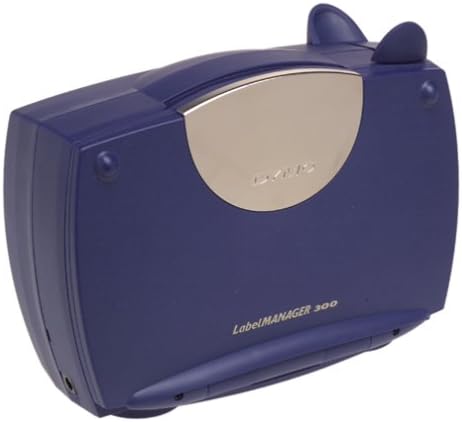
Image 6.1: The DYMO LabelMANAGER 300 in its closed position, showcasing its compact and portable design.
7. વોરંટી અને સપોર્ટ
વોરંટી માહિતી
The DYMO LabelMANAGER 300 comes with a limited warranty. Please refer to the warranty card included with your product for specific terms and conditions, or visit the official DYMO webવિગતવાર વોરંટી માહિતી માટે સાઇટ.
ગ્રાહક આધાર
For further assistance, technical support, or to purchase accessories and replacement tape, please visit the official DYMO website or contact their customer service department. Contact information can typically be found on the DYMO webસાઇટ અથવા ઉત્પાદન પેકેજિંગમાં.


