પરિચય
Welcome to the user manual for your Flipper Big Button Remote. This remote is designed for simplicity and ease of use, especially for seniors, allowing control of two devices: a television and a cable/satellite/DTV box. Its intuitive design and large, color-coded buttons simplify the viewઅનુભવ.
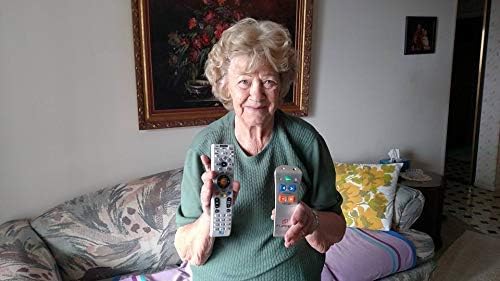
Image: An older woman demonstrates the Flipper remote's simplicity by holding it alongside a more complex standard remote, emphasizing its user-friendly design.
સલામતી માહિતી
Please read all safety instructions before using the Flipper remote to ensure safe operation and prevent damage.
- Do not expose the remote to water or excessive moisture.
- જૂની અને નવી બેટરીઓનું મિશ્રણ કરશો નહીં. આલ્કલાઇન, સ્ટાન્ડર્ડ (કાર્બન-ઝિંક) અથવા રિચાર્જ કરી શકાય તેવી (નિકલ-કેડમિયમ) બેટરીઓનું મિશ્રણ કરશો નહીં.
- વપરાયેલી બેટરીનો સ્થાનિક નિયમો અનુસાર યોગ્ય રીતે નિકાલ કરો.
- નાના બાળકોની પહોંચથી દૂર રાખો.
પેકેજ સામગ્રી
Your Flipper Big Button Remote package should contain the following items:
- 1 x Flipper Big Button Remote (Model A22)
- ૧ x વપરાશકર્તા માર્ગદર્શિકા (આ દસ્તાવેજ)
ઉત્પાદન ઓવરview
રીમોટ કંટ્રોલ લેઆઉટ
The Flipper remote features a simplified layout for common functions and a hidden sliding panel for advanced controls such as direct channel entry.

Image: The Flipper remote with its main, large, color-coded buttons visible: green ON/OFF, gray MUTE, blue CHANNEL up/down, and orange VOLUME up/down.

Image: The Flipper remote with its lower panel slid open, exposing the numeric keypad (0-9), LC (Last Channel), TV, STB (Set Top Box), ADD, and DEL buttons.
Main Buttons:
- ON/OFF (Green): Powers on/off both the TV and Set Top Box simultaneously.
- MUTE (Gray): Mutes/unmutes the TV audio.
- CHANNEL (Blue Arrows): Changes channels up or down.
- VOLUME (Orange +/-): વોલ્યુમ ઉપર અથવા નીચે સમાયોજિત કરે છે.
Hidden Panel Buttons:
Slide down the lower panel to access these functions:
- ન્યુમેરિક કીપેડ (0-9): For direct channel entry.
- LC (Last Channel): અગાઉના પર પાછા ફરે છે viewએડ ચેનલ.
- ટીવી: Selects TV mode for programming or direct control.
- STB (Set Top Box): Selects Set Top Box mode for programming or direct control.
- ઉમેરો: Used for adding favorite channels.
- ધ: Used for deleting favorite channels.
સેટઅપ
બેટરી ઇન્સ્ટોલેશન
The Flipper remote requires two (2) AAA batteries (not included).
- રિમોટની પાછળના ભાગમાં બેટરી કમ્પાર્ટમેન્ટ કવર ખોલો.
- યોગ્ય ધ્રુવીયતા (+ અને -) સુનિશ્ચિત કરીને, બે AAA બેટરી દાખલ કરો.
- બેટરી કમ્પાર્ટમેન્ટ કવર સુરક્ષિત રીતે બંધ કરો.
Device Pairing (Simple Setup)
The Flipper remote is designed for easy setup with most TVs and cable/satellite boxes. Follow these steps:

Image: A visual guide illustrating the three steps for setting up the Flipper remote: 1. Test presets using VOL and CH buttons. 2. Sync TV by holding TV button, entering codes, and pressing VOL. 3. Sync STB by holding STB button, entering codes, and pressing CH.
- Test Presets: The Flipper remote is pre-synced to many TVs and Set Top Boxes (cable boxes). Test by pressing the વોલ્યુમ અને ચેનલ buttons. If one or both presets do not work, proceed to the next steps.
- Sync TV:
- દબાવો અને પકડી રાખો TV button (under the sliding panel) until the red light on the remote turns solid.
- Enter the 3-digit code for your TV brand (refer to the Flipper website or included code list for common codes). The light will turn off.
- દબાવો વોલ્યુમ to test. If it doesn't work, try another code for your TV brand.
- Special Note for no STB/cable box: If you only have a TV and no Set Top Box, press and hold TV until the light is solid, then enter 970. This syncs the Channel buttons to the TV.
- Sync STB (Set Top Box):
- દબાવો અને પકડી રાખો STB button (under the sliding panel) until the red light on the remote turns solid.
- Enter the 3-digit code for your cable, satellite, or DTV box brand (refer to the Flipper website or included code list). The light will turn off.
- દબાવો ચેનલ to test. If it doesn't work, try another code for your STB brand.
- ટીપ: For Xfinity boxes, you may need to look behind the TV or furniture to find the box.
- Once both devices are synced, the ચાલુ/બંધ button will control both simultaneously.
ઓપરેટિંગ સૂચનાઓ
મૂળભૂત નિયંત્રણ
- શક્તિ: લીલા દબાવો ચાલુ/બંધ button to turn both your TV and Set Top Box on or off.
- ચેનલ: વાદળી રંગનો ઉપયોગ કરો ચેનલ arrows to navigate through channels.
- વોલ્યુમ: Use the orange વોલ્યુમ +/- buttons to adjust the sound level.
- મ્યૂટ: ગ્રે દબાવો મૌન ઑડિઓને શાંત કરવા માટે બટન. અનમ્યૂટ કરવા માટે ફરીથી દબાવો.
Favorite Channel Feature
Program up to 30 of your favorite channels for quick access.
- Ensure the remote is in STB mode (if using a cable/satellite box) or TV mode (if only controlling TV channels directly).
- દબાવો અને પકડી રાખો ઉમેરો button (under the sliding panel) until the red light turns solid.
- Enter the channel number you wish to add using the numeric keypad.
- દબાવો ઉમેરો again. The light will flash and turn off, indicating the channel is saved.
- Repeat for all desired favorite channels.
- To scroll through favorite channels, use the blue ચેનલ તીર
Locking Feature (Prevent Reprogramming)
The Flipper remote includes an optional locking feature to prevent accidental reprogramming.
- થી તાળું the remote: Press and hold ઉમેરો અને DEL simultaneously for 5 seconds until the red light flashes twice.
- થી અનલોક કરો the remote: Press and hold ઉમેરો અને DEL simultaneously for 5 seconds until the red light flashes three times.
જાળવણી
સફાઈ
Wipe the remote with a soft, dry cloth. Do not use liquid cleaners or abrasive materials, as these may damage the remote's surface or internal components.
બેટરી રિપ્લેસમેન્ટ
Replace batteries when the remote's response becomes sluggish or the indicator light does not illuminate consistently. Refer to the "Battery Installation" section for instructions.
મુશ્કેલીનિવારણ
સામાન્ય મુદ્દાઓ અને ઉકેલો
| સમસ્યા | સંભવિત કારણ | ઉકેલ |
|---|---|---|
| રિમોટ કામ કરતું નથી. | મૃત અથવા ખોટી રીતે દાખલ કરેલી બેટરીઓ. | યોગ્ય ધ્રુવીયતા સુનિશ્ચિત કરીને, બેટરીઓને નવી AAA બેટરીથી બદલો. |
| Remote controls one device but not the other. | Only one device is programmed, or incorrect code used. | Re-program the unresponsive device using the "Device Pairing" instructions. Try alternative codes for your device brand. |
| ON/OFF button only controls one device. | Both devices are not properly synced for the one-touch power feature. | Ensure both TV and STB are programmed correctly. The ON/OFF button will then control both. |
| Cannot add or delete favorite channels. | રિમોટ લોક થયેલ છે. | Unlock the remote using the "Locking Feature" instructions. |
વિશિષ્ટતાઓ
ટેકનિકલ વિગતો
- મોડલ: A22
- બ્રાન્ડ: ફ્લિપર
- ઉત્પાદક: Flipper LLC
- સુસંગત ઉપકરણો: TV, Set Top Box (Cable, Satellite, DTV)
- સમર્થિત ઉપકરણોની મહત્તમ સંખ્યા: 2
- પાવર સ્ત્રોત: 2 x AAA બેટરી (શામેલ નથી)
- કનેક્ટિવિટી ટેકનોલોજી: ઇન્ફ્રારેડ
- માનવ ઇન્ટરફેસ ઇનપુટ: બટનો, કીપેડ
- ઉત્પાદન પરિમાણો: 17.78 x 5.08 x 5.08 સેમી
- વસ્તુનું વજન: 141.75 ગ્રામ
- ખાસ લક્ષણો: Favorite channel feature (up to 30 channels), Locking feature to prevent reprogramming, Large tactile friendly buttons.
વોરંટી અને આધાર
વોરંટી માહિતી
Specific warranty details are typically provided with your purchase documentation or on the manufacturer's official website. Please refer to those resources for the most accurate and up-to-date warranty terms regarding your Flipper remote.
ગ્રાહક આધાર
For further assistance, troubleshooting, or to find device codes not listed in this manual, please visit the official Flipper webસાઇટ અથવા તેમના ગ્રાહક સપોર્ટનો સંપર્ક કરો.
Note: Contact information and support resources may vary by region. Please check the product packaging or manufacturer's webવિગતો માટે સાઇટ.


