1. પરિચય
ખરીદી બદલ આભારasing the Atlanta 1669/19 Quartz Alarm Clock. This digital alarm clock features a silent movement, a light sensor for automatic display illumination, and a snooze function. This manual provides detailed instructions for setup, operation, and maintenance to ensure optimal performance and longevity of your device.
2. સલામતી માહિતી
- ઉપકરણને પાણી અને ઉચ્ચ ભેજથી દૂર રાખો.
- ઘડિયાળને સીધા સૂર્યપ્રકાશ અથવા અતિશય તાપમાનમાં રાખવાનું ટાળો.
- ઘડિયાળને જાતે ડિસએસેમ્બલ કરવાનો કે રિપેર કરવાનો પ્રયાસ કરશો નહીં. લાયક સેવા કર્મચારીઓનો સંપર્ક કરો.
- વપરાયેલી બેટરીનો સ્થાનિક નિયમો અનુસાર જવાબદારીપૂર્વક નિકાલ કરો.
- જૂની અને નવી બેટરીઓ અથવા વિવિધ પ્રકારની બેટરીઓનું મિશ્રણ કરશો નહીં.
3. પેકેજ સામગ્રી
- Atlanta 1669/19 Quartz Alarm Clock Unit
- વપરાશકર્તા માર્ગદર્શિકા (આ દસ્તાવેજ)
નોંધ: બેટરીઓ શામેલ નથી અને અલગથી ખરીદવી આવશ્યક છે.
4. ઉત્પાદન ઓવરview
The Atlanta 1669/19 features a clear digital display, intuitive controls, and a light sensor for enhanced visibility in low-light conditions.
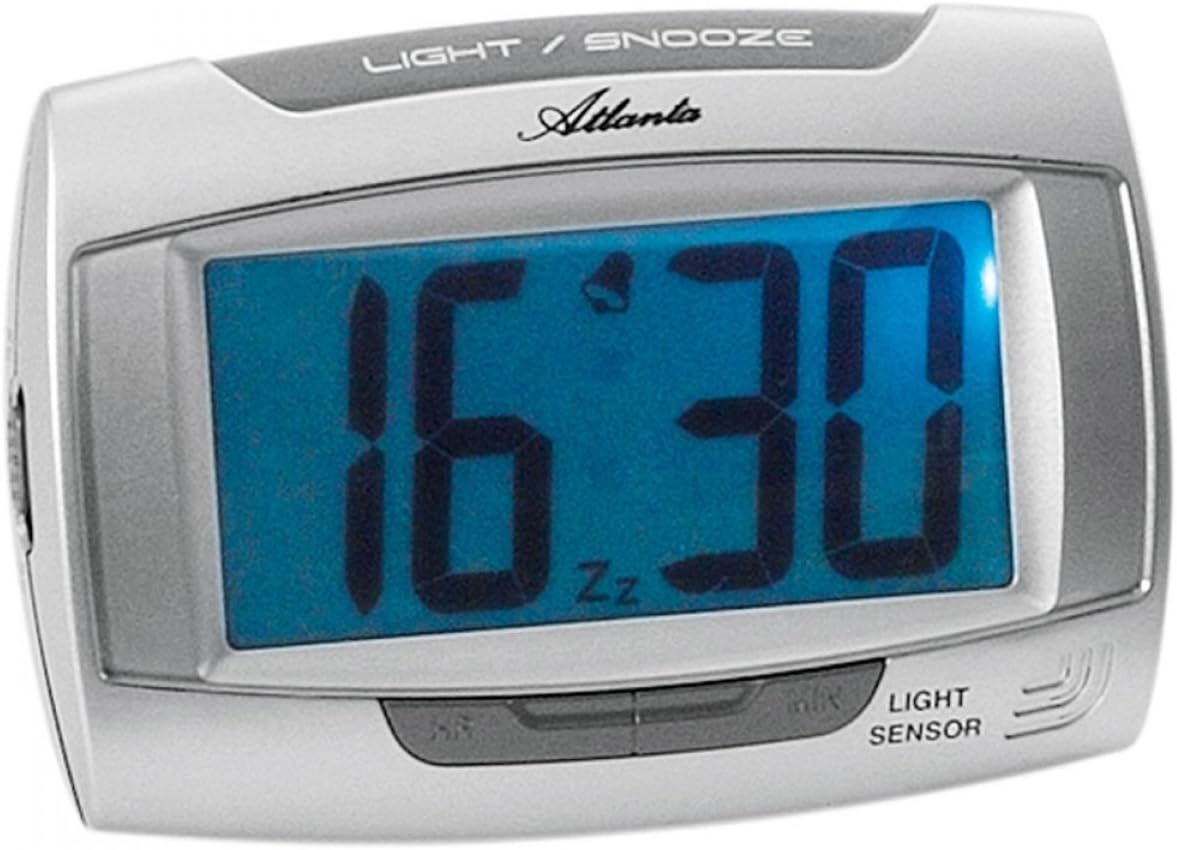
આકૃતિ 1: આગળ view of the Atlanta 1669/19 Quartz Alarm Clock. The clock features a large digital display, a "LIGHT / SNOOZE" button at the top, and a "LIGHT SENSOR" indicator at the bottom right. The display shows the time 16:30, with an alarm bell icon and 'Zz' indicating snooze functionality.
મુખ્ય ઘટકો:
- ડિજિટલ ડિસ્પ્લે: Shows time and alarm status.
- LIGHT / SNOOZE Button: Activates temporary backlight and snooze function.
- લાઇટ સેન્સર: Automatically illuminates the display in dark environments.
- Control Buttons (Rear/Side): For setting time and alarm.
- Battery Compartment (Rear): જરૂરી બેટરીઓ ધરાવે છે.
5. સેટઅપ
5.1. બેટરી ઇન્સ્ટોલેશન
- એલાર્મ ઘડિયાળની પાછળ બેટરી કમ્પાર્ટમેન્ટ કવર શોધો.
- Remove the cover by sliding or lifting it.
- Insert the required batteries (typically 1x AA, refer to compartment markings) ensuring correct polarity (+ and -).
- બેટરી કમ્પાર્ટમેન્ટ કવર સુરક્ષિત રીતે બદલો.
5.2. પ્રારંભિક સમય સેટિંગ
Upon battery installation, the display will typically show a default time. You will need to set the current time.
- Locate the time setting buttons, usually labeled "SET", "HOUR", and "MINUTE" or similar, on the back or side of the clock.
- Press the "SET" button (or equivalent) to enter time setting mode. The hour digits may start flashing.
- Use the "HOUR" button to adjust the hour.
- Press "SET" again to move to minute setting. The minute digits may start flashing.
- Use the "MINUTE" button to adjust the minutes.
- Press "SET" one more time to confirm and exit time setting mode.
6. ઓપરેટિંગ સૂચનાઓ
6.1. એલાર્મ સુયોજિત કરી રહ્યા છે
- Locate the alarm setting buttons, typically labeled "ALARM SET", "ALARM HOUR", and "ALARM MINUTE" or similar.
- Press the "ALARM SET" button to enter alarm setting mode. The alarm hour digits may flash.
- Use the "ALARM HOUR" button to adjust the desired alarm hour.
- Press "ALARM SET" again to move to alarm minute setting. The alarm minute digits may flash.
- Use the "ALARM MINUTE" button to adjust the desired alarm minutes.
- Press "ALARM SET" one more time to confirm and exit alarm setting mode.
૫.૨. એલાર્મને સક્રિય/નિષ્ક્રિય કરવું
There is usually a switch or button to turn the alarm on or off. Look for a switch labeled "ALARM ON/OFF" or an alarm icon button. When the alarm is active, an alarm icon (e.g., a bell) will typically appear on the display.
૫.૩. સ્નૂઝ ફંક્શન
When the alarm sounds, press the large "LIGHT / SNOOZE" button located on the top of the clock. This will temporarily silence the alarm, and it will sound again after a few minutes (typically 5-9 minutes). The "Zz" icon on the display indicates that the snooze function is active.
6.4. Light Sensor and Display Backlight
- Automatic Backlight (Light Sensor): The clock is equipped with a light sensor. When enabled, the display will automatically illuminate with a soft, constant light in dark environments, making it easy to read the time at night without pressing any buttons. Look for a switch or button labeled "SENSOR ON/OFF" or similar to enable or disable this feature.
- કામચલાઉ બેકલાઇટ: To briefly illuminate the display in any lighting condition, press the "LIGHT / SNOOZE" button on the top of the clock. The backlight will stay on for a few seconds and then turn off automatically.
7. જાળવણી
- સફાઈ: Wipe the clock with a soft, dry cloth. Do not use abrasive cleaners or solvents, as these may damage the casing અથવા ડિસ્પ્લે.
- બેટરી રિપ્લેસમેન્ટ: When the display dims or the clock stops functioning correctly, it is time to replace the batteries. Follow the battery installation steps in Section 5.1.
- સંગ્રહ: If the clock will not be used for an extended period, remove the batteries to prevent leakage and damage.
8. મુશ્કેલીનિવારણ
| સમસ્યા | સંભવિત કારણ | ઉકેલ |
|---|---|---|
| ઘડિયાળનું પ્રદર્શન ખાલી અથવા ઝાંખું છે. | ઓછી અથવા બંધ બેટરી; ખોટી બેટરી ઇન્સ્ટોલેશન. | યોગ્ય ધ્રુવીયતા સુનિશ્ચિત કરીને બેટરીને નવી સાથે બદલો. |
| એલાર્મ વાગતો નથી. | Alarm is not activated; alarm time is incorrect; low batteries. | Ensure alarm is switched ON (bell icon visible); verify alarm time setting; replace batteries. |
| Automatic backlight not working. | Light sensor feature is disabled; insufficient darkness. | Ensure the light sensor switch is ON; test in a completely dark room. |
| સમય ખોટો છે. | Time was not set correctly; batteries were removed/replaced. | Reset the current time following Section 5.2. |
9. સ્પષ્ટીકરણો
| મોડલ | 1669/19 |
| બ્રાન્ડ | એટલાન્ટા |
| ઓપરેશન મોડ | ડિજિટલ |
| ખાસ લક્ષણો | Alarm, Lighting (Light Sensor) |
| સામગ્રી | પ્લાસ્ટિક |
| ફ્રેમ સામગ્રી | પ્લાસ્ટિક |
| માઉન્ટિંગ પ્રકાર | ટેબલટોપ |
| રંગ | Blue (display), Silver-coloured (case) |
| બેટરી જરૂરી છે | Yes (Type not specified, typically AA or AAA for such clocks) |
| બેટરી સમાવાયેલ | ના |
| પરિમાણો (અંદાજે) | 11 x 7 સે.મી |
10. વોરંટી અને સપોર્ટ
વોરંટી માહિતી અથવા તકનીકી સહાય માટે, કૃપા કરીને ખરીદી સમયે આપેલા દસ્તાવેજોનો સંદર્ભ લો અથવા તમારા રિટેલરનો સંપર્ક કરો. કોઈપણ વોરંટી દાવા માટે ખરીદીનો પુરાવો રાખો.


