પરિચય
The Belkin Hands-Free Bluetooth CarAudio Connect Aux provides an in-car solution for making calls and streaming music from a smartphone through your vehicle's stereo system. This device enables hands-free communication and audio playback, routing both calls and music through your car's speakers for enhanced sound quality.
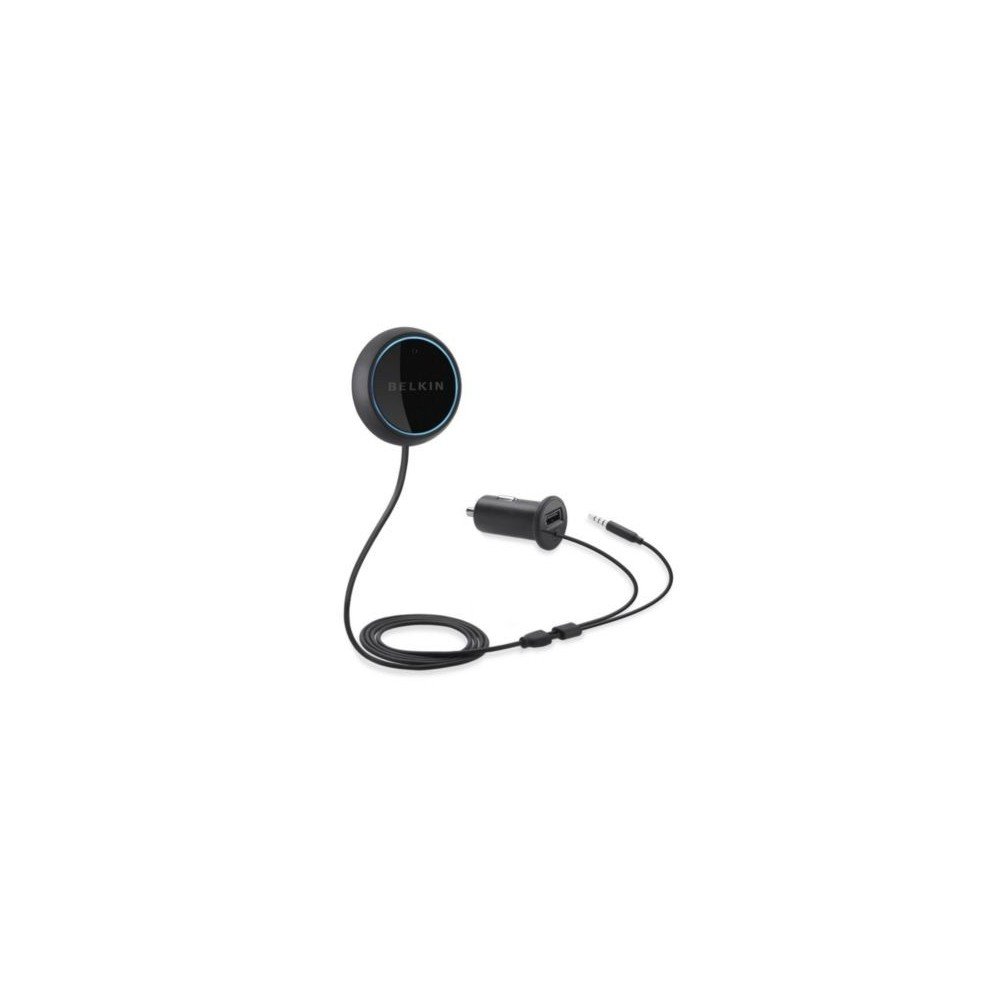
Image: The Belkin Hands-Free Bluetooth CarAudio Connect Aux, showing the main control button, the Micro CLA power adapter with USB port, and the Aux-In connection cable.
બૉક્સમાં શું છે
ખાતરી કરો કે બધા ઘટકો પેકેજમાં હાજર છે:
- Hands-Free Bluetooth CarAudio Connect Aux (main control button with integrated microphone)
- Micro CLA Power Adapter with USB Power Port
- Aux-In Connection Cable
સલામતી માહિતી
For safe operation and to prevent potential hazards, please observe the following guidelines:
- Do not attempt to adjust the device or its settings while operating a vehicle.
- Ensure the device is positioned in a location that does not obstruct your view રસ્તા પર ઉતરવાથી અથવા વાહન નિયંત્રણમાં દખલ કરવાથી.
- ઉપકરણને અતિશય તાપમાન, સીધા સૂર્યપ્રકાશ અને ભેજથી સુરક્ષિત કરો.
સેટઅપ સૂચનાઓ
૫.૨. ભૌતિક જોડાણ
- Connect the Aux-In Cable: Plug the 3.5mm audio jack from the Belkin device into your car's auxiliary input port.
- પાવર એડેપ્ટરને કનેક્ટ કરો: Insert the Micro CLA power adapter into your vehicle's 12V accessory outlet (cigarette lighter socket).
- Mount the Control Button: Secure the control button to a convenient location on your dashboard using the adhesive backing or magnetic mount. Ensure it is within easy reach and does not obstruct driving. The button also contains the microphone for hands-free calls.

Image: Connecting the Micro CLA power adapter to the car's 12V accessory outlet.

Image: Positioning the Belkin control button on the dashboard.
2. બ્લૂટૂથ જોડી
- Ensure your vehicle's ignition is on, providing power to the adapter. The control button should illuminate with an orange light.
- Press and hold the control button for several seconds until the light begins to blink blue. This indicates the device is in pairing mode.
- તમારા સ્માર્ટફોન પર, બ્લૂટૂથ સેટિંગ્સ પર જાઓ અને બ્લૂટૂથ સક્ષમ કરો.
- Select "Belkin CarAudio Connect" (or similar name) from the list of available devices.
- Once paired, the control button's light will turn solid blue. No PIN is typically required.
વિડિઓ: એક ઓવરview of the Belkin Hands-Free Bluetooth CarAudio Connect Aux, demonstrating its installation and basic functionality within a car environment.
ઓપરેટિંગ સૂચનાઓ
સંગીત પ્લેબેક
- Start/Resume Music: After pairing, select your audio content on your smartphone. The audio will play through your car stereo. If paused, briefly press the control button to resume playback.
- સંગીત થોભાવો: Briefly press the control button once to pause playback.
- ટ્રેક છોડો: Double-press the control button to skip to the next track.
- The device will automatically reconnect to your paired smartphone when the car is started and the button is pressed.
હેન્ડ્સ-ફ્રી કૉલિંગ
- કૉલનો જવાબ આપો: When an incoming call is received, your music will automatically fade. Briefly press the control button once to answer the call.
- કૉલ સમાપ્ત કરો: Briefly press the control button once to end an active call.
- વૉઇસ આદેશો: Press and hold the control button to activate your smartphone's voice assistant (e.g., Siri, Google Assistant) for voice dialing or other commands.

Image: Demonstrating an incoming call handled by the Belkin device in a car.
જાળવણી
To ensure the longevity and optimal performance of your Belkin CarAudio Connect Aux:
- ઉપકરણને નરમ, સૂકા કપડાથી સાફ કરીને સાફ રાખો. કઠોર રસાયણો અથવા ઘર્ષક ક્લીનર્સનો ઉપયોગ કરવાનું ટાળો.
- ખાતરી કરો કે બધા કનેક્શન સુરક્ષિત છે અને કાટમાળથી મુક્ત છે.
- જ્યારે ઉપકરણ લાંબા સમય સુધી ઉપયોગમાં ન હોય ત્યારે તેને ઠંડી, સૂકી જગ્યાએ સંગ્રહિત કરો.
મુશ્કેલીનિવારણ
| સમસ્યા | ઉકેલ |
|---|---|
| No Power/Light Off | Ensure the Micro CLA power adapter is securely plugged into the 12V accessory outlet and the vehicle's ignition is on. Check the vehicle's fuse for the 12V outlet if necessary. |
| Cannot Pair Device | Ensure the Belkin device is in pairing mode (blinking blue light). Turn off and on your smartphone's Bluetooth. Try restarting both the Belkin device (by unplugging and replugging) and your smartphone. Ensure no other devices are actively connected to the Belkin unit. |
| કોઈ ઓડિયો આઉટપુટ નથી | Verify the 3.5mm Aux-In cable is fully inserted into both the Belkin device and your car's auxiliary input. Ensure your car stereo is set to the AUX input source. Check the volume levels on both your smartphone and car stereo. |
| નબળી કૉલ ગુણવત્તા | Ensure the control button (microphone) is positioned clearly, away from obstructions or excessive noise sources like air vents. Adjust the volume on your car stereo. |
| ઉપકરણ વારંવાર ડિસ્કનેક્ટ થાય છે | Ensure your smartphone is within close proximity to the Belkin device. Avoid placing large metal objects between the device and your phone. Try re-pairing the device. |
વિશિષ્ટતાઓ
| લક્ષણ | વિગત |
|---|---|
| મોડલ નંબર | F4U037bt |
| કનેક્ટિવિટી ટેકનોલોજી | બ્લૂટૂથ, સહાયક |
| વાયરલેસ કોમ્યુનિકેશન | બ્લૂટૂથ |
| ખાસ લક્ષણો | Hands-Free Calls, Echo Cancelling Microphone, Seamless switching between calls and music |
| માનવ ઇન્ટરફેસ ઇનપુટ | માઇક્રોફોન |
| પાવર સ્ત્રોત | Corded Electric (via 12V accessory outlet) |
| રંગ | કાળો |
| ઉત્પાદન પરિમાણો | 1.4 x 6 x 5.6 ઇંચ |
| વસ્તુનું વજન | ૧૧.૩ ઔંસ (આશરે ૩૨૦ ગ્રામ) |
| ઉત્પાદક | બેલ્કિન |
વોરંટી અને આધાર
This product is subject to Belkin's standard warranty terms and conditions. For detailed warranty information, please refer to the official Belkin website or contact Belkin customer support.
કાનૂની અસ્વીકરણ: This product is non-refundable as per the provided information. Please review the return policy of your retailer at the time of purchase.
For further assistance or technical support, please visit the official Belkin support page or contact their customer service.


