પરિચય
The Plantronics Savi W720 is a multi-device wireless headset system designed to streamline communication across your PC, mobile phone, and desk phone. This manual provides detailed instructions for setup, operation, maintenance, and troubleshooting to ensure optimal performance of your headset system.
પેકેજ સામગ્રી
ચકાસો કે તમારા પેકેજમાં નીચેની વસ્તુઓ છે:
- Savi W720 Headset
- ચાર્જિંગ બેઝ
- યુએસબી કેબલ
- ટેલિફોન ઇન્ટરફેસ કેબલ
- પાવર એડેપ્ટર

Image: Plantronics Savi W720 Headset System, showing the headset docked in its charging base.
સેટઅપ
1. હેડસેટ ચાર્જ કરી રહ્યું છે
Before initial use, fully charge the headset. Place the headset into the charging cradle on the base unit. The charge indicator light on the base will illuminate to confirm charging.
2. પીસી સાથે કનેક્ટ થઈ રહ્યું છે
- Connect the USB cable from the base unit to an available USB port on your computer.
- The computer should automatically detect the device. Install any necessary software or drivers if prompted.
3. Connecting to a Mobile Phone (Bluetooth)
- On the Savi W720 base, press and hold the Bluetooth pairing button until the Bluetooth indicator light flashes red and blue.
- તમારા મોબાઇલ ફોન પર, બ્લૂટૂથ સક્ષમ કરો અને નવા ઉપકરણો શોધો.
- Select "Plantronics Savi W720" from the list of found devices.
- જો પાસકોડ માટે પૂછવામાં આવે, તો "0000" દાખલ કરો.
- The Bluetooth indicator on the base will turn solid blue when successfully paired.
4. ડેસ્ક ફોન સાથે કનેક્ટ કરી રહ્યું છે
- Disconnect the handset coil cord from the desk phone base.
- Connect the telephone interface cable from the Savi W720 base to the handset port on your desk phone.
- Connect the desk phone handset to the telephone interface cable.
- Adjust the configuration switch on the Savi W720 base to the correct setting for your desk phone (refer to the full user guide for specific phone models).
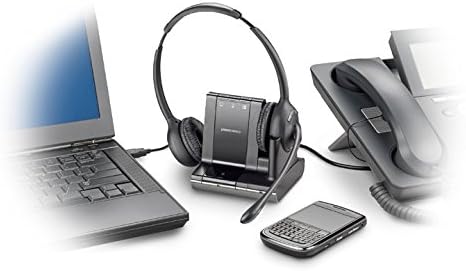
Image: The Plantronics Savi W720 base unit connected to a laptop via USB, a desk phone, and wirelessly paired with a mobile phone, demonstrating its multi-device capability.
ઓપરેટિંગ સૂચનાઓ
કallsલ કરવા અને જવાબો આપવો
- કallsલ્સનો જવાબ / અંત: Press the Call Control button on the headset or the corresponding phone button on the base.
- સ્વિચિંગ ઉપકરણો: Press the desired phone button (PC, Mobile, Desk Phone) on the base to select the active audio source.
હેડસેટ નિયંત્રણો
- વોલ્યુમ નિયંત્રણ: Use the volume up (+) and volume down (-) buttons on the headset.
- મ્યૂટ: માઇક્રોફોનને મ્યૂટ અથવા અનમ્યૂટ કરવા માટે હેડસેટ પર મ્યૂટ બટન દબાવો.
- ફ્લેશ નિયંત્રણ: For desk phone calls, press the Call Control button on the headset to answer a new incoming call or switch between active calls.

છબી: ક્લોઝ-અપ view of the Plantronics Savi W720 headset, highlighting the earcups and microphone boom, with visible controls for volume and call management.
જાળવણી
- સફાઈ: Wipe the headset and base with a soft, dry cloth. Avoid using liquid cleaners or solvents.
- સંગ્રહ: When not in use, store the headset on its charging base to ensure it is always ready.
- બેટરી: The headset features a hot-swappable battery for extended talk time. Additional batteries are sold separately.
મુશ્કેલીનિવારણ
| સમસ્યા | ઉકેલ |
|---|---|
| હેડસેટમાંથી કોઈ ઑડિઓ નથી. |
|
| Cannot pair with mobile phone. |
|
| Desk phone connection issues. |
|
વિશિષ્ટતાઓ
- મોડલ: સવી ડબ્લ્યુ 720
- કનેક્ટિવિટી: Bluetooth, DECT (for desk phone/PC base)
- વાયરલેસ શ્રેણી: ૩૫૦ ફૂટ સુધી (DECT)
- વાત કરવાનો સમય: 9 કલાક સુધી
- બેટરી: 1 લિથિયમ પોલિમર (સમાવેલ)
- ઓડિયો પર્ફોર્મન્સ: Wideband (up to 6,800 Hz)
- માઇક્રોફોન: ઘોંઘાટ-રદ
- વજન: Approximately 0.32 ounces (headset)
- પરિમાણો: 5.65 x 2.1 x 7.13 inches (product)
વોરંટી અને આધાર
This Plantronics product comes with a US Warranty. For detailed warranty information and technical support, please refer to the official Plantronics website or contact their customer service. The full user manual in PDF format is also available for download from the manufacturer's support page.
વધારાની સહાય માટે, તમે મુલાકાત લઈ શકો છો Plantronics Brand Store.


