1. પરિચય
This manual provides essential instructions for the safe and effective use of your Ken-A-Vision T-17541C Digital CoreScope 2 Compound Microscope. Designed for biological and educational applications, this digital microscope features a monocular head, LED illumination, and a 1.3-megapixel camera for capturing still images and video. Please read this manual thoroughly before operating the device and retain it for future reference.
2. સલામતી માહિતી
- ઇલેક્ટ્રિકલ સલામતી: Ensure the power supply is connected to a grounded outlet. Do not operate the microscope with wet hands or in damp environments. Disconnect power before cleaning or servicing.
- હેન્ડલિંગ: Always carry the microscope by its base and arm. Avoid sudden impacts or vibrations.
- Optical Care: Do not touch optical surfaces with bare fingers. Use only approved lens cleaning materials.
- વેન્ટિલેશન: Ensure adequate ventilation around the microscope to prevent overheating.
- બાળકો: This device is not a toy. Adult supervision is recommended when used by children.
3. પેકેજ સામગ્રી
ખાતરી કરો કે નીચે સૂચિબદ્ધ બધી વસ્તુઓ તમારા પેકેજમાં હાજર છે:
- Ken-A-Vision CoreScope 2 Digital Microscope
- પાવર સપ્લાય
- Applied Vision 4 Software (for Windows, Mac, and Linux)
- Microscope Cover
- એલન રેન્ચ
- સૂચનાઓ (આ માર્ગદર્શિકા)
4. ઉત્પાદન ઓવરview
The Ken-A-Vision T-17541C CoreScope 2 is a robust digital compound microscope designed for clarity and ease of use. Key components include:
- Monocular Head: Features a fixed 45-degree incline for comfortable viewing and 360-degree rotation.
- આઈપીસ: 10x widefield eyepiece with a pointer for easy observation.
- ઉદ્દેશ્યો: Reverse-mounted 4x, 10x, and 40xS DIN achromatic lens objectives, protected against humidity and climate variations.
- Floating Stage: રાઉન્ડ એસtage with spring-loaded clips to secure slides and a stop mechanism to prevent damage.
- Focus Knobs: Separate coaxial coarse and fine focus controls for precise adjustments.
- એલઇડી રોશની: Built-in bright and cool white LED light with dimmer and on/off switch.
- ડીજીટલ કેમેરા: Integrated 1.3-megapixel (MP), 720P high-definition (HD) CMOS camera with a built-in USB port for direct connection to a computer or monitor.

આકૃતિ 1: ફ્રન્ટ-સાઇડ view of the Ken-A-Vision T-17541C Digital CoreScope 2 Compound Microscope, showing the monocular head, objective lenses, floating stage, focus knobs, and connected USB cable.
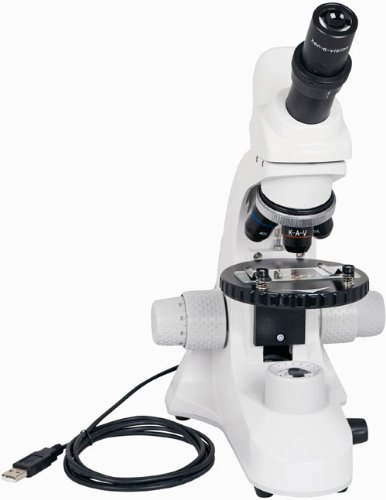
આકૃતિ 2: કોણીય view of the Ken-A-Vision T-17541C Digital CoreScope 2 Compound Microscope, highlighting the compact design and the position of the objective lenses and stage.
5. સેટઅપ
- અનપેકીંગ: Carefully remove the microscope and all accessories from the packaging.
- પ્લેસમેન્ટ: Place the microscope on a stable, level surface away from direct sunlight, excessive heat, or vibrations.
- પાવર કનેક્શન: Connect the provided power supply to the microscope and then plug it into a standard electrical outlet (120-240V). The microscope can also be powered via a low voltage USB computer connection.
- સૉફ્ટવેર ઇન્સ્ટોલેશન: For digital imaging, install the Applied Vision 4 software on your computer. The software is compatible with Windows (XP SP2 or later, Vista, 7), Mac (OS 10.5 or later), and Linux. Follow the on-screen instructions during installation.
- યુએસબી કનેક્શન: Connect the microscope's built-in USB port to your computer using a USB cable. This connection enables the digital camera functionality and can also provide power.
- કવર દૂર કરો: Remove the microscope cover before use.
6. ઓપરેટિંગ સૂચનાઓ
- પાવર ચાલુ: Turn on the microscope using the on/off switch for the LED illumination.
- રોશની ગોઠવો: Use the dimmer control to adjust the brightness of the LED light to a comfortable level for viewing your specimen.
- Place Specimen: Place your prepared slide on the floating stage, securing it with the spring-loaded clips.
- Select Objective: Rotate the nosepiece to select the desired objective lens (4x, 10x, or 40xS). Start with the lowest magnification (4x) for initial viewing
- ધ્યાન કેન્દ્રિત:
- નો ઉપયોગ કરો coarse focus knob (larger knob) to bring the specimen into approximate focus.
- પછી, ઉપયોગ કરો fine focus knob (smaller knob) for precise focusing and to achieve a sharp image.
- આઈપીસ ગોઠવણ: Adjust the variable diopter on the eyepiece for optimal visual clarity.
- Rotate Head: The monocular head can be rotated 360 degrees for shared viewing or comfortable positioning.
- Digital Imaging (with software):
- Ensure the microscope is connected to your computer via USB and the Applied Vision 4 software is running.
- The software will display the live feed from the 1.3 MP HD CMOS camera.
- Use the software interface to capture still images or record video. Refer to the Applied Vision 4 software manual for detailed instructions on its features.
- પાવર બંધ: When finished, turn off the LED illumination and disconnect the power supply. Cover the microscope with the provided dust cover.
7. જાળવણી
- શરીરની સફાઈ: માઇક્રોસ્કોપ બોડીને સોફ્ટ, ડી વડે સાફ કરોamp કાપડ કઠોર રસાયણો અથવા સોલવન્ટનો ઉપયોગ કરવાનું ટાળો.
- લેન્સ સાફ કરવા: Use a soft lens brush to remove dust. For smudges, use a specialized lens cleaning solution and lens paper. Do not use abrasive materials.
- સંગ્રહ: Always cover the microscope with the dust cover when not in use to protect it from dust and debris. Store in a dry environment.
- ભેજ નિયંત્રણ: The objective lenses are designed with humidity and climate control protection, but prolonged exposure to extreme conditions should be avoided.
8. મુશ્કેલીનિવારણ
- No Illumination: Check if the power supply is properly connected and the on/off switch is engaged. Ensure the dimmer is not set to its lowest setting.
- છબી ઝાંખી છે: Adjust both the coarse and fine focus knobs. Ensure the objective lens is properly clicked into place. Clean the eyepiece and objective lenses if smudges are present.
- No Image on Computer Screen: Verify the USB cable is securely connected to both the microscope and the computer. Ensure the Applied Vision 4 software is installed and running correctly. Check your computer's device manager to confirm the camera is recognized.
- Specimen Not Centered: Gently adjust the position of the slide on the floating stage.
9. સ્પષ્ટીકરણો
| લક્ષણ | સ્પષ્ટીકરણ |
|---|---|
| મોડલ નંબર | T-17541C |
| Viewing રૂપરેખાંકન | Monocular with 45-degree incline, 360-degree rotation |
| આઈપીસ | 10x widefield with pointer |
| ઉદ્દેશ્ય લેન્સ | 4x, 10x, 40xS DIN Achromatic |
| મહત્તમ વિસ્તરણ | 400x |
| રોશની | Bright and cool LED white light with dimmer and on/off switch |
| ફોકસ કરો | Coaxial coarse and fine focus |
| ડિજિટલ કેમેરા | 1.3 MP, 720P HD CMOS, USB 2.0 |
| સોફ્ટવેર સુસંગતતા | Applied Vision 4 (Windows XP SP2+, Vista, 7; Mac OS 10.5+; Linux) |
| Stage | Round floating stage with 2 spring-loaded clips |
| પાવર સ્ત્રોત | લો વોલ્યુમtage USB computer connection or external USB power plug, 120-240V |
| સામગ્રી | એલ્યુમિનિયમ |
| ઉત્પાદનના પરિમાણો (H x W x D) | 40.0 x 30.48 x 22.86 સેમી (15.75 x 12 x 9 ઇંચ) |
| વજન | 2.31 કિગ્રા (5.1 lb) |
| પ્રમાણપત્રો | ISO:9001 – 2000, CE, CSA, RoHS |
10. વોરંટી અને સપોર્ટ
The Ken-A-Vision T-17541C Digital CoreScope 2 Compound Microscope is manufactured by Ken-A-Vision Manufacturing, headquartered in Kansas City, MO. For warranty information, technical support, or service inquiries, please refer to the official Ken-A-Vision website or contact their customer service department directly. Please have your model number (T-17541C) and purchase date available when contacting support.


