1. ઉત્પાદન ઓવરview
The ASRock 990FX EXTREME3 is an ATX motherboard designed for AMD AM3+ and AM3 processors. It features the AMD 990FX and SB950 chipsets, supporting advanced technologies such as AMD Quad CrossFireX and NVIDIA Quad SLI for multi-GPU configurations. This motherboard provides robust connectivity with SATA3 and USB 3.0 ports, making it suitable for high-performance computing and gaming systems.
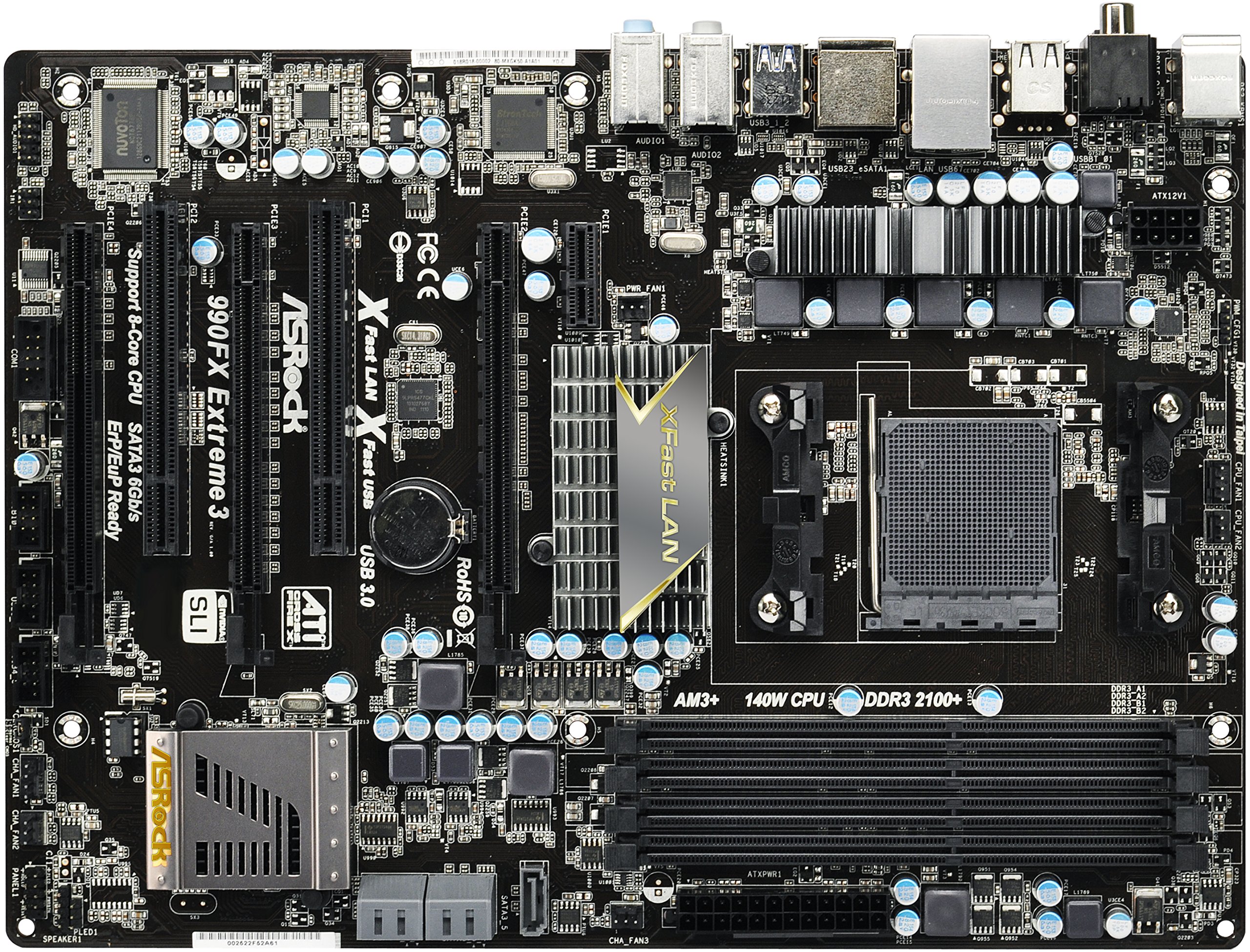
Image 1.1: ASRock 990FX EXTREME3 Motherboard. This image displays the full layout of the motherboard, highlighting the CPU socket, DIMM slots, PCIe slots, and various connectors.
મુખ્ય લક્ષણો:
- CPU સપોર્ટ: Socket AM3+/AM3 for AMD Phenom II, Athlon II, and Sempron processors, supporting 8-Core CPUs up to 140W. Features AMD's Cool 'n' Quiet Technology and Hyper-Transport 3.0.
- ચિપસેટ: AMD 990FX & SB950.
- મેમરી: 4x DDR3 DIMM slots, Dual Channel, Non-ECC/Un-buffered, supporting up to 32GB at speeds including 2100(OC)/1866/1600/1333/1066/800 MHz.
- વિસ્તરણ સ્લોટ્સ: 3x PCI-Express 2.0 x16 slots (one operates at x4), 1x PCI-Express 2.0 x1 slot, 2x PCI slots. Supports AMD Quad/3-Way CrossFireX and NVIDIA Quad SLI/SLI.
- સંગ્રહ: 5x SATA3 ports with RAID 0/1/5/10 support, 1x eSATA3 port.
- ઓડિયો: Realtek ALC892 7.1-Channel HD Audio CODEC with Premium Blu-ray audio support and THX TruStudio Pro.
- લ LANન: Broadcom BCM57781 PCI-Express x1 Gigabit Ethernet Controller with Wake-On-LAN support.
- યુએસબી પોર્ટ્સ: 12x USB 2.0 ports (6 rear, 6 via headers), 2x USB 3.0 ports.
2. સેટઅપ અને ઇન્સ્ટોલેશન
This section provides general guidelines for installing your ASRock 990FX EXTREME3 motherboard. For detailed, step-by-step instructions, please refer to the included Quick Installation Guide.
2.1 પ્રી-ઇન્સ્ટોલેશન ચેકલિસ્ટ
- Ensure you have a compatible CPU (Socket AM3+/AM3).
- Gather necessary components: RAM (DDR3), graphics card, power supply, storage devices.
- Prepare your computer case and ensure proper ventilation.
- ઘટકોને ઇલેક્ટ્રોસ્ટેટિક ડિસ્ચાર્જ (ESD) નુકસાન અટકાવવા માટે તમારી જાતને જમીન પર રાખો.
2.2 મધરબોર્ડ સ્થાપન
- સીપીયુ ઇન્સ્ટોલ કરો: Carefully place your AM3+/AM3 processor into the CPU socket. Ensure correct orientation and secure the retention lever.
- CPU કુલર ઇન્સ્ટોલ કરો: ઉત્પાદકની સૂચનાઓ અનુસાર CPU કુલરને જોડો.
- રેમ ઇન્સ્ટોલ કરો: Insert DDR3 memory modules into the DIMM slots. For dual-channel operation, refer to the Quick Installation Guide for recommended slot configurations.
- મધરબોર્ડ માઉન્ટ કરો: Secure the motherboard into your PC case using standoffs and screws.
- ગ્રાફિક્સ કાર્ડ ઇન્સ્ટોલ કરો: Insert your PCI-Express graphics card(s) into the appropriate PCIe x16 slot(s).
- સ્ટોરેજ ડિવાઇસ કનેક્ટ કરો: Connect SATA data cables from your storage drives (HDDs, SSDs) to the SATA3 ports on the motherboard.
- પાવર સપ્લાય કનેક્ટ કરો: Connect the 24-pin ATX power connector and the 8-pin (or 4-pin) CPU power connector from your power supply to the motherboard. Connect power to graphics cards and storage devices as needed.
- ફ્રન્ટ પેનલ કેબલ્સ કનેક્ટ કરો: Connect the power button, reset button, USB ports, audio jacks, and indicator LEDs from your case to the corresponding headers on the motherboard.
- I/O શીલ્ડ ઇન્સ્ટોલ કરો: Place the I/O shield into the rear opening of your PC case before mounting the motherboard.
2.3 ડ્રાઇવર ઇન્સ્ટોલેશન
After initial hardware setup and operating system installation, install the necessary drivers from the included Support CD. This includes chipset drivers, audio drivers, LAN drivers, and any other utility drivers for optimal performance.
3. ઓપરેટિંગ સૂચનાઓ
This section covers basic operation and configuration aspects of the ASRock 990FX EXTREME3 motherboard.
૨.૨ BIOS/UEFI સેટઅપ
BIOS/UEFI સેટઅપ યુટિલિટીને ઍક્સેસ કરવા માટે, તમારા કમ્પ્યુટરને ચાલુ કરો અને વારંવાર દબાવો DEL or F2 key during the boot process. The UEFI interface allows you to configure system settings, boot order, overclocking parameters, and monitor hardware status.
3.2 Multi-GPU Configuration
The motherboard supports AMD Quad/3-Way CrossFireX and NVIDIA Quad SLI/SLI. To enable these features, install multiple compatible graphics cards into the PCI-Express 2.0 x16 slots and connect them with the appropriate bridge connectors (an ASRock SLI_Bridge_2S Card is included). Ensure you install the latest graphics drivers from AMD or NVIDIA.
3.3 Storage Configuration (RAID)
The AMD SB950 chipset supports RAID 0, RAID 1, RAID 5, and RAID 10 configurations across the SATA3 ports. To set up a RAID array, access the RAID configuration utility during system boot (usually by pressing a specific key combination, as indicated on screen or in the Quick Installation Guide) and follow the on-screen instructions.
3.4 Audio and Network
- ઓડિયો: The integrated Realtek ALC892 7.1-Channel HD Audio CODEC provides high-quality sound. Connect your speakers or headphones to the appropriate audio jacks on the rear I/O panel. The motherboard supports THX TruStudio Pro for enhanced audio experiences.
- નેટવર્ક: The Broadcom BCM57781 Gigabit Ethernet controller provides a stable and fast network connection. Connect an Ethernet cable to the RJ45 LAN port. The Wake-On-LAN feature allows you to power on your computer remotely via the network.
4. જાળવણી
યોગ્ય જાળવણી તમારા મધરબોર્ડની ટકાઉપણું અને સ્થિર કામગીરી સુનિશ્ચિત કરે છે.
- સફાઈ રાખો: Regularly clean dust from inside your computer case, especially around the motherboard, CPU cooler, and graphics card fans. Use compressed air for best results.
- BIOS/UEFI અપડેટ્સ: Periodically check the ASRock website for updated BIOS/UEFI versions. Updating the BIOS can improve compatibility, stability, and performance. Exercise caution during BIOS updates, as interruptions can render the motherboard inoperable.
- ડ્રાઇવર અપડેટ્સ: Keep all system drivers (chipset, audio, LAN, graphics) updated to their latest versions for optimal performance and security.
- કેબલ મેનેજમેન્ટ: Ensure internal cables are neatly routed to promote good airflow and prevent interference.
5. મુશ્કેલીનિવારણ
આ વિભાગ તમારા મધરબોર્ડ સાથે આવતી સામાન્ય સમસ્યાઓને સંબોધિત કરે છે.
૪.૧ પાવર નથી / બુટ નથી
- પાવર કનેક્શન તપાસો: Ensure the 24-pin ATX and 8-pin CPU power connectors are securely seated on the motherboard. Verify the power supply is switched on and connected to a working outlet.
- Verify Front Panel Connections: Confirm that the power button cable from the case is correctly connected to the motherboard's front panel header.
- પરીક્ષણ ઘટકો: If possible, test components (CPU, RAM, GPU, PSU) individually on a known working system or with minimal configuration (e.g., one RAM stick, no GPU if integrated graphics are available).
- CMOS સાફ કરો: Refer to the Quick Installation Guide for instructions on how to clear the CMOS, which can reset BIOS settings to default and resolve boot issues.
૬.૨ ડિસ્પ્લે આઉટપુટ નથી
- Check Graphics Card: Ensure the graphics card is fully seated in its PCIe slot and any required auxiliary power connectors are attached.
- મોનિટર કનેક્શન: Verify the display cable is securely connected to both the graphics card and the monitor.
- Test with Different GPU/Monitor: If available, test with a different graphics card or monitor to isolate the problem.
૬.૧ નેટવર્ક કનેક્ટિવિટી સમસ્યાઓ
- Check LAN Cable: Ensure the Ethernet cable is properly connected to the RJ45 port on the motherboard and to your network router/switch.
- Install/Update LAN Drivers: Verify that the Broadcom LAN drivers are correctly installed and up to date.
- Check BIOS Settings: Ensure the integrated LAN controller is enabled in the BIOS/UEFI settings.
6. સ્પષ્ટીકરણો
| લક્ષણ | સ્પષ્ટીકરણ |
|---|---|
| મોડેલનું નામ | ASRock 990FX EXTREME3 |
| CPU સોકેટ | AM3+ / AM3 |
| ચિપસેટ | AMD 990FX / SB950 |
| મેમરી પ્રકાર | 4x DDR3 DIMM, Dual Channel, Max 32GB (2100(OC)/1866/1600/1333/1066/800 MHz) |
| વિસ્તરણ સ્લોટ્સ | 3x PCIe 2.0 x16, 1x PCIe 2.0 x1, 2x PCI |
| સ્ટોરેજ પોર્ટ્સ | 5x SATA3 (RAID 0/1/5/10), 1x eSATA3 |
| ઓડિયો | Realtek ALC892 7.1-Channel HD Audio, THX TruStudio Pro |
| LAN | Broadcom BCM57781 Gigabit Ethernet |
| યુએસબી પોર્ટ્સ | 12x USB 2.0 (6 rear, 6 via headers), 2x USB 3.0 |
| ફોર્મ ફેક્ટર | એટીએક્સ |
| પરિમાણો | 12 x 3.5 x 8.6 ઇંચ |
| વસ્તુનું વજન | 2.64 પાઉન્ડ |
7. વોરંટી અને સપોર્ટ
7.1 રીટર્ન પોલિસી
This motherboard is sold as-is with a 15-day return policy. Please consult your retailer for specific terms and conditions regarding returns and exchanges.
7.2 ટેકનિકલ સપોર્ટ
For technical assistance, driver downloads, and BIOS updates, please visit the official ASRock support website. The included Support CD also contains drivers and utilities. ASRock customer service is available to assist with product-related inquiries.


