1. પરિચય
Thank you for choosing the VITAL USB-C™ 4-Port Hub. This device is designed to expand the connectivity options of your USB-C enabled computer or device, allowing you to connect multiple USB peripherals simultaneously. It provides a convenient solution for connecting both older USB-A devices and newer USB-C devices, including those requiring power delivery.
2. ઉત્પાદન ઓવરview
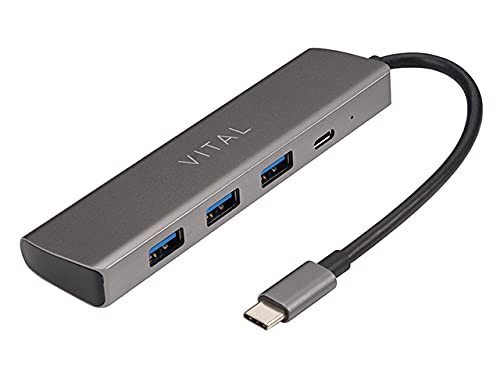
Figure 2.1: VITAL USB-C™ 4-Port Hub. This image displays the compact, rectangular hub in a dark grey finish, featuring three standard USB-A ports on one side and a single USB-C port on the end, alongside a small indicator light. An integrated USB-C cable extends from one end of the hub.
The VITAL USB-C™ 4-Port Hub is a compact and versatile accessory that expands the connectivity of your USB-C enabled devices. It features multiple ports to accommodate various peripherals, enhancing your productivity and device management.
3. લક્ષણો
- કુલ પોર્ટ્સ: 4
- પોર્ટ રૂપરેખાંકન: Includes 3 USB 3.0 Type-A Female ports and 1 USB-C port with Power Delivery (PD) and data transfer capabilities.
- વ્યાપક સુસંગતતા: Compatible with Windows 10 (32/64 bit), Windows 8.1/8 (32/64 bit), Windows 7 (32/64 bit), and Mac OS X 10.8.2 or later versions.
- પ્લગ એન્ડ પ્લે: No drivers required for most operating systems.
- કોમ્પેક્ટ ડિઝાઇન: પોર્ટેબલ અને વહન સરળ છે.
4. સેટઅપ
- હબને કનેક્ટ કરો: Insert the integrated USB-C connector of the VITAL 4-Port Hub into an available USB-C port on your computer, laptop, or compatible device.
- ડ્રાઇવર ઇન્સ્ટોલેશન (ઓટોમેટિક): For most supported operating systems (Windows, macOS), the hub is plug-and-play. The necessary drivers will install automatically upon first connection. No manual driver installation is typically required.
- પેરિફેરલ્સ કનેક્ટ કરો: Once the hub is recognized, you can connect your USB-A devices (e.g., flash drives, keyboards, mice, external hard drives) to the three USB 3.0 Type-A ports.
- Connect USB-C Devices/Power: Use the USB-C port on the hub for additional USB-C peripherals or for power delivery to your host device (if your host device supports USB-C PD and you connect a compatible USB-C power adapter to the hub's USB-C port).
5. ઓપરેટિંગ સૂચનાઓ
The VITAL USB-C™ 4-Port Hub operates as a simple extension of your device's USB-C port. Once connected, it functions immediately.
- ડેટા ટ્રાન્સફર: Connect USB flash drives, external hard drives, or other data storage devices to any of the USB 3.0 Type-A ports or the USB-C data port for high-speed data transfer.
- પેરિફેરલ કનેક્ટિવિટી: Use the ports to connect standard USB peripherals such as keyboards, mice, printers, and webકેમ્સ
- પાવર ડિલિવરી (PD): If your host device (laptop, tablet) supports charging via USB-C Power Delivery, you can connect your original USB-C power adapter to the hub's USB-C port. This allows the hub to pass through power to charge your host device while simultaneously using the other ports for data and peripherals. Note: The hub itself does not generate power; it passes through power from a connected power source.
- હોટ-સ્વેપિંગ: Devices can be connected and disconnected from the hub while it is in use, without needing to restart your computer.
6. જાળવણી
- સફાઈ: Use a soft, dry, lint-free cloth to clean the surface of the hub. Do not use liquid cleaners or aerosol sprays.
- સંગ્રહ: હબને સીધા સૂર્યપ્રકાશ અને અતિશય તાપમાનથી દૂર ઠંડી, સૂકી જગ્યાએ સંગ્રહિત કરો.
- હેન્ડલિંગ: Avoid dropping the hub or subjecting it to strong impacts. Do not attempt to disassemble the device.
7. મુશ્કેલીનિવારણ
- ઉપકરણ ઓળખાયું નથી:
- Ensure the hub's USB-C connector is fully inserted into your host device's USB-C port.
- Try connecting the hub to a different USB-C port on your host device.
- તમારા કમ્પ્યુટર અથવા હોસ્ટ ડિવાઇસને ફરીથી શરૂ કરો.
- ખાતરી કરો કે તમારી ઓપરેટિંગ સિસ્ટમ અપ ટુ ડેટ છે.
- Connected devices are not working:
- Verify that the connected peripheral is functioning correctly by plugging it directly into your host device (if possible).
- Ensure the peripheral is properly connected to the hub's port.
- Some high-power devices may require external power. If the hub's USB-C port is used for power delivery, ensure a sufficient power adapter is connected.
- ધીમી ડેટા ટ્રાન્સફર ગતિ:
- Ensure you are using USB 3.0 compatible devices and cables for optimal speeds.
- Verify that your host device's USB-C port supports USB 3.0 or higher speeds.
- Avoid connecting too many high-bandwidth devices simultaneously.
8. સ્પષ્ટીકરણો
| ઉત્પાદન નામ | VITAL USB-C™ 4-Port Hub |
| મોડલ નંબર | USB-C™ 4-Port Hub (ASIN: B007FASPPA) |
| બંદરોની સંખ્યા | 4 |
| પોર્ટ પ્રકારો | 3 x USB 3.0 Type-A Female, 1 x USB-C (with PD + data) |
| Connector Type (Host) | યુએસબી પ્રકાર સી |
| કેબલ પ્રકાર | યુએસબી |
| ઉત્પાદન પરિમાણો | 0.03 x 0.03 x 0.03 સેમી |
| વસ્તુનું વજન | 5 ગ્રામ |
| ઉત્પાદક | મહત્વપૂર્ણ |
9. સુસંગતતા
The VITAL USB-C™ 4-Port Hub is compatible with a wide range of operating systems:
- વિન્ડોઝ 10 (32-બીટ અને 64-બીટ)
- Windows 8.1 / 8 (32-bit and 64-bit)
- વિન્ડોઝ 7 (32-બીટ અને 64-બીટ)
- Mac OS X 10.8.2 or later versions
Ensure your device has a functional USB-C port for connection.
10. વોરંટી અને સપોર્ટ
For warranty information or technical support, please refer to the Vital product packaging or visit the official Vital website. You may also contact Vital customer service directly for assistance with product setup, troubleshooting, or general inquiries.
નવીનતમ સપોર્ટ માહિતી માટે, કૃપા કરીને મુલાકાત લો: Vital Official Store on Amazon


