પરિચય
This manual provides instructions for the safe and efficient operation of your SkyTech 1410T/LCD Timer Fireplace Remote Control system. This system is designed to offer convenient remote control for gas heating appliances, featuring a timer function and an LCD display for room temperature.
સલામતી માહિતી
- ઇન્સ્ટોલેશન અને ઉપયોગ કરતા પહેલા બધી સૂચનાઓ સારી રીતે વાંચો.
- Ensure all electrical wiring is performed by a qualified professional to prevent electrical shock or fire hazards.
- Do not expose the remote control or receiver to water or excessive moisture.
- Replace batteries promptly when the low battery indicator appears on the remote's display.
- Keep the remote control out of reach of children to prevent unintended operation of the fireplace.
- Always ensure the fireplace area is clear of flammable materials before operation.
પેકેજ સામગ્રી
ખાતરી કરો કે બધા ઘટકો તમારા પેકેજમાં હાજર છે:
- 1 x Remote Control Transmitter (4-button: On/Off/Timer/Set, with LCD display)
- 1 x Receiver Box (110V AC, with learn function and On/Remote/Off slider switch)
- 2 x AAA Alkaline Batteries (for transmitter)
સેટઅપ અને ઇન્સ્ટોલેશન
૧. બેટરી ઇન્સ્ટોલેશન (ટ્રાન્સમીટર)
Open the battery compartment located on the back of the remote control. Insert two AAA alkaline batteries, ensuring correct polarity (+/-). Close the compartment securely.
2. Receiver Placement and Wiring
The receiver box operates on 110-120 VAC and provides a "dry contact" output to your fireplace. It can be placed on the hearth or discreetly under the fireplace behind the control access panel.
ચેતવણી: Installation should be performed by a qualified technician. Always ensure power to the fireplace is disconnected at the circuit breaker before performing any wiring.
Connect the receiver's wires to the appropriate terminals on your gas heating appliance. These terminals are typically where a wall switch or existing remote receiver would connect. The receiver includes male-female connectors for straightforward integration.
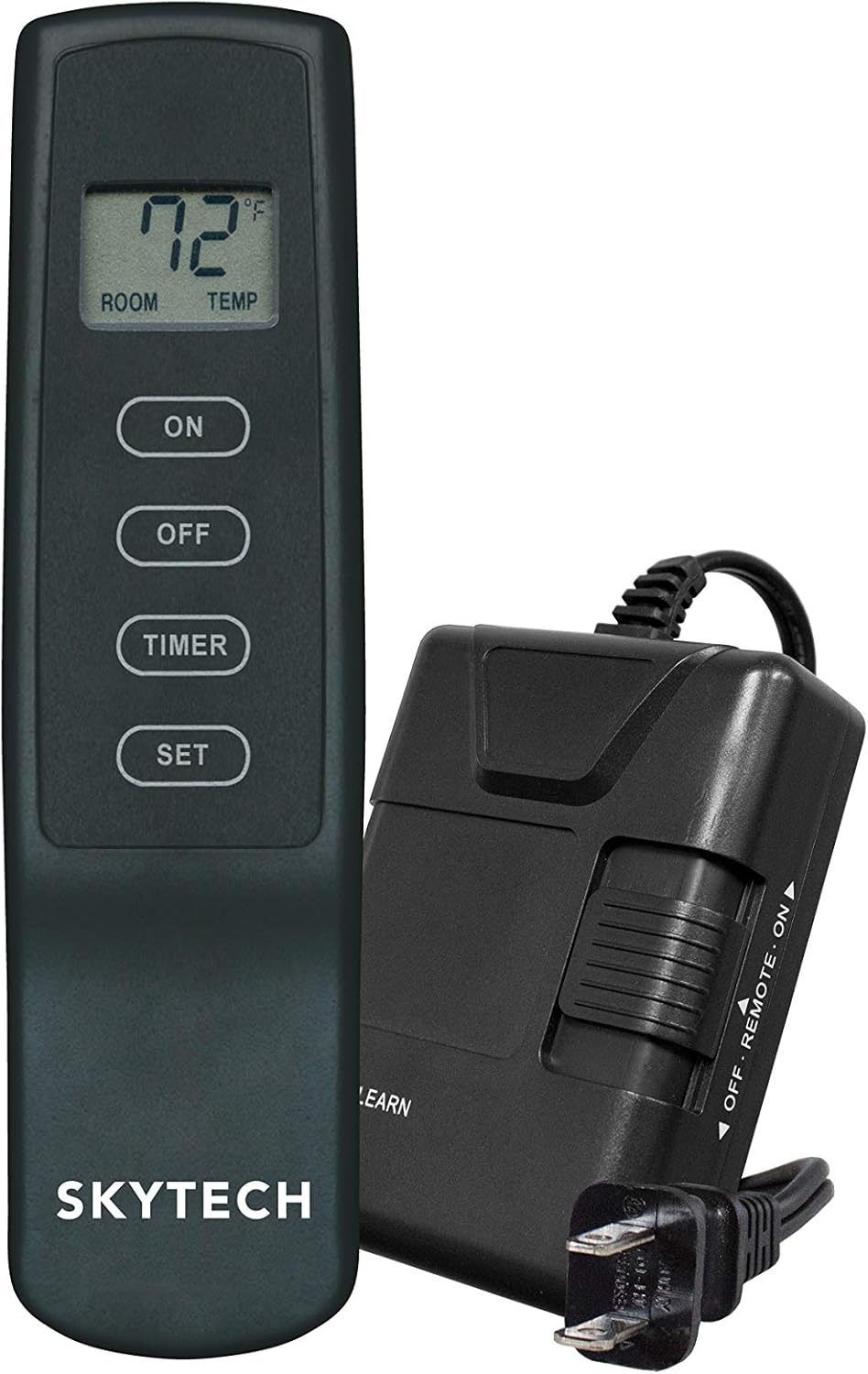
Image: The SkyTech 1410T/LCD remote control transmitter alongside its receiver unit. The receiver has a power cord and a slider switch for ON/REMOTE/OFF modes.

છબી: આગળ view of the SkyTech 1410T/LCD remote control transmitter, showing the LCD display and four control buttons: ON, OFF, TIMER, and SET.
3. Pairing the Transmitter and Receiver (Learning Function)
- Ensure the receiver is powered on and its slider switch is set to the "REMOTE" position.
- Locate the "LEARN" button on the receiver box. Press and hold this button until you hear a beep or see an indicator light flash.
- Within 20 seconds of pressing the "LEARN" button, press the "ON" button on the remote control transmitter.
- A confirmation beep from the receiver indicates successful pairing. The system operates on one of 65,536 security codes programmed at the factory.
ઓપરેટિંગ સૂચનાઓ
મૂળભૂત કામગીરી
- ચાલુ બટન: Press to turn the fireplace ON. The LCD will display the current room temperature.
- બંધ બટન: Press to turn the fireplace OFF.
ટાઈમર કાર્ય
The remote features a convenient 3-hour countdown timer for automatic fireplace shutdown.
- With the fireplace ON, press the "TIMER" button. The LCD will display "3:00" and begin counting down.
- To adjust the timer duration, press the "SET" button while the timer is active. Each press will cycle through available timer durations (e.g., 1 hour, 2 hours, 3 hours).
- The fireplace will automatically turn OFF when the timer reaches zero.
- To cancel the timer at any point, press the "OFF" button.
તાપમાન પ્રદર્શન
The LCD on the transmitter displays the current ambient room temperature in either Fahrenheit (°F) or Celsius (°C). It is important to note that this unit is not a thermostat and does not control the fireplace based on a set temperature. It only provides a reading of the room's temperature.
Childproof Feature
To activate the childproof feature, press and hold the "ON" and "OFF" buttons simultaneously for approximately 5 seconds until "CP" appears on the LCD. When active, the remote will not respond to button presses. To deactivate, repeat the process until "CP" disappears from the display.
જાળવણી
બેટરી રિપ્લેસમેન્ટ
When the low battery indicator appears on the LCD, replace the two AAA batteries in the transmitter promptly. Use only alkaline batteries for optimal performance and longevity.
સફાઈ
Wipe the remote control and receiver with a soft, dry cloth. Do not use abrasive cleaners, solvents, or immerse the units in liquids, as this can cause damage.
મુશ્કેલીનિવારણ
| સમસ્યા | સંભવિત કારણ | ઉકેલ |
|---|---|---|
| Fireplace does not turn ON/OFF via remote | 1. Receiver slider switch in wrong position. 2. Transmitter batteries low or dead. 3. Remote and receiver not paired. 4. Receiver not powered. | 1. Ensure receiver switch is in the "REMOTE" position. 2. Replace transmitter batteries. 3. Re-pair remote and receiver (refer to "Pairing" section). 4. Check 110V AC power connection to the receiver. |
| LCD display is blank or dim | Low batteries in transmitter. | ટ્રાન્સમીટર બેટરી બદલો. |
| રિમોટ કંટ્રોલ રેન્જ નબળી છે | Obstructions or radio frequency interference. | Move closer to the receiver; ensure no large metal objects are blocking the signal path. |
| Fireplace turns off unexpectedly | Timer activated or safety feature triggered. | Check if the timer is set. Some fireplace systems have safety features that shut off gas if the remote signal is lost for an extended period. |
વિશિષ્ટતાઓ
| બ્રાન્ડ | SkyTech |
| મોડેલનું નામ | SkyTech 1410T/LCD Timer Fireplace Remote Control (SKY-1410T-LCD-A) |
| ઉત્પાદન પરિમાણો | 3.6"D x 6.4"W x 3"H |
| નિયંત્રક પ્રકાર | બટન દબાવો |
| ખાસ લક્ષણો | LCD Screen, Low Battery Indicator, Childproof Feature |
| પાવર સ્ત્રોત | Battery Powered (Transmitter), 110V AC (Receiver) |
| બેટરીઓ | 2 AAA બેટરી જરૂરી છે (સમાવેલ) |
| કનેક્ટિવિટી ટેકનોલોજી | RF (રેડિયો ફ્રીક્વન્સી) |
| સામગ્રી | પ્લાસ્ટિક |
| વસ્તુનું વજન | 12 ઔંસ |
વોરંટી અને આધાર
For warranty information or technical assistance, please contact SkyTech customer support. Refer to the product packaging or the manufacturer's official website for current contact details. It is recommended to keep your purchase receipt as proof of purchase for any warranty claims.


