1. પરિચય
The SPYPOINT S-SB-T Steel Security Box is designed to provide robust protection for your SPYPOINT game cameras. This armored shell safeguards your camera from environmental damage, wildlife interference, and potential theft. Its heavy-duty steel construction ensures durability in various outdoor conditions.
This manual provides essential information for the proper setup, operation, and maintenance of your S-SB-T security box.
મુખ્ય લક્ષણો:
- Black steel construction for enhanced durability.
- Removable front panel for convenient camera access.
- Integrated holes for padlock and cable-lock security options.
- Designed to fit all 38-LED SPYPOINT cameras.
2. પેકેજ સામગ્રી
The SPYPOINT S-SB-T Steel Security Box package typically includes:
- 1 x SPYPOINT S-SB-T Steel Security Box
- (Note: Game camera, padlock, and cable-lock are sold separately.)
3. સેટઅપ
3.1 Installing Your Camera
- Open the Security Box: The front panel of the S-SB-T security box is removable. Gently slide or unlatch the front panel to open the box.
- કેમેરા દાખલ કરો: Carefully place your compatible 38-LED SPYPOINT game camera inside the security box. Ensure it fits snugly and the lens, sensors, and flash are aligned with the corresponding openings on the front panel.
- Close the Security Box: Reattach the front panel, ensuring it is securely fastened.

Figure 1: SPYPOINT S-SB-T Steel Security Box with a game camera installed. This image shows the camera securely housed within the steel box, with the lens and sensors visible through the front openings.
3.2 Securing the Box
The S-SB-T offers multiple options for securing your camera and the box itself:
- તાળું: A dedicated hole is provided on the front of the box to install a standard padlock (not included). This secures the camera inside the box and prevents unauthorized access to the camera itself.
- Cable-Lock: Holes are present on both sides of the security box, allowing for the use of a cable-lock (not included). This enables you to secure the entire box to a tree, post, or other fixed object, preventing its removal.
- એન્કરિંગ: The back panel of the security box features holes that can be used to anchor the box directly to a tree or wall using screws or bolts (not included) for a more permanent installation.
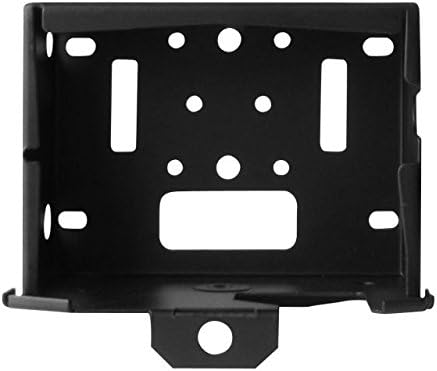
આકૃતિ 2: ફ્રન્ટ view of the S-SB-T Security Box. This image clearly shows the central hole for a padlock and the side openings designed for a cable-lock, illustrating the various security points.
4. ઓપરેશન
The S-SB-T security box is designed for ease of access to your camera while maintaining security. To access your camera for battery changes, SD card retrieval, or settings adjustments:
- અનલૉક: If a padlock or cable-lock is in use, unlock and remove it from the security box.
- ફ્રન્ટ પેનલ દૂર કરો: Carefully remove the front panel of the security box. This provides full access to the camera without needing to remove the entire box from its mounted location.
- Perform Camera Tasks: Once the front panel is removed, you can easily retrieve pictures, swap batteries, or adjust camera settings.
- Re-secure: After completing your tasks, reattach the front panel and re-engage any security locks to ensure the camera remains protected.
5. જાળવણી
- સફાઈ: Periodically wipe down the exterior of the security box with a damp cloth to remove dirt, dust, or debris. Avoid abrasive cleaners that could damage the finish.
- નિરીક્ષણ: Regularly inspect the security box for any signs of wear, damage, or corrosion, especially if exposed to harsh weather conditions. Ensure all locking mechanisms are functioning correctly.
- રસ્ટ નિવારણ: While made of steel, prolonged exposure to moisture can lead to rust. Consider applying a rust-inhibiting spray to the exterior if the box is in a particularly wet environment, ensuring not to spray into camera openings.
6. મુશ્કેલીનિવારણ
6.1 Difficulty Opening/Closing Front Panel
- અવરોધો માટે તપાસો: Ensure no debris or foreign objects are preventing the panel from sliding or latching correctly.
- Verify Camera Placement: Confirm the game camera is seated properly within the box and not obstructing the panel's movement.
- નુકસાન માટે તપાસ કરો: Check if the panel or the box frame is bent or damaged, which might impede smooth operation.
6.2 Security Locks Not Engaging
- તાળું: Ensure the padlock shackle is correctly aligned with the hole on the front panel. Use a padlock with an appropriate shackle diameter.
- Cable-Lock: Verify the cable-lock is threaded through both side holes and is not obstructed.
6.3 Rust Formation
- Clean and Treat: If minor rust appears, clean the affected area and apply a rust-inhibiting primer or paint.
- સ્થાનાંતરિત કરો: If possible, consider relocating the security box to a drier environment or providing additional shelter from direct rain and moisture.
7. સ્પષ્ટીકરણો
| લક્ષણ | વિગત |
|---|---|
| મોડલ નંબર | S-SB-T |
| બ્રાન્ડ | સ્પાયપોઇન્ટ |
| સામગ્રી | Heavy-Duty Steel |
| રંગ | કાળો |
| સુસંગતતા | All 38-LED SPYPOINT Cameras |
| સુરક્ષા સુવિધાઓ | Padlock hole, Cable-lock holes, Rear anchoring holes |
| એક્સેસ | દૂર કરી શકાય તેવી ફ્રન્ટ પેનલ |
| અંદાજિત પેકેજ વજન | 2 પાઉન્ડ |
8. વોરંટી માહિતી
SPYPOINT products are manufactured to high-quality standards. For detailed information regarding the warranty coverage for your S-SB-T Steel Security Box, please refer to the official SPYPOINT webસાઇટ પર જાઓ અથવા તેમના ગ્રાહક સપોર્ટનો સીધો સંપર્ક કરો. વોરંટીના નિયમો અને શરતો પ્રદેશ અને ઉત્પાદન પ્રમાણે બદલાઈ શકે છે.
9. આધાર
Should you require further assistance, have questions about your SPYPOINT S-SB-T Steel Security Box, or need technical support, please visit the official SPYPOINT webસાઇટ:
સત્તાવાર સ્પાયપોઇન્ટ Webસાઇટ: SPYPOINT Store
You may also find helpful resources, FAQs, and contact information on their support pages.


