પરિચય
This manual provides detailed instructions for the setup, operation, and maintenance of your La Crosse Technology Model 302-604R-TBP Indoor Digital Thermometer and Hygrometer Station. Please read this manual thoroughly before using the device to ensure proper function and longevity.
લક્ષણો
- Indoor Temperature Display (Fahrenheit/Celsius)
- Indoor Humidity Display (%RH)
- Minimum/Maximum Value Records for Temperature and Humidity
- Comfort Level Icon Indicator
- Manual Set Time (12/24 Hour Format)
- Compact Tabletop or Wall-Mount Design
ઉત્પાદન ઓવરview
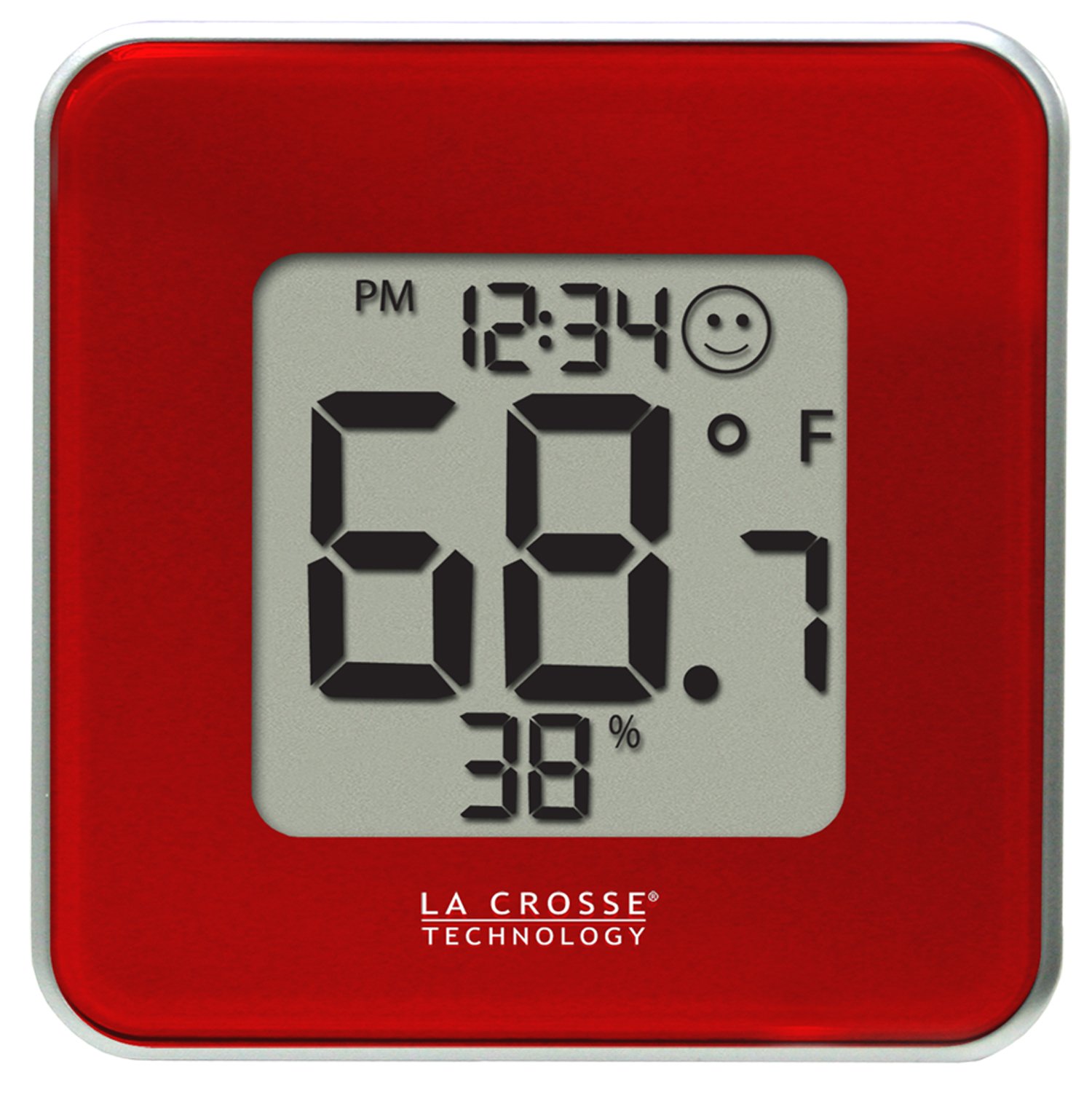
આકૃતિ 1: આગળ view of the La Crosse Technology 302-604R-TBP station. The display shows the current time, indoor temperature, indoor humidity, and a comfort level indicator. The device is red with a silver trim.
સેટઅપ
1. બેટરી ઇન્સ્ટોલેશન
- યુનિટની પાછળ બેટરીનો ડબ્બો શોધો.
- બેટરી કમ્પાર્ટમેન્ટ કવર દૂર કરો.
- Insert one CR2032 battery, ensuring the correct polarity (+/-).
- Replace the battery compartment cover. The unit will power on automatically.
2. પ્લેસમેન્ટ
The 302-604R-TBP can be placed on a tabletop using its integrated stand or mounted on a wall. Choose a location away from direct sunlight, heat sources, or vents for accurate readings.
ઓપરેશન
The device features three buttons on the back: SET/CF, સ્વિચ કરો, અને MAX/MIN.
સમય સુયોજિત કરી રહ્યા છીએ
- દબાવો અને પકડી રાખો SET/CF button for approximately 3 seconds to enter time setting mode. The hour digit will flash.
- દબાવો સ્વિચ કરો કલાક સમાયોજિત કરવા માટે બટન.
- દબાવો SET/CF button again to confirm the hour and move to minute setting. The minute digit will flash.
- દબાવો સ્વિચ કરો મિનિટ એડજસ્ટ કરવા માટે બટન.
- દબાવો SET/CF button again to confirm the minute and exit time setting mode.
Changing 12/24 Hour Format
While in time setting mode (hour flashing), press the MAX/MIN button to toggle between 12-hour (with AM/PM) and 24-hour time formats.
Changing Temperature Units (Fahrenheit/Celsius)
દબાવો SET/CF button briefly (not held) to switch between Fahrenheit (°F) and Celsius (°C) temperature display.
Viewing Minimum/Maximum Values
- દબાવો MAX/MIN button once to display the maximum recorded temperature and humidity.
- દબાવો MAX/MIN button a second time to display the minimum recorded temperature and humidity.
- દબાવો MAX/MIN button a third time to return to current readings.
- To clear the MIN/MAX records, press and hold the MAX/MIN button for 3 seconds while the MIN or MAX values are displayed.
કમ્ફર્ટ લેવલ આઇકન
The display includes a comfort level icon (a smiley face) that indicates the general comfort level based on current temperature and humidity. This is an approximate indicator and not a precise measurement.
જાળવણી
બેટરી રિપ્લેસમેન્ટ
When the battery indicator appears on the display, replace the CR2032 battery as described in the "Battery Installation" section. Old batteries should be disposed of according to local regulations.
સફાઈ
સોફ્ટ સાથે એકમ સાફ કરો, ડીamp કાપડ. ઘર્ષક ક્લીનર્સ અથવા સોલવન્ટ્સનો ઉપયોગ કરશો નહીં, કારણ કે આ ડિસ્પ્લે અથવા સી ને નુકસાન પહોંચાડી શકે છે.asing. Ensure no moisture enters the battery compartment or other openings.
મુશ્કેલીનિવારણ
| સમસ્યા | ઉકેલ |
|---|---|
| કોઈ ડિસ્પ્લે નહીં અથવા ઝાંખું ડિસ્પ્લે નહીં | Replace the CR2032 battery. Ensure correct polarity. |
| Incorrect temperature/humidity readings | Ensure the unit is not in direct sunlight, near heat sources, or in a draft. Allow 20-30 minutes for readings to stabilize after initial setup or relocation. |
| બટનો પ્રતિસાદ આપતા નથી | Remove and reinsert the battery to perform a soft reset. If the issue persists, replace the battery. |
વિશિષ્ટતાઓ
- મોડલ: 302-604R-TBP
- બ્રાન્ડ: લા ક્રોસ ટેકનોલોજી
- ઇન્ડોર તાપમાન શ્રેણી: Not specified in provided data, typical range is 0°C to 50°C (32°F to 122°F).
- ઇન્ડોર ભેજ શ્રેણી: Not specified in provided data, typical range is 10% to 99% RH.
- પાવર આવશ્યકતાઓ: 1 x CR2032 બેટરી (શામેલ)
- પરિમાણો: 4.13 x 1.15 x 4.13 ઇંચ (10.49 x 2.92 x 10.49 સેમી)
- વસ્તુનું વજન: 4 ઔંસ (113.4 ગ્રામ)
- માઉન્ટ કરવાનો પ્રકાર: Tabletop or Wall-mount
વોરંટી અને આધાર
For warranty information or technical support, please refer to the documentation included with your product packaging or visit the official La Crosse Technology webસાઇટ. ગ્રાહક સેવા માટેની સંપર્ક માહિતી સામાન્ય રીતે ઉત્પાદકની સાઇટ પર ઉપલબ્ધ હોય છે webસાઇટ


