1. ઉત્પાદન ઓવરview
This manual provides essential information for the installation, maintenance, and troubleshooting of the BlackVue 15M (50FT) Front to Rear Camera Connection Coax Cable. This cable is designed to provide a reliable and stable connection between the front and rear cameras of compatible BlackVue dashcam systems.

Figure 1: The BlackVue 15M (50FT) Front to Rear Camera Connection Coax Cable, coiled, displaying its male and female connectors.
2. સુસંગતતા
This coaxial cable is specifically designed for use with the following BlackVue dash camera models for front-to-rear camera connection:
- DR530W-2CH
- DR550GW-2CH
- DR650GW-2CH
- DR650S-2CH
- DR750LW-2CH
Ensure your dash camera model is listed above for proper compatibility and functionality.
3. સેટઅપ અને ઇન્સ્ટોલેશન
Proper installation of the coaxial cable is crucial for optimal performance of your BlackVue dash camera system. Always refer to your specific BlackVue dash camera's installation guide for detailed instructions.
- તૈયારી: Before beginning, ensure your vehicle's ignition is off and the dash camera system is disconnected from power.
- કેબલ રૂટીંગ: Carefully route the 15M (50FT) coaxial cable from the front dash camera's rear camera port to the desired mounting location of the rear camera. Common routing paths include along the vehicle's headliner, A-pillars, door sills, or under the floorboard, leading to the trunk or cargo area. Avoid routing the cable near sharp edges, moving parts, or areas that generate excessive heat.
- Connecting to Front Camera: Connect one end of the coaxial cable to the designated rear camera input port on your front BlackVue dash camera. Ensure the connection is firm and secure.
- Connecting to Rear Camera: Connect the other end of the coaxial cable to the rear camera. When connecting, ensure the delicate central pin of the coaxial connector is perfectly straight and aligns correctly with the camera's port. Avoid forcing the connection, as this can bend or damage the pin, leading to connection issues.
- કેબલને સુરક્ષિત કરો: Use cable clips or ties (not included) to secure the cable along its route, preventing it from interfering with vehicle operation or becoming damaged.
- પરીક્ષણ કનેક્શન: Once installed, power on your dash camera system and verify that the rear camera is recognized and displaying video feed correctly.
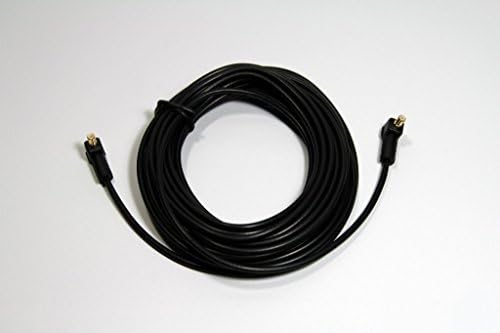
આકૃતિ 2: ટોચ view of the BlackVue 15M (50FT) Coax Cable, showing its coiled form and the two distinct connector types.
૫. સંચાલન બાબતો
The coaxial cable functions as a passive conduit for video signals and power between your BlackVue front and rear dash cameras. There are no operational controls on the cable itself. Its primary function is to ensure a stable and uninterrupted data flow for your dashcam system.
- Ensure all connections are secure and free from debris to maintain consistent signal transmission.
- Avoid disconnecting the cable while the dash camera system is powered on, as this may cause temporary interruptions in recording.
5. જાળવણી
To ensure the longevity and reliable performance of your BlackVue coaxial cable, follow these maintenance guidelines:
- નિયમિત તપાસ: Periodically inspect the cable for any signs of wear, cuts, kinks, or damage, especially at the connection points and along its routed path.
- કનેક્શન ઇન્ટિગ્રિટી: Ensure the connectors remain clean and free of dust or moisture. A dirty connection can lead to signal degradation.
- તણાવ ટાળો: Do not pull, twist, or bend the cable excessively, particularly near the connectors. Excessive stress can damage the internal wiring or the delicate central pin.
- સફાઈ: If necessary, gently wipe the cable and connectors with a dry, soft, lint-free cloth. Do not use harsh chemicals or abrasive cleaners.
- તાપમાન: While designed for automotive environments, extreme temperatures can affect cable materials over time. Ensure the cable is not exposed to direct, prolonged sunlight or extreme heat sources.
6. મુશ્કેલીનિવારણ
If you experience issues with your BlackVue rear camera, the coaxial cable may be a factor. Here are common troubleshooting steps:
| સમસ્યા | સંભવિત કારણ | ઉકેલ |
|---|---|---|
| No Rear Camera Signal / Rear Camera Not Detected |
|
|
| Intermittent Rear Camera Signal |
|
|
If troubleshooting steps do not resolve the issue, please contact BlackVue customer support or your authorized dealer for further assistance.
7. સ્પષ્ટીકરણો
| લક્ષણ | વર્ણન |
|---|---|
| બ્રાન્ડ | બ્લેકવ્યુ |
| મોડેલનું નામ | DR650 (DR650-2CH-COAX) |
| કેબલ પ્રકાર | કોક્સિયલ |
| કનેક્ટર પ્રકાર | કોક્સિયલ |
| કનેક્ટર જાતિ | પુરુષથી સ્ત્રી |
| લંબાઈ | ૧.૮ મીટર (૫.૯ ફૂટ) |
| રંગ | કાળો |
| બાહ્ય સામગ્રી | પોલીવિનાઇલ ક્લોરાઇડ (પીવીસી) |
| ભલામણ કરેલ ઉપયોગો | Vehicle dash camera connection (front to rear) |
| ખાસ લક્ષણ | Improved Construction, OEM Compatibility |
| સુસંગત ઉપકરણો | BlackVue DR530W-2CH, DR550GW-2CH, DR650GW-2CH, DR650S-2CH, DR750LW-2CH Dash Cams |
| ઇન્ડોર/આઉટડોર વપરાશ | ઇન્ડોર, આઉટડોર |
| ઉત્પાદક | પિટાસોફ્ટ |
| યુપીસી | 095225277818 |
| વસ્તુનું વજન | 2.46 પાઉન્ડ |
| પેકેજ પરિમાણો | 8.1 x 4.4 x 4.3 ઇંચ |
8. વોરંટી અને સપોર્ટ
For information regarding the warranty of your BlackVue coaxial cable, please refer to the warranty documentation provided with your original BlackVue dash camera system or contact BlackVue customer support directly. Warranty terms and conditions may vary by region and retailer.
For technical support or further assistance, please visit the official BlackVue website or contact their customer service department. Keep your purchase receipt and product model information readily available when seeking support.
બ્લેકવ્યુ ઓફિશિયલ Webસાઇટ: www.blackvue.com


