1. પરિચય
This manual provides essential information for the proper installation, operation, and maintenance of your Fermax iLoft VDS 3.5 Inch Surface Monitor. Fermax specializes in advanced communication and security solutions, including videophone systems, audio intercoms, and access control. This monitor is designed to offer reliable communication for residential and commercial environments.
2. ઉત્પાદન ઓવરview
The Fermax iLoft VDS 3.5 Inch Surface Monitor is a key component of a videophone system, providing an easy-to-use interface with clear audio and video transmission. It allows for visual identification of visitors and convenient communication.
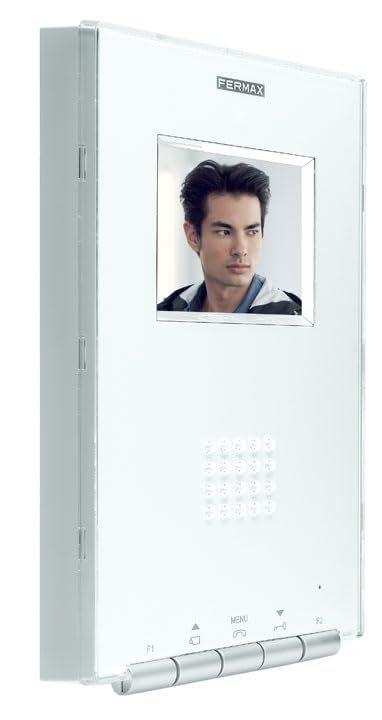
આકૃતિ 1: Fermax iLoft VDS 3.5 Inch Surface Monitor. This image displays the Fermax iLoft VDS 3.5 Inch Surface Monitor. It features a white casing with a 3.5-inch screen displaying a person. Below the screen are control buttons for functions like F1, Menu, Call, Door Release, and F2, along with a numeric keypad.
મુખ્ય લાક્ષણિકતાઓમાં શામેલ છે:
- Integrated video system capability.
- Clear audio transmission.
- સાહજિક નિયંત્રણો સાથે વપરાશકર્તા મૈત્રીપૂર્ણ ઇન્ટરફેસ.
- Customizable settings to suit individual preferences.
3. સેટઅપ
For optimal performance and safety, professional installation of the Fermax iLoft VDS 3.5 Inch Surface Monitor is highly recommended. Incorrect installation can lead to system malfunctions or damage.
3.1 પાવર આવશ્યકતાઓ
Ensure the installation site meets the specified power requirements:
- ભાગtage: 100 વી
- શક્તિ: 100W
Consult a qualified electrician or installer to verify compatibility with your existing electrical system.
4. ઓપરેટિંગ સૂચનાઓ
Once installed, the Fermax iLoft VDS 3.5 Inch Surface Monitor provides straightforward operation for managing visitor access and communication.
4.1 મૂળભૂત કાર્યો
- કૉલ પ્રાપ્ત કરવો: When a visitor initiates a call from the outdoor panel, the monitor will ring and display the visitor's image on the 3.5-inch screen.
- કૉલનો જવાબ આપવો: દબાવો કૉલ કરો button (typically indicated by a phone icon) to establish two-way audio communication with the visitor.
- દરવાજા છોડવા: To grant access, press the ડોર રિલીઝ button (often depicted as a key or door icon).
- મેનુ નેવિગેશન: નો ઉપયોગ કરો મેનુ button and arrow keys (if present) to access and adjust settings such as volume, brightness, and other system configurations.
- Auxiliary Functions (F1/F2): The F1 and F2 buttons may be programmable for additional functions, such as activating a secondary door release or turning on an external light. Refer to your installer or system configuration for specific assignments.
5. જાળવણી
Regular maintenance ensures the longevity and optimal performance of your Fermax iLoft VDS 3.5 Inch Surface Monitor.
5.1 સફાઈ
- મોનિટર સ્ક્રીન સાફ કરો અને સી.asing with a soft, dry, lint-free cloth.
- હઠીલા ગુણ માટે, થોડું ડીampen the cloth with water or a mild, non-abrasive cleaning solution. Avoid harsh chemicals, solvents, or abrasive materials, as these can damage the surface.
- ખાતરી કરો કે ઉપકરણના છિદ્રોમાં કોઈ પ્રવાહી પ્રવેશતું નથી.
.5.2.૧ સામાન્ય કાળજી
- Avoid exposing the monitor to direct sunlight for extended periods or extreme temperatures.
- યુનિટ જાતે ખોલવાનો કે રિપેર કરવાનો પ્રયાસ કરશો નહીં. બધી સર્વિસિંગ લાયક કર્મચારીઓને સોંપો.
6. મુશ્કેલીનિવારણ
This section addresses common issues you might encounter with your Fermax iLoft VDS 3.5 Inch Surface Monitor. For complex problems, contact your installer or Fermax technical support.
6.1 No Image on Screen
- પાવર તપાસો: Ensure the monitor is receiving power. Verify that the power supply is connected and functional.
- સિસ્ટમ કનેક્શન: Confirm that the monitor is properly connected to the VDS system. Loose connections can cause signal loss.
- આઉટડોર પેનલ: Ensure the outdoor panel camera is clean and unobstructed, and that it is functioning correctly.
6.2 No Audio During Call
- વોલ્યુમ સેટિંગ્સ: Check the monitor's volume settings and adjust if necessary.
- માઇક્રોફોન/સ્પીકર: Ensure the microphone and speaker on both the monitor and the outdoor panel are not obstructed.
- વાયરિંગ: Verify all audio wiring connections are secure.
6.3 Door Release Not Working
- કનેક્શન: Confirm the door release mechanism is correctly wired to the system.
- પાવર સપ્લાય: Ensure the door release mechanism has adequate power.
- રચના ની રૂપરેખા: Verify that the door release function is properly configured within the VDS system.
7. સ્પષ્ટીકરણો
| સ્પષ્ટીકરણ | વિગત |
|---|---|
| ઉત્પાદક | ફર્મેક્સ |
| મોડલ નંબર | 8424299056142 |
| ભાગtage | 100 વી |
| શક્તિ | 100W |
| આઇટમ જથ્થો | 1 |
| બેટરી સમાવાયેલ | ના |
| બેટરી જરૂરી છે | ના |
| વજન | 80 ગ્રામ |
| સ્પેર પાર્ટ્સની ઉપલબ્ધતા | સ્પેરપાર્ટ્સ વિશે માહિતી ઉપલબ્ધ નથી |
8. વોરંટી અને સપોર્ટ
For information regarding product warranty, please refer to the documentation provided at the time of purchase or contact your authorized Fermax dealer. For technical assistance, professional installation services, or further support, please contact Fermax customer service or visit the official Fermax webસાઇટ


