1. પરિચય
Thank you for choosing the La Crosse Technology WS9162IT-SIL Wireless Temperature Station. This device provides accurate indoor and outdoor temperature readings, featuring a quartz clock and 24-hour time format. It utilizes 868 MHz IT+ technology for reliable wireless transmission up to 100 meters in open fields. This manual will guide you through the setup, operation, and maintenance of your temperature station.
2. સલામતી માહિતી
- ઉપકરણ ચલાવતા પહેલા બધી સૂચનાઓ વાંચો.
- Do not expose the main unit to extreme temperatures, direct sunlight, or moisture.
- The outdoor sensor is designed for outdoor use but should be protected from direct rain and snow for extended longevity.
- Use only the specified battery type (AA LR6). Do not mix old and new batteries or different battery types.
- વપરાયેલી બેટરીનો સ્થાનિક નિયમો અનુસાર જવાબદારીપૂર્વક નિકાલ કરો.
- ઉપકરણને બાળકોની પહોંચથી દૂર રાખો.
3. પેકેજ સામગ્રી
- La Crosse Technology WS9162IT-SIL Main Temperature Station Unit
- વાયરલેસ આઉટડોર ટેમ્પરેચર સેન્સર
- સૂચના માર્ગદર્શિકા
4. ઉત્પાદન ઓવરview
The La Crosse Technology WS9162IT-SIL consists of a main display unit and a wireless outdoor sensor. The main unit features an LCD screen displaying indoor and outdoor temperatures, as well as the current time. It can be mounted on a wall or placed on a tabletop. The outdoor sensor transmits temperature data wirelessly to the main unit.
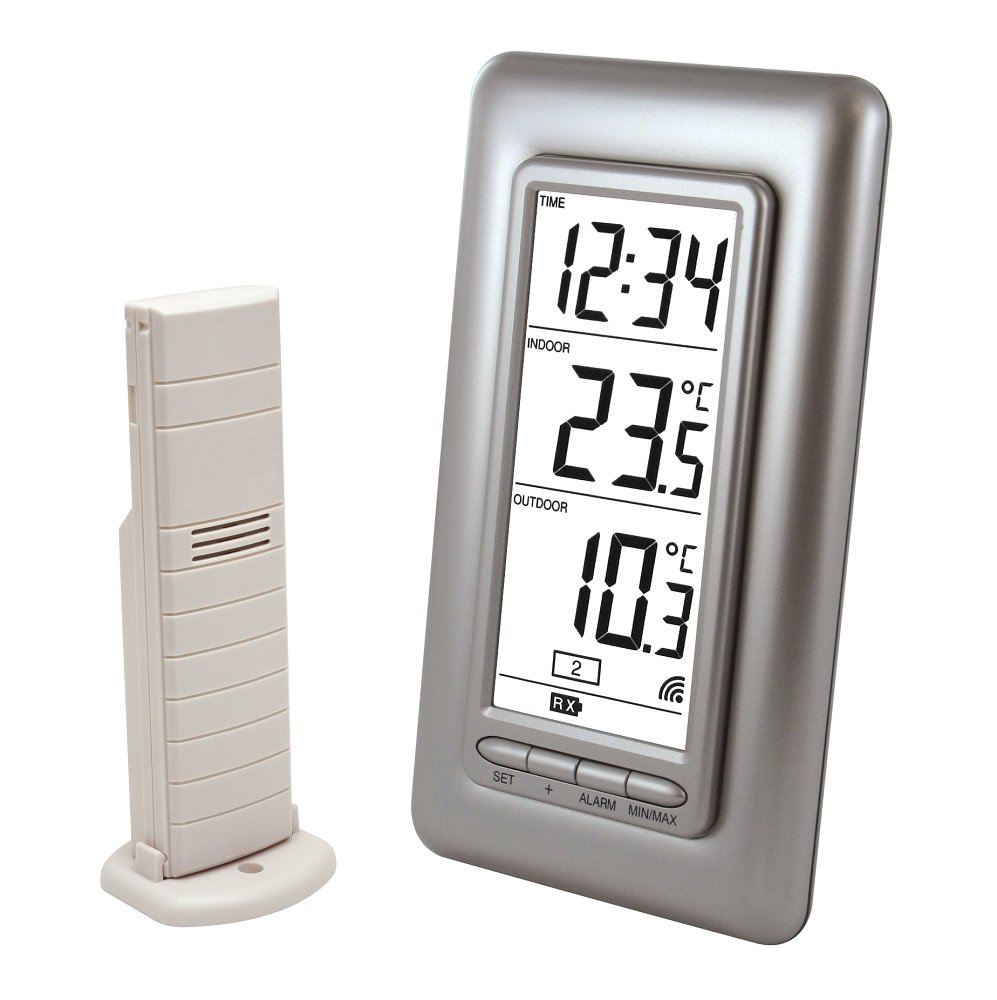
Image 1: La Crosse Technology WS9162IT-SIL Wireless Temperature Station. This image shows the main display unit and the accompanying wireless outdoor sensor, both in a silver finish. The main unit has an LCD screen for displaying temperature and time information.
5. સેટઅપ
5.1 બેટરી ઇન્સ્ટોલેશન
- For the Wireless Outdoor Sensor: Open the battery compartment on the back of the outdoor sensor. Insert the required batteries (typically 2 x AA LR6, not included) according to the polarity markings (+/-). Close the compartment securely.
- For the Main Temperature Station Unit: Open the battery compartment on the back of the main unit. Insert 2 x AA LR6 batteries (not included) according to the polarity markings (+/-). Close the compartment securely.
મહત્વપૂર્ણ: Always insert batteries into the outdoor sensor પહેલાં inserting them into the main unit to ensure proper synchronization.
5.2 સેન્સર પ્લેસમેન્ટ
- Place the outdoor sensor in a shaded area, away from direct sunlight and heat sources, to ensure accurate temperature readings.
- Ensure the sensor is protected from direct rain and snow.
- Position the sensor within 100 meters (328 feet) of the main unit, ensuring there are minimal obstructions (e.g., thick walls, metal objects) that could interfere with the 868 MHz wireless signal.
૪.૩ પ્રારંભિક સુમેળ
After inserting batteries into both units, the main station will automatically search for the outdoor sensor. This process may take a few minutes. Once connected, the outdoor temperature will appear on the main unit's display. If the outdoor temperature does not appear, refer to the Troubleshooting section.
6. ઓપરેટિંગ સૂચનાઓ
6.1 માહિતી દર્શાવો
એલસીડી ડિસ્પ્લે નીચેની માહિતી દર્શાવે છે:
- વર્તમાન સમય: Displayed in 24-hour format.
- ઇન્ડોર તાપમાન: The temperature measured by the main unit.
- આઉટડોર તાપમાન: The temperature transmitted from the wireless sensor.
- ઓછી બેટરી સૂચકાંકો: Icons will appear to indicate low battery for either the main unit or the outdoor sensor.
૩.૩ તાપમાન એકમ પસંદગી (°C/°F)
To switch between Celsius (°C) and Fahrenheit (°F), locate the °C/°F button (usually on the back or side of the main unit) and press it. The display will update to the selected unit.
6.3 Minimum/Maximum Temperature Display
The station records the minimum (MIN) and maximum (MAX) indoor and outdoor temperatures. Press the 'MIN/MAX' button (or similar, refer to specific button labels on your unit) to cycle through the current, minimum, and maximum temperature readings. To reset the MIN/MAX records, press and hold the 'MIN/MAX' button for a few seconds.
6.4 સમય સેટિંગ
The time is typically set automatically via a quartz clock. If manual adjustment is needed, refer to the buttons on the back of the unit (e.g., 'SET', 'MODE', '+', '-') to enter time setting mode and adjust the hours and minutes. The time format is 24-hour.
7. જાળવણી
7.1 બેટરી રિપ્લેસમેન્ટ
When the low battery indicator appears on the display, replace the batteries in the respective unit (main station or outdoor sensor). Always replace all batteries in a unit at the same time with new, fresh batteries of the specified type (AA LR6). Follow the battery installation steps in Section 5.1.
7.2 સફાઈ
Clean the display and casing of the main unit and sensor with a soft, damp કાપડ. ઘર્ષક ક્લીનર્સ અથવા સોલવન્ટ્સનો ઉપયોગ કરશો નહીં, કારણ કે આ ઉપકરણને નુકસાન પહોંચાડી શકે છે.
8. મુશ્કેલીનિવારણ
| સમસ્યા | શક્ય ઉકેલ |
|---|---|
| No outdoor temperature display or '---' shown. |
|
| અચોક્કસ તાપમાન રીડિંગ્સ. |
|
| ડિસ્પ્લે ઝાંખું અથવા ખાલી છે. |
|
| Outdoor sensor stops working after some time. |
|
9. સ્પષ્ટીકરણો
- મોડલ: WS9162IT-SIL
- સમય: Quartz clock, 24-hour format
- ઇન્ડોર તાપમાન શ્રેણી: -9.9°C થી +59.9°C (14.2°F થી 139.8°F)
- આઉટડોર તાપમાન શ્રેણી: -39.9°C થી +59.9°C (-39.8°F થી 139.8°F)
- તાપમાન રીઝોલ્યુશન: 0.1°C (0.2°F)
- Indoor Temperature Reading Interval: દર 15 સેકન્ડે
- આવર્તન: 868 MHz
- ટ્રાન્સમિશન રેન્જ: Up to 100 meters (328 feet) in open field
- ટેકનોલોજી: IT+
- ડિસ્પ્લે પ્રકાર: એલસીડી
- Power Source (Main Station): 2 x AA LR6 batteries (not included)
- પાવર સ્ત્રોત (આઉટડોર સેન્સર): Batteries (type not specified, typically 2 x AA LR6, not included)
- ઓછી બેટરી સૂચક: હા
- માઉન્ટ કરવાના વિકલ્પો: Wall mountable or tabletop placement
- સ્ટેશનના પરિમાણો: 80 x 150 x 29.4 mm (3.15 x 5.91 x 1.16 ઇંચ)
- ઉત્પાદન વજન: 260 ગ્રામ (0.57 lbs)
10. વોરંટી અને સપોર્ટ
La Crosse Technology products are designed for reliability and performance. For specific warranty information, please refer to the warranty card included with your purchase or visit the official La Crosse Technology website. For technical support or further assistance, please contact La Crosse Technology customer service through their official channels.