1. ઉત્પાદન ઓવરview
The Dino-Lite AM4113ZT is a versatile USB digital microscope designed for detailed observation and analysis. It features 1.3-megapixel resolution, offering true optical magnification from 20x to 50x, and up to 200x. This model includes integrated polarized light to reduce glare on reflective surfaces, MicroTouch for convenient image capture, and measurement capabilities through its accompanying software.

Image 1.1: The Dino-Lite AM4113ZT USB Digital Microscope, showcasinતેની કોમ્પેક્ટ ડિઝાઇન.

છબી 1.2: ઓવરview of the Dino-Lite AM4113ZT's primary features, including magnification range, software compatibility, and specialized functions.
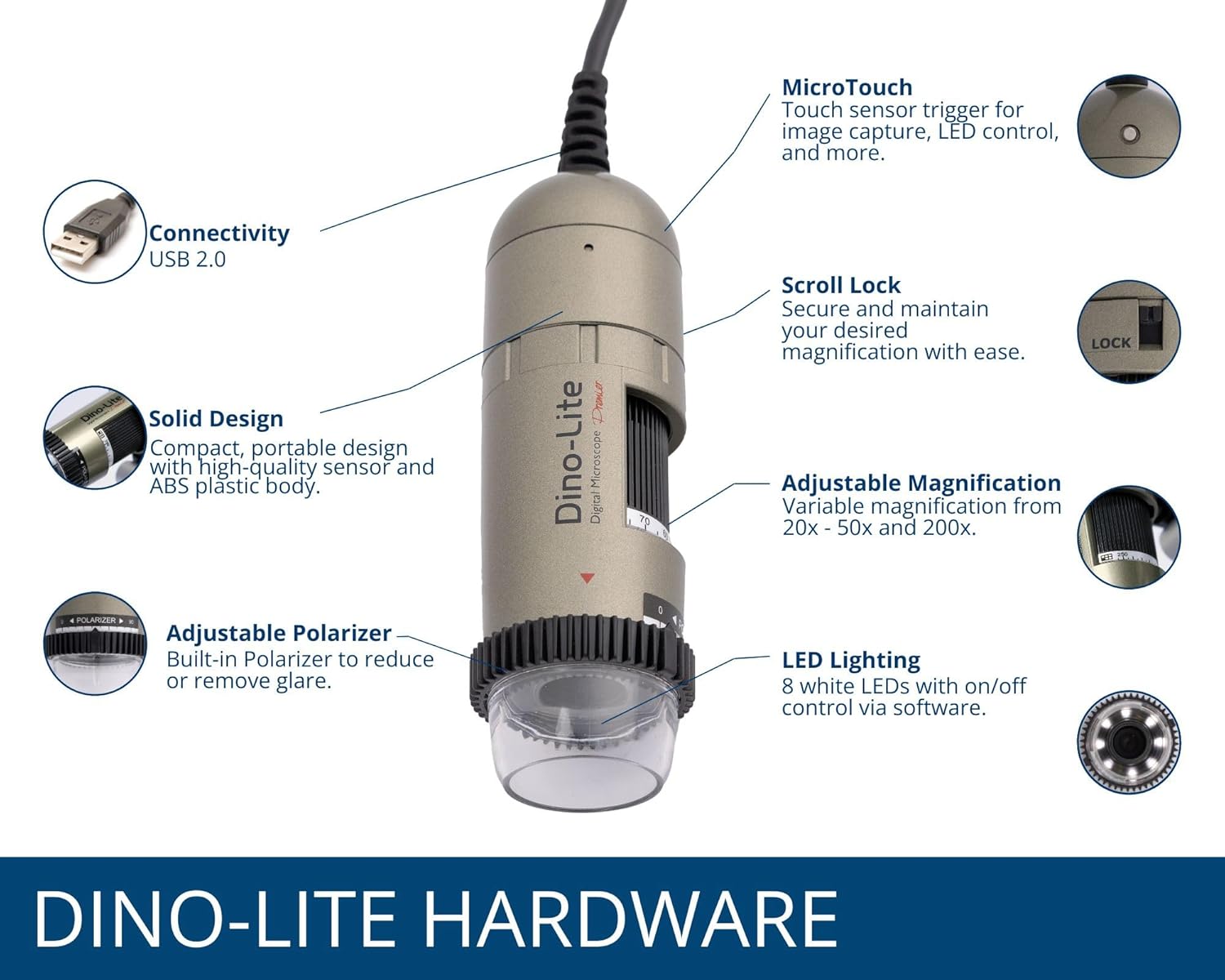
Image 1.3: Detailed illustration of the Dino-Lite AM4113ZT hardware, highlighting its various components and their functions.
2. પેકેજ સામગ્રી
ખાતરી કરો કે નીચે સૂચિબદ્ધ બધી વસ્તુઓ તમારા ઉત્પાદન પેકેજમાં હાજર છે:
- Dino-Lite AM4113ZT USB Digital Microscope
- ઝડપી પ્રારંભ માર્ગદર્શિકા
- Software Download Link/Information
- પાઉચ લઈ જાઓ
- Calibration Target + Cover
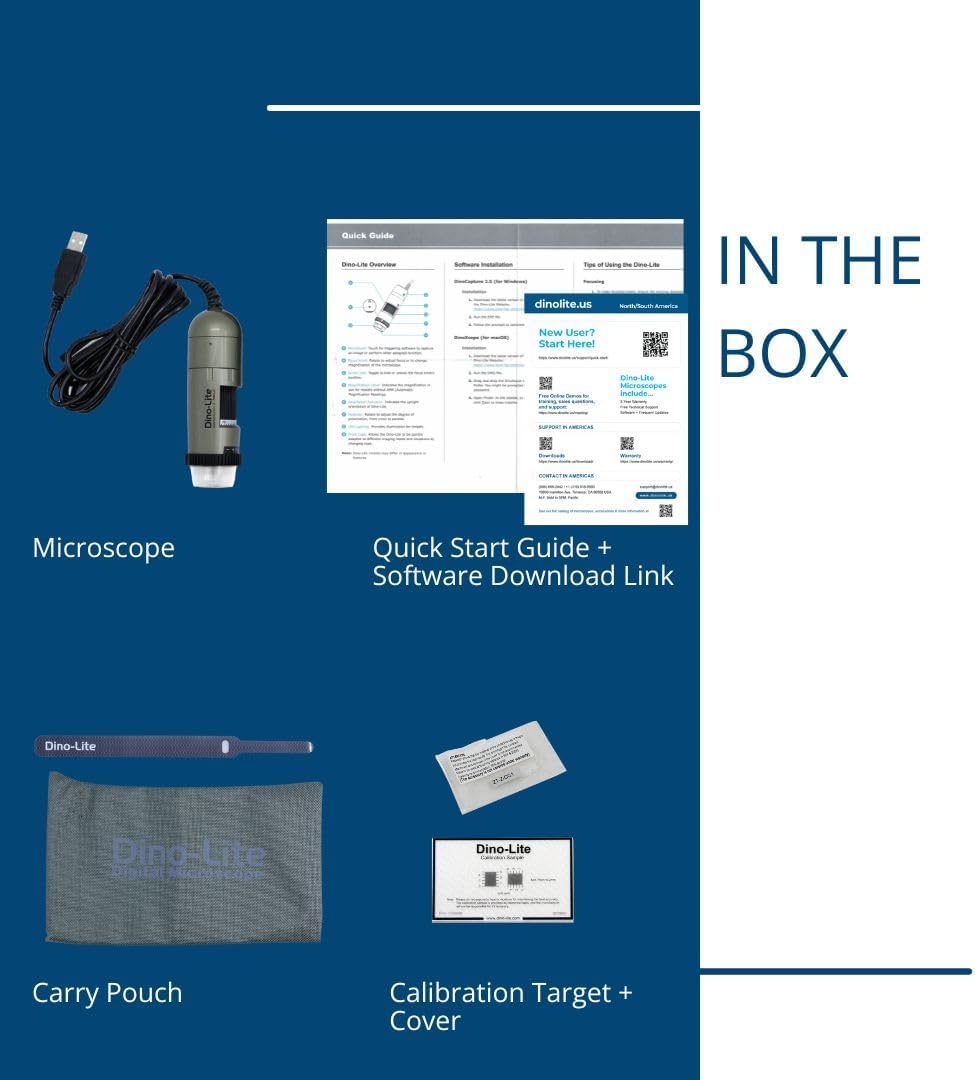
Image 2.1: Visual representation of the items included in the Dino-Lite AM4113ZT product box.
3. સેટઅપ
3.1 સૉફ્ટવેર ઇન્સ્ટોલેશન
- સૉફ્ટવેર ડાઉનલોડ કરો: Visit the official Dino-Lite website or use the provided software download link to obtain the latest version of DinoCapture (for Windows) or DinoXcope (for Mac).
- સૉફ્ટવેર ઇન્સ્ટોલ કરો: તમારા કમ્પ્યુટર પર સોફ્ટવેર ઇન્સ્ટોલ કરવા માટે સ્ક્રીન પરની સૂચનાઓને અનુસરો.
- સિસ્ટમ આવશ્યકતાઓ: Ensure your operating system (Windows or Mac) meets the minimum requirements specified by the software.

Image 3.1: The DinoCapture software interface displayed on a laptop, demonstrating its functionality for image capture and analysis.
૨.૩ માઇક્રોસ્કોપને જોડવું
- Connect the USB cable from the Dino-Lite AM4113ZT microscope to an available USB port on your computer.
- The operating system should automatically detect the device.
- Launch the DinoCapture (Windows) or DinoXcope (Mac) software. The microscope's live feed should appear in the software window.
The Dino-Lite AM4113ZT can be used handheld for quick inspections or mounted on an optional stand (sold separately) for more stable and precise observations.

Image 3.2: The Dino-Lite AM4113ZT shown in both handheld use and mounted on a stand, demonstrating its adaptability for various inspection needs.
4. ઓપરેટિંગ સૂચનાઓ
4.1 Adjusting Magnification
The AM4113ZT offers variable optical magnification from 20x to 50x, and a fixed 200x magnification. To adjust the magnification:
- Rotate the magnification dial on the microscope body.
- Observe the live image in the software to achieve the desired level of detail.
- For stable observation at a specific magnification, use the scroll lock mechanism to secure the dial.

Image 4.1: Close-up of the magnification dial and scroll lock on the Dino-Lite AM4113ZT.
4.2 Using Polarized Light
The integrated adjustable polarizer helps reduce glare on reflective surfaces, improving image clarity:
- Rotate the polarizer ring located at the front of the microscope.
- Adjust until glare is minimized and surface details become clearer.

Image 4.2: The adjustable polarizer ring, designed to control reflections and enhance image quality.
4.3 Image Capture and LED Control
- MicroTouch: Gently touch the MicroTouch sensor on the microscope body to capture a still image.
- Software Capture: Use the capture button within the DinoCapture/DinoXcope software to take photos or record videos.
- એલઇડી લાઇટિંગ: The microscope features 8 white LEDs. Control their on/off status and brightness through the software interface.
4.4 Measurement Functions
The DinoCapture/DinoXcope software provides advanced measurement tools:
- After capturing an image, use the software to perform various measurements such as length, area, and angles.
- Ensure proper calibration using the included calibration target for accurate measurements.

Image 4.3: The Dino-Lite AM4113ZT positioned on a stand, illustrating a stable setup for detailed observation and measurement tasks.
5. જાળવણી
5.1 સફાઈ
- લેન્સ: Use a soft, lint-free cloth specifically designed for optical lenses to gently wipe the microscope lens. Avoid abrasive materials or harsh chemicals.
- શરીર: Wipe the microscope body with a soft, dry cloth. If necessary, a slightly damp cloth with mild soap can be used, followed by a dry cloth. Ensure no liquid enters the device.
- ટાળો: Do not use alcohol, benzene, thinners, or other chemical solvents, as they may damage the plastic components.
5.2 સંગ્રહ
- Store the microscope in its protective carry pouch when not in use.
- Keep the device in a cool, dry place, away from direct sunlight, extreme temperatures, and high humidity.
- Avoid storing in dusty environments.
6. મુશ્કેલીનિવારણ
6.1 No Image Displayed
- Ensure the USB cable is securely connected to both the microscope and the computer.
- Verify that the DinoCapture/DinoXcope software is running and the correct device is selected.
- તમારા કમ્પ્યુટર પર એક અલગ યુએસબી પોર્ટ સાથે કનેક્ટ કરવાનો પ્રયાસ કરો.
- સોફ્ટવેર અને/અથવા તમારા કમ્પ્યુટરને પુનઃપ્રારંભ કરો.
6.2 Blurry or Unfocused Image
- Adjust the magnification dial to bring the object into focus.
- Ensure the microscope is held steady or mounted on a stable stand.
- Check the working distance between the microscope lens and the object. Adjust as needed for optimal focus at the selected magnification.
- Clean the microscope lens if smudges or dust are present.
6.3 Software Issues (Crashing, Freezing)
- ખાતરી કરો કે તમારું સોફ્ટવેર નવીનતમ સંસ્કરણ પર અપડેટ થયેલ છે.
- Check your computer's system resources (RAM, CPU) to ensure they meet the software's requirements.
- Close other demanding applications running in the background.
- Reinstall the software if the issue persists.
6.4 Glare on Specimen
- Rotate the adjustable polarizer ring on the microscope to minimize reflections.
- Adjust the intensity of the LED lighting through the software.
- Change the angle of the microscope relative to the specimen.
7. સ્પષ્ટીકરણો
| લક્ષણ | વિગત |
|---|---|
| મોડેલનું નામ | AM4113ZT |
| છબી રીઝોલ્યુશન | 1.3 Megapixels (1280 x 1024) |
| વિસ્તૃતીકરણ | 20x - 50x, 200x (Optical) |
| વિડિઓ ફ્રેમ દર | 30 FPS સુધી |
| કનેક્ટિવિટી | યુએસબી 2.0 |
| પ્રકાશ સ્ત્રોત | 8 White LEDs (adjustable via software) |
| ખાસ લક્ષણો | MicroTouch, Measurement, Adjustable Polarized Light |
| સુસંગત ઉપકરણો | Personal Computer, Laptop (Windows/Mac) |
| ઉત્પાદન પરિમાણો | ૧૧"લિ x ૪"પગ x ૧૩"કલો |
| વસ્તુનું વજન | 0.11 કિલોગ્રામ (3.87 ઔંસ) |
| સામગ્રી | પ્લાસ્ટિક |
| ભાગtage | 5 Volts (via USB) |
8. વોરંટી અને સપોર્ટ
8.1 વોરંટી માહિતી
For detailed warranty information regarding your Dino-Lite AM4113ZT USB Digital Microscope, please refer to the warranty card included in your product packaging or visit the official Dino-Lite webસાઇટ. વોરંટીના નિયમો અને શરતો પ્રદેશ અને ખરીદી તારીખ પ્રમાણે બદલાઈ શકે છે.
8.2 ટેકનિકલ સપોર્ટ
If you encounter issues not covered in this manual or require further assistance, please contact Dino-Lite customer support. Contact information can typically be found on the official Dino-Lite webસાઇટ અથવા તમારા ઉત્પાદન દસ્તાવેજોમાં.
- ઑનલાઇન સંસાધનો: Check the Dino-Lite website for FAQs, driver updates, and additional support materials.
- સંપર્ક: Refer to your product's quick start guide or the manufacturer's website for specific contact details (phone, email, or support portal).


