1. પરિચય
The AJA V2Analog is a compact, high-quality mini-converter designed to convert HD/SD-SDI signals to analog component or composite video. This device is engineered for professional video workflows, providing reliable signal conversion for various applications.
Its versatility allows for complete integration into any workflow, making it a valuable asset in any video production environment.

આકૃતિ 1: આગળ અને બાજુ view of the AJA V2Analog Mini-Converter, highlighting input and output ports.
2. સલામતી માહિતી
Please read all safety instructions carefully before operating the device. Keep this manual for future reference.
- એકમને વરસાદ, ભેજ અથવા અતિશય તાપમાનના સંપર્કમાં ન લાવો.
- ઓવરહિટીંગને રોકવા માટે યોગ્ય વેન્ટિલેશનની ખાતરી કરો.
- Use only the specified power supply (5-20 VDC).
- Avoid dropping or subjecting the unit to severe impacts.
- તમામ સેવાનો સંદર્ભ લાયક સેવા કર્મચારીઓને આપો.
3. સેટઅપ અને જોડાણો
Follow these steps to set up your AJA V2Analog converter:
- પાવર કનેક્શન: Connect the appropriate power supply (5-20 VDC) to the "POWER" input on the converter.
- SDI ઇનપુટ: Connect your HD/SD-SDI source to the "SDI IN" BNC connector.
- એનાલોગ આઉટપુટ: Connect the Y/G, Pb/B, and Pr/R BNC outputs to your analog component or composite display/device. Ensure correct color component matching (Y/G for Luminance/Green, Pb/B for Blue Difference, Pr/R for Red Difference).
- યુએસબી કનેક્શન (વૈકલ્પિક): For firmware updates or configuration, connect a USB cable from the "USB" port on the converter to your computer.
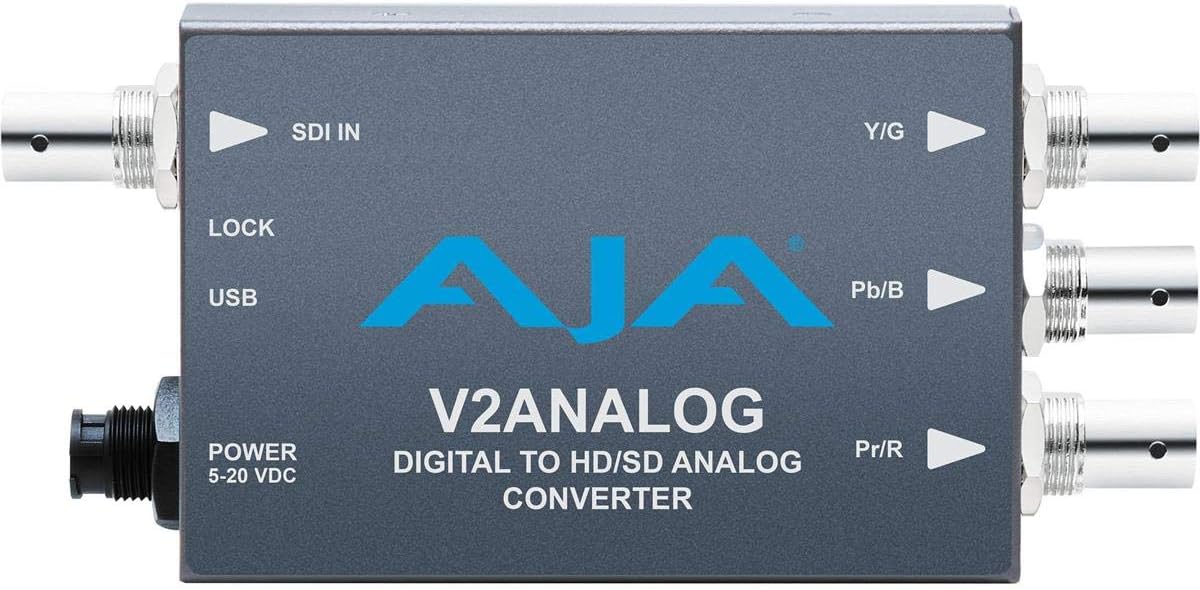
આકૃતિ 2: ટોચ view of the AJA V2Analog Mini-Converter, illustrating port labels for connection.
4. ઓપરેટિંગ સૂચનાઓ
Once all connections are made, power on the device. The V2Analog will automatically detect the incoming SDI signal format and convert it to the appropriate analog output. The "LOCK" LED indicator will illuminate when a stable SDI signal is detected and locked.
4.1. Signal Compatibility
The V2Analog supports various HD and SD SDI formats. It is designed to convert these digital signals to standard analog component (YPbPr) or composite (CVBS) outputs.
4.2. Configuration (Advanced)
Advanced configuration options, such as output format selection or color space adjustments, may be available via AJA's Mini-Config software, accessible through the USB port. Refer to the AJA webનવીનતમ સોફ્ટવેર અને વિગતવાર રૂપરેખાંકન માર્ગદર્શિકાઓ માટેની સાઇટ.
5. જાળવણી
The AJA V2Analog is designed for reliable operation with minimal maintenance. Follow these guidelines:
- સફાઈ: Use a soft, dry cloth to clean the exterior of the unit. Do not use liquid or aerosol cleaners.
- ફર્મવેર અપડેટ્સ: Periodically check the AJA website for firmware updates. Keeping the firmware current ensures optimal performance and compatibility.
- સંગ્રહ: જ્યારે લાંબા સમય સુધી ઉપયોગમાં ન હોય, ત્યારે યુનિટને ઠંડી, સૂકી જગ્યાએ, સીધા સૂર્યપ્રકાશ અને અતિશય તાપમાનથી દૂર રાખો.
6. મુશ્કેલીનિવારણ
If you encounter issues with your V2Analog, refer to the following common problems and solutions:
| સમસ્યા | સંભવિત કારણ | ઉકેલ |
|---|---|---|
| કોઈ વિડિયો આઉટપુટ નથી | No power; Incorrect SDI input; Incorrect analog output connection; No signal lock. | Check power supply; Verify SDI source is active and connected to "SDI IN"; Ensure Y/G, Pb/B, Pr/R are connected correctly to display; Check "LOCK" LED. |
| Distorted or colored video | Incorrect analog output format; Loose connections. | Ensure display is set to correct input type (component/composite); Tighten all BNC connections. |
| "LOCK" LED not illuminated | No valid SDI input signal. | Verify SDI source is active and sending a compatible signal. Check SDI cable integrity. |
If the problem persists, contact AJA Technical Support for further assistance.
7. સ્પષ્ટીકરણો
| લક્ષણ | વિગત |
|---|---|
| મોડલ | V2ANALOG |
| બ્રાન્ડ | AJA |
| ઇનપુટ | HD/SD-SDI (BNC) |
| આઉટપુટ | Component (Y/G, Pb/B, Pr/R BNC), Composite (selectable) |
| ઈન્ટરફેસ પ્રકાર | USB, SDI, Component |
| શક્તિ | 5-20 વીડીસી |
| પરિમાણો (L x W x H) | 7.2 x 5.7 x 4.2 ઇંચ |
| વજન | 1.35 પાઉન્ડ |
| યુપીસી | 091131246023 |
8. આધાર અને વોરંટી
For technical support, product registration, or warranty information, please visit the official AJA website or contact their customer service department. Specific warranty terms and conditions may vary by region and purchase date.
AJA Webસાઇટ: www.aja.com


