1. પરિચય
This manual provides essential information for the proper use and care of your Leica SL (Typ 601) Mirrorless Digital Camera. Designed for professional imaging, this camera features a 24MP full-frame CMOS sensor and the Maestro II processor, delivering high-quality images and advanced video capabilities. Key features include internal DCI 4K video recording, a 4.4MP electronic viewfinder, a 2.95-inch touchscreen, and a robust weather-resistant milled aluminum body. Please read this manual thoroughly to ensure optimal performance and longevity of your device.
2. ઉત્પાદન ઓવરview
The Leica SL (Typ 601) is engineered for precision and durability. Familiarize yourself with the camera's components and design.

આકૃતિ 2.1: કોણીય આગળનો ભાગ view of the Leica SL (Typ 601) camera, equipped with the Vario-Elmarit-SL 24-90mm f/2.8-4 ASPH. lens. This view highlights the lens, the camera body's robust construction, and the Leica branding.
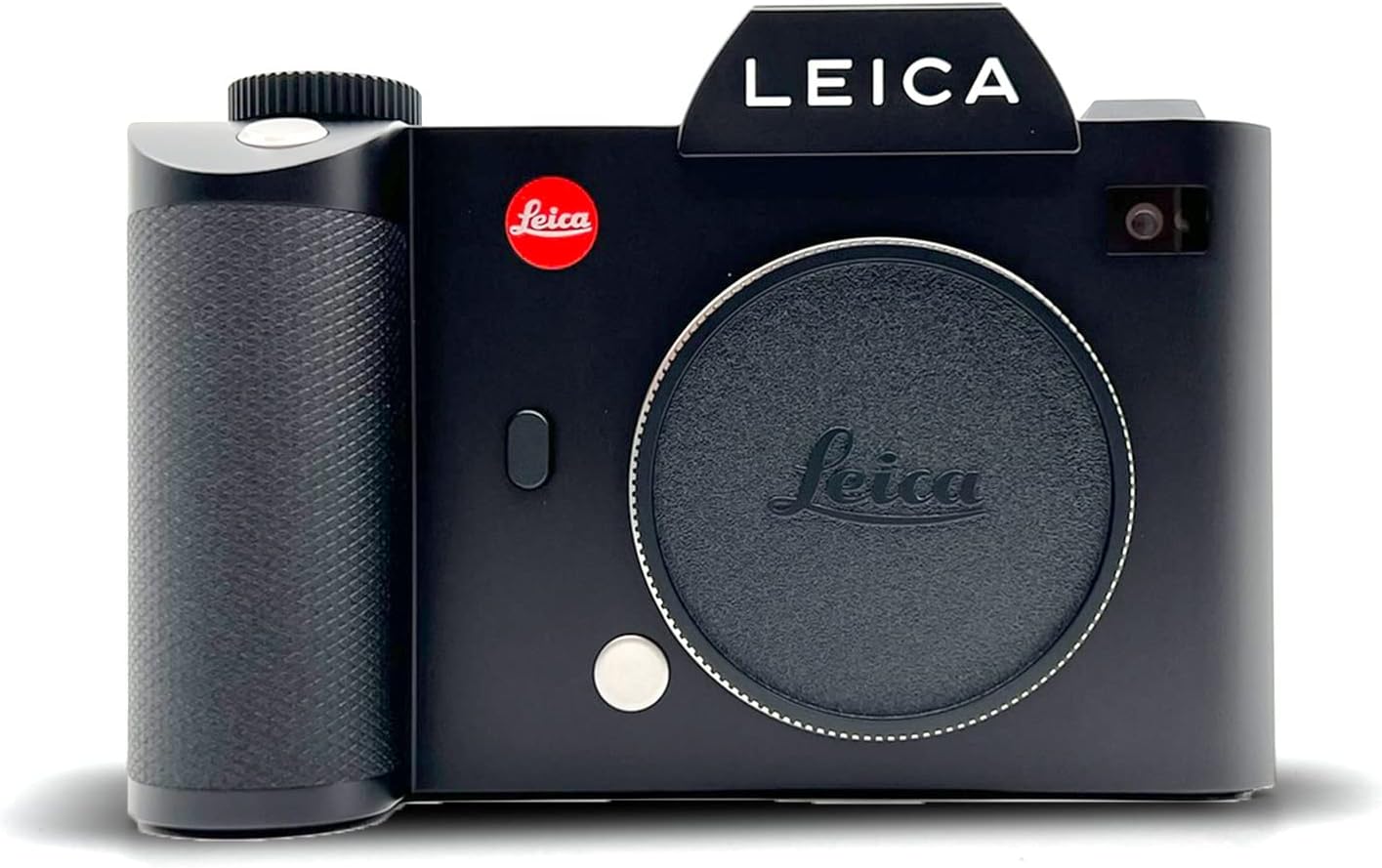
આકૃતિ 2.2: આગળ view of the Leica SL (Typ 601) camera body without a lens attached, showcasing the L-mount bayonet, the red Leica logo, and the textured grip.

આકૃતિ 2.3: ટોચ view of the Leica SL (Typ 601) camera, illustrating the top LCD screen, control dials, shutter button, and the electronic viewfinder housing.

આકૃતિ 2.4: બાજુ view of the Leica SL (Typ 601) camera, highlighting the clean lines of the aluminum body and the placement of ports or strap lugs.

આકૃતિ 2.5: પાછળ view of the Leica SL (Typ 601) camera, showing the 2.95-inch LED-backlit touchscreen display with an image displayed, along with the electronic viewfinder and surrounding control buttons.
3. સેટઅપ
3.1. બેટરી ઇન્સ્ટોલેશન
- કેમેરાના તળિયે બેટરી કમ્પાર્ટમેન્ટ શોધો.
- કમ્પાર્ટમેન્ટ કવર ખોલો.
- Insert the battery, ensuring the contacts align correctly.
- બેટરી કમ્પાર્ટમેન્ટ કવર સુરક્ષિત રીતે બંધ કરો.
- Charge the battery fully before first use using the provided charger.
૩.૨. SD કાર્ડ દાખલ કરવું
The Leica SL (Typ 601) features two SD card slots, supporting UHS-II and UHS-I standards.
- Locate the SD card slot cover on the side of the camera.
- કવર ખોલો.
- Insert the SD card(s) into the designated slots with the label facing the correct direction until it clicks into place.
- કવરને સુરક્ષિત રીતે બંધ કરો.
- Format the SD card(s) in the camera's menu before initial use to ensure compatibility and optimal performance.
3.3. લેન્સ જોડાણ
The camera uses a Leica L mount.
- કેમેરામાંથી બોડી કેપ અને લેન્સમાંથી પાછળની કેપ દૂર કરો.
- લેન્સ પરના લાલ બિંદુને કેમેરાના લેન્સ માઉન્ટ પરના લાલ બિંદુ સાથે સંરેખિત કરો.
- Gently insert the lens into the mount and rotate it clockwise until it clicks into place.
- To remove the lens, press the lens release button on the camera body and rotate the lens counter-clockwise.
4. ઓપરેટિંગ સૂચનાઓ
4.1. મૂળભૂત કામગીરી
- પાવર ચાલુ/બંધ: Use the power switch located on the camera body.
- મેનુ નેવિગેશન: Utilize the 2.95-inch LED-backlit touchscreen or the physical buttons and dials to navigate through camera settings.
- Viewશોધક: The 0.66-inch 4.4MP electronic viewfinder provides a clear view શોટ્સ કંપોઝ કરવા માટે.
4.2. ફોટોગ્રાફી
- શૂટિંગ મોડ્સ: The camera supports various shooting modes, including Manual exposure control.
- ઓટોફોકસ સિસ્ટમ: The Contrast AF system features 49 fields for precise focusing. Continuous-Servo AF (AF-C) is available for tracking moving subjects.
- આઇએસઓ સંવેદનશીલતા: ISO 50 થી 50000 સુધી એડજસ્ટેબલ.
- સતત શૂટિંગ: Capture action at up to 11 frames per second (fps).
- File ફોર્મેટ્સ: Images can be saved in DNG (RAW) and JPEG formats.
- સફેદ સંતુલન: Custom white balance settings are available for accurate color reproduction.
4.3. Videography
- વિડિઓ રિઝોલ્યુશન:
- DCI 4K (4096 x 2160) at 24 fps (Super35 mode).
- UHD 4K (3840 x 2160) at 30 and 25 fps.
- Full HD (1920 x 1080) and HD (1280 x 720) at up to 120 fps for slow motion.
- Gamma Profile: Utilize L-Log gamma for maximum dynamic range in post-production.
- રેકોર્ડિંગ: Internal recording at 4:2:0 8-bit sampling. HDMI output supports 4:2:2 10-bit sampલિંગ.
- File ફોર્મેટ: વિડિઓઝ MP4 ફોર્મેટમાં રેકોર્ડ કરવામાં આવે છે.
4.4. કનેક્ટિવિટી
- Wi-Fi: Built-in Wi-Fi for wireless transfer and remote control via compatible devices.
- એચડીએમઆઈ: Connect to external monitors or recorders using the HDMI output.
- GPS: Integrated GPS for geotagging images.
5. જાળવણી
Proper maintenance ensures the longevity and optimal performance of your Leica SL (Typ 601).
- કેમેરા બોડી સાફ કરવી: કેમેરા બોડી સાફ કરવા માટે નરમ, સૂકા કપડાનો ઉપયોગ કરો. હઠીલા ગંદકી માટે, થોડો ડીamp cloth can be used, followed by a dry one. Avoid harsh chemicals.
- Lens and Sensor Cleaning: Use a blower brush to remove dust from the lens and sensor. For smudges, use specialized lens cleaning fluid and microfiber cloths. Exercise extreme caution when cleaning the sensor.
- બેટરી સંભાળ: Store batteries in a cool, dry place. Avoid fully discharging batteries frequently.
- સંગ્રહ: When not in use, store the camera in a dry, dust-free environment, ideally with a desiccant to prevent moisture buildup.
- હવામાન પ્રતિકાર: While the camera features a weather-resistant milled aluminum body, it is not fully waterproof. Avoid prolonged exposure to heavy rain or submersion.
6. મુશ્કેલીનિવારણ
આ વિભાગ તમને આવી શકે તેવી સામાન્ય સમસ્યાઓનું નિરાકરણ લાવે છે.
- કેમેરા ચાલુ થતો નથી:
- ખાતરી કરો કે બેટરી સંપૂર્ણપણે ચાર્જ થયેલ છે અને યોગ્ય રીતે દાખલ કરેલી છે.
- બેટરીના સંપર્કો સ્વચ્છ છે કે નહીં તે તપાસો.
- મેમરી કાર્ડ ભૂલ:
- ખાતરી કરો કે SD કાર્ડ યોગ્ય રીતે દાખલ કરેલ છે.
- Try formatting the card in the camera (this will erase all data).
- Test with a different, compatible SD card.
- ઑટોફોકસ સમસ્યાઓ:
- Ensure the lens is securely attached.
- Check for sufficient light in the scene.
- Clean the lens contacts on both the camera and the lens.
- છબી ગુણવત્તાની ચિંતાઓ:
- Verify exposure settings (ISO, aperture, shutter speed).
- Check if the lens or sensor is clean.
- Ensure the correct white balance setting is selected.
For issues not covered here, please refer to the Warranty and Support section.
7. સ્પષ્ટીકરણો
| લક્ષણ | વિગત |
|---|---|
| મોડેલનું નામ | SLTYP601KIT |
| સેન્સર પ્રકાર | 24 MP Full-Frame CMOS |
| ઇમેજ પ્રોસેસર | Leica Maestro II |
| લેન્સ માઉન્ટ | Leica L |
| ISO શ્રેણી | 50 - 50000 |
| વિડિઓ રિઝોલ્યુશન | DCI 4K (4096 x 2160) at 24 fps, UHD 4K (3840 x 2160) at 30/25 fps |
| ઈલેક્ટ્રોનિક Viewશોધક | 0.66" 4.4MP 0.8x |
| રીઅર ડિસ્પ્લે | 2.95" 1.04M-Dot LED-Backlit Touchscreen |
| ઓટોફોકસ સિસ્ટમ | Contrast AF with 49 fields |
| સતત શૂટિંગ | 11 fps સુધી |
| સ્ટોરેજ મીડિયા | Two SD Card Slots (UHS-II, UHS-I) |
| કનેક્ટિવિટી | Built-In Wi-Fi, HDMI, GPS |
| શારીરિક સામગ્રી | Milled Aluminum (Weather-Resistant) |
| વસ્તુનું વજન | 9.52 પાઉન્ડ |
| પરિમાણો (ઊંચાઈ) | 4.1 ઇંચ |
8. વોરંટી અને સપોર્ટ
Leica products are manufactured to high-quality standards. For information regarding warranty coverage, please refer to the warranty card included with your product or visit the official Leica webસાઇટ
For technical assistance, service, or support inquiries, please contact Leica customer service directly. Contact details can typically be found on the Leica official webસાઇટ અથવા તમારા કેમેરા સાથે આપેલા દસ્તાવેજોમાં.
ઉત્પાદક: લેઇકા


