1. પરિચય
The Amkette Trubeats S50 is a versatile smart wireless Bluetooth speaker designed to enhance your audio experience. It features multiple connectivity options including Bluetooth, USB, Micro SD card, and AUX input, along with an integrated FM radio. The speaker also includes a digital clock with alarm functions and can be controlled via a dedicated smartphone application. Additionally, it can function as a power bank to charge your mobile devices.
2. પેકેજ સામગ્રી
કૃપા કરીને નીચેની વસ્તુઓ માટે બોક્સ ચેક કરો:
- Amkette Trubeats S50 Smart Wireless Bluetooth Speaker
- યુએસબી ચાર્જિંગ કેબલ
- AUX કેબલ
- વપરાશકર્તા માર્ગદર્શિકા (આ દસ્તાવેજ)
3. ઉત્પાદન ઓવરview
Familiarize yourself with the various parts and controls of your Amkette Trubeats S50 speaker.
3.1 મોરચો View

આકૃતિ 1: ફ્રન્ટ view of the Amkette Trubeats S50 speaker, showing the speaker grille and LED display.
૪.૧ ટોચનું નિયંત્રણ પેનલ

Figure 2: Labeled diagram of the Amkette Trubeats S50 speaker's top control buttons: Mode, Volume Down/Previous, Play/Pause/Answer Call, Volume Up/Next, Clock, and Microphone.
- મોડ બટન: Press to switch between Bluetooth, FM, AUX, USB, and Micro SD modes.
- K-/ Button: Press to decrease volume; long press for previous track/station.
- Play/Pause/Answer Call Button: Press to play/pause audio; press to answer/end calls.
- +/N Button: Press to increase volume; long press for next track/station.
- ઘડિયાળ બટન: Press to set time and alarms.
- માઇક્રોફોન: હેન્ડ્સ-ફ્રી કોલિંગ માટે.
3.3 Rear Ports and Switch

Figure 3: Labeled diagram of the Amkette Trubeats S50 speaker's rear ports: AUX, Micro SD, USB Host, USB DC, and On/Off switch.
- AUX ઇનપુટ: 3.5mm AUX કેબલનો ઉપયોગ કરીને બાહ્ય ઑડિઓ ઉપકરણોને કનેક્ટ કરો.
- માઇક્રો એસડી કાર્ડ સ્લોટ: Insert a Micro SD card for audio playback.
- યુએસબી હોસ્ટ પોર્ટ: Insert a USB drive for audio playback or use as a power bank.
- USB DC Input: Connect the USB charging cable to power the speaker.
- ચાલુ/બંધ સ્વિચ: Power the speaker on or off.
4. સેટઅપ
૩.૧ સ્પીકરને ચાર્જ કરવું
- Connect the small end of the USB charging cable to the USB DC Input port on the rear of the speaker.
- USB ચાર્જિંગ કેબલના મોટા છેડાને USB પાવર એડેપ્ટર (શામેલ નથી) અથવા કમ્પ્યુટરના USB પોર્ટ સાથે કનેક્ટ કરો.
- LED સૂચક ચાર્જિંગ સ્થિતિ બતાવશે. સંપૂર્ણ ચાર્જ થવામાં સામાન્ય રીતે લગભગ 4 કલાક લાગે છે.
નોંધ: The speaker does not have a visible battery level indicator. It is recommended to charge fully before first use and when the battery is low.
4.2 પાવરિંગ ચાલુ/બંધ
- પાવર ચાલુ કરવા માટે, સ્લાઇડ કરો ચાલુ/બંધ સ્વિચ on the rear of the speaker to the 'ON' position.
- પાવર બંધ કરવા માટે, સ્લાઇડ કરો ચાલુ/બંધ સ્વિચ to the 'OFF' position.
5. ઓપરેટિંગ સૂચનાઓ
5.1 બ્લૂટૂથ પેરિંગ

Figure 4: Speaker in Bluetooth pairing mode, indicated by 'BT' on the display.
- Power on the speaker. It will automatically enter Bluetooth pairing mode, indicated by 'BT' flashing on the LED display.
- તમારા સ્માર્ટફોન અથવા અન્ય ઉપકરણ પર બ્લૂટૂથ સક્ષમ કરો.
- માટે શોધો available devices and select "Amkette S50" from the list.
- Once paired, the speaker will emit a confirmation tone, and 'BT' will stop flashing.
- હવે તમે સ્પીકર દ્વારા તમારા ઉપકરણમાંથી ઓડિયો ચલાવી શકો છો.
૪.૪ AUX ઇનપુટનો ઉપયોગ કરવો

Figure 5: Speaker connected to a smartphone via AUX cable for wired audio playback.
- Connect one end of the 3.5mm AUX cable to the AUક્સ ઇનપુટ port on the rear of the speaker.
- Connect the other end of the AUX cable to the audio output jack of your external device (e.g., smartphone, MP3 player, laptop).
- દબાવો મોડ બટન repeatedly until the speaker enters AUX mode.
- તમારા કનેક્ટેડ ડિવાઇસમાંથી ઑડિયો ચલાવો.
5.3 Using USB/Micro SD Card
- Insert a USB drive into the યુએસબી હોસ્ટ બંદર or a Micro SD card into the માઇક્રો SD કાર્ડ સ્લોટ સ્પીકરના પાછળના ભાગમાં.
- તમારા ઑડિયોની ખાતરી કરો files (MP3 format recommended) are stored on the drive/card.
- દબાવો મોડ બટન repeatedly until the speaker enters USB or Micro SD mode. Playback will begin automatically.
- નો ઉપયોગ કરો K-/ અને +/N ટ્રેક નેવિગેશન અને વોલ્યુમ નિયંત્રણ માટે બટનો.
૬.૫ એફએમ રેડિયો ઓપરેશન

Figure 6: Speaker displaying FM frequency, with app control for station selection.
- દબાવો મોડ બટન repeatedly until the speaker enters FM radio mode.
- ઓટો સ્કેન: In FM mode, long press the ચલાવો/થોભો button to initiate an automatic scan for available FM stations. The speaker will save detected stations.
- મેન્યુઅલ ટ્યુનિંગ: નો ઉપયોગ કરો K-/ અને +/N સાચવેલા સ્ટેશનો દ્વારા નેવિગેટ કરવા માટે બટનો.
- For precise tuning and station management, use the Amkette Trubeats Smart Speaker App (see section 5.7).
5.5 Digital Clock and Alarm Setup

Figure 7: Speaker displaying the current time on its LED screen.
- સેટિંગ સમય: દબાવો અને પકડી રાખો ઘડિયાળ બટન. The hour display will flash. Use the K-/ અને +/N buttons to adjust the hour. Press the ઘડિયાળ બટન again to set minutes, and adjust with K-/ અને +/N. દબાવો ઘડિયાળ બટન once more to confirm.
- એલાર્મ સેટ કરી રહ્યું છે: સંક્ષિપ્તમાં દબાવો ઘડિયાળ બટન to cycle through Alarm 1 and Alarm 2 settings. When an alarm time is displayed, long press the ઘડિયાળ બટન to enter alarm setting mode. Adjust hour and minute using K-/ અને +/N, confirming each with a short press of the ઘડિયાળ બટન. You can also set the alarm source (FM/SD Card/USB) via the app.
૫.૨ પાવર બેંક તરીકે ઉપયોગ
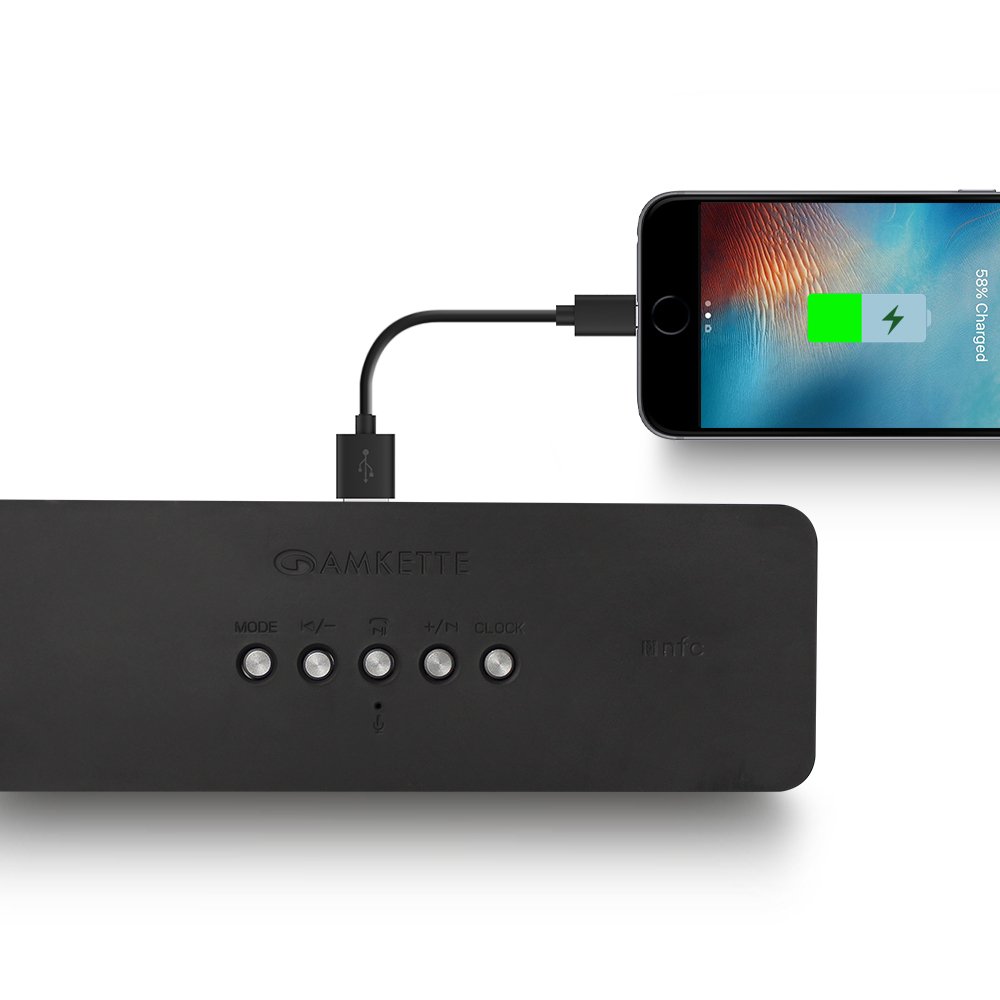
Figure 8: Speaker providing power to a smartphone through its USB Host port.
The Amkette Trubeats S50 can charge your smartphone or other USB-powered devices. Connect your device's charging cable to the યુએસબી હોસ્ટ બંદર on the rear of the speaker. The speaker's internal battery will then supply power to your device.
5.7 App Control (Android Only)

Figure 9: Smartphone displaying the Amkette Trubeats Smart Speaker App interface.
For enhanced control, download the Amkette Trubeats Smart Speaker App from the Google Play Store (for Android phones). The app allows you to:
- વિવિધ ઑડિઓ મોડ્સ વચ્ચે સ્વિચ કરો.
- Control volume and track playback.
- Manage FM radio stations and perform precise tuning.
- Set and customize alarms, including alarm source.
Ensure your speaker is connected via Bluetooth to your smartphone for app functionality.
૬.૩ કોલ હેન્ડલિંગ
When connected via Bluetooth to a smartphone, the speaker can be used for hands-free calling:
- કૉલનો જવાબ આપો: દબાવો Play/Pause/Answer Call Button એકવાર
- કૉલ સમાપ્ત કરો: દબાવો Play/Pause/Answer Call Button એકવાર કોલ દરમિયાન.
- કૉલ નકારો: લાંબા સમય સુધી દબાવો Play/Pause/Answer Call Button.
6. જાળવણી
- સ્પીકરને અતિશય તાપમાન, સીધા સૂર્યપ્રકાશ અને ભેજથી દૂર રાખો.
- સ્પીકરને નરમ, સૂકા કપડાથી સાફ કરો. ઘર્ષક ક્લીનર્સ અથવા સોલવન્ટનો ઉપયોગ કરશો નહીં.
- સ્પીકરને પડતું મૂકવાનું કે તેને જોરદાર ફટકો મારવાનું ટાળો.
- જ્યારે લાંબા સમય સુધી ઉપયોગમાં ન હોય, ત્યારે સ્પીકરને ઠંડી, સૂકી જગ્યાએ સંગ્રહિત કરો અને બેટરીની તંદુરસ્તી જાળવવા માટે સમયાંતરે તેને ચાર્જ કરો.
7. મુશ્કેલીનિવારણ
| સમસ્યા | સંભવિત કારણ | ઉકેલ |
|---|---|---|
| સ્પીકર ચાલુ થતો નથી. | બેટરી ખતમ થઈ ગઈ છે. | સ્પીકરને સંપૂર્ણ ચાર્જ કરો. |
| સ્પીકરમાંથી કોઈ અવાજ નથી. | વૉલ્યૂમ ખૂબ ઓછું છે; ખોટો મોડ પસંદ કરેલ છે; ડિવાઇસ યોગ્ય રીતે કનેક્ટ થયેલ નથી. | Increase speaker and source device volume. Ensure correct mode (Bluetooth, AUX, etc.) is selected. Reconnect the device. |
| બ્લૂટૂથ જોડી નિષ્ફળ. | સ્પીકર પેરિંગ મોડમાં નથી; ડિવાઇસ ખૂબ દૂર છે; દખલગીરી. | Ensure speaker is in pairing mode ('BT' flashing). Move device closer to speaker. Turn off other Bluetooth devices. |
| ખરાબ FM રેડિયો રિસેપ્શન. | નબળો સંકેત; પર્યાવરણીય દખલગીરી. | સ્પીકરને વધુ સારી રિસેપ્શનવાળી જગ્યાએ ખસેડો. ફરીથી ઓટો-સ્કેન કરો. |
| App not connecting to speaker. | Bluetooth not connected; app issue. | Ensure speaker is paired via Bluetooth to your phone. Restart the app and try again. |
8. સ્પષ્ટીકરણો
- મોડલ: S50
- બ્રાન્ડ: અમ્કેટ્ટે
- સ્પીકરનો પ્રકાર: Portable Bluetooth Speaker (Outdoor)
- કનેક્ટિવિટી: બ્લૂટૂથ, યુએસબી, માઇક્રો એસડી, ઓક્સ, એફએમ રેડિયો
- વાયરલેસ કોમ્યુનિકેશન ટેકનોલોજી: બ્લૂટૂથ
- નિયંત્રણ પદ્ધતિ: Buttons, App (Android)
- ઓડિયો આઉટપુટ મોડ: સ્ટીરિયો
- ઓડિયો વોટtage: 10 વોટ્સ
- પાવર સ્ત્રોત: બેટરી સંચાલિત
- બેટરી જીવન: ૧૨ કલાક સુધી (સરેરાશ)
- ચાર્જિંગ સમય: લગભગ 4 કલાક
- સુસંગત ઉપકરણો: Laptop, Mobile, Tablet
- પરિમાણો (LxWxH): 26.7 x 10.9 x 7.9 સેમી
- વસ્તુનું વજન: 703 ગ્રામ
- જળરોધક: હા
- માઉન્ટ કરવાનો પ્રકાર: ટેબલટોપ માઉન્ટ
9. વોરંટી અને સપોર્ટ
The Amkette Trubeats S50 Smart Wireless Bluetooth Speaker comes with a 1 વર્ષની વોરંટી ખરીદીની તારીખથી. આ વોરંટી સામાન્ય ઉપયોગ હેઠળ ઉત્પાદન ખામીઓને આવરી લે છે.
For warranty claims, technical assistance, or any other support inquiries, please contact Amkette customer support through their official webસાઇટ અથવા તમારા ખરીદી દસ્તાવેજો સાથે પૂરી પાડવામાં આવેલ સંપર્ક માહિતી.
વોરંટી હેતુઓ માટે ખરીદીના પુરાવા તરીકે કૃપા કરીને તમારી ખરીદી રસીદ જાળવી રાખો.


