1. પરિચય
The Waveshare 2.13-inch E-Ink Display HAT V4 is a low-power, high-resolution display module designed for Raspberry Pi and other microcontrollers. It features a 250x122 pixel resolution and communicates via an SPI interface, supporting partial refresh capabilities. This display is ideal for applications requiring clear, persistent visuals with minimal power consumption, such as electronic shelf labels, industrial instruments, and information displays.
મુખ્ય લક્ષણો:
- 2.13-inch E-Ink Display: Provides a clear, paper-like visual experience.
- 250x122 Resolution: Offers crisp text and graphics.
- SPI ઇન્ટરફેસ: Enables communication with various microcontrollers.
- Partial Refresh Support: Allows for faster updates of specific screen areas.
- અતિ-નીચું વીજ વપરાશ: Power is primarily required only during screen refreshes.
- કોઈ બેકલાઇટ નથી: Maintains display content indefinitely without power, offering wide viewખૂણો
- Standard Raspberry Pi 40PIN GPIO Extension Header: Compatible with Raspberry Pi series boards and Jetson Nano.
- ઓનબોર્ડ વોલ્યુમtage Translator: Ensures compatibility with 3.3V/5V MCUs.
Official product video demonstrating the features and applications of the Waveshare 2.13-inch e-Paper HAT, including its low power consumption, wide viewing angle, and compatibility with Raspberry Pi and other microcontrollers.
2. પેકેજ સામગ્રી
ખાતરી કરો કે નીચે સૂચિબદ્ધ બધી વસ્તુઓ તમારા પેકેજમાં શામેલ છે. જો કોઈ વસ્તુ ખૂટે છે અથવા ક્ષતિગ્રસ્ત છે, તો કૃપા કરીને ગ્રાહક સપોર્ટનો સંપર્ક કરો.

This image displays the standard package contents for the 2.13-inch E-Paper HAT. Ensure you have received all components.
સમાવિષ્ટ વસ્તુઓ:
- 1x 2.13inch e-Paper HAT
- 1x PH2.0 20cm 8Pin Cable
- 1x RPi Screws Pack (2pcs)
3. સેટઅપ
This section guides you through the physical connection of the E-Ink Display HAT to your host device.
3.1 Connecting to Raspberry Pi
The 2.13-inch E-Paper HAT is designed to directly connect to the 40PIN GPIO header of Raspberry Pi series boards (e.g., Raspberry Pi 5/4B/3B/Zero/Zero W/Zero 2W) and Jetson Nano. Align the HAT carefully with the GPIO pins and press down gently until it is securely seated.

The e-Paper HAT connected to a Raspberry Pi. The Raspberry Pi is not included.
3.2 Connecting to Other Microcontrollers (e.g., Arduino/STM32)
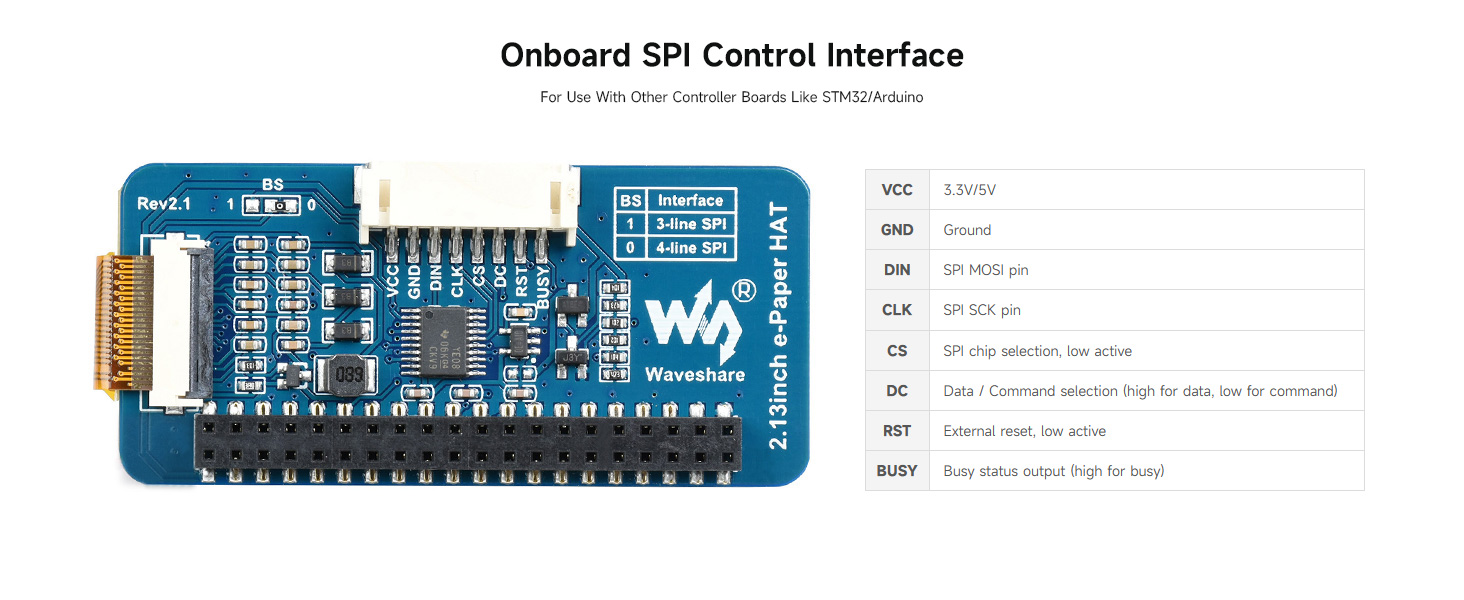
For other controller boards that do not have a direct HAT interface, you can use the provided PH2.0 8Pin cable to connect via the SPI interface. The HAT includes an onboard voltage translator, making it compatible with both 3.3V and 5V microcontrollers.

વિગતવાર view of the onboard SPI control interface and voltage translator for connecting to various MCUs.
Refer to the pinout table below for correct wiring:
| પિન | વર્ણન |
|---|---|
| વીસીસી | 3.3V/5V પાવર સપ્લાય |
| જીએનડી | જમીન |
| ડીઆઈએન | SPI MOSI પિન |
| સીએલકે | SPI SCK પિન |
| CS | SPI ચિપ પસંદગી, ઓછી સક્રિય |
| DC | Data / Command selection (high for data, low for command) |
| આરએસટી | External reset, low active |
| વ્યસ્ત | Busy status output (high for busy) |
4. Operating the E-Ink Display
The Waveshare 2.13-inch E-Ink Display operates by arranging charged particles in microcapsules. When an electric field is applied, these particles move to become visible, reflecting ambient light. This technology provides a paper-like display that is clear and readable in various lighting conditions without requiring a backlight.
4.1 Display Refresh
The display supports both full and partial refresh modes. Full refresh clears the entire screen and redraws the content, typically taking longer but ensuring a completely clean display. Partial refresh updates only the changed areas, resulting in faster updates and reduced power consumption, suitable for dynamic content like sensor readings or notifications.
4.2 પાવર વપરાશ
E-Ink displays are known for their ultra-low power consumption. Power is primarily consumed only during the screen refresh cycle. Once an image is displayed, it remains visible without any further power input, making it highly energy-efficient for static information displays.
4.3 Programming and Exampલેસ
Waveshare provides extensive online documentation and example code for various platforms, including Raspberry Pi, Jetson Nano, Arduino, and STM32. These resources include driver board circuit diagrams and demo programs to help you get started with programming the display. Please refer to the official Waveshare online user manual for detailed programming guides and exampલેસ
5. જાળવણી
To ensure the longevity and optimal performance of your Waveshare 2.13-inch E-Ink Display HAT, follow these maintenance guidelines:
- સફાઈ: Gently wipe the display surface with a soft, dry, lint-free cloth. Avoid using abrasive materials, solvents, or chemical cleaners, as these can damage the screen.
- હેન્ડલિંગ: Handle the display by its edges. Avoid applying excessive pressure to the screen surface, which can cause damage.
- સંગ્રહ: Store the display in a cool, dry environment, away from direct sunlight and extreme temperatures.
- પર્યાવરણીય પરિસ્થિતિઓ: Operate the display within its specified temperature and humidity ranges to prevent malfunction.
- ઉર્જા વ્યવસ્થાપન: While E-Ink displays retain content without power, frequent power cycling or improper shutdown procedures can potentially impact performance over time.
6. મુશ્કેલીનિવારણ
If you encounter issues with your Waveshare 2.13-inch E-Ink Display HAT, consider the following troubleshooting steps:
- Display Not Refreshing:
- Check all physical connections, especially the SPI interface and power supply.
- Ensure your code is correctly initializing the display and sending refresh commands.
- Verify that the power supply to your host board (Raspberry Pi, Arduino, etc.) is stable and sufficient.
- Garbled or Incomplete Display:
- Confirm that the SPI communication lines (MOSI, SCK, CS, DC, RST, BUSY) are correctly wired and not loose.
- Check for any software errors in your display driver or application code.
- Perform a full refresh to clear any residual image data.
- No Display at All:
- Ensure the HAT is properly seated on the Raspberry Pi GPIO header or that all wires are connected correctly if using a different MCU.
- Verify that the host board is powered on and functioning.
- Check for any short circuits or damage to the HAT.
- સુસંગતતા મુદ્દાઓ:
- Confirm that your host microcontroller's voltage (3.3V or 5V) is compatible and that the onboard voltage translator is functioning correctly.
- Ensure you are using the correct drivers and libraries for your specific host platform and the V4 version of the display.
For further assistance, consult the online user manual and resources provided by Waveshare, or contact their technical support.
7. સ્પષ્ટીકરણો
Detailed technical specifications for the Waveshare 2.13-inch E-Ink Display HAT V4:

ઉપરview of the display's features and technical specifications.
| લક્ષણ | મૂલ્ય |
|---|---|
| સ્ટેન્ડિંગ સ્ક્રીન ડિસ્પ્લેનું કદ | 2.13 ઇંચ |
| આઇટમ મોડલ નંબર | 2.13 ઇંચ ઇ-પેપર હેટ |
| વસ્તુનું વજન | 0.352 ઔંસ |
| ઉત્પાદનના પરિમાણો (LxWxH) | 7.09 x 3.94 x 3.54 ઇંચ |
| રંગ | 2.13 ઇંચ ઇ-પેપર હેટ |
| સંચાલન ભાગtage | 3.3V/5V |
| ઈન્ટરફેસ | 3-વાયર SPI, 4-વાયર SPI |
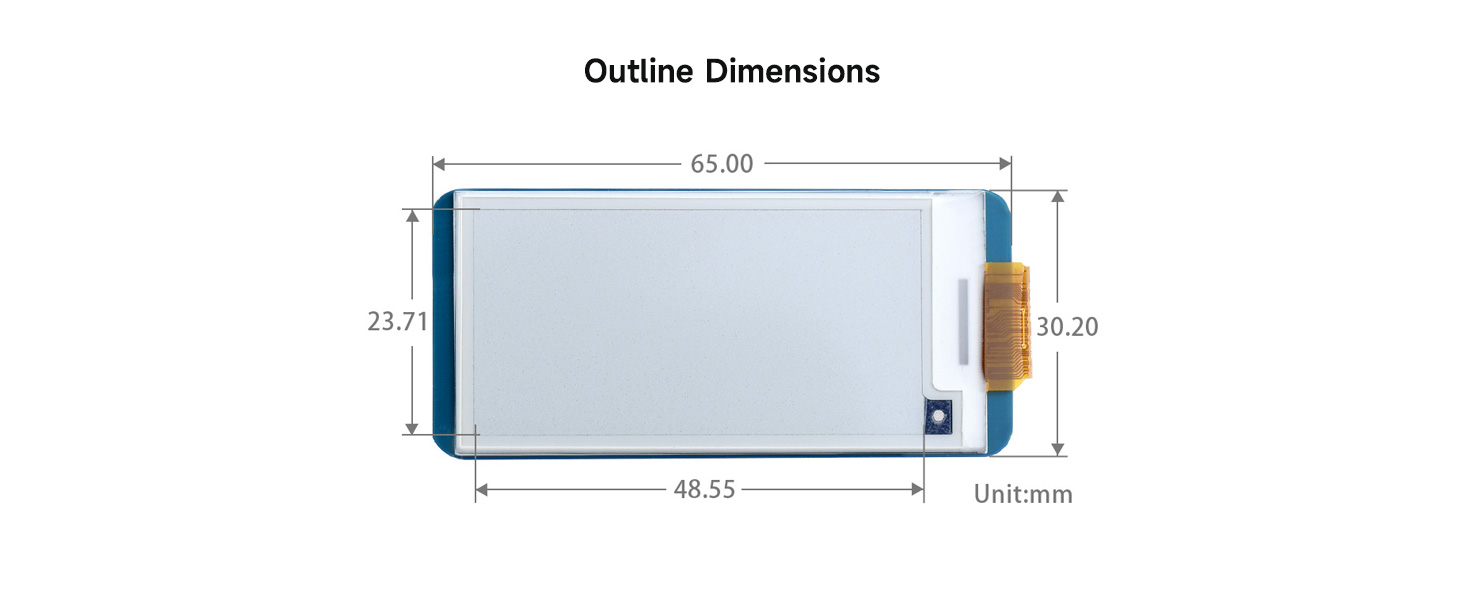
| રૂપરેખા પરિમાણો | 65 x 30.2 મીમી |
| ડિસ્પ્લે માપ | 48.55 x 23.71 મીમી |
| ડોટ પિચ | 0.194 x 0.194 મીમી |
| ઠરાવ | 250 x 122 પિક્સેલ્સ |
| ડિસ્પ્લે રંગ | કાળો, સફેદ |
| ગ્રે સ્કેલ | 2 |
| Partial Refresh Time | 0.3 સે |
| Full Refresh Time | 2s |
| Refresh Power | 26.4mW (પ્રકાર) |
| સ્ટેન્ડબાય વર્તમાન | <0.01uA (almost none) |
| Viewએન્ગલ | >170° |
Outline Dimensions Diagram:
Detailed diagram illustrating the physical dimensions of the 2.13-inch e-Paper HAT in millimeters.
8. અરજી સampલેસ
The Waveshare 2.13-inch E-Ink Display HAT is suitable for a wide range of applications due to its unique characteristics:
વિઝ્યુઅલ એક્સamples of the e-Paper HAT in various real-world applications.
- Electronic Shelf Labels: Ideal for displaying product information and pricing in retail environments.
- Industrial Instruments: Suitable for displaying data in low-power or harsh industrial settings.
- Asset/Equipment Tags: For tracking and identifying assets with persistent information.
- Conference Name Tags: Provides clear, customizable identification for events.
- Smart Home Displays: For displaying static information like weather, schedules, or device status.
૩.૧. સપોર્ટ અને સંસાધનો
Waveshare provides comprehensive online resources to assist you with the 2.13-inch E-Ink Display HAT V4. These resources include detailed user manuals, programming examples, and technical documentation.
ઑનલાઇન વપરાશકર્તા માર્ગદર્શિકા:
For the most up-to-date information, detailed tutorials, and example code for various platforms (Raspberry Pi, Jetson Nano, Arduino, STM32), please refer to the official Waveshare online user manual. This manual includes driver board circuit diagrams and guides for implementing fast refreshing functions.
You can typically find these resources on the Waveshare product page or their official wiki by searching for "2.13inch e-Paper HAT".
ટેકનિકલ સપોર્ટ:
If you require further technical assistance or have questions not covered in the online documentation, please contact Waveshare customer support through their official webસાઇટ


