1. પરિચય
This manual provides comprehensive instructions for the safe and effective use of the PCE Instruments PCE-170 A Light Meter. This device is designed for measuring illuminance (lux or foot-candles) in various environments, such as offices, factories, and outdoor settings. It features a wide measurement range, fast response time, and a compact design for ease of use.
Please read this manual thoroughly before operating the device and retain it for future reference.
2. સલામતી માહિતી
Observe the following safety precautions to prevent injury and avoid damage to the device:
- ઉપકરણને અતિશય તાપમાન, ભેજ અથવા સીધા સૂર્યપ્રકાશમાં ન લો.
- મજબૂત કંપન અથવા આંચકા ટાળો.
- Do not attempt to open or modify the device. Refer all servicing to qualified personnel.
- Keep the light sensor clean and free from obstructions to ensure accurate readings.
- જો ઉપકરણ લાંબા સમય સુધી ઉપયોગમાં ન આવે તો લીકેજ અટકાવવા માટે બેટરી દૂર કરો.
- સ્થાનિક નિયમો અનુસાર બેટરી અને ઉપકરણનો નિકાલ કરો.
3. ઉત્પાદન ઓવરview
The PCE-170 A Light Meter consists of a main unit with a display and control buttons, and an integrated light sensor.

આકૃતિ 1: આગળ view of the PCE-170 A Light Meter, showing the display, control buttons, and light sensor at the top.
3.1 ઘટકો
- લાઇટ સેન્સર: Located at the top of the device, protected by a white dome. This silicon photodiode measures incident light.
- એલસીડી ડિસ્પ્લે: A 5-digit display showing measurement values, units (lux/fc), and function indicators (e.g., AUTO RANGE, HOLD, MIN, MAX).
- પાવર બટન (ચાલુ/બંધ): ઉપકરણને ચાલુ અથવા બંધ કરે છે.
- CAL બટન: Used for zero adjustment.
- હોલ્ડ બટન: ડિસ્પ્લે પર વર્તમાન વાંચનને સ્થિર કરે છે.
- fc/lx Button: Toggles between foot-candle (fc) and lux (lx) measurement units.
- રેન્જ બટન: Manually selects measurement ranges or activates auto-ranging.
- બેટરી કમ્પાર્ટમેન્ટ: Located at the rear, houses the 9V battery.

આકૃતિ 2: ક્લોઝ-અપ view of the LCD display, showing a reading of "534 lx" and "AUTO RANGE 4 000".
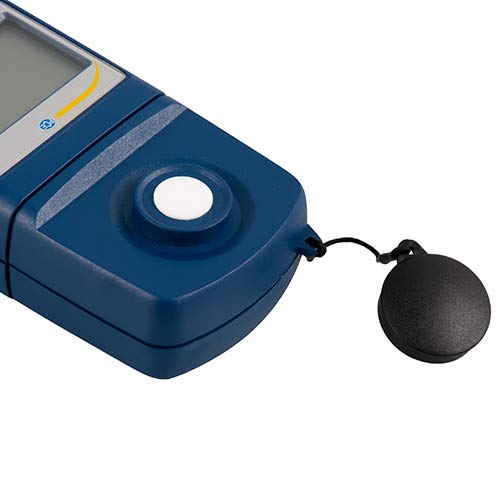
આકૃતિ 3: વિગતવાર view of the light sensor at the top of the device, with its protective cap removed.
4. સેટઅપ
4.1 બેટરી ઇન્સ્ટોલેશન
- ઉપકરણની પાછળ બેટરી કમ્પાર્ટમેન્ટ કવર શોધો.
- Slide the cover open or unscrew it, depending on the model.
- Insert one 9V battery, observing the correct polarity (+/-).
- બેટરી કમ્પાર્ટમેન્ટ કવર સુરક્ષિત રીતે બદલો.
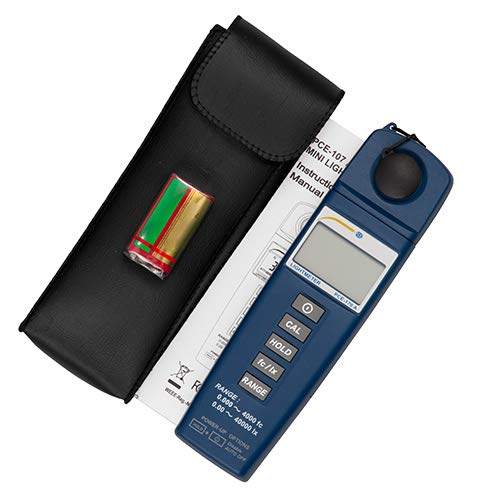
આકૃતિ 4: The PCE-170 A Light Meter shown with its carrying case and the included 9V battery, ready for installation.
4.2 પ્રારંભિક પાવર-ઓન
દબાવો શક્તિ button to turn on the device. The display will illuminate and show a reading. If the battery symbol appears, replace the battery.
5. ઓપરેટિંગ સૂચનાઓ
5.1 એક માપન લેવું
- Turn on the device using the શક્તિ બટન
- Ensure the light sensor is clean and unobstructed.
- Position the light sensor at the location where illuminance is to be measured. Ensure the sensor is facing the light source directly for accurate readings.
- The current illuminance value will be displayed on the LCD.

આકૃતિ 5: A user measuring light levels in an office environment with the PCE-170 A Light Meter.
5.2 Changing Measurement Units (fc/lx)
દબાવો fc/lx button to toggle between foot-candles (fc) and lux (lx) units. The selected unit will be indicated on the display.
5.3 હોલ્ડ ફંક્શન
દબાવો પકડી રાખો button to freeze the current reading on the display. Press it again to release the hold and resume live measurements.
5.4 Zero Adjustment (CAL)
શૂન્ય ગોઠવણ કરવા માટે:
- Place the light sensor in a completely dark environment (e.g., cover it with the protective cap or place it in a dark box).
- દબાવો CAL button. The display should show "0.00" or a value very close to zero.
- If the display does not show zero, repeat the process.
૫.૨.૪ શ્રેણી પસંદગી
The device typically operates in auto-ranging mode. To manually select a range or cycle through available ranges, press the બદલો button. The display will indicate the active range. Press and hold the બદલો button to return to auto-ranging mode.
5.6 Min/Max Function (Power-Up Option)
The PCE-170 A supports Min/Max recording. To activate this feature, refer to the power-up options indicated on the device label (e.g., press and hold a specific button during power-on). This function records the minimum and maximum illuminance values detected during a measurement session.
6. જાળવણી
6.1 સફાઈ
Wipe the device with a soft, dry cloth. Do not use abrasive cleaners or solvents. Keep the light sensor clean and free of dust or smudges, as this can affect measurement accuracy.
6.2 સંગ્રહ
When not in use, store the PCE-170 A Light Meter in its carrying case in a cool, dry place, away from direct sunlight and extreme temperatures. Remove the battery if storing for extended periods.
7. મુશ્કેલીનિવારણ
| સમસ્યા | સંભવિત કારણ | ઉકેલ |
|---|---|---|
| ડિવાઇસ ચાલુ થતું નથી. | બેટરી મરી ગઈ છે અથવા ખોટી રીતે ઇન્સ્ટોલ કરેલી છે. | બેટરીની પોલેરિટી તપાસો અથવા નવી 9V બેટરીથી બદલો. |
| ડિસ્પ્લે "OL" (ઓવરલોડ) બતાવે છે. | Light intensity exceeds the current measurement range. | Switch to a higher measurement range using the બદલો button, or move to a less intensely lit area. |
| અચોક્કસ વાંચન. | Dirty sensor, incorrect zero adjustment, or sensor not facing light source correctly. | Clean the sensor, perform zero adjustment in darkness, and ensure the sensor is properly oriented. |
| ડિસ્પ્લે ખાલી છે અથવા ઝબકતું છે. | ઓછી બેટરી. | 9 વી બેટરી બદલો. |
8. સ્પષ્ટીકરણો
| પરિમાણ | મૂલ્ય |
|---|---|
| માપન શ્રેણીઓ | 0.00 ... 40,000 lux / 0.000 ... 4000 fc |
| ઠરાવ | 0.01 lux / 0.001 fc |
| ચોકસાઈ | ±3% of measurement value + 5 digits |
| ઓવરલોડ સૂચક | "OL" |
| માપન દર | દર 2 સેકન્ડે |
| ઓપરેટિંગ તાપમાન | 0 ... 40°C / 32 ... 104°F |
| લાઇટ સેન્સર | Silicon photodiode, corrected cosine angle |
| ડિસ્પ્લે | 5-અંકનું LCD |
| પાવર સ્ત્રોત | 9V બેટરી (શામેલ) |
| પરિમાણો | 33 x 54 x 196 મીમી / 1.3 x 2.1 x 7.7 ઇંચ |
| વજન | 180 g / <1 lb (approx. 9.17 ounces) |
8.1 ડિલિવરી અવકાશ
The standard delivery package includes:
- 1 x PCE-170 A Lux Meter
- 1 x 9V બેટરી
- 1 x વહન કેસ
- 1 x User manual (this document)
9. વોરંટી અને સપોર્ટ
PCE Instruments provides a warranty for this product against defects in materials and workmanship. For specific warranty terms and conditions, please refer to the warranty card included with your purchase or visit the official PCE Instruments website. For technical support, service, or calibration inquiries, please contact PCE Instruments customer service.
PCE Instruments US: સ્ટોરની મુલાકાત લો


