1. પરિચય
The AUTOOL BT360 is a 12V battery load tester designed to analyze the health status of automotive batteries. It performs battery tests, cranking tests, and charging system tests, providing accurate results for various battery types including regular flooded, AGM flat plate, AGM spiral, and Gel batteries. This manual provides detailed instructions for the proper use and maintenance of your BT360 tester.
2. સલામતી માહિતી
Always observe the following safety precautions when using the AUTOOL BT360 battery tester:
- Wear appropriate eye protection and protective clothing when working near batteries.
- ખાતરી કરો કે વાહન સારી રીતે વેન્ટિલેટેડ વિસ્તારમાં છે.
- Avoid sparks, flames, and smoking near the battery, as batteries can produce explosive gases.
- Do not touch hot engine parts or moving components.
- Keep the tester and cables away from water, oil, and grease.
- ખાતરી કરો કે બેટરી clamps યોગ્ય ટર્મિનલ્સ સાથે સુરક્ષિત રીતે જોડાયેલા છે (લાલ થી ધન, કાળો થી નકારાત્મક).
- જો બેટરી એસિડ ત્વચા અથવા આંખોના સંપર્કમાં આવે, તો તરત જ પુષ્કળ પાણીથી કોગળા કરો અને તબીબી સહાય મેળવો.
3. ઉત્પાદન ઓવરview
3.1 ઘટકો
The AUTOOL BT360 package typically includes:
- AUTOOL BT360 Main Unit
- Integrated Testing Cables with Alligator Clamps (Red for Positive, Black for Negative)
- વપરાશકર્તા માર્ગદર્શિકા (આ દસ્તાવેજ)
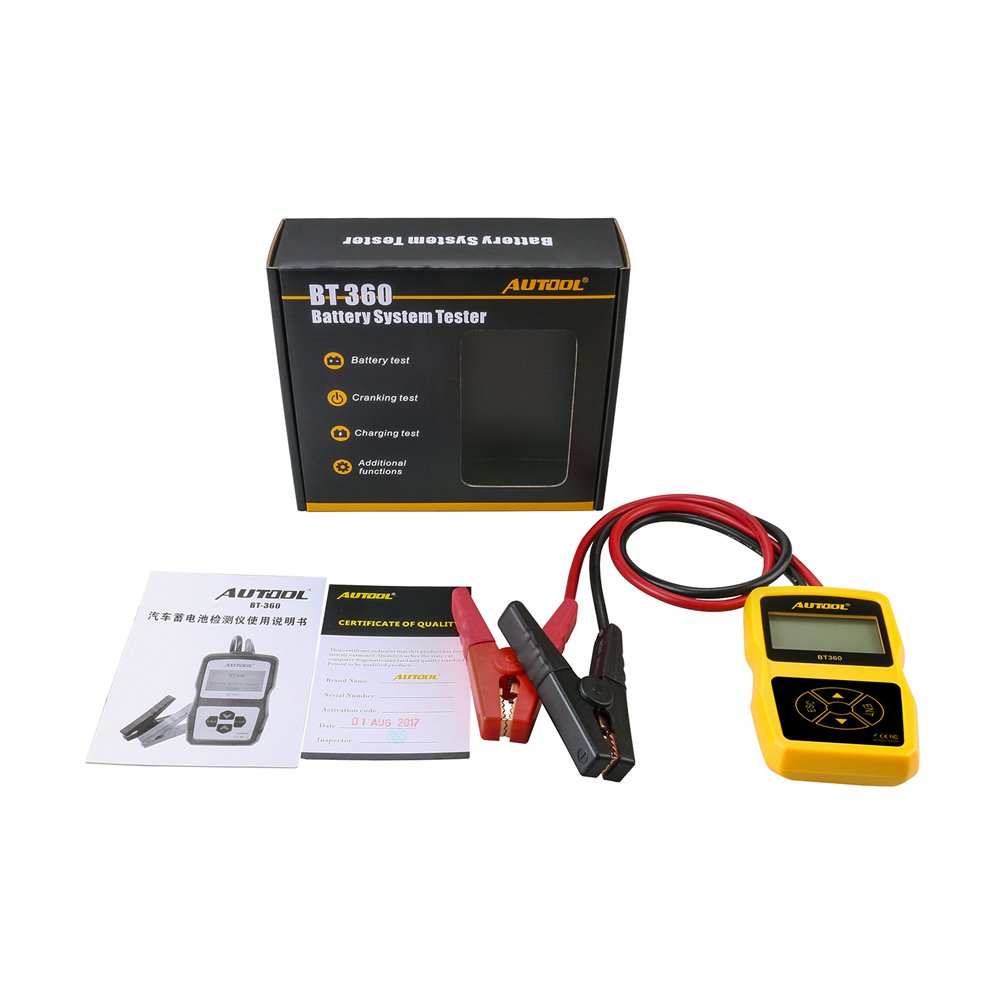
Image 3.1: AUTOOL BT360 Battery Tester and its included accessories.
3.2 Tester Unit
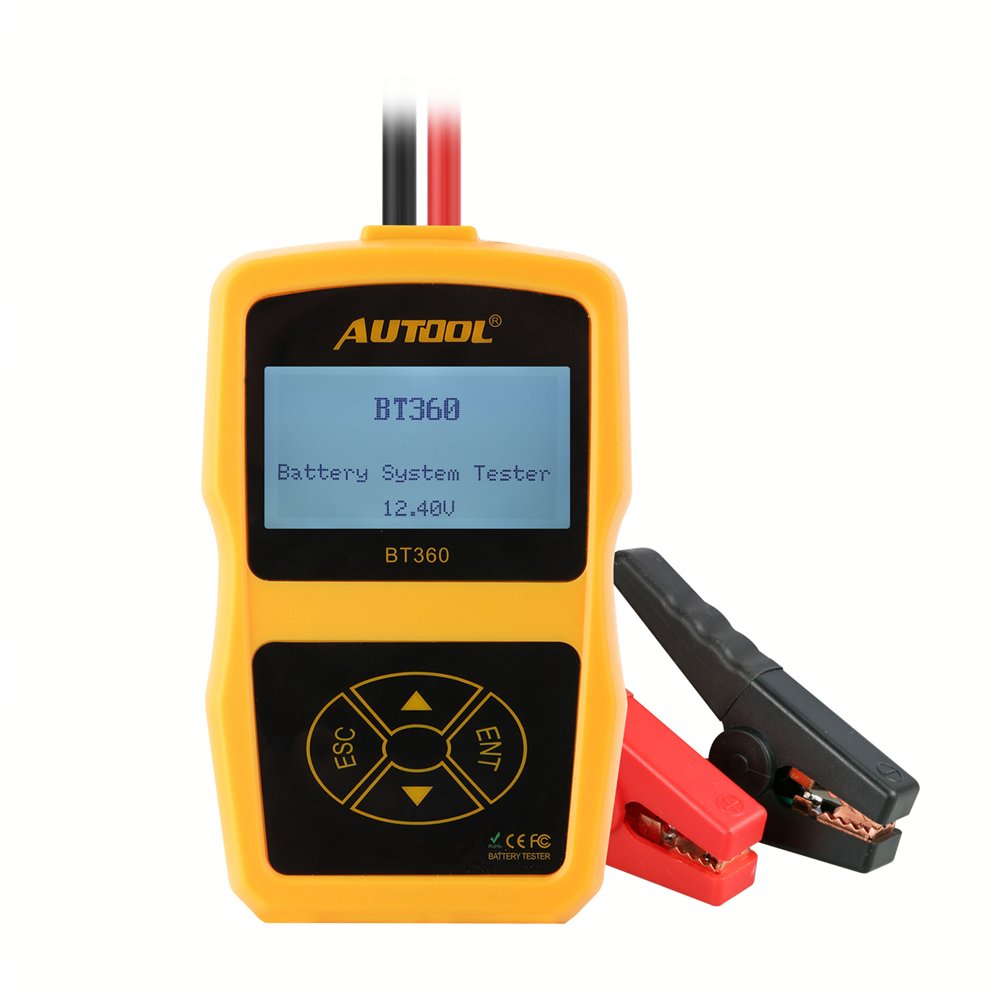
છબી 3.2: આગળ view of the AUTOOL BT360 Battery Tester, showing the display and control buttons.
The main unit features an LCD display and four control buttons:
- ESC: Escape/Back button.
- ENT: Enter/Confirm button.
- ઉપર/નીચે તીર: Navigation buttons for menu selection.
3.3 મુખ્ય લક્ષણો
- Performs Battery Test, Cranking Test, and Charging Test.
- Supports multiple battery types: Regular Flooded, AGM Flat Plate, AGM Spiral, and Gel.
- Wide CCA testing range: 100-2400 CCA.
- Multi-language support for user interface.

Image 3.3: The AUTOOL BT360 supports multiple languages for its user interface.
4. સ્પષ્ટીકરણો

Image 4.1: Physical dimensions of the AUTOOL BT360 Battery Tester.
| પરિમાણ | મૂલ્ય |
|---|---|
| મોડલ | BT360 |
| સિસ્ટમ વોલ્યુમtage | 12 વોલ્ટ |
| ઇનપુટ વોલ્યુમtage રેન્જ | 9V ~ 15V |
| CCA રેન્જ | 100-2400 સીસીએ |
| ઓપરેટિંગ તાપમાન | -20°C થી 50°C |
| સપોર્ટેડ બેટરી પ્રકારો | Regular Flooded, AGM Flat Plate, AGM Spiral, Gel |
| પરિમાણો (L x W x H) | 18.8 x 16.76 x 5.84 સેમી |
| વજન | 320 ગ્રામ |
| યુપીસી | 602860607704 |
4.1 Supported Starting Power Supply Standards

Image 4.2: Table showing various starting power supply standards supported by the BT360.
| ધોરણ | શ્રેણી |
|---|---|
| સીસીએ | 100-2400 |
| JIS | 26A17-245H52 |
| ડીઆઈએન | 100-2200 |
| IEC | 100-2200 |
| EN | 100-1400 |
| SAE | 100-2400 |
| GB | 30-220 એએચ |
| BCI | 100-2400 |
| એમસીએ | 100-2400 |
| CA | 100-2400 |
5. સેટઅપ
5.1 અનપેકિંગ
Carefully remove the AUTOOL BT360 tester and all accessories from the packaging. Inspect for any signs of damage. If any components are missing or damaged, contact customer support.
૫.૧ ટેસ્ટરને કનેક્ટ કરવું
The BT360 is powered directly by the vehicle's 12V battery. Follow these steps to connect the tester:
- ખાતરી કરો કે વાહનનું ઇગ્નીશન બંધ છે અને બધી એસેસરીઝ બંધ છે.
- કનેક્ટ કરો લાલ હકારાત્મક (+) clamp to the positive (+) terminal of the 12V battery.
- કનેક્ટ કરો કાળો ઋણ (-) clamp to the negative (-) terminal of the 12V battery.
- Once connected, the tester will power on automatically.

Image 5.1: The AUTOOL BT360 tester with its integrated testing cables and clamps.

Image 5.2: The BT360 tester connected to a vehicle battery for testing.
6. ઓપરેટિંગ સૂચનાઓ
After connecting the tester, the main menu will appear. Use the Up/Down arrow buttons to navigate through options and the ENT button to confirm selections. Use the ESC button to go back to the previous screen.

Image 6.1: Various display screens of the AUTOOL BT360, illustrating menu navigation and test result displays.
6.1 બેટરી ટેસ્ટ
This function evaluates the overall health of the battery.
- મુખ્ય મેનુમાંથી, પસંદ કરો બેટરી ટેસ્ટ and press ENT.
- પસંદ કરો બેટરી સ્થાન: Choose 'In-Vehicle' if the battery is installed in the car, or 'Out-of-Vehicle' if it's removed. Press ENT.
- પસંદ કરો બેટરીનો પ્રકાર: Choose the type that matches your battery (e.g., Regular Flooded, AGM Flat Plate, AGM Spiral, Gel). Press ENT.
- પસંદ કરો ટેસ્ટ સ્ટાન્ડર્ડ: Choose the standard specified on your battery (e.g., CCA, JIS, DIN). Press ENT.
- સેટ બteryટરી રેટિંગ: Input the CCA value (or equivalent rating) as indicated on your battery label. Use arrow buttons to adjust the value and ENT to confirm.
- The tester will perform the analysis and display results such as State of Health (SOH), State of Charge (SOC), voltage, internal resistance, and a recommendation (e.g., 'Good Battery', 'Charge', 'Replace').
6.2 ક્રેન્કિંગ ટેસ્ટ
This test analyzes the vehicle's starting system, including the starter motor.
- મુખ્ય મેનુમાંથી, પસંદ કરો ક્રેન્કિંગ ટેસ્ટ and press ENT.
- Follow the on-screen prompts to start the vehicle. The tester will monitor the battery voltage cranking દરમિયાન.
- Once the test is complete, the display will show cranking voltage, cranking time, and a diagnosis of the starting system's performance.
6.3 Charging Test
This test evaluates the vehicle's charging system, including the alternator and regulator.
- મુખ્ય મેનુમાંથી, પસંદ કરો ચાર્જિંગ ટેસ્ટ and press ENT.
- Follow the on-screen prompts to rev the engine to a specified RPM (e.g., 2500 RPM for 5 seconds).
- ટેસ્ટર ચાર્જિંગ વોલ્યુમ માપશેtage under load and no-load conditions.
- The results will indicate the charging system's output, ripple voltage, and overall health (e.g., 'Good', 'Low Output', 'High Output').
7. જાળવણી
To ensure the longevity and accuracy of your AUTOOL BT360 tester:
- Clean the tester with a soft, dry cloth. Do not use abrasive cleaners or solvents.
- બેટરીને બરાબર રાખોampસ્વચ્છ અને કાટમુક્ત છે.
- Store the tester in a dry, cool place, away from direct sunlight and extreme temperatures.
- ઉપકરણને છોડવાનું ટાળો અથવા તેને મજબૂત અસરોને આધિન કરો.
8. મુશ્કેલીનિવારણ
If you encounter issues with your AUTOOL BT360, refer to the following common problems and solutions:
| સમસ્યા | સંભવિત કારણ | ઉકેલ |
|---|---|---|
| ટેસ્ટર ચાલુ થતું નથી. | Loose connection; Battery voltage too low; Faulty cables. | Cl ની ખાતરી કરોamps are securely connected. Check battery voltage (must be above 9V). Inspect cables for damage. |
| અચોક્કસ વાંચન. | Incorrect battery type/standard/rating selected; Corroded battery terminals. | Verify selected parameters match the battery. Clean battery terminals. |
| ભૂલ સંદેશ પ્રદર્શિત થયો. | ચોક્કસ ભૂલ સ્થિતિ. | Refer to the specific error code (if any) or re-run the test ensuring all steps are followed correctly. |
| સ્ક્રીન ખાલી છે અથવા સ્થિર છે. | Software glitch; Power interruption. | Disconnect and reconnect the tester to reset. If problem persists, contact support. |
9. વોરંટી અને સપોર્ટ
For warranty information and technical support, please refer to the documentation provided with your purchase or visit the official AUTOOL webસાઇટ. વોરંટી દાવાઓ માટે ખરીદીના પુરાવા તરીકે તમારી ખરીદી રસીદ રાખો.
ઉત્પાદક: AUTOOL
પ્રથમ ઉપલબ્ધ તારીખ: 27 ઓક્ટોબર, 2017


